2500_Users_Manual-.pdf - 第364页
Translation Formats Data records follow the same format as the start-of-flle record but do not contain a file header. The end-of-file record consists of a colon (:) only. The output translator sends a CTRL-S after the co…
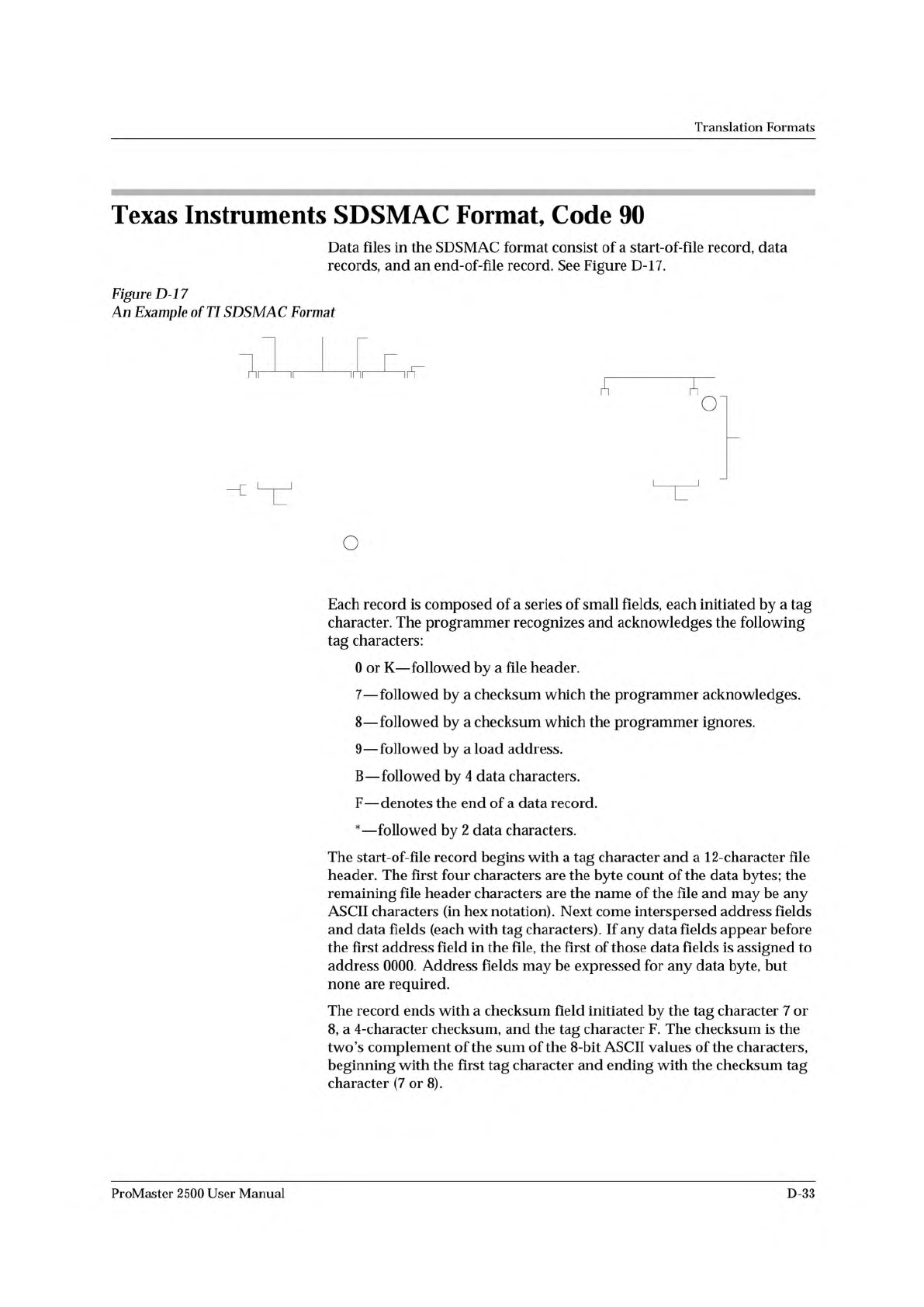
00050 7FDD4F
90000BFFFFBFFFFBFFFFBFFFFBFFFFBFFFFBFFFFBFFFF7F400F
90010BFFFFBFFFFBFFFFBFFFFBFFFFBFFFFBFFFFBFFFF7F3FFF
90020BFFFFBFFFFBFFFFBFFFFBFFFFBFFFFBFFFFBFFFF7F3FEF
90030BFFFFBFFFFBFFFFBFFFFBFFFFBFFFFBFFFFBFFFF7F3FDF
90040BFFFFBFFFFBFFFFBFFFFBFFFFBFFFFBFFFFBFFFF7F3FCF
:
Checksum
Tag Character
Tag Character
Tag Character
Byte Count
Filename
Load Address
End-of-File Record
Tag Characters
Data
Records
Checksum
LEGEND
Nonprinting Carriage Return, with optional
line feed and nulls determined by null count.
0089-4
Translation
Formats
Texas
Instruments
SDSMAC
Format,
Code
90
Data
files
in
the
SDSMAC
format
consist
of
a
start-of-file
record,
data
records,
and
an
end-of-file
record.
See
Figure
D-17.
Figure
D-l
7
An
Example
of
TI
SDSMAC
Format
Each
record
is
composed
of
a
series
of
small
fields,
each
initiated
by
a
tag
character.
The
programmer
recognizes
and
acknowledges
the
following
tag
characters:
0
or
K
—
followed
by
a
file
header.
7
—
followed
by
a
checksum
which
the
programmer
acknowledges.
8
—
followed
by
a
checksum
which
the
programmer
ignores.
9
—
followed
by
a
load
address.
B
—
followed
by
4
data
characters.
F
—
denotes
the
end
of
a
data
record.
*
—
followed
by
2
data
characters.
The
start-of-file
record
begins
with
a
tag
character
and
a
12-character
file
header.
The
first
four
characters
are
the
byte
count
of
the
data
bytes;
the
remaining
file
header
characters
are
the
name
of
the
file
and
may
be
any
ASCII
characters
(in
hex
notation).
Next
come
interspersed
address
fields
and
data
fields
(each
with
tag
characters).
If
any
data
fields
appear
before
the
first
address
field
in
the
file,
the
first
of
those
data
fields
is
assigned
to
address
0000.
Address
fields
may
be
expressed
for
any
data
byte,
but
none
are
required.
The
record
ends
with
a
checksum
field
initiated
by
the
tag
character
7
or
8,
a
4-character
checksum,
and
the
tag
character
F.
The
checksum
is
the
two's
complement
of
the
sum
of
the
8-bit
ASCII
values
of
the
characters,
beginning
with
the
first
tag
character
and
ending
with
the
checksum
tag
character
(7
or
8).
ProMaster
2500
User
Manual
D-33
Translation
Formats
Data
records
follow
the
same
format
as
the
start-of-flle
record
but
do
not
contain
a
file
header.
The
end-of-file
record
consists
of
a
colon
(:)
only.
The
output
translator
sends
a
CTRL-S
after
the
colon.
D-34
ProMaster
2500
User
Manual
Translation
Formats
JEDEC
Format,
Codes
91
and
92
Introduction
The
JEDEC
(Joint
Electron
Device
Engineering
Council)
format
is
used
to
transfer
fuse
and
test
vector
data
between
the
programmer
and
a
host
computer.
Code
91
is
full
format
and
includes
all
the
data
fields
(such
as
note
and
test
fields)
described
on
the
following
pages.
Code
92
is
the
Kernel,
or
shorter,
format.
The
JEDEC
Kernel
format
includes
only
the
minimum
information
needed
for
the
programming;
it
does
not,
for
example,
include
information
fields
or
test
vector
fields.
Prior
to
transferring
a
JEDEC
file,
the
appropriate
Logic
device
must
be
selected.
JEDEC's
legal
character
set
consists
of
all
the
printable
ASCII
characters
and
four
control
characters.
The
four
allowable
control
characters
are
STX,
ETX,
CR
(RETURN),
and
LF
(line
feed).
Other
control
characters,
such
as
ESC
or
BREAK,
should
not
be
used.
Note:
This
is
Data
Corporation
's
implementation
of
JEDEC
Standard
3A.
For
a
copy
of
the
strict
standard,
write
to:
Electronic
Industries
Association
Engineering
Department
2001
Eye
Street
NW
Washington,
DC
20006
BNF
Rules
and
Standard
Definitions
The
Backus-Naur
Form
(BNF)
is
used
in
the
description
here
to
define
the
syntax
of
the
JEDEC
format.
BNF
is
a
shorthand
notation
that
follows
these
rules:
::
=
denotes
"is
defined
as.”
Characters
enclosed
by
single
quotes
are
literals
(required).
Angle
brackets
enclose
identifiers.
Square
brackets
enclose
optional
items.
Braces
{}
enclose
a
repeated
item.
The
item
may
appear
zero
or
more
times.
Vertical
bars
indicate
a
choice
between
items.
Repeat
counts
are
given
by
a
:
n
suffix.
For
example,
a
6-digit
number
would
be
defined
as:
<number>
::
=
<digit>:6
ProMaster
2500
User
Manual
D-35