2500_Users_Manual-.pdf - 第396页
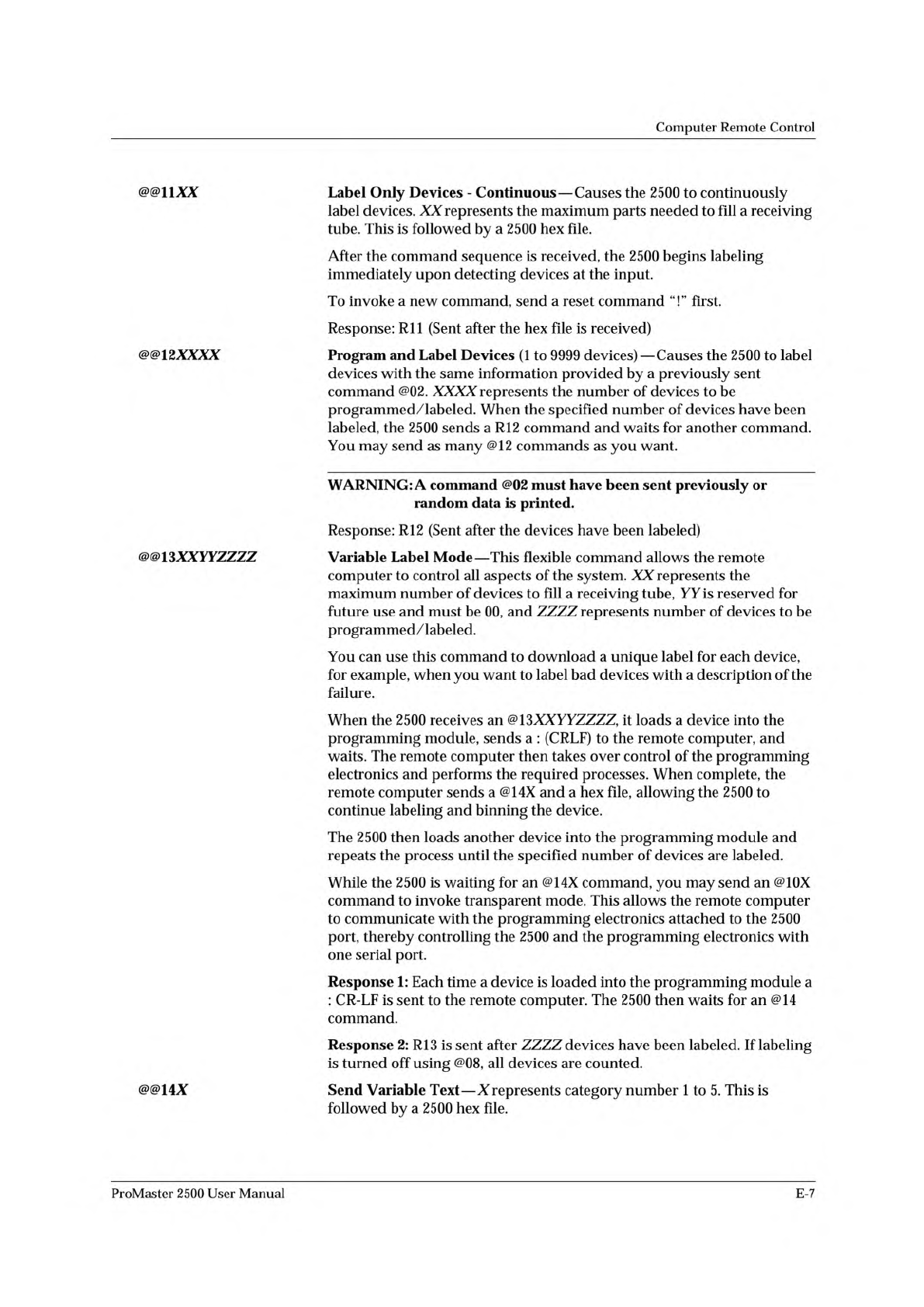
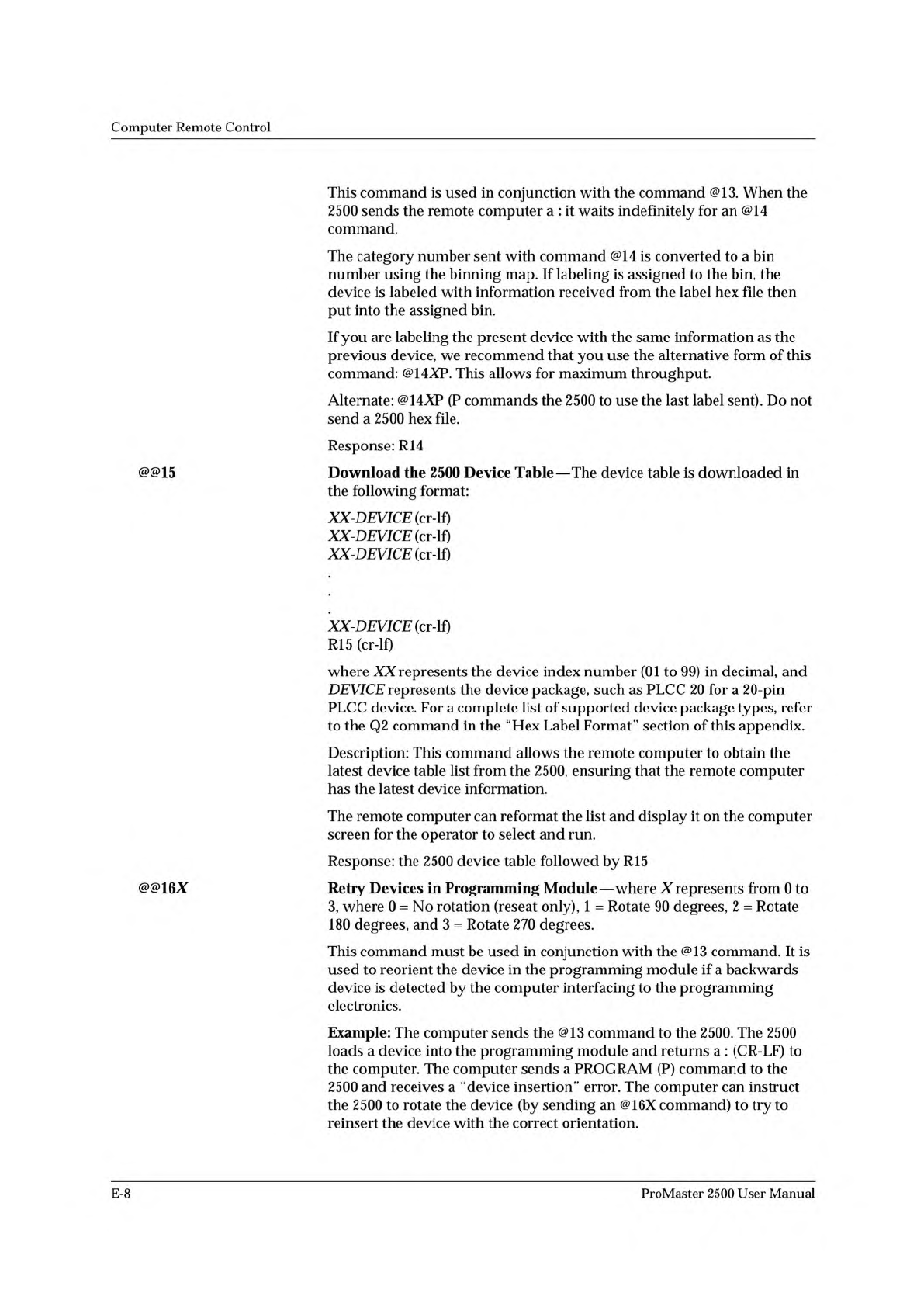
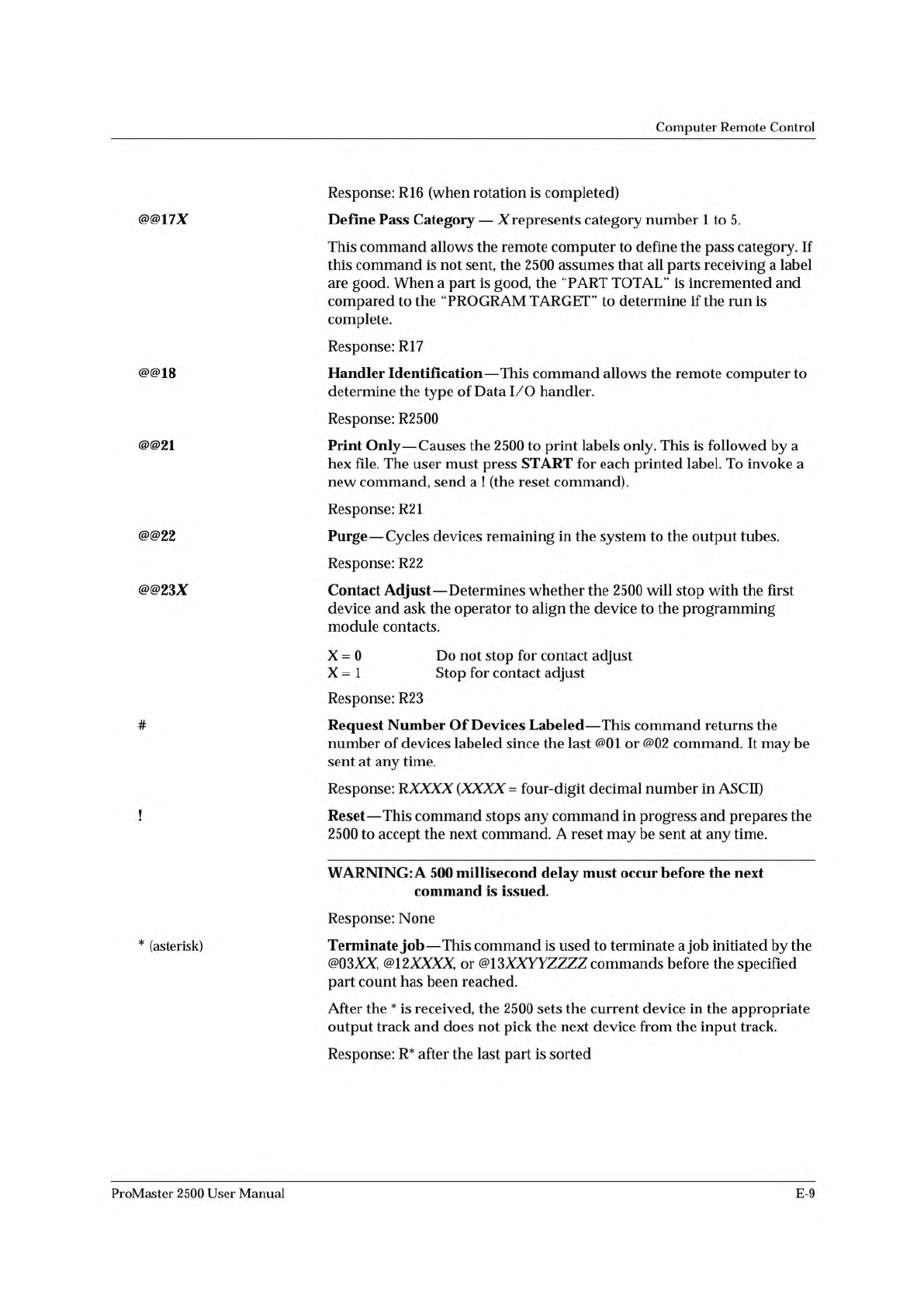
Computer Remote Control This command is used in conjunction with the command @13. When the 2500 sends the remote computer a : it waits indefinitely for an @14 command. The category number sent with command @14 is convert…
Computer
Remote
Control
@@uxx
Label
Only
Devices
-
Continuous
—
Causes
the
2500
to
continuously
label
devices.
XX
represents
the
maximum
parts
needed
to
fill
a
receiving
tube.
This
is
followed
by
a
2500
hex
file.
After
the
command
sequence
is
received,
the
2500
begins
labeling
immediately
upon
detecting
devices
at
the
input.
To
invoke
a
new
command,
send
a
reset
command
first.
Response:
Rll
(Sent
after
the
hex
file
is
received)
@@12XXXX
Program
and
Label
Devices
(1
to
9999
devices)
—
Causes
the
2500
to
label
devices
with
the
same
information
provided
by
a
previously
sent
command
@02.
XXXX
represents
the
number
of
devices
to
be
programmed/labeled.
When
the
specified
number
of
devices
have
been
labeled,
the
2500
sends
a
R12
command
and
waits
for
another
command.
You
may
send
as
many
@12
commands
as
you
want.
WARNING:
A
command
@02
must
have
been
sent
previously
or
random
data
is
printed.
Response:
R12
(Sent
after
the
devices
have
been
labeled)
@@13XXYYZZZZ
Variable
Label
Mode
—
This
flexible
command
allows
the
remote
computer
to
control
all
aspects
of
the
system.
XX
represents
the
maximum
number
of
devices
to
fill
a
receiving
tube,
YY
is
reserved
for
future
use
and
must
be
00,
and
ZZZZ
represents
number
of
devices
to
be
programmed/labeled.
You
can
use
this
command
to
download
a
unique
label
for
each
device,
for
example,
when
you
want
to
label
bad
devices
with
a
description
of
the
failure.
When
the
2500
receives
an
@
1
3XXYYZZZZ,
it
loads
a
device
into
the
programming
module,
sends
a
:
(CRLF)
to
the
remote
computer,
and
waits.
The
remote
computer
then
takes
over
control
of
the
programming
electronics
and
performs
the
required
processes.
When
complete,
the
remote
computer
sends
a
@14X
and
a
hex
file,
allowing
the
2500
to
continue
labeling
and
binning
the
device.
The
2500
then
loads
another
device
into
the
programming
module
and
repeats
the
process
until
the
specified
number
of
devices
are
labeled.
While
the
2500
is
waiting
for
an
@14X
command,
you
may
send
an
@10X
command
to
invoke
transparent
mode.
This
allows
the
remote
computer
to
communicate
with
the
programming
electronics
attached
to
the
2500
port,
thereby
controlling
the
2500
and
the
programming
electronics
with
one
serial
port.
Response
1:
Each
time
a
device
is
loaded
into
the
programming
module
a
:
CR-LF
is
sent
to
the
remote
computer.
The
2500
then
waits
for
an
@14
command.
Response
2:
R13
is
sent
after
ZZZZ
devices
have
been
labeled.
If
labeling
is
turned
off
using
@08,
all
devices
are
counted.
@@14X
Send
Variable
Text
—
Xrepresents
category
number
1
to
5.
This
is
followed
by
a
2500
hex
file.
ProMaster
2500
User
Manual
E-7
Computer
Remote
Control
This
command
is
used
in
conjunction
with
the
command
@13.
When
the
2500
sends
the
remote
computer
a
:
it
waits
indefinitely
for
an
@14
command.
The
category
number
sent
with
command
@14
is
converted
to
a
bin
number
using
the
binning
map.
If
labeling
is
assigned
to
the
bin,
the
device
is
labeled
with
information
received
from
the
label
hex
file
then
put
into
the
assigned
bin.
If
you
are
labeling
the
present
device
with
the
same
information
as
the
previous
device,
we
recommend
that
you
use
the
alternative
form
of
this
command:
@14XP.
This
allows
for
maximum
throughput.
Alternate:
@14AP
(P
commands
the
2500
to
use
the
last
label
sent).
Do
not
send
a
2500
hex
file.
Response:
R14
@@15
Download
the
2500
Device
Table
—
The
device
table
is
downloaded
in
the
following
format:
XX-DEWCE
(cr-lf)
XX-DEVICE
XX-DEVICE
XX-DEVICE
R15
(cr-lf)
where
XX
represents
the
device
index
number
(01
to
99)
in
decimal,
and
DEVICE
represents
the
device
package,
such
as
PLCC
20
for
a
20-pin
PLCC
device.
For
a
complete
list
of
supported
device
package
types,
refer
to
the
Q2
command
in
the
“Hex
Label
Format”
section
of
this
appendix.
Description:
This
command
allows
the
remote
computer
to
obtain
the
latest
device
table
list
from
the
2500,
ensuring
that
the
remote
computer
has
the
latest
device
information.
The
remote
computer
can
reformat
the
list
and
display
it
on
the
computer
screen
for
the
operator
to
select
and
run.
Response:
the
2500
device
table
followed
by
R15
@@16X
Retry
Devices
in
Programming
Module
—
where
X
represents
from
0
to
3,
where
0
=
No
rotation
(reseat
only),
1
=
Rotate
90
degrees,
2
=
Rotate
180
degrees,
and
3
=
Rotate
270
degrees.
This
command
must
be
used
in
conjunction
with
the
@13
command.
It
is
used
to
reorient
the
device
in
the
programming
module
if
a
backwards
device
is
detected
by
the
computer
interfacing
to
the
programming
electronics.
Example:
The
computer
sends
the
@13
command
to
the
2500.
The
2500
loads
a
device
into
the
programming
module
and
returns
a
:
(CR-LF)
to
the
computer.
The
computer
sends
a
PROGRAM
(P)
command
to
the
2500
and
receives
a
“device
insertion”
error.
The
computer
can
instruct
the
2500
to
rotate
the
device
(by
sending
an
@16X
command)
to
try
to
reinsert
the
device
with
the
correct
orientation.
E-8
ProMaster
2500
User
Manual
Computer
Remote
Control
Response:
R16
(when
rotation
is
completed)
@@17X
Define
Pass
Category
—
X
represents
category
number
1
to
5.
This
command
allows
the
remote
computer
to
define
the
pass
category.
If
this
command
is
not
sent,
the
2500
assumes
that
all
parts
receiving
a
label
are
good.
When
a
part
is
good,
the
“PART
TOTAL”
is
incremented
and
compared
to
the
^PROGRAM
TARGET”
to
determine
if
the
run
is
complete.
Response:
R17
@@18
Handler
Identification
—
This
command
allows
the
remote
computer
to
determine
the
type
of
Data
I/O
handler.
Response:
R2500
@@21
Print
Only
—
Causes
the
2500
to
print
labels
only.
This
is
followed
by
a
hex
file.
The
user
must
press
START
for
each
printed
label.
To
invoke
a
new
command,
send
a
!
(the
reset
command).
Response:
R21
@@22
Purge
—
Cycles
devices
remaining
in
the
system
to
the
output
tubes.
Response:
R22
@@23X
Contact
Adjust
—
Determines
whether
the
2500
will
stop
with
the
first
device
and
ask
the
operator
to
align
the
device
to
the
programming
module
contacts.
X
=
0
Do
not
stop
for
contact
adjust
X
=
1
Stop
for
contact
adjust
Response:
R23
#
!
Request
Number
Of
Devices
Labeled
—
This
command
returns
the
number
of
devices
labeled
since
the
last
@01
or
@02
command.
It
may
be
sent
at
any
time.
Response:
RXXXX
(XXXX
=
four-digit
decimal
number
in
ASCII)
Reset
—
This
command
stops
any
command
in
progress
and
prepares
the
2500
to
accept
the
next
command.
A
reset
may
be
sent
at
any
time.
WARNING:
A
500
millisecond
delay
must
occur
before
the
next
command
is
issued.
Response:
None
*
(asterisk)
Terminate
job
—
This
command
is
used
to
terminate
a
job
initiated
by
the
@03XX,
@12XXXX,
or
@13XXYYZZZZ
commands
before
the
specified
part
count
has
been
reached.
After
the
*
is
received,
the
2500
sets
the
current
device
in
the
appropriate
output
track
and
does
not
pick
the
next
device
from
the
input
track.
Response:
R*
after
the
last
part
is
sorted
ProMaster
2500
User
Manual
E-9