2500_Users_Manual-.pdf - 第401页
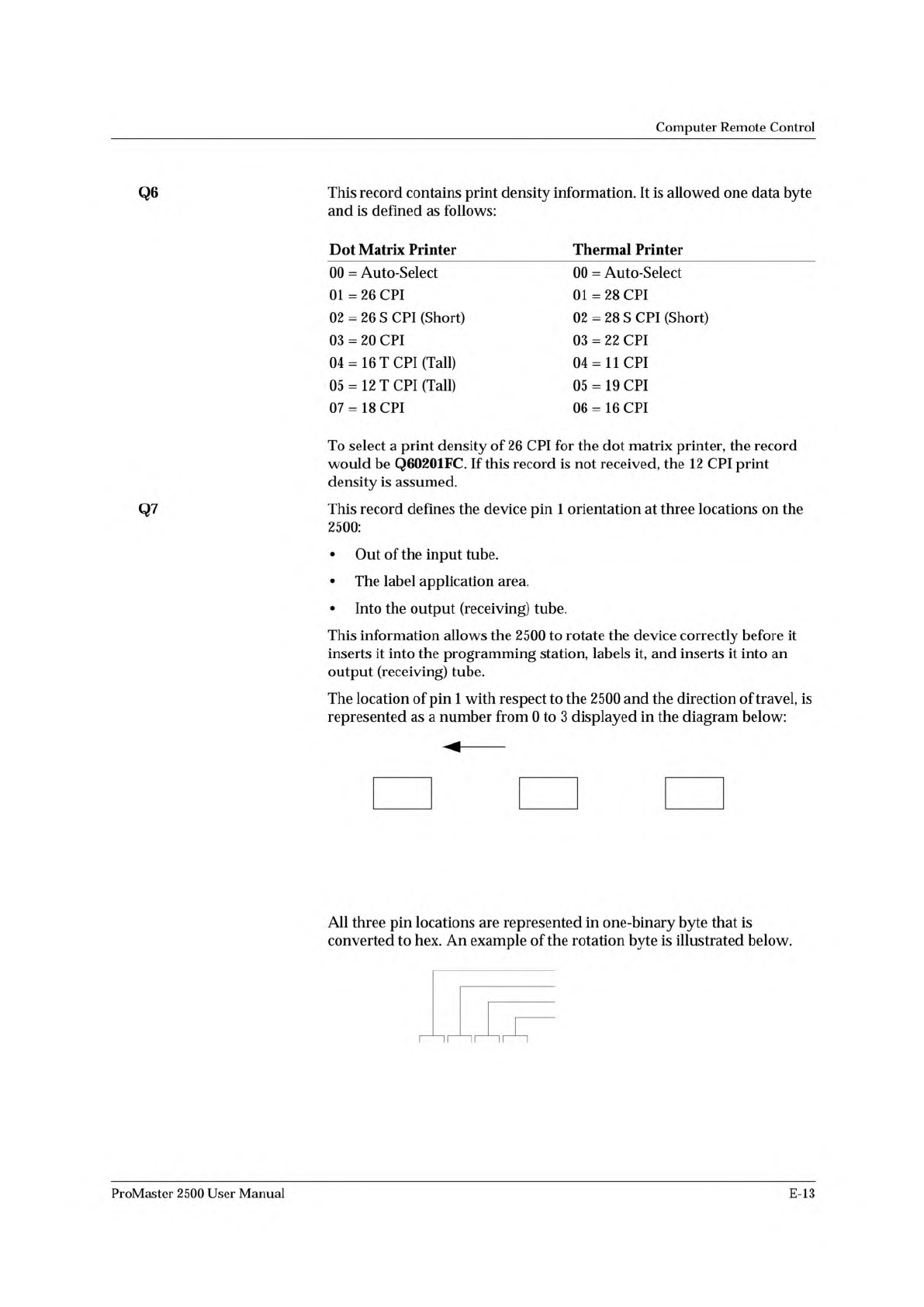
DIRECTION OF TRAVEL 3 INTO RECEIVING TUBE 1 0 2 3 LABEL ORIENTATION 1 TXT 0 2 3 OUT OF INPUT TUBE 1 0 2 1391-1 00010011 RESERVED FOR FUTURE USE INTO RECEIVING TUBE LABEL ORIENTATION OUT OF INPUT TUBE 1392-1 Computer Remo…
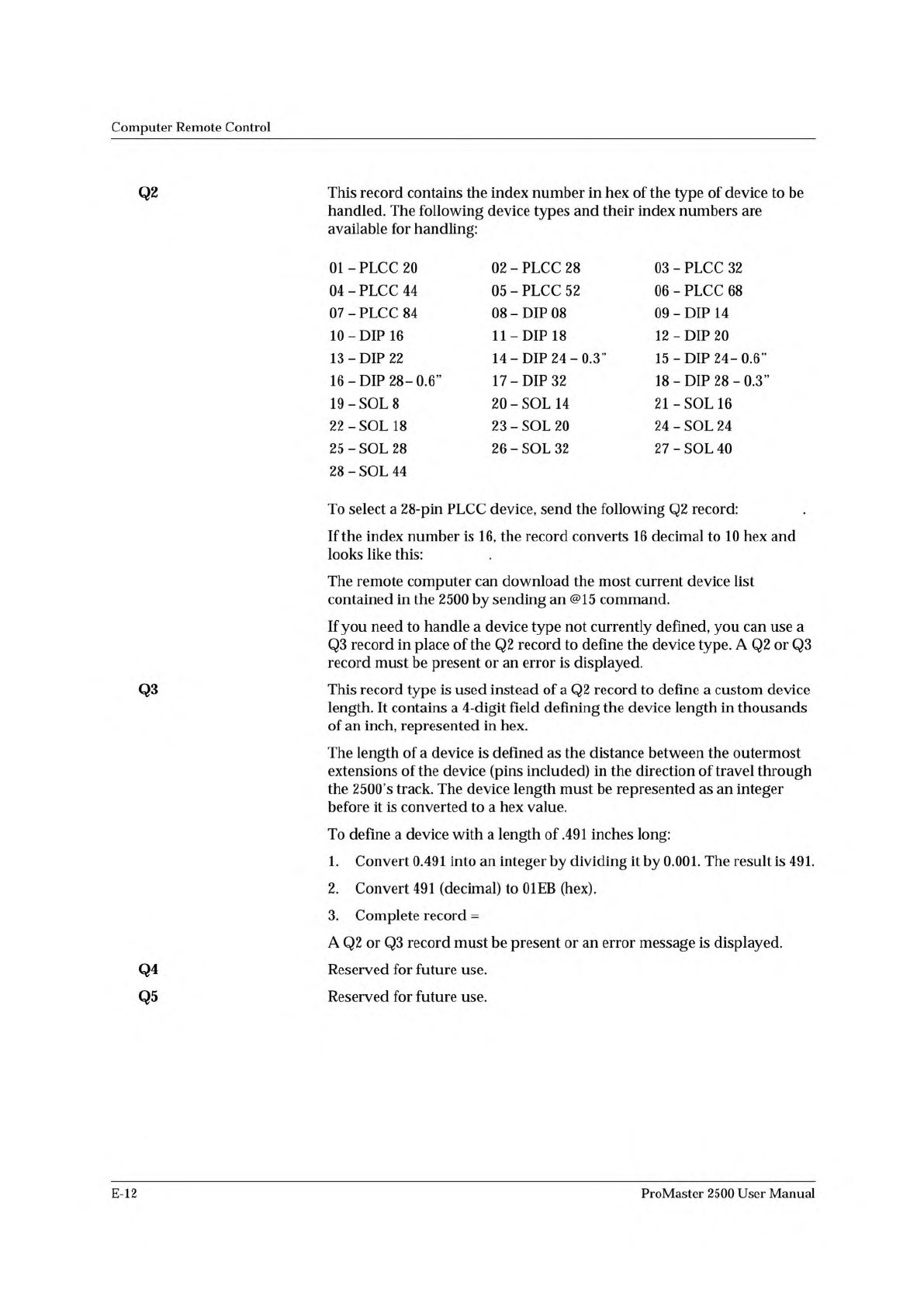
Q20202FB
Q20210ED
Q30301EB10
Computer
Remote
Control
Q2
Q3
Q4
Q5
This
record
contains
the
index
number
in
hex
of
the
type
of
device
to
be
handled.
The
following
device
types
and
their
index
numbers
are
available
for
handling:
01
-
PLCC
20
02
-
PLCC
28
03
-
PLCC
32
04
-
PLCC
44
05
-
PLCC
52
06
-
PLCC
68
07
-
PLCC
84
08
-
DIP
08
09
-
DIP
14
10
-
DIP
16
11
-DIP
18
12
-DIP
20
13
-DIP
22
14
-
DIP
24-0.3”
15
-DIP
24-06'
16
-DIP
28-0.6”
17
-DIP
32
18
-DIP
28-0.3”
19
-SOL
8
20
-
SOL
14
21
-SOL
16
22
-
SOL
18
23
-
SOL
20
24
-
SOL
24
25
-
SOL
28
26
-
SOL
32
27
-
SOL
40
28
-
SOL
44
To
select
a
28-pin
PLCC
device,
send
the
following
Q2
record:
.
If
the
index
number
is
16,
the
record
converts
16
decimal
to
10
hex
and
looks
like
this:
.
The
remote
computer
can
download
the
most
current
device
list
contained
in
the
2500
by
sending
an
@15
command.
If
you
need
to
handle
a
device
type
not
currently
defined,
you
can
use
a
Q3
record
in
place
of
the
Q2
record
to
define
the
device
type.
A
Q2
or
Q3
record
must
be
present
or
an
error
is
displayed.
This
record
type
is
used
instead
of
a
Q2
record
to
define
a
custom
device
length.
It
contains
a
4-digit
field
defining
the
device
length
in
thousands
of
an
inch,
represented
in
hex.
The
length
of
a
device
is
defined
as
the
distance
between
the
outermost
extensions
of
the
device
(pins
included)
in
the
direction
of
travel
through
the
2500's
track.
The
device
length
must
be
represented
as
an
integer
before
it
is
converted
to
a
hex
value.
To
define
a
device
with
a
length
of
.491
inches
long:
1.
Convert
0.491
into
an
integer
by
dividing
it
by
0.001.
The
result
is
491.
2.
Convert
491
(decimal)
to
01EB
(hex).
3.
Complete
record
=
A
Q2
or
Q3
record
must
be
present
or
an
error
message
is
displayed.
Reserved
for
future
use.
Reserved
for
future
use.
E-12
ProMaster
2500
User
Manual
DIRECTION OF TRAVEL
3
INTO RECEIVING
TUBE
1
0 2
3
LABEL
ORIENTATION
1
TXT
0 2
3
OUT OF
INPUT TUBE
1
0 2
1391-1
00010011
RESERVED FOR FUTURE USE
INTO RECEIVING TUBE
LABEL ORIENTATION
OUT OF INPUT TUBE
1392-1
Computer
Remote
Control
Q6
This
record
contains
print
density
information.
It
is
allowed
one
data
byte
and
is
defined
as
follows:
Dot
Matrix
Printer
00
=
Auto-Select
01
=
26
CPI
02
=
26
S
CPI
(Short)
03
=
20
CPI
04=
16T
CPI
(Tall)
05
=
12
T
CPI
(Tall)
07
=
18
CPI
Thermal
Printer
00
=
Auto-Select
01
=
28
CPI
02
=
28
S
CPI
(Short)
03
=
22
CPI
04=
11
CPI
05
=
19
CPI
06
=
16
CPI
To
select
a
print
density
of
26
CPI
for
the
dot
matrix
printer,
the
record
would
be
Q60201FC.
If
this
record
is
not
received,
the
12
CPI
print
density
is
assumed.
Q7
This
record
defines
the
device
pin
1
orientation
at
three
locations
on
the
2500:
•
Out
of
the
input
tube.
•
The
label
application
area.
•
Into
the
output
(receiving)
tube.
This
information
allows
the
2500
to
rotate
the
device
correctly
before
it
inserts
it
into
the
programming
station,
labels
it,
and
inserts
it
into
an
output
(receiving)
tube.
The
location
of
pin
1
with
respect
to
the
2500
and
the
direction
of
travel,
is
represented
as
a
number
from
0
to
3
displayed
in
the
diagram
below:
All
three
pin
locations
are
represented
in
one-binary
byte
that
is
converted
to
hex.
An
example
of
the
rotation
byte
is
illustrated
below.
ii
~
~
ii
~
~
i
「
ProMaster
2500
User
Manual
E-13
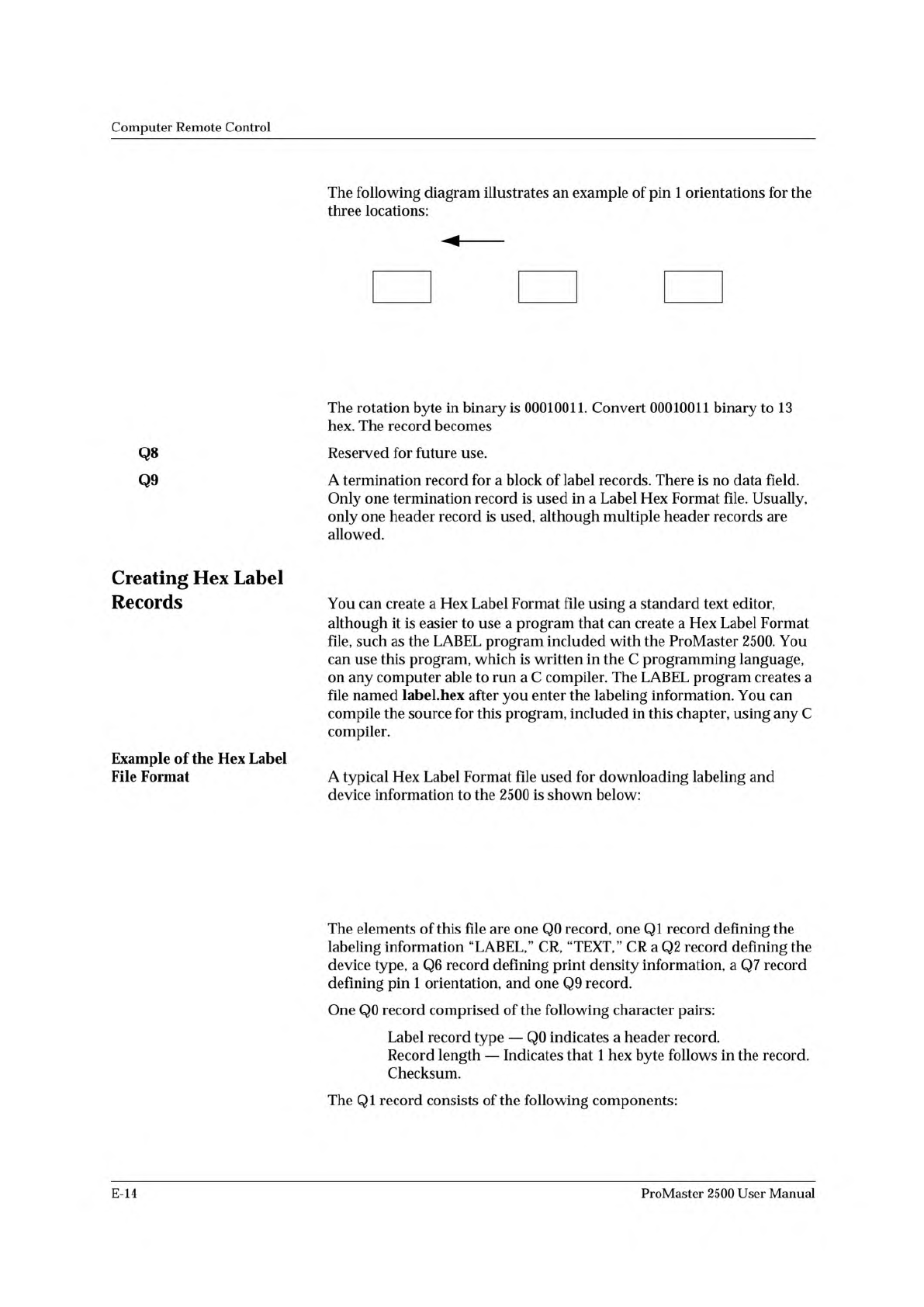
Q70213EA.
Q001FE
Q10C4C4142454C0D544558540D34
Q20201FC
Q60202FB
Q70213EA
Q901FE
Q0
01
FE
INTO RECEIVING
TUBE = 01 (1)
PIN 1
LABEL
ORIENTATION = 0
DIRECTION OF TRAVEL
TXT
PIN 1
PIN 1
OUT OF
INPUT TUBE = 11 (3)
1393-1
Computer
Remote
Control
Q8
Q9
Creating
Hex
Label
Records
Example
of
the
Hex
Label
File
Format
The
following
diagram
illustrates
an
example
of
pin
1
orientations
for
the
three
locations:
The
rotation
byte
in
binary
is
00010011.
Convert
00010011
binary
to
13
hex.
The
record
becomes
Reserved
for
future
use.
A
termination
record
for
a
block
of
label
records.
There
is
no
data
field.
Only
one
termination
record
is
used
in
a
Label
Hex
Format
file.
Usually,
only
one
header
record
is
used,
although
multiple
header
records
are
allowed.
You
can
create
a
Hex
Label
Format
file
using
a
standard
text
editor,
although
it
is
easier
to
use
a
program
that
can
create
a
Hex
Label
Format
file,
such
as
the
LABEL
program
included
with
the
ProMaster
2500.
You
can
use
this
program,
which
is
written
in
the
C
programming
language,
on
any
computer
able
to
run
a
C
compiler.
The
LABEL
program
creates
a
file
named
label.hex
after
you
enter
the
labeling
information.
You
can
compile
the
source
for
this
program,
included
in
this
chapter,
using
any
C
compiler.
A
typical
Hex
Label
Format
file
used
for
downloading
labeling
and
device
information
to
the
2500
is
shown
below:
The
elements
of
this
file
are
one
Q0
record,
one
QI
record
defining
the
labeling
information
“LABEL,”
CR,
“TEXT,”
CR
a
Q2
record
defining
the
device
type,
a
Q6
record
defining
print
density
information,
a
Q7
record
defining
pin
1
orientation,
and
one
Q9
record.
One
Q0
record
comprised
of
the
following
character
pairs:
Label
record
type
—
Q0
indicates
a
header
record.
Record
length
—
Indicates
that
1
hex
byte
follows
in
the
record.
Checksum.
The
QI
record
consists
of
the
following
components:
E-14
ProMaster
2500
User
Manual