2500_Users_Manual-.pdf - 第51页
DEVICE TYPE PLCC DIP L M N 20-PIN 28-PIN 32-PIN 44-PIN 52-PIN 68-PIN 84-PIN 300 mil 600 mil 1850-3 Recommended Alternate SOIC 150 mil 220 mil 300 mil 330 mil 420 mil 500 mil K CHUCK ProMaster 2500 Installation and Setup …
L
O
W
P
R
E
S
S
U
R
E
2
0
-
5
0
P
S
I
H
I
G
H
P
R
E
S
S
U
R
E
6
5
-
8
5
P
S
I
A
J
S
SHIFT
B
K
T
DEL
C
L
U
D
M
V
E
N
W
F
O
X
SHIFT
G
P
Y
H
Q
Z
I
R
ENTER
1
4
7
2
5
8
3
6
9
0
LOWER
CASE
RESET
STOP
CAL
START
ON
1764-4
HIGH PRESSURE
ADJUSTMENT KNOB
LOW PRESSURE
ADJUSTMENT KNOB
Installation
and
Setup
The
line
should
come
out
easily,
without
any
resistance.
If
it
is
difficult
to
remove,
make
sure
that
the
collar
is
fully
depressed
against
the
2500's
body
before
pulling
on
the
air
line
(see
Figure
2-5).
Ac^usting
the
High
and
Low
Air
Pressure
After
connecting
the
air
line
to
the
connector
on
the
rear
panel,
set
the
high
and
low
air
pressure
on
the
2500.
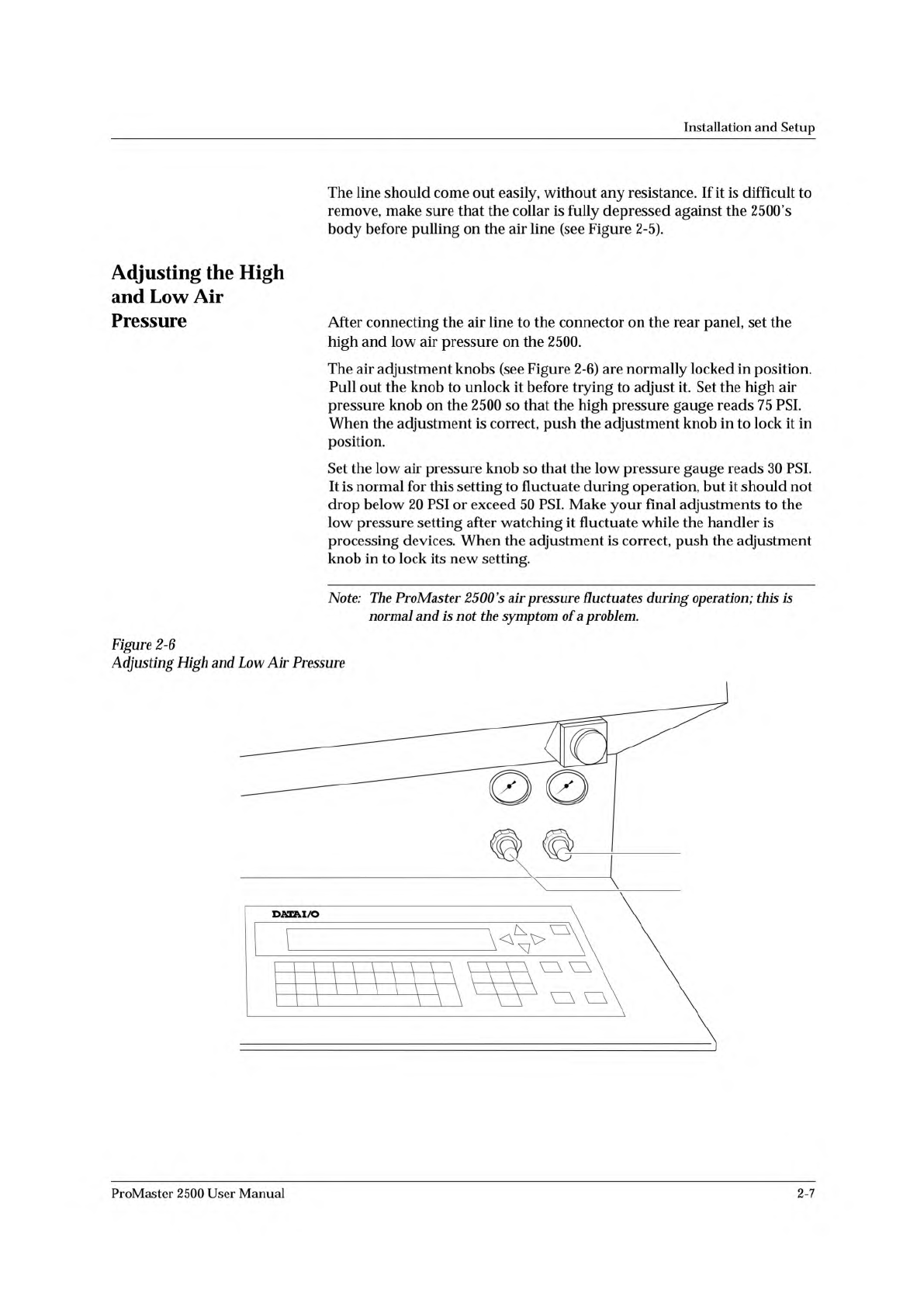
The
air
adjustment
knobs
(see
Figure
2-6)
are
normally
locked
in
position.
Pull
out
the
knob
to
unlock
it
before
trying
to
adjust
it.
Set
the
high
air
pressure
knob
on
the
2500
so
that
the
high
pressure
gauge
reads
75
PSI.
When
the
adjustment
is
correct,
push
the
adjustment
knob
in
to
lock
it
in
position.
Set
the
low
air
pressure
knob
so
that
the
low
pressure
gauge
reads
30
PSI.
It
is
normal
for
this
setting
to
fluctuate
during
operation,
but
it
should
not
drop
below
20
PSI
or
exceed
50
PSI.
Make
your
final
adjustments
to
the
low
pressure
setting
after
watching
it
fluctuate
while
the
handler
is
processing
devices.
When
the
adjustment
is
correct,
push
the
adjustment
knob
in
to
lock
its
new
setting.
Note:
The
ProMaster
2500
's
air
pressure
fluctuates
during
operation;
this
is
normal
and
is
not
the
symptom
of
a
problem.
Figure
2-6
Adjusting
High
and
Low
Air
Pressure
ProMaster
2500
User
Manual
2-7
DEVICE
TYPE
PLCC
DIP
L M N
20-PIN
28-PIN
32-PIN
44-PIN
52-PIN
68-PIN
84-PIN
300 mil
600 mil
1850-3
Recommended
Alternate
SOIC 150 mil
220 mil
300 mil
330 mil
420 mil
500 mil
K
CHUCK
ProMaster 2500
Installation
and
Setup
Installing
and
Removing
Chucks
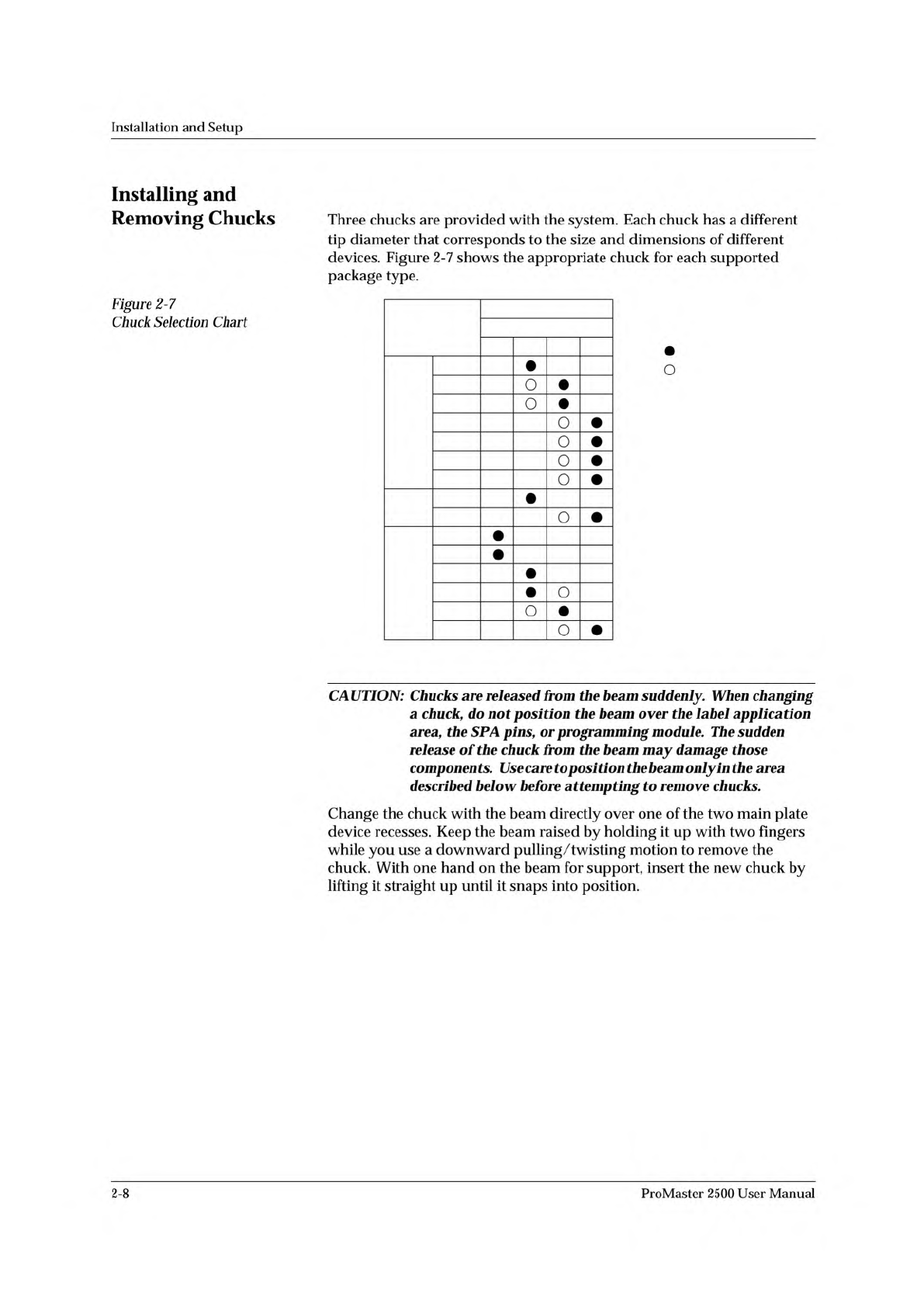
Figure
2-7
Chuck
Selection
Chart
Three
chucks
are
provided
with
the
system.
Each
chuck
has
a
different
tip
diameter
that
corresponds
to
the
size
and
dimensions
of
different
devices.
Figure
2-7
shows
the
appropriate
chuck
for
each
supported
package
type.
O
CAUTION:
Chucks
are
released
from
the
beam
suddenly.
When
changing
a
chuck,
do
not
position
the
beam
over
the
label
application
area,
the
SPA
pig
or
programming
module.
The
sudden
release
of
the
chuck
from
the
beam
may
damage
those
components.
Use
care
to
posi
tion
the
beam
only
in
the
area
described
below
before
attempting
to
remove
chucks.
Change
the
chuck
with
the
beam
directly
over
one
of
the
two
main
plate
device
recesses.
Keep
the
beam
raised
by
holding
it
up
with
two
fingers
while
you
use
a
downward
pulling/twisting
motion
to
remove
the
chuck.
With
one
hand
on
the
beam
for
support,
insert
the
new
chuck
by
lifting
it
straight
up
until
it
snaps
into
position.
2-8
ProMaster
2500
User
Manual
1853-1
PLATEN
APPLICATION PLATE
PRESS BEARINGS
BEARING PLATE
SCREW (1 of 4)
DEVICE
TOP VIEW OF BEARING PLATE
Installation
and
Setup
Setting
Up
the
Dot
Matrix
Printer
Checking
the
Application
Plate
Height
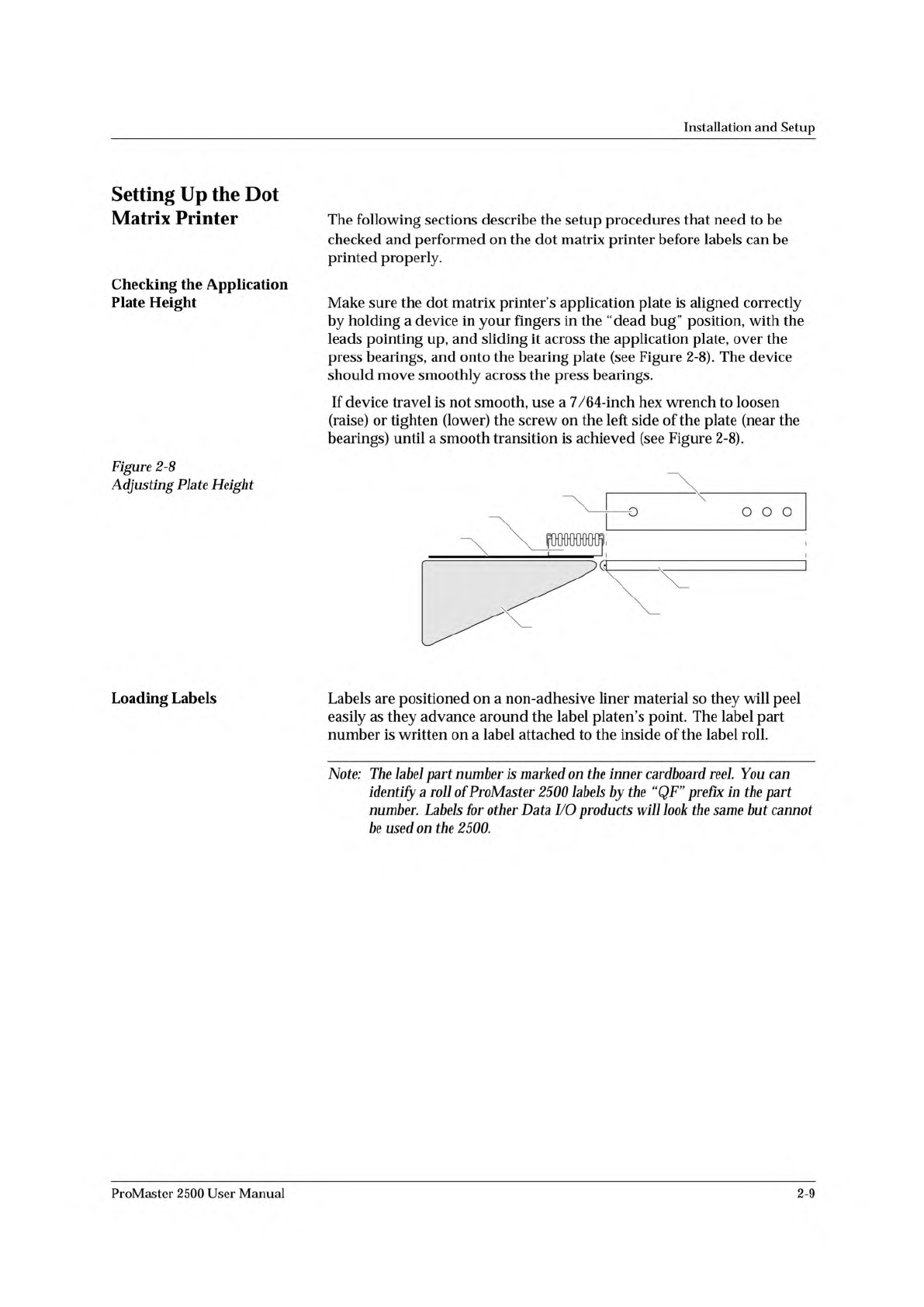
Figure
2-8
Adjusting
Plate
Height
The
following
sections
describe
the
setup
procedures
that
need
to
be
checked
and
performed
on
the
dot
matrix
printer
before
labels
can
be
printed
properly.
Make
sure
the
dot
matrix
printer's
application
plate
is
aligned
correctly
by
holding
a
device
in
your
fingers
in
the
“dead
bug”
position,
with
the
leads
pointing
up,
and
sliding
it
across
the
application
plate,
over
the
press
bearings,
and
onto
the
bearing
plate
(see
Figure
2-8).
The
device
should
move
smoothly
across
the
press
bearings.
If
device
travel
is
not
smooth,
use
a
7/64-inch
hex
wrench
to
loosen
(raise)
or
tighten
(lower)
the
screw
on
the
left
side
of
the
plate
(near
the
bearings)
until
a
smooth
transition
is
achieved
(see
Figure
2-8).
Loading
Labels
Labels
are
positioned
on
a
non-adhesive
liner
material
so
they
will
peel
easily
as
they
advance
around
the
label
platen's
point.
The
label
part
number
is
written
on
a
label
attached
to
the
inside
of
the
label
roll.
Note:
The
label
part
number
is
marked
on
the
inner
cardboard
reel.
You
can
identify
a
roll
of
ProMaster
2500
labels
by
the
“QF”
prefix
加
the
part
number.
Labels
for
other
Data
I/O
products
will
look
the
same
but
cannot
加
used
on
the
2500.
ProMaster
2500
User
Manual
2-9