2500_Users_Manual-.pdf - 第54页
Installation and Setup Calibrating Labels 8. Thread the label liner across the platen and lower the application plate to hold it in position. 9. Route the liner to the left side of roller E and to the right of roller F. …
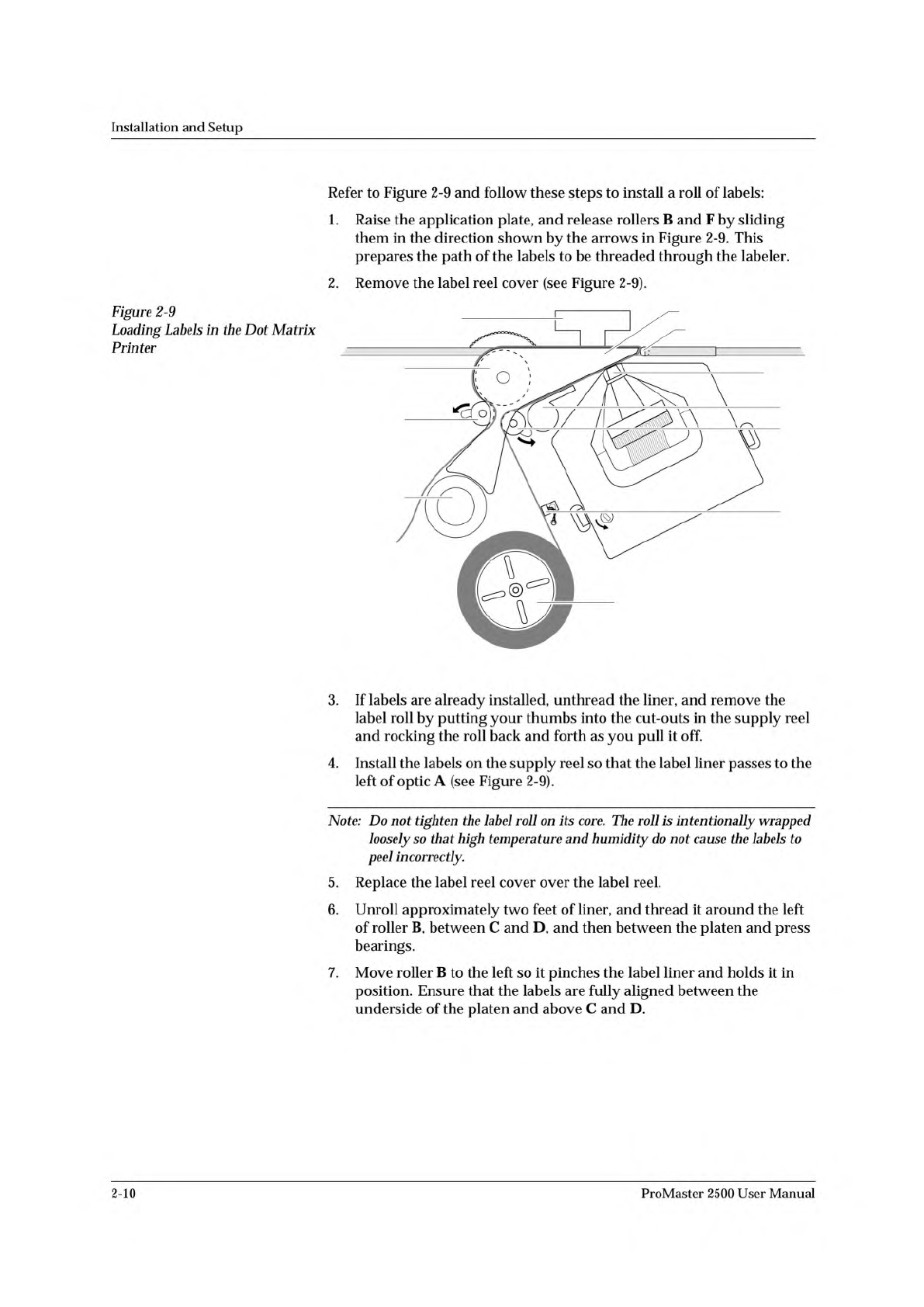
1851-2
D
PRESS BEARINGS
PLATEN
APPLICATION PLATE
E
LABEL REEL COVER
F
B
C
A
G
Installation
and
Setup
Refer
to
Figure
2-9
and
follow
these
steps
to
install
a
roll
of
labels:
1.
Raise
the
application
plate,
and
release
rollers
B
and
F
by
sliding
them
in
the
direction
shown
by
the
arrows
in
Figure
2-9.
This
prepares
the
path
of
the
labels
to
be
threaded
through
the
labeler.
2.
Remove
the
label
reel
cover
(see
Figure
2-9).
Figure
2-9
Loading
Labels
in
the
Dot
Matrix
Printer
3.
If
labels
are
already
installed,
unthread
the
liner,
and
remove
the
label
roll
by
putting
your
thumbs
into
the
cut-outs
in
the
supply
reel
and
rocking
the
roll
back
and
forth
as
you
pull
it
off.
4.
Install
the
labels
on
the
supply
reel
so
that
the
label
liner
passes
to
the
left
of
optic
A
(see
Figure
2-9).
Note:
Do
not
tighten
the
label
roll
on
its
core.
The
roll
is
intentionally
wrapped
loosely
so
that
high
temperature
and
humidity
do
not
cause
the
labels
to
peel
incorrectly.
5.
Replace
the
label
reel
cover
over
the
label
reel.
6.
Unroll
approximately
two
feet
of
liner,
and
thread
it
around
the
left
of
roller
B,
between
C
and
D,
and
then
between
the
platen
and
press
bearings.
7.
Move
roller
B
to
the
left
so
it
pinches
the
label
liner
and
holds
it
in
position.
Ensure
that
the
labels
are
fully
aligned
between
the
underside
of
the
platen
and
above
C
and
D.
2-10
ProMaster
2500
User
Manual
Installation
and
Setup
Calibrating
Labels
8.
Thread
the
label
liner
across
the
platen
and
lower
the
application
plate
to
hold
it
in
position.
9.
Route
the
liner
to
the
left
side
of
roller
E
and
to
the
right
of
roller
F.
Allow
the
remaining
liner
to
drape
to
the
left
of
knob
G.
10.
Move
roller
F
to
the
right
until
it
snaps
into
position.
Note:
To
ensure
correct
label
printing
and
application,
make
sure
both
pinch
rollers
(B
and
F)
are
fully
engaged.
At
certain
times,
you
must
calibrate
the
labels
so
that
the
2500
can
correctly
print
and
apply
them
to
devices.
During
the
label
calibration
process,
the
ADC
(label
detection)
optic
reads
and
assigns
a
value
to
the
amount
of
light
passing
through
the
label
when
it
is
blocking
the
optic.
You
can
view
and
adjust
this
ADC
optic
value
from
the
2500's
optics
diagnostics
menu
(refer
to
page
5-34).
You
must
calibrate
labels
whenever
you:
•
Change
the
labels
•
Change
the
ribbon
•
Advance
the
labels
by
running
the
label
drive
motor
test,
turning
the
label
advance
knob,
or
pulling
the
labels
forward
by
hand
•
Adjust
the
ADC
optic
value
To
calibrate
labels,
do
the
following:
1.
Place
your
finger
next
to
the
press
bearings
to
“catch”
the
two
or
three
labels
that
are
advanced
during
the
calibration
process.
2.
Press
CAL
on
the
2500's
keyboard.
3.
When
the
labels
stop
advancing,
calibration
is
complete.
ProMaster
2500
User
Manual
2-11
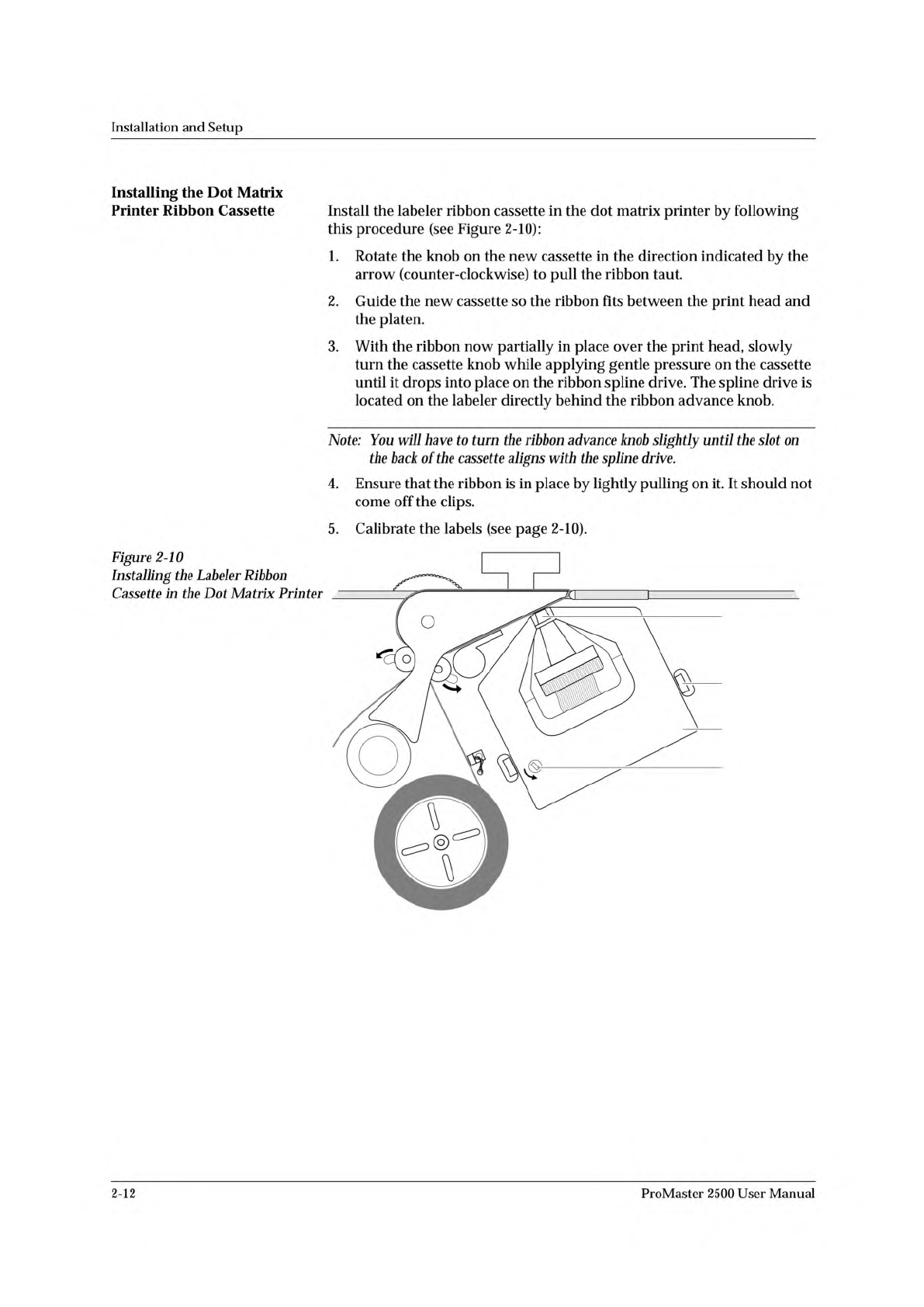
1852-2
PRINT HEAD
SPRING CLIP
(1 of 2)
RIBBON
ADVANCE
KNOB
RIBBON
CASSETTE
Installation
and
Setup
Installing
the
Dot
Matrix
Printer
Ribbon
Cassette
Install
the
labeler
ribbon
cassette
in
the
dot
matrix
printer
by
following
this
procedure
(see
Figure
2-10):
1.
Rotate
the
knob
on
the
new
cassette
in
the
direction
indicated
by
the
arrow
(counter-clockwise)
to
pull
the
ribbon
taut.
2.
Guide
the
new
cassette
so
the
ribbon
fits
between
the
print
head
and
the
platen.
3.
With
the
ribbon
now
partially
in
place
over
the
print
head,
slowly
turn
the
cassette
knob
while
applying
gentle
pressure
on
the
cassette
until
it
drops
into
place
on
the
ribbon
spline
drive.
The
spline
drive
is
located
on
the
labeler
directly
behind
the
ribbon
advance
knob.
Note:
You
will
have
to
turn
the
ribbon
advance
knob
slightly
until
the
slot
on
the
back
of
the
cassette
aligns
with
the
spline
drive.
4.
Ensure
that
the
ribbon
is
in
place
by
lightly
pulling
on
it.
It
should
not
come
off
the
clips.
5.
Calibrate
the
labels
(see
page
2-10).
Figure
2-10
Installing
the
Labeler
Ribbon
Cassette
in
the
Dot
Matrix
Printer
2-12
ProMaster
2500
User
Manual