00196478-08_MM_SX12DX12_en.pdf - 第29页
Minor Maintenance 4.2.2 Performing Maintenance Ta sks Maintenance Tasks for Base Ma chine Maintenance Manual SIPLACE SX1/SX2/DX1/DX2 29 4.2.2.2 4 . 2 . 2 . 2 C h e c k in g t h e F a n s o n t h e G C U s Checking the Fa…
Minor Maintenance
Maintenance Tasks for Base Machine 4.2.1 Tools, Consumables, Spare and Wear Parts
28 Maintenance Manual SIPLACE SX1/SX2/DX1/DX2
4.2
4.2 Maintenance Tasks for Base Machine
Maintenance Tasks for Base Machine
4.2.1
4.2.1 Tools, Consumables, Spare and Wear Parts
Tools, Consumables, Spare and Wear Parts
▪ ESD wristband [00320279-xx]
▪ Sheet of paper
▪ If necessary, cover fan 1 part [03094598-xx]
▪ Fan for GCU, if required [03060954-xx]
▪ Vacuum cleaner
▪ Service manual for your machine
4.2.2
4.2.2 Performing Maintenance Tasks
Performing Maintenance Tasks
4.2.2.1
4.2.2.1 Checking/Cleaning the Cover Fans
Checking/Cleaning the Cover Fans
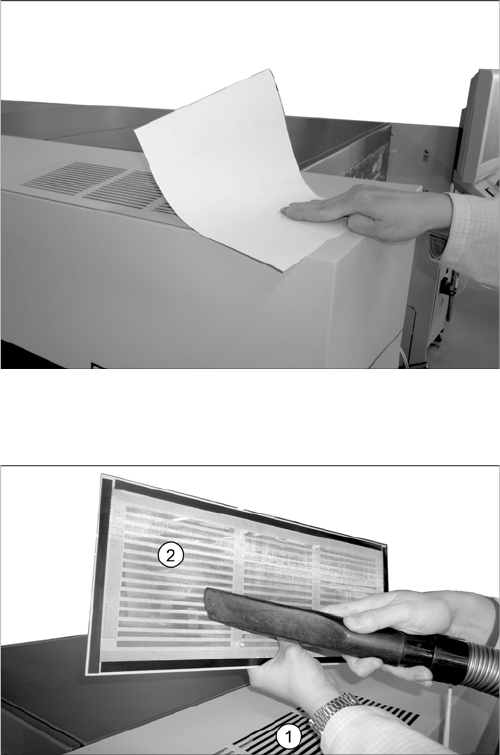
Checking the cover fans
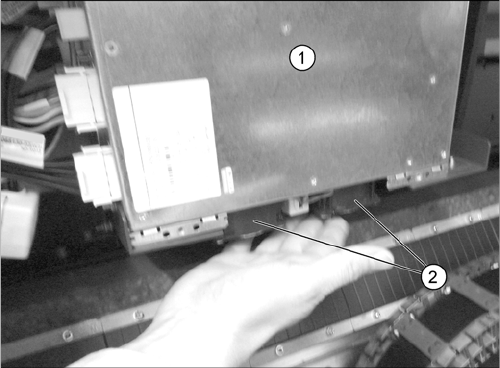
Cleaning the Protective Grids on the Cover Fans
The machine needs to be switched on for this check.
► Close the protective covers and press the Start but-
ton.
► Check the function of the fans. You should be able to
feel a noticeable flow of air. Place a sheet of paper on
the fan openings, if required.
► If the fan does not work, authorized personnel has to
check the corresponding fuse for the power supply. If
the fuse is okay, the fan must be replaced (Fan hood
1-piece [03094598-xx]).
For removal and installation details, refer to the Ser-
vice manual for your machine.
► Repeat this check for all cover fans.
► Take the protective grid (2) off the air vent (1).
► Use a vacuum cleaner to clean the protective grid.
► Place the protective grid back on the air vent.
► Repeat these steps at all four air vents.
Minor Maintenance
4.2.2 Performing Maintenance Tasks Maintenance Tasks for Base Machine
Maintenance Manual SIPLACE SX1/SX2/DX1/DX2 29
4.2.2.2
4.2.2.2 Checking the Fans on the GCUs
Checking the Fans on the GCUs
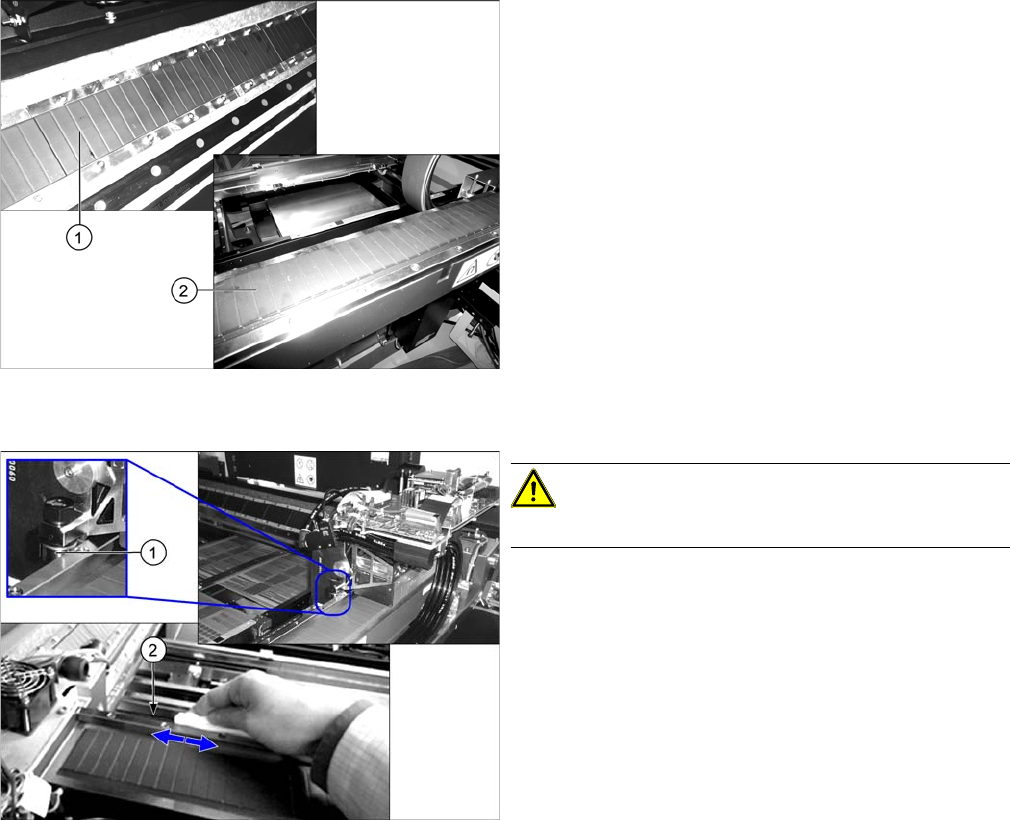
► Open the protective cover.
► Check the function of the fan (2) on the GCU (1) by
holding your hand in front of the fan. You should be
able to feel a noticeable flow of air.
► If the fan does not work, it has to be replaced by au-
thorized personnel (Fan GCU [03060954-xx]). For
details about how to remove the GCU, read the ser-
vice manual for the respective machine.
► Repeat this check for all GCUs.
Minor Maintenance
Maintenance Work on the Gantry 4.3.1 Tools, Consumables, Spare and Wear Parts
30 Maintenance Manual SIPLACE SX1/SX2/DX1/DX2
4.3
4.3 Maintenance Work on the Gantry
Maintenance Work on the Gantry
4.3.1
4.3.1 Tools, Consumables, Spare and Wear Parts
Tools, Consumables, Spare and Wear Parts
▪ Lint-free cloths [03082092-xx]
▪ SIPLACE cleaning tissue [00315253-xx]
▪ Protective latex gloves [00372972-xx]
▪ Cotton gloves [00359087-xx]
▪ Set of Allen keys
▪ ESD wristband [00320279-xx]
4.3.2
4.3.2 Performing Maintenance Tasks
Performing Maintenance Tasks
See also
1.1.6 Safety Instructions for the Gantry [ ➙ 9]
1.1.2 Safety Instructions for Working with Strong Magnetic Fields [ ➙ 8]
4.3.2.1
4.3.2.1 Checking and Cleaning the Magnetic Surfaces of the X and Y Axes
Checking and Cleaning the Magnetic Surfaces of the X and Y Axes
4.3.2.2
4.3.2.2 Cleaning the X Axis Loose Bearing and Contact Surface
Cleaning the X Axis Loose Bearing and Contact Surface
► Clean the magnetic surfaces of the X (2) and Y (1)
axes thoroughly over their entire length. Use a lint-
free cloth to remove any dirt from the magnetic sur-
faces. Where necessary, remove components with a
non-magnetic tool.Where necessary, remove compo-
nents with a non-magnetic tool.
► In the event of damage or other problems, please
contact your SIPLACE Service team in Munich.
CAUTION!
Do not use any chemical cleaning agents!
► Use a SIPLACE cleaning tissue to wipe the loose
bearing (1) for the X axis and its contact surface (2) .
► Repeat these steps for the loose bearing on the other
side of the head mount.
► Repeat these steps for all gantries.