00193875-01.pdf - 第5页
SIPLACE Software Guide Version 101.xx 1 Preface Issue 05/03 EN 1.1 Ge neral 5 1P r e f a c e 1.1 General 1.1.1 Overview This software guid e describes the operat ing so ftwar e for the SIPLACE machine s (softwar e ver- s…
SIPLACE Software Guide Version 101.xx Contents
Issue 05/03 EN
4
4 Switching the SIPLACE line on and off . . . . . . . . . . . . . . . . . . . . . . . . . . . . . . 45
4.1 Switching on the SIPLACE line . . . . . . . . . . . . . . . . . . . . . . . . . . . . . . . . . . . . . . . . . . . . . . . . . . . .45
4.1.1 Starting the SIPLACE C Pro programming system. . . . . . . . . . . . . . . . . . . . . . . . .45
4.1.2 What to check before switching on the stations . . . . . . . . . . . . . . . . . . . . . . . . . . .46
4.1.3 Switching on the station / Starting the user interface of the
station computer program . . . . . . . . . . . . . . . . . . . . . . . . . . . . . . . . . . . . . . . . . . . .47
4.1.4 "Switching on the SIPLACE line" flow chart . . . . . . . . . . . . . . . . . . . . . . . . . . . . . .48
4.2 Switching off the SIPLACE line . . . . . . . . . . . . . . . . . . . . . . . . . . . . . . . . . . . . . . . . . . . . . . . . . . . .50
4.2.1 Switching off SIPLACE C Pro (Windows) . . . . . . . . . . . . . . . . . . . . . . . . . . . . . . . .50
4.2.2 Switching off the stations. . . . . . . . . . . . . . . . . . . . . . . . . . . . . . . . . . . . . . . . . . . . .50
5 Error information . . . . . . . . . . . . . . . . . . . . . . . . . . . . . . . . . . . . . . . . . . . . . . . . 53
5.1 General . . . . . . . . . . . . . . . . . . . . . . . . . . . . . . . . . . . . . . . . . . . . . . . . . . . . . . . . . . . . . . . . . . . . . .53
5.2 Calling error information. . . . . . . . . . . . . . . . . . . . . . . . . . . . . . . . . . . . . . . . . . . . . . . . . . . . . . . . . .53
5.2.1 Displaying information on the current error . . . . . . . . . . . . . . . . . . . . . . . . . . . . . . .55
5.2.2 Displaying information about a selected error. . . . . . . . . . . . . . . . . . . . . . . . . . . . .55
5.2.2.1 Inserting or editing comments on errors . . . . . . . . . . . . . . . . . . . . . . . . . . . . . . . . .57
5.3 Clear error . . . . . . . . . . . . . . . . . . . . . . . . . . . . . . . . . . . . . . . . . . . . . . . . . . . . . . . . . . . . . . . . . . . .58
6 Online Help system . . . . . . . . . . . . . . . . . . . . . . . . . . . . . . . . . . . . . . . . . . . . . . 59
6.1 General . . . . . . . . . . . . . . . . . . . . . . . . . . . . . . . . . . . . . . . . . . . . . . . . . . . . . . . . . . . . . . . . . . . . . .59
6.1.1 Functions of the "Help" menu . . . . . . . . . . . . . . . . . . . . . . . . . . . . . . . . . . . . . . . . .59
6.1.1.1 Displaying the contents of the Help system. . . . . . . . . . . . . . . . . . . . . . . . . . . . . . .60
6.1.1.2 Displaying help for a particular topic area . . . . . . . . . . . . . . . . . . . . . . . . . . . . . . . .61
6.1.1.3 Displaying help on the current view. . . . . . . . . . . . . . . . . . . . . . . . . . . . . . . . . . . . .62
6.1.1.4 Calling general station computer information . . . . . . . . . . . . . . . . . . . . . . . . . . . . .63
7 Additional programs . . . . . . . . . . . . . . . . . . . . . . . . . . . . . . . . . . . . . . . . . . . . . 65
7.1 Test program "SITEST" . . . . . . . . . . . . . . . . . . . . . . . . . . . . . . . . . . . . . . . . . . . . . . . . . . . . . . . . . .65
7.1.1 Purpose. . . . . . . . . . . . . . . . . . . . . . . . . . . . . . . . . . . . . . . . . . . . . . . . . . . . . . . . . . 65
7.1.2 Description. . . . . . . . . . . . . . . . . . . . . . . . . . . . . . . . . . . . . . . . . . . . . . . . . . . . . . . .65
7.2 Operator Information System "OIS". . . . . . . . . . . . . . . . . . . . . . . . . . . . . . . . . . . . . . . . . . . . . . . . .66
7.2.1 Purpose. . . . . . . . . . . . . . . . . . . . . . . . . . . . . . . . . . . . . . . . . . . . . . . . . . . . . . . . . . 66
7.2.2 Description. . . . . . . . . . . . . . . . . . . . . . . . . . . . . . . . . . . . . . . . . . . . . . . . . . . . . . . .66
SIPLACE Software Guide Version 101.xx 1 Preface
Issue 05/03 EN 1.1 General
5
1Preface
1.1 General
1.1.1 Overview
This software guide describes the operating software for the SIPLACE machines (software ver-
sion SC 101.xx). It is intended for use by the following groups of people: 1
– operators
– line engineers
– service personnel.
The headers of each of the chapters provides information about the 1
–issue
– chapter number
– software version.
1.1.2 Where to find additional information?
If you have questions regarding this software guide or would like more detailed information about
a particular topic, please contact the appropriate Siemens representative or us directly at: 1
Siemens Dematic AG
SD EA 1
Rupert-Mayer-Str. 44
D-81359 Munich, Germany 1
1.1.3 SIPLACE on the Internet (WWW)
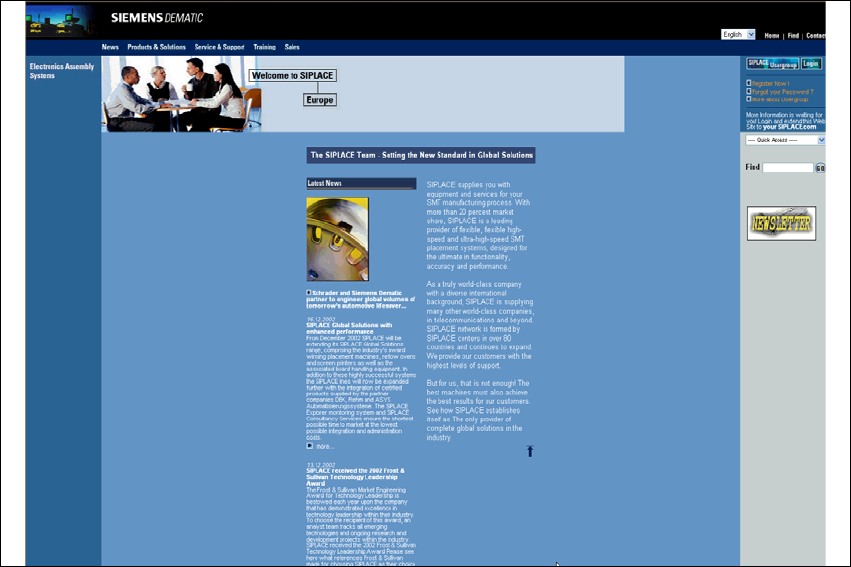
Information can also be found on the Internet. You can log on to the SIPLACE home page under
http://www.siplace.com. 1
Æ On the welcome page, select the country in which you reside, and the home page opens.
1
1
1 Preface SIPLACE Software Guide Version 101.xx
1.1 General Issue 05/03 EN
6
1
Fig. 1.1 - 1 SIPLACE home page
The various topics include information on the following 1
– our products
–our services
– the people to contact etc.
In addition to this, registered customers also have access to the SIPLACE User Group. Here you
can call up specialized information about our placement machines, for example 1
– technical documentation
– technical information
– nozzle catalog
– lists of spare parts
Registration for access to the User Group is very simple: 1
Æ Click the icon Register Now!.
Æ Fill in the registration form and send it off.
You will receive a USER ID and a password which entitles you to access. 1