00195424-01.pdf - 第128页
Anh ang Inst all atio ns- u nd Konf igu rat ions anle itun g SI PLAC E E xplo rer Bu ndle d We b S erver Inst all atio n Au sgabe 05/ 200 7 DE 128
Installations- und Konfigurationsanleitung SIPLACE Explorer Anhang
Ausgabe 05/2007 DE Bundled Web Server Installation
127
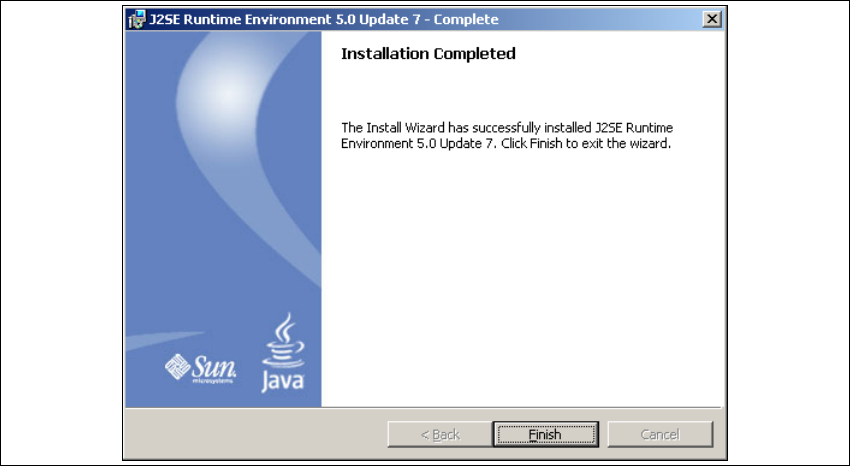
→ Wenn die Installation beendet ist, öffnet sich das Dialogfenster Installation Completed.
5
Abb. 5 - 38 Java 2SE Setup - Installation beendet
→ Klicken Sie auf Finish.
5
Anhang Installations- und Konfigurationsanleitung SIPLACE Explorer
Bundled Web Server Installation Ausgabe 05/2007 DE
128

Installations- und Konfigurationsanleitung Index
SIPLACE Explorer Ausgabe 05/2007 DE
129
Index
A
Administrator-Rechte
. . . . . . . 28, 36, 39, 43, 112
Adobe Reader 6.0
. . . . . . . . . . . . . . . . . . . . . . . .27
Anmeldung DB-Administrator
. . . . . . . . . . . 70, 95
Anwendungsassistent, starten
. . . . . . . . . . . . . .75
Apache Tomcat Setup
. . . . . . . . . . . . . . . . . . .116
Applikations-Einstellungen
. . . . . . . . . . . . . . . . .90
Applikations-Funktionen überprüfen
. . . . . . . . . .63
Applikations-Parameter verändern
. . . . . . . . . . .72
Architektur des SIPLACE Explorer
. . . . . . . . . . .15
Archivierungsplan
. . . . . . . . . . . . . . . . . . . . 69, 96
B
Backflush
. . . . . . . . . . . . . . . . . . . . . . . . . . 28, 38
Benutzer
. . . . . . . . . . . . . . . . . . . . . . . . . . . 90, 91
Benutzer Details
. . . . . . . . . . . . . . . . . . . . . . . . .92
Benutzer hinzufügen
. . . . . . . . . . . . . . . . . . . . . .91
Benutzerdefiniert
. . . . . . . . . . . . . . . . . . . . . . . . .78
Benutzer-Management
. . . . . . . . . . . . . . . . 90, 91
Benutzer-Rechte Profile
. . . . . . . . . . . . . . . . . . .93
Berichte
. . . . . . . . . . . . . . . . . . . . . . . . . . . . . . . .89
Berichte auf Anforderung
. . . . . . . . . . . . . . . . . .89
Betriebsmittel Hinzufügen
. . . . . . . . . . . . . . . . . .61
Bundled Web Server Installation
. . . . . . . 111, 112
D
Datenbank Einstellungen
. . . . . . . . . . . . . . . . . .98
Datenbank-Backup
. . . . . . . . . . . . . . . . . . . 71, 97
Datenbank-Verbindung konfigurieren
. . . . . 67, 82
Datenbank-Verbindungs-Assistent
. . . . . . 98, 100
DB Fehler
. . . . . . . . . . . . . . . . . . . . . . . . . . 66, 81
DB-Administrator
. . . . . . . . . . . . . . . . . . . . . 70, 96
DB-Wartung
. . . . . . . . . . . . . . . . . . . . . 69, 70, 95
DB-Wartungs-Plan
. . . . . . . . . . . . . . . . . . . . . . .69
DE Windows Start Menü
. . . . . . . . . . . . . . . . . . .45
Deinstallation
. . . . . . . . . . . . . . . . . . . . . . . . . .103
Deinstallationsvorgang
. . . . . . . . . . . . . . . . . . .110
deinstallieren
. . . . . . . . . . . . . . . . . . . . . . . . . . .103
Development Environment
. . . . . . . . . . . . . . . . .25
E
Einstellungen, Datenbank
. . . . . . . . . . . . . . . . . 98
Erfolg
. . . . . . . . . . . . . . . . . . . . . . . . 67, 69, 82, 84
Erstellung einer SMA, Konfigurieren
der Fertigungslinie
. . . . . . . . . . . . . . . . . . . 79
Erstellung einer SMA,
Laden der Zielanwendung
. . . . . . . . . . . . . 79
Erstellung maßgeschneiderter Anwendungen
. 55
Erstinstallation, SIPLACE Explorer 2.2
. 28, 36, 43
F
Factory - Einstellungen laden
. . . . . . . . . . . . . . 81
Factory Configuration Utility
. . . . . . . . . . . . . . . 25
Factory Configuration Utility
Windows Start Menü
. . . . . . . . . . . . . . . . . 45
Fertigungslinie konfigurieren
. . . . . . . . . . . . . . . 61
Fertigungslinie überwachen
. . . . . . . . . . . . . . . 90
Fertigungslinien konfigurieren
. . . . . . . . . . . . . . 84
Fertigungs-linien zu überwachen
. . . . . . . . . . . 55
Fertigungslinien-Plan erstellen
. . . . . . . . . . . . . 64
Fertigungslinien-Websites
. . . . . . . . . . . . . . . . . 98
Firewall
. . . . . . . . . . . . . . . . . . . . . . . . . . . . . . . 46
Funktions-Beschreibung
. . . . . . . . . . . . . . . . . . 63
G
Generieren der Website
. . . . . . . . . . . . . . . . . . 73
I
Installation beendet, Java 2JSE
. . . . . . . . . . . 127
Installation beendet,
SIPLACE Explorer Setup
. . . . . . . . . . . 36, 42
Installation des SIPLACE Explorer
. . . . . . . . . . 25
Installation wiederherstellen
. . . . . . . . . . . . . . 103
Installation, Bundled Web Server
. . . . . . . . . . 112
Installation, Development Environment
. . . . . . . 34
Installation, Factor Configuration Utility
. . . . . . . 34
Installation, Runtime Environment
. . . . . . . . . . 34
Installations-Varianten
. . . . . . . . . . . . . . . . . . . . 19
Installationsvorgang MSDE 2000
. . . . . . . . . . . 37