SiplaceX4_en.pdf - 第43页
1 - 19 S tudent Guide SIPLACE X Edition 09/2005 2 Overview 19 2.2.5.4 Axis Card A363 Abbreviation: X = X-axis and gantry number Z 1 = Z-axis for twin head module 1 Y= Y -axis and gantr y number D 1 = Rotary axis for twin…
1 - 18
Student Guide SIPLACE X
2 Overview Edition 09/2005
18
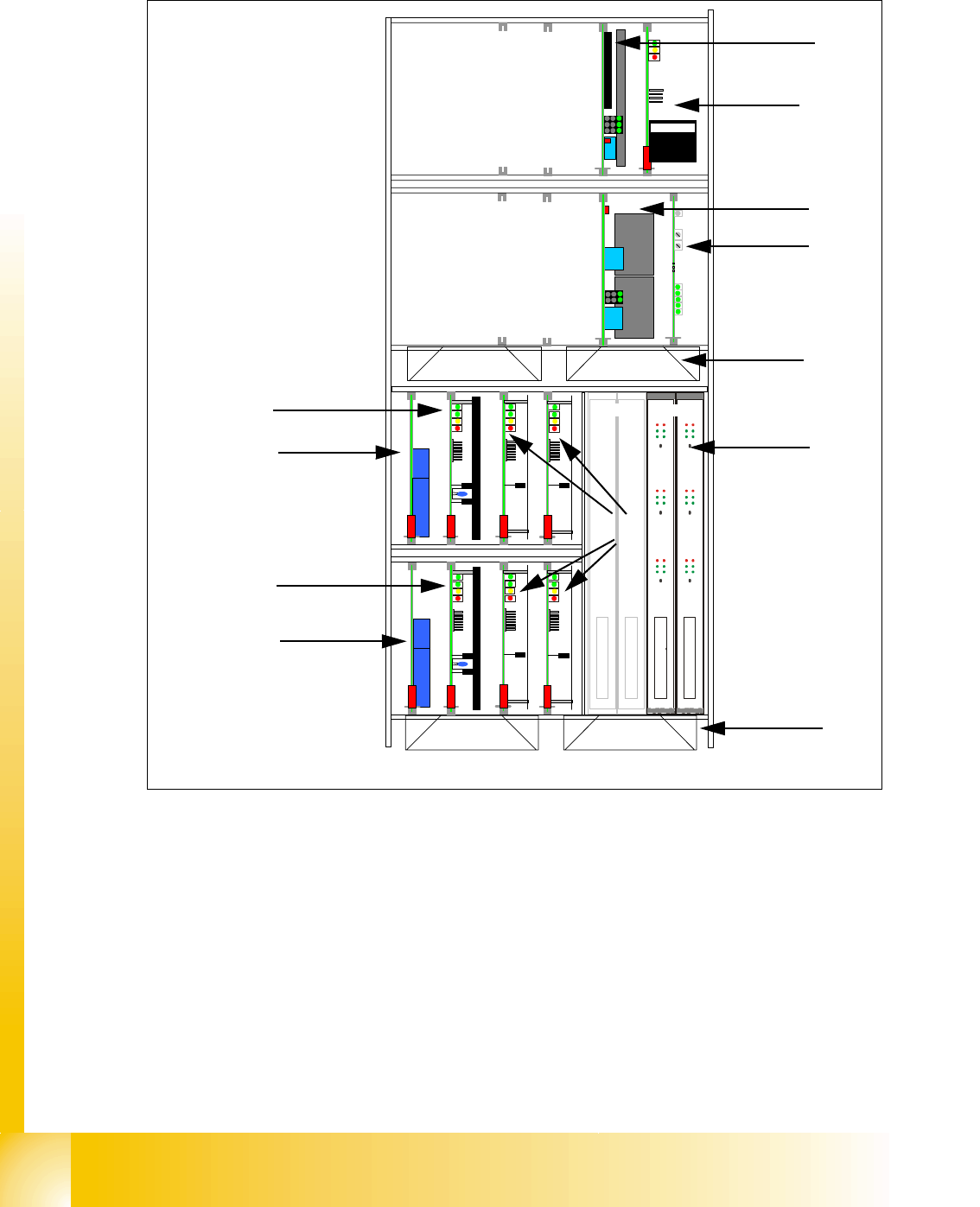
2.2.5.3 Example of Axis Unit for X3/ X2 with Twin Head in Placement Area 2
Fig. 2.2 - 7 Axis unit BB2 with twin head
Key
(1) DC/DC converter 5V/15A for axis unit
(2) Ballast circuit board
(3) DC/DC converter +/-15V for gantries and
head interface, 5V CAN BUS
(4) Anti crash board
(5) Fan unit (blow downwards) (6) Axis boards A363
(7) Servo boards X-axis, placement area 2 for
gantry 3
(8) Servo boards Y-axis, placement area 2 for
gantry 3
(9) Brake board for each X and Y axis (10) Servo boards Z/D-axis twin head
TBS 250/10X
DBM/3P-06
SDS 60/1Z1 (f. Segment 2)
DBM/3P-06
SDS 60/0,5D1 (f. Segment 2)
TBS 250/20Y
SDS 60/1Z1 (f. Segment 1)
SDS 60/0,5D1 (f. Segment 1)
5 V / 15A 15V/1,7A 15V/ 1,7A
15 V / 5A 15 V / 5A
Anti crash board
BS 250 / 1000 -03
X
Y
Z 2
dp 1
Z 1
dp 2
Portal 3
Portal 2
1
2
3
4
5
6
7
9
8
9
Placement area 2
Only for gantry 2 in
X4
Placement area 2
Gantry 3
5
10
1 - 19
Student Guide SIPLACE X
Edition 09/2005 2 Overview
19
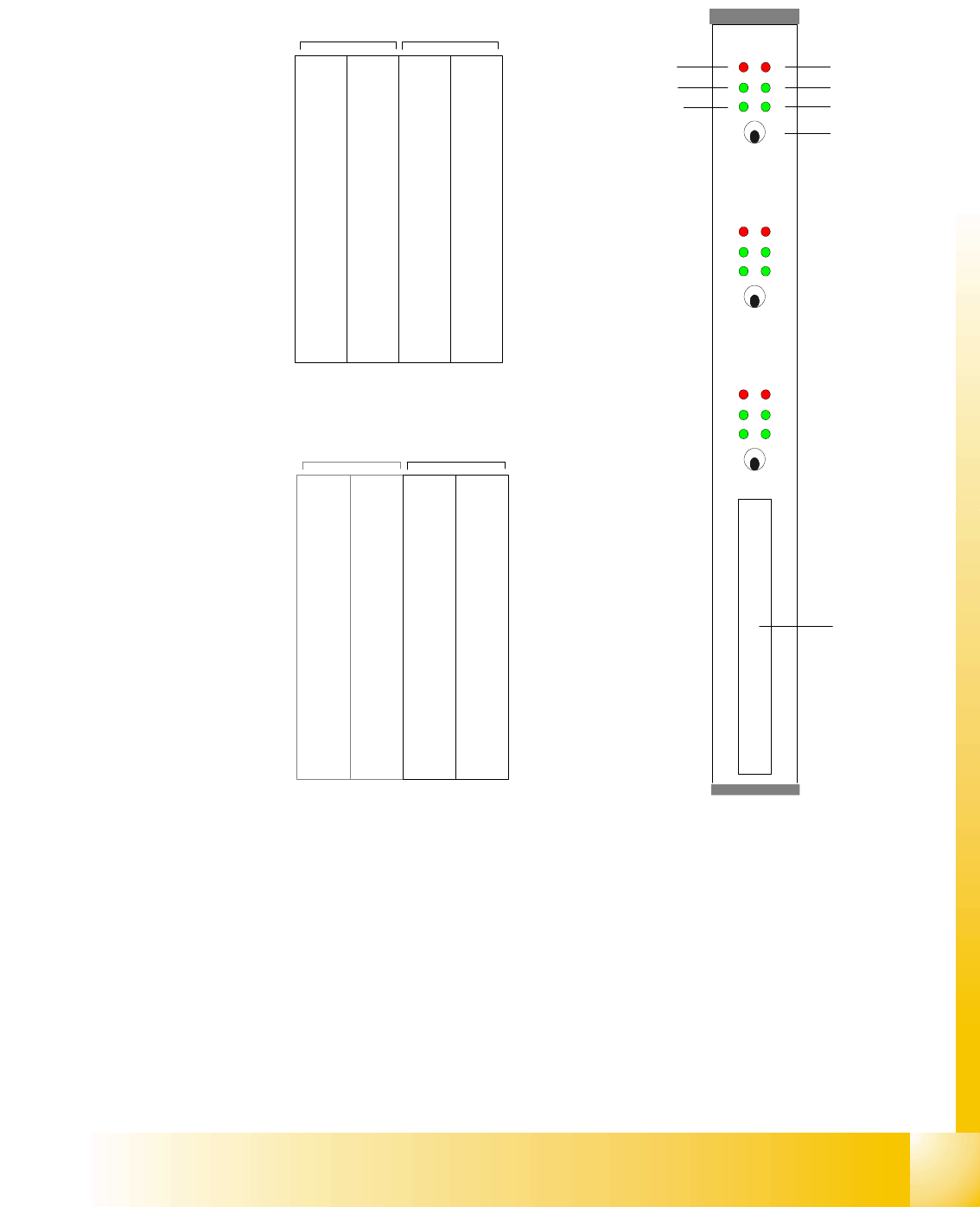
2.2.5.4 Axis Card A363
Abbreviation:
X = X-axis and gantry number
Z1= Z-axis for twin head module 1
Y= Y-axis and gantry number D
1= Rotary axis for twin head modules 1
S= Star axis and gantry number for C&P head Z
2= Z-axis for twin head module 2
Z= Z-axis and gantry number for C&P head D
2= Rotary axis for twin head module 2
DP= Swivel axis and gantry number for C&P
head
The DP/D-axis controller is not used in C&P20
heads.
Counter error
Zero puls
End signal
Common error,
Board error
Initialisation
Servo On
Axis switch off/on
Axis 0
Axis 1
Axis 2
Interface
Axis test box
X 1
Address
0
Y 1
Address
1
S 1
Address
2
Z 1
Address
3
DP 1
Address
5
free
Address
5
X 4
Address
6
Y 4
Address
7
S 4
Address
8
Z 4
Adress
9
DP 4
Address
10
free
Address
11
Gantry 1 Gantry 4
Placement area PA 1
Servos 'bottom'Servos 'top'
X 2
Address
16
Y 2
Address
17
S 2
Address
18
Z 2
Address
19
DP 2
Address
20
free
Address
21
X 3
Address
22
Y 3
Address
23
S3/Z
2
Address
24
Z/Z
1
Address
25
DP/D
1
Address
26
/D
2
Addres
27
Gantry 2 not used Gantry 3
Placement area PA 2
Servos 'bottom'Servos 'top'
1 - 20
Student Guide SIPLACE X
2 Overview Edition 09/2005
20
2.2.6 Component changeover tables
A new feeder generation has been developed for the Siplace X. These new feeders also require
a new component table. The new table has no electronic assemblies. The conventional compo-
nent table uses the communication unit for feeder supply and control. The power supply to the
feeders is now non-contacting, run via an inductive interface at the docking unit, directly to the
feeders. The control and communication between the feeder control unit (FCU) and the feeders
is conducted via two optoelectronic channels (fiber optics). The FCU is connected to the machine
control unit via the machine CAN Bus. Both S-tables and X-tables can be used with the machine.
Restriction: If the machine has C&P20 heads, only X-tables may be used.
2.2.6.1 Docking and Undocking
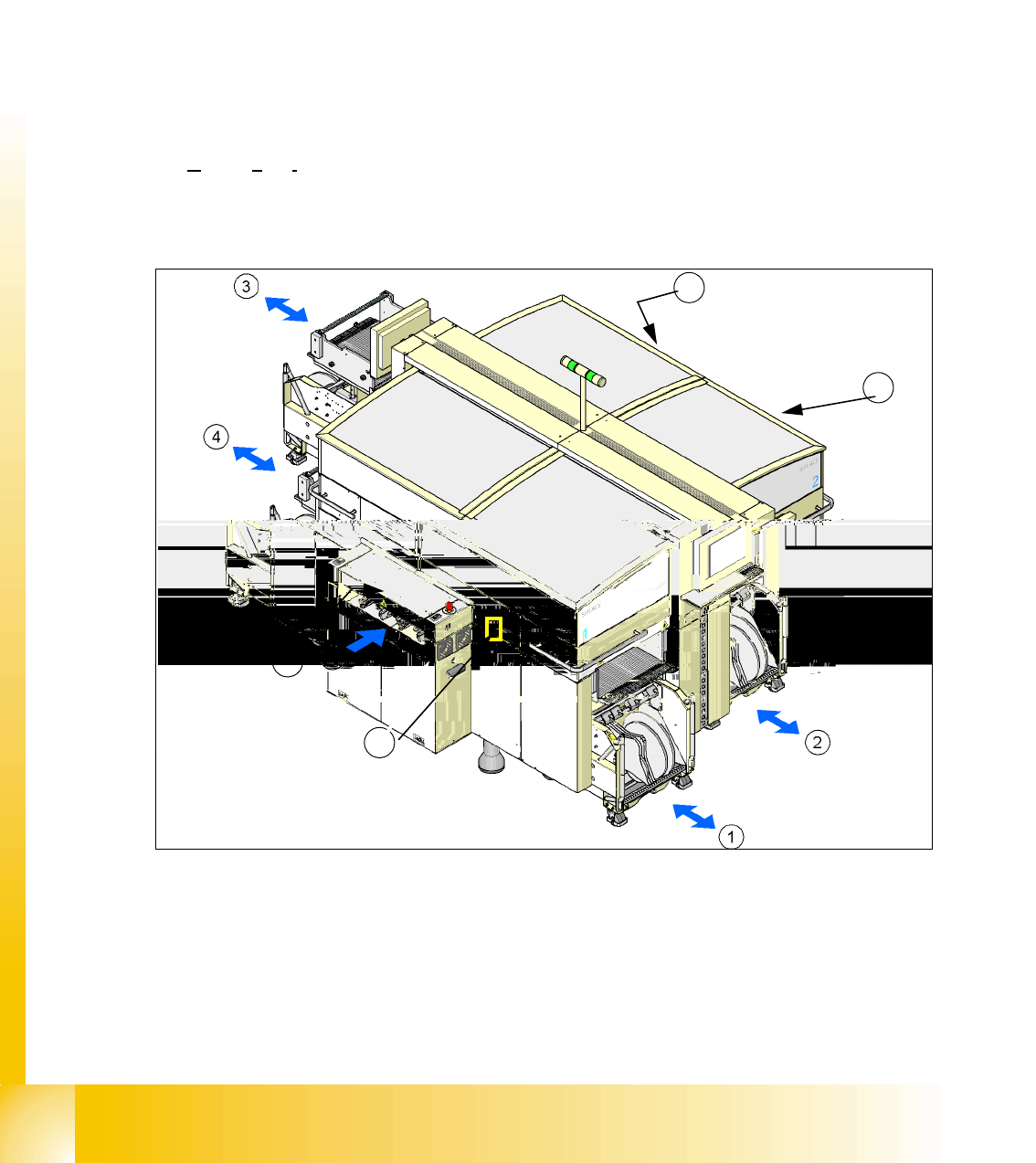
The changeover table (COT) is automatically docked and undocked to/from the machine via 2
pneumatic cylinders. To dock the COT, move the table to the docking unit, close the cover and
press button 5. To undock the COT, open the cover and press button 5.
.
Fig. 2.2 - 8 Shows the buttons for docking and undocking the COTs
(1-4) Component table location 1 - location 4
(T) Direction of transport
(5) Button to dock and undock component changeover tables
5
5
5
5