SiplaceX4_en.pdf - 第512页
1 - 6 S tudent Guide SIPLACE X 1 1 Sitest Edition 09/2005 6 1 1.1.3 Overview Siplace X4 M ain v iew [F1 ] [F2 ] Error Track errors Ma chine e rrors Transport errors General err ors SITEST version 601. xx Menu and toolbar…
1 - 5
Student Guide SIPLACE X
Edition 09/2005 11 Sitest
5
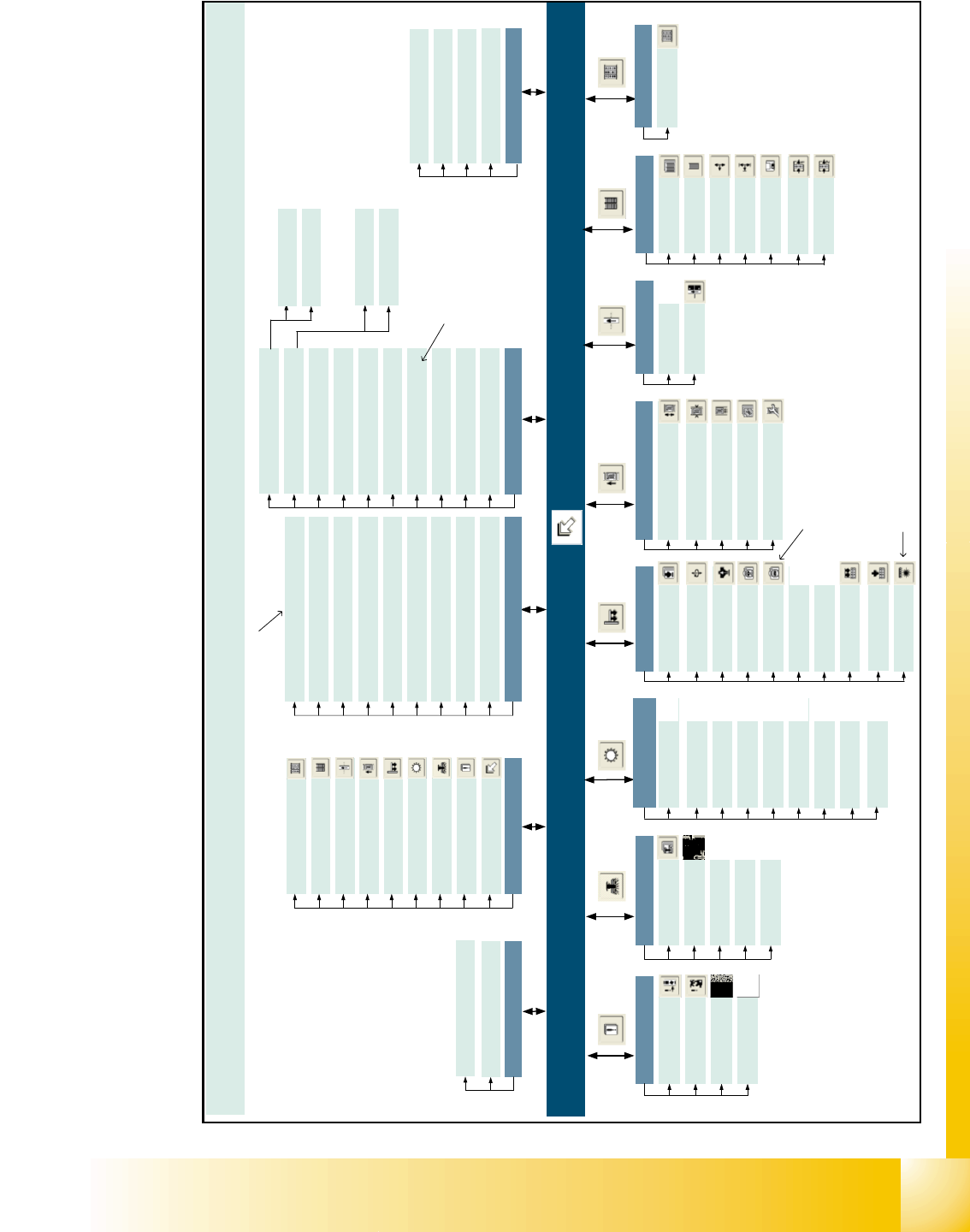
11.1.2 Overview Siplace X2
SITEST version 601.xx Menu and toolbar in the main view
Machine type: SIPLACE X2
Mode
Shut down computer...
Exit Esc
View
In-/outputs F9
MTC F8
Tables F7
PCB conveyor F6
Twin Head F5
C&P heads / F4
RV heads
Gantries F3
Error F2
Main view F1
Save machine data
Settings
Access level...
Copy machine data...
Edit machine data… *
Firmware download...
Machine configuration...
Whispering down the line...
Recovery placement...
Help
Contents Ctrl+Alt+F1
Help Alt+F1
Use help
Info...
Main view [F1]
[F2]
Error
Track errors
Machine errors
Transport errors
General errors
[F3]
Gantry functions
Gantries
Axis functions
Calibrate position
PCB camera
functions
PCB mapping
[F4]
C&P heads /
RV heads
Functions
Axes
Holding/reject circ./
turning station
Placement and
pick-up circuit
Head and
component camera
Head mapping
Nozzle changer,
head functions
Nozzle changer,
magazine functions
Component sensor
Twin Head
Functions
Axes
Head board
Component
camera 1
Component
camera 2
*
[F5]
Calibrate
Twin Head
Head mapping
Nozzle changer,
head functions
Nozzle changer,
magazine functions
Coplanarity
module
*
PCB conveyor
PCB conveyor functions
Adjust and measure
PCB conveyor width
Adjust and test
conveyor speed
Calibrate conveyor
and functions
Options and configuration
[F6]
[F7]
Tables
Functions
Calibrate
pick-up position
Functions
Tower functions
Axes
MTC
[F8]
[F9]
Inputs/outputs
1 - 15
Inputs/outputs
Settings
Machine data
Inputs/outputs 1
Inputs/outputs 2
*
C
a
n
o
n
l
y
b
e
s
e
l
e
c
t
e
d
o
n
t
h
e
"
S
e
r
v
i
c
e
(
S
i
e
m
e
n
s
)
"
a
c
c
e
s
s
l
e
v
e
l
* Can only be selected when the
coplanarity module is configured
* Can only be selected when the
component camera 2 is configured
* You can only select the cameras that
are currently configured for the head
on the relevant gantry.
General functions
Run options… Alt+t
PCB camera gantry 1 > Alt+1
Component camera gantry 3 > Alt+2 *
Component camera 1 gantry 1 > Alt+3 *
Component camera 2 gantry 1 > Alt+4 *
PCB camera gantry 3 > Alt+5
Component camera gantry 3 > Alt+6 *
Component camera 1 gantry 3 > Alt+7 *
Component camera 2 gantry 3 > Alt+8 *
Head exchange
Language
English
German
Head 3…
Head 1...
1 - 6
Student Guide SIPLACE X
11 Sitest Edition 09/2005
6
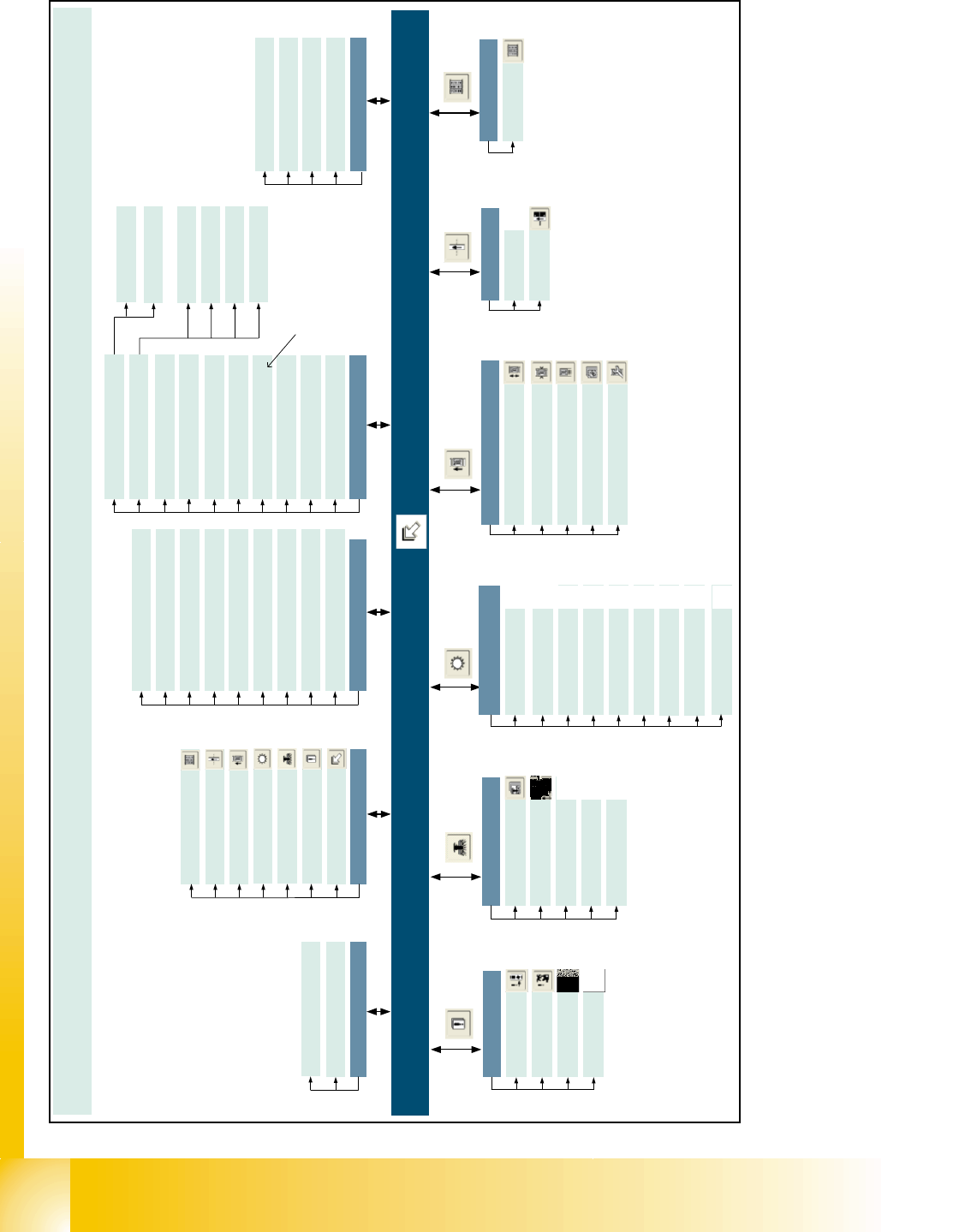
11.1.3 Overview Siplace X4
Main view [F1]
[F2]
Error
Track errors
Machine errors
Transport errors
General errors
SITEST version 601.xx Menu and toolbar in the main view
Machine type: SIPLACE X4
Mode
Shut down computer...
Exit Esc
View
In-/outputs F8
Tables F6
PCB conveyor F5
C&P heads / F4
RV heads
Gantries F3
Error F2
Main view F1
General functions
Run options… Alt+t
PCB camera gantry 1 > Alt+1
Component camera gantry 1 > Alt+2
PCB camera gantry 2 > Alt+3
Component camera gantry 2 > Alt+4
PCB camera gantry 3 > Alt+5
Component camera gantry 3 > Alt+6
PCB camera gantry 4 > Alt+7
Component camera gantry 4 > Alt+8
Save machine data
Einstellungen
Access level...
Copy machine data...
Edit machine data… *
Firmware download...
Machine configuration...
German
Help
Contents Ctrl+Alt+F1
Help Alt+F1
Use help
Info...
PCB conveyor
PCB conveyor functions
Adjust and measure
PCB conveyor width
Adjust and test
conveyor speed
Calibrate conveyor
and functions
Options and configuration
[F5]
[F6]
Tables
Functions
Calibrate
pick-up position
[F3]
Gantry functions
Gantries
Axis functions
Calibrate position
PCB camera
functions
PCB mapping
[F4]
C&P heads /
RV heads
Functions
Axes
Holding/reject circ./
turning station
Placement and
pick-up circuit
Head and
component camera
Head mapping
Nozzle changer,
head functions
Nozzle changer, magazine
functions
Component sensor
[F8]
Inputs/outputs
1 - 15
Inputs/outputs
*
C
a
n
o
n
l
y
b
e
s
e
l
e
c
t
e
d
o
n
t
h
e
"
S
e
r
v
i
c
e
(
S
i
e
m
e
n
s
)
"
a
c
c
e
s
s
l
e
v
e
l
Head exchange
Language
Head 4...
Head 3...
Head 2...
Head 1...
English
Whispering down the line...
Recovery placement...
1 - 7
Student Guide SIPLACE X
Edition 09/2005 11 Sitest
7
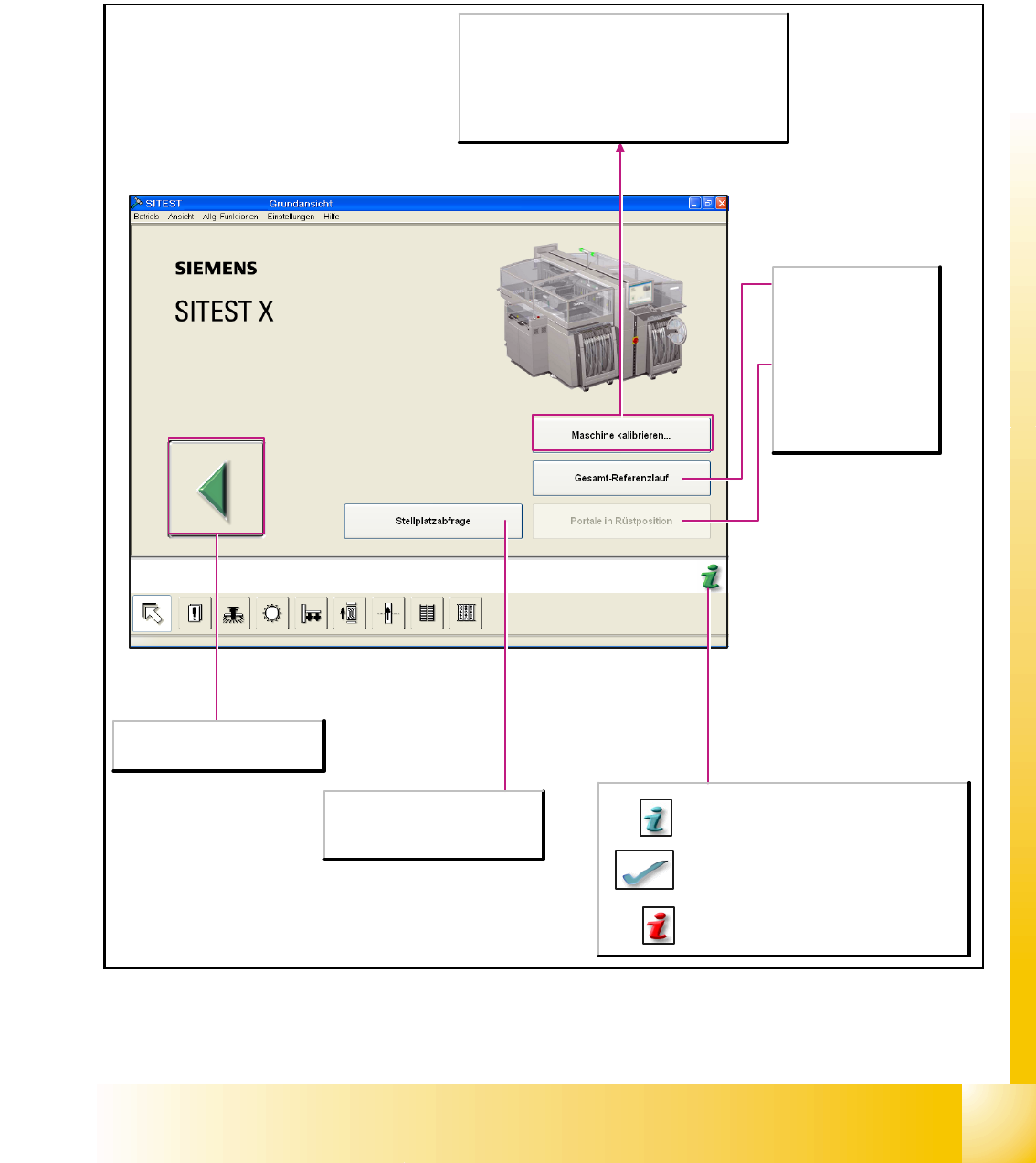
11.1.4 Main view Sitest
After starting the SITEST test program, the main view of the user interface will be displayed. The
operator can control the basic functions of the program from this view. He can return to the main
view from all the other displays.
Location interrogation
Available locations are queried as to
whether component tables or MTCs
(matrix- tray changers) are attached.
Cancels processing and exits the
SITEST test program.
Calibrate machine...
Opens the Calibrate entire machine dialog box. All
functions which are needed to calibrate the entire
machine are offered here.
Note
Before the calibration operation is carried out, a reference
run must be carried out for the heads and gantries.
Overall reference run
Starts the reference run
for all head and gantry
axes of the machine and
initializes the conveyor.
Gantries in setup
position
Moves the gantries from
the feeder area to allow
access to the component
tables with the feeders.
Starts a help system which lists possible causes
of the current error along with corrective
measures.
The current error message is deleted from the
status bar.
Provides context-sensitive help on the current
view.. This also provides a short description of all
the displayed operating elements.