SiplaceX4_en.pdf - 第537页
1 - 32 S tudent Guide SIPLACE X 1 1 Sitest Edition 09/2005 32 1 1.2.15 PCB mapping With the PCB mapping the linearity of the X- and Y -guidance for PCB-camera movement is mea- sured in the place ment area. The PCB-camera…

1 - 31
Student Guide SIPLACE X
Edition 09/2005 11 Sitest
31
11.2.14.4 Pick up position (Calibrate the component table Track 1- 90)
Determines the X and Y positions for the table 1up to 4 with the relevant track 1 and 90.
Fig. 11.2 - 16 Calibrate the Component table
11.2.14.5 Pick up position (Calibrate the X- tables Track 1- 40)
The calibration of the X- tables is the same like it is with the S- tables. The only differece is that
the calibration fiducials are directly mounted on the X- tables, so the calibration is automatically
done during calibrate the pick up position (no adjustment gauge necessary). Before pick up this
fiducials will be optical centered by the PCB- camera.
1 - 32
Student Guide SIPLACE X
11 Sitest Edition 09/2005
32
11.2.15 PCB mapping
With the PCB mapping the linearity of the X- and Y-guidance for PCB-camera movement is mea-
sured in the placement area.
The PCB-camera center the cross fiducials on a high precise glass plate. This glass plate is cali-
brated with a measurement machine and this data´s are considered in the measurement se-
quence.
Preperation mapping: 11
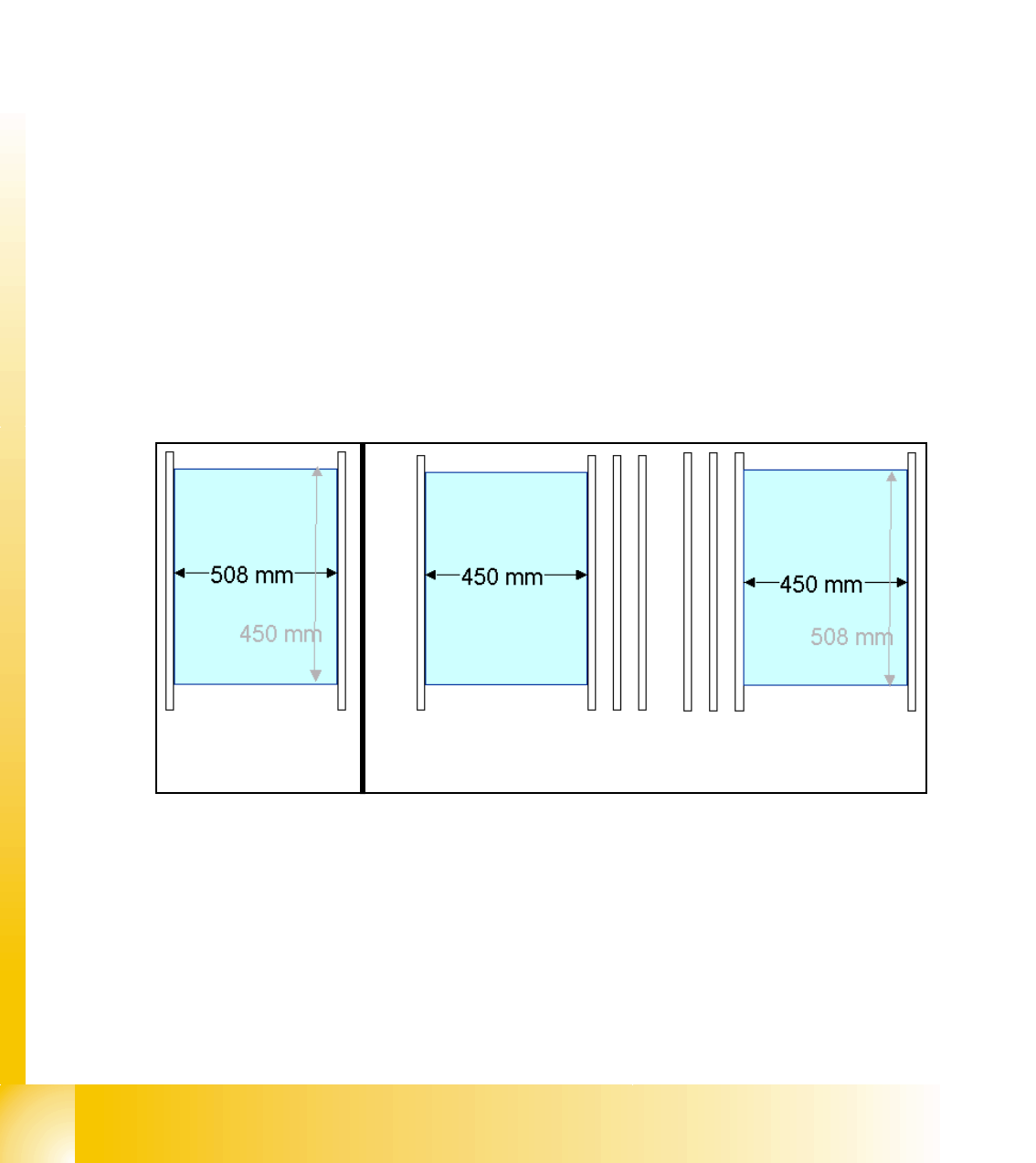
➠ At the single conveyor the SITEST move the transport rails to 508mm wide the mapping plate
is 90 degree turned.
➠ At dual conveyor the SITEST SW move all the transport rails depend of the conveyer which
is selected the conveyor for mapping to 450 mm wide the other track to 0mm. This allow to
used the Dual conveyor as a single conveyor. The Mapping must be carried out for the maxi-
mum conveyor width.
➠ To prepare the PCB and RV Mapping the SITEST SW move automatically the conveyer rails
that the mapping plate fit to the the referring track.
➠ The C&P6/12 Heads have to have 956 nozzles, the C&P20 head 1235 nozzles and the Twin
head 517 nozzles for mapping.
➠ The calibration tools are in the calibration pocket.
Fig. 11.2 - 17 Position mapping plate and conveyor rail position for single and dual conveyor
Procedure: 11
➠ insert the mapping disk at the station computer to prepare and copy the nominal data for this
individual mapping plate.
➠ Put the mapping plate in the input conveyor for placement area 1 or in the intermediate con-
veyor for placement area 2.
➠ Now appears the teach menue to teach the fixed PCB corner OK.
Single conveyor
Dual conveyor
Track 2 Track 1
1 - 33
Student Guide SIPLACE X
Edition 09/2005 11 Sitest
33
➠ PCB mapping is running.
➠ Then the gantry axes move the camera up to the start position. This is centered according to
the synthetic picture of the bright cross structure at this position.
➠ This results are set for the nominal coordinates. 40.000 µm in X- respectively Y- direction
added for the next fiducial nominal position.
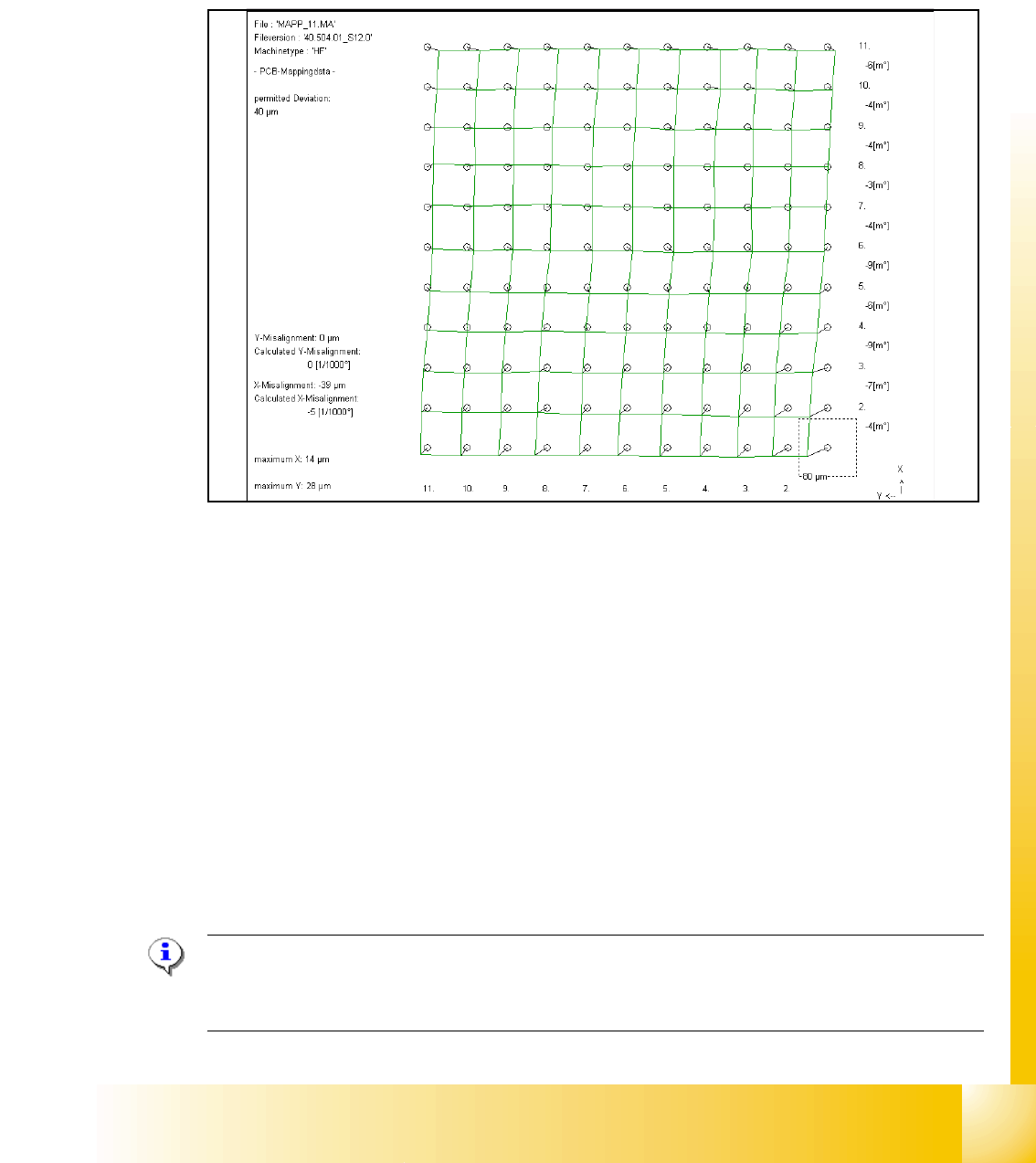
➠ The deviation of the structure to this theoretical position is measured.
Fig. 11.2 - 18 Result of PCB mapping
The result are saved in the mapp _xy.ma ( x= number of the gantry , y= transport track)
11.2.16 Head mapping( C&P,Twin head)
With the head mapping the linearity of the X- and Y-guidance for C&P head movement is mea-
sured in the placement area.
The C&P head place the calibration tool on the mapping glass board exact to the nominal posi-
tions of the glass plate. The PCB-camera measure the placement accuracy of this placements for
the whole placement area.
➠ After the PCB mapping the placement head place at the theoretical positions of the PCB-map-
ping the calibration tool.
➠ The PCB-Camera look for the placement accuracy on the 4 fiducials at the calibration tool cor-
ner.
Note:
All described automatically calibration steps above, can you do manually step by step under the
sub menus (see chapter 12.1).