EUS0153210_YFact_Standard_E.pdf - 第10页
iii Before using Factory T ools w W ARNING IN NETWORK SETTINGS AND CONNECTIONS, Y AMAHA WILL T AKE NO RESPONSIBILITY FOR NETWORKS CONFIGURED BY OTHER THAN OFF-LINE PC AND MACHINES. WHEN YOU MAKE CONNECTIONS TO IN-HOUSE N…
ii
Before using Factory Tools
3. Checking the system configuration
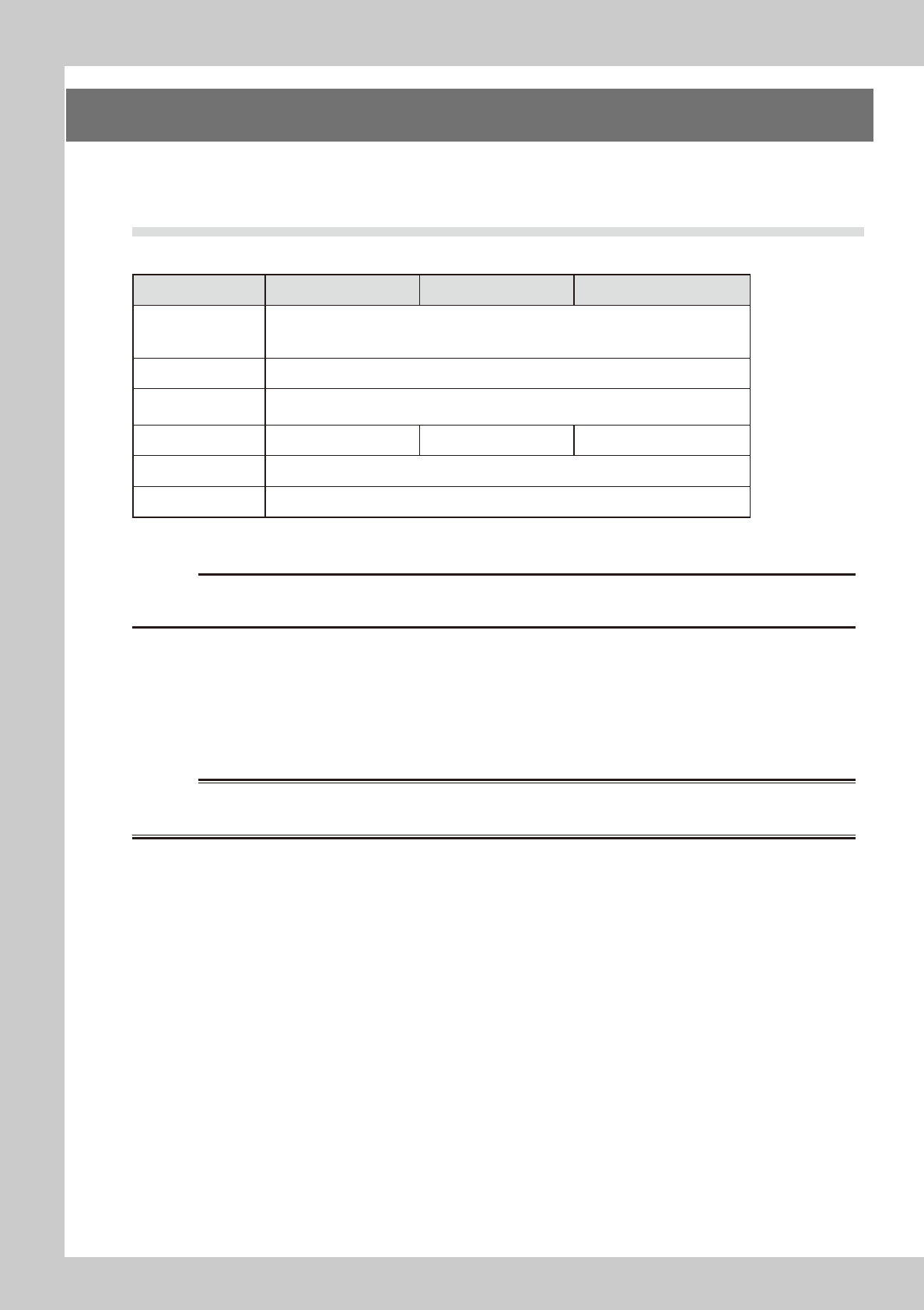
Factory Tools runs on Microsoft™ Windows . The following hardware specifications are necessary for the
operation.
3.1 Necessary hardware
P-Tool M-Tool S-Tool
OS
Windows XP Professional SP2 Japanese/English
Windows Vista Business Japanese/English *
Windows 7 Professional 32-bit/64-bit Japanese/English *
CPU Above-mentiond OS must operate. ( Recommendation: Dual 2GHz,Single 3GHz)
Display
1024 by 768 dots or higher ( Recommendation: 1280 by 1024 dots or higher), with 256 or
more colors
Memory 8GB or more 3GB or more 4GB or more
Hard disk Free space of 30GB or more
CD-ROM drive Quad-speed or higher
* Ultimate Edition or more is necessary for changing the display language besides the language of OS.
c
CAUTION
• USB port is needed to attach a hardware key for each Tool.
• USB port is needed to attach a barcode reader for S-Tool.
●
Using Microsoft™ Excel (2000/2003/2007/2010)
Microsoft™ Excel is required to use the following functions of Factory Tools.
•FeederViewer:SetupAssignment
•FeederViewer:OptimizationMonitor
•FeederViewer:OptimizerExcelSheet
w
WARNING
THOSE USERS WHO INSTALL THE MICROSOFT™ EXCEL MUST ACCEPT RESPONSIBILITY FOR THE SUBSEQUENT RESULTS OF
INSTALLATION. YAMAHA WILL TAKE NO RESPONSIBILITY FOR ANY SUBSEQUENT RESULTS.
iii
Before using Factory Tools
w
WARNING
IN NETWORK SETTINGS AND CONNECTIONS, YAMAHA WILL TAKE NO RESPONSIBILITY FOR NETWORKS CONFIGURED BY
OTHER THAN OFF-LINE PC AND MACHINES. WHEN YOU MAKE CONNECTIONS TO IN-HOUSE NETWORKS ON YOUR OWN
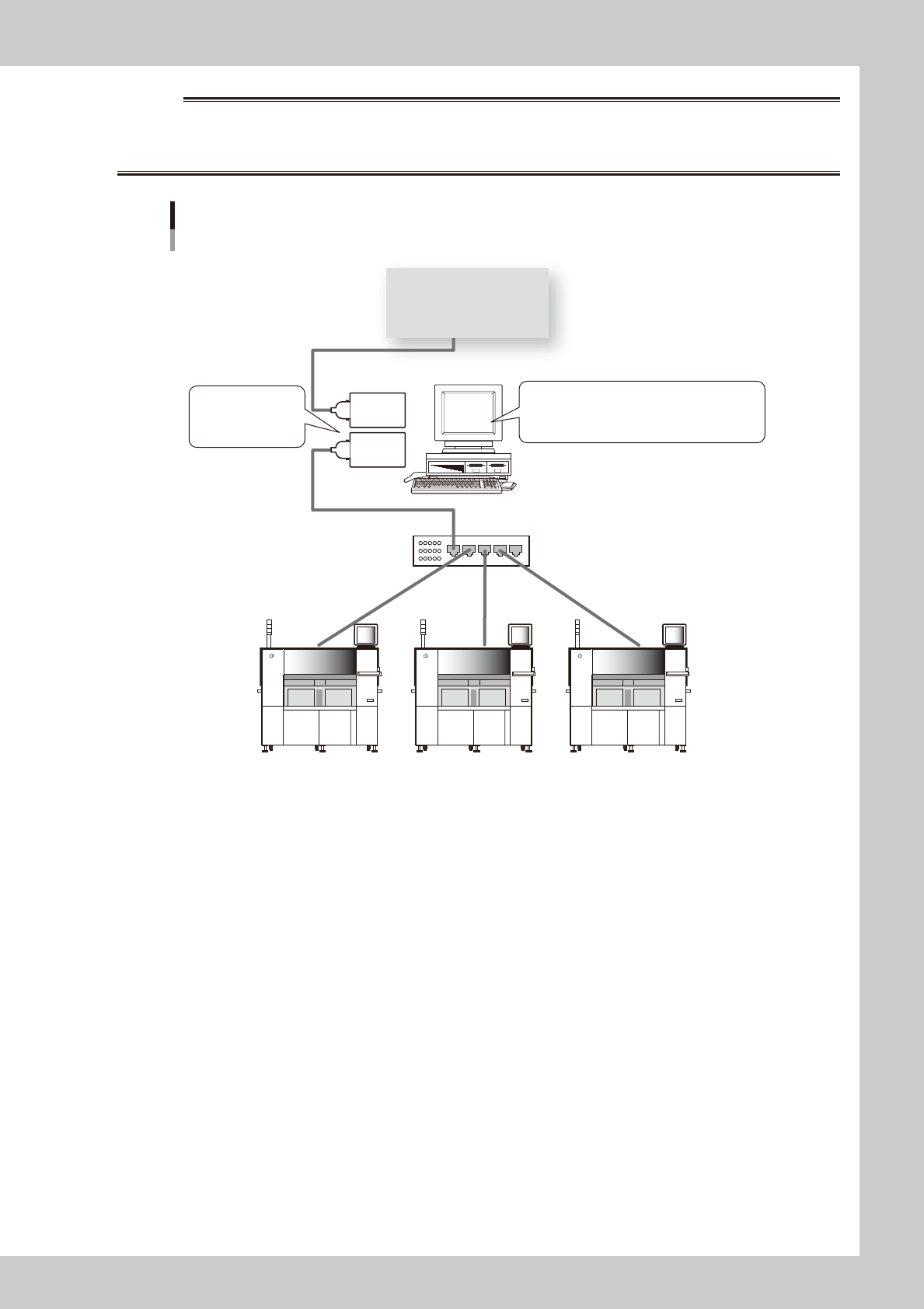
RESPONSIBILITY, REFER TO THE FOLLOWING RECOMMENDED CONFIGURATION.
Recommended network configuration
PC for off-line software
Network hub
Give different
IP addresses to
2 LAN cards.
Commercially available anti-virus software
Microsoft debug patch
Computer Browser Service should be stopped.
LAN
card
LAN
card
In-house network
63100-S0-00
●
Restrictions on communication function
The number of machines and lines are restricted as shown below for line remote control.
•Upto10machinescanberegistered.
•Upto50linescanberegistered.
iv
Before using Factory Tools
3.2 Applicable models
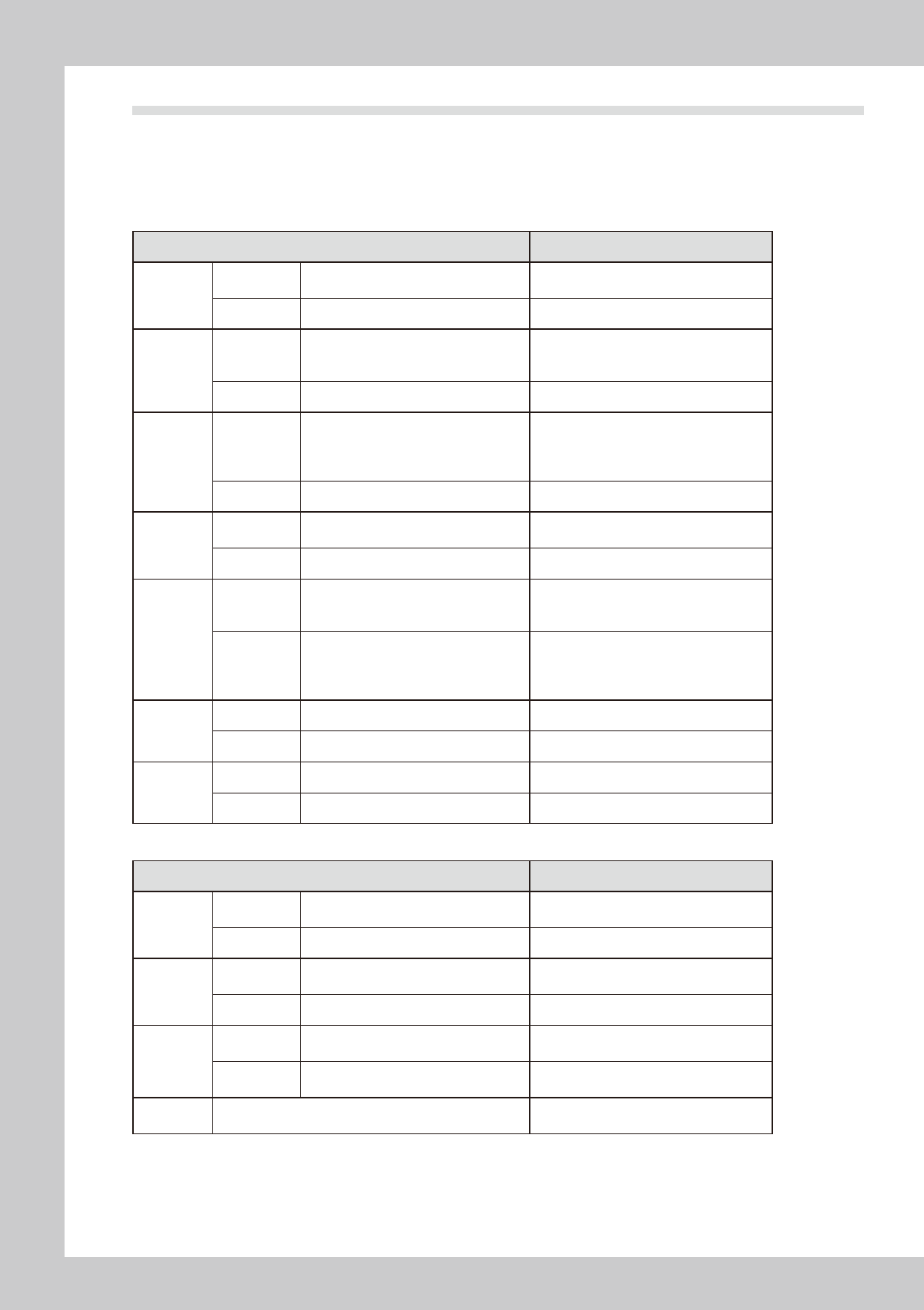
The following table shows which models of YAMAMA surface mounters and related machines are compatible
or incompatible with Factory Tools.
List of machines compatible or incompatible with Factory Tools
n
List of machines compatible or incompatible with P-Tool and M-Tool
Machine model Remarks
YS series
Compatible
YS12, YS100, YS88, YS12F,
YS12P, YS24, YS24X, YSP
Incompatible None
YG series
Compatible
YG100, YG100R, YG12, YG88, YG88R,
YG200, YG200L, YG300, YHP-2, YGD,
YGP, YG12F
Incompatible None
Xg series
Compatible
YV100Xg, YV100XgP, YV100XgC,
YV88Xg, YV100XTg, YV180Xg,
THREEM, THREEM2, HSDXg,
YVP-Xg, YCP, YCP-II
Incompatible None
X series
Compatible
YV100X, YV88X, YV100XT, YV180X,
YV100Xe, HSDX
Incompatible None
I/II series
Compatible
YV100-II, YVL88-II, YV112-III, YV64,
YV64D, HSD, YV100, YVL88, YVL80,
YV100D/86D
• VIOS must be Ver. 1.3 or later.
• Machines prior to VIOS Ver. 1.3 will be
compatible by upgrading to Ver. 1.3.
Incompatible
Machines of VIOS Ver. 1.0, Ver. 1.1 or
Ver. 1.2
YVL80 (VIOS Ver.0.8/0.9)
YV120, YV112-I/II
YM series
Compatible None
Incompatible HYPER, TRAD
Others
Compatible None
Incompatible YVP, YHP-1
n
List of machines compatible or incompatible with S-Tool
Machine mode Remarks
YS series
Compatible
YS12, YS100, YS88, YS12F,
YS12P, YS24, YS24X, YSP
Incompatible None
YG series
Compatible
YG100, YG100R, YG88, YG88R,
YG200, YG200L, YG300, YG12F
Incompatible YHP-2, YGD, YGP
Xg series
Compatible
YV100Xg, YV100XgP, YV100XgC,
YV88Xg, YV100XTg
Incompatible
YV180Xg, THREEM, THREEM2,
HSDXg, YVP-Xg, YCP, YCP-II
Others Incompatible
X series, I/II series, YM series, YVP,
YHP-1 etc.