EUS0153210_YFact_Standard_E.pdf - 第11页
iv Before using Factory T ools 3.2 Applicable models The following table shows which models of YAMAMA surface mounters and related machines are compatible or incompatible with Factory Tools. List of machines compatible o…
iii
Before using Factory Tools
w
WARNING
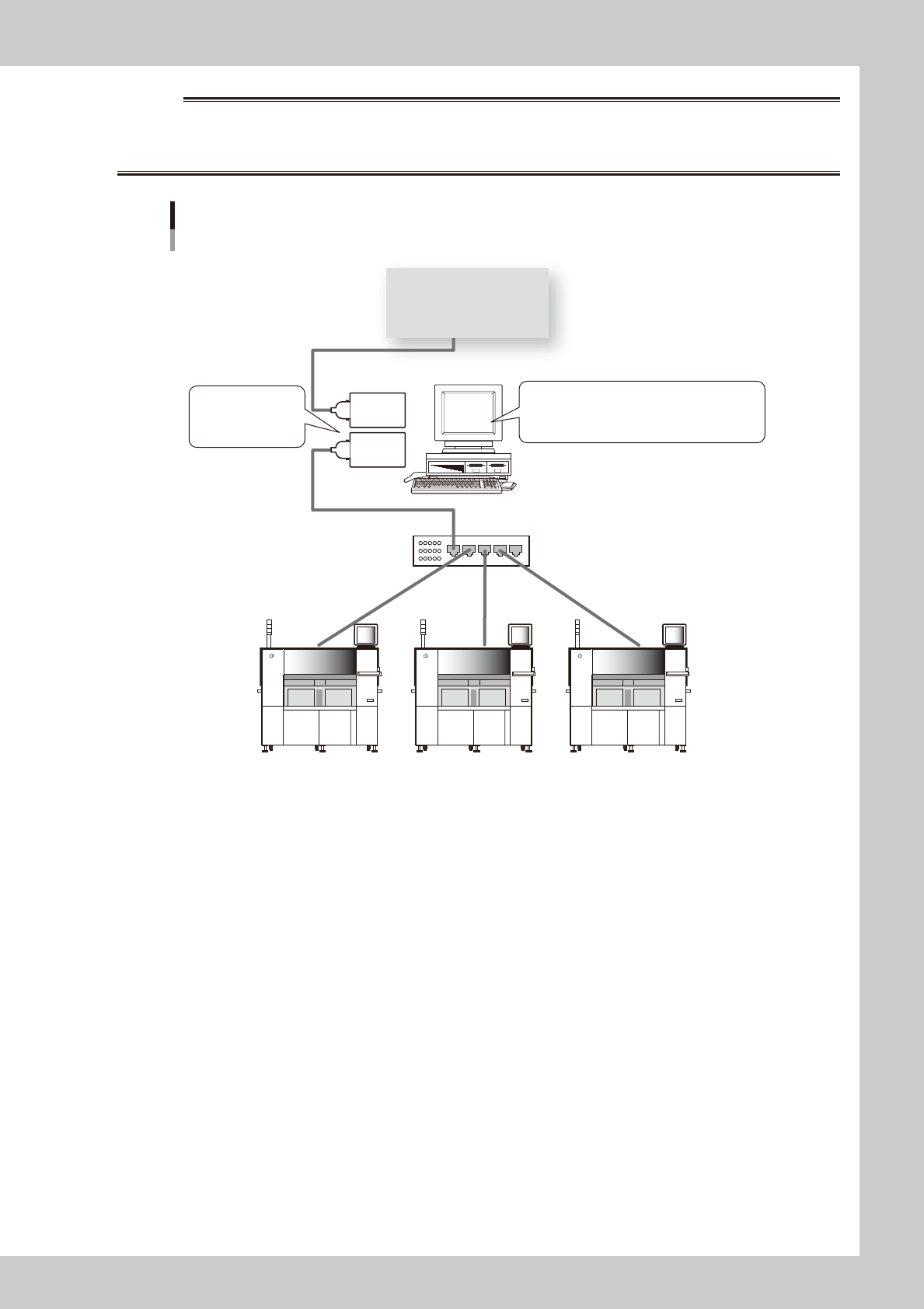
IN NETWORK SETTINGS AND CONNECTIONS, YAMAHA WILL TAKE NO RESPONSIBILITY FOR NETWORKS CONFIGURED BY
OTHER THAN OFF-LINE PC AND MACHINES. WHEN YOU MAKE CONNECTIONS TO IN-HOUSE NETWORKS ON YOUR OWN
RESPONSIBILITY, REFER TO THE FOLLOWING RECOMMENDED CONFIGURATION.
Recommended network configuration
PC for off-line software
Network hub
Give different
IP addresses to
2 LAN cards.
Commercially available anti-virus software
Microsoft debug patch
Computer Browser Service should be stopped.
LAN
card
LAN
card
In-house network
63100-S0-00
●
Restrictions on communication function
The number of machines and lines are restricted as shown below for line remote control.
•Upto10machinescanberegistered.
•Upto50linescanberegistered.
iv
Before using Factory Tools
3.2 Applicable models
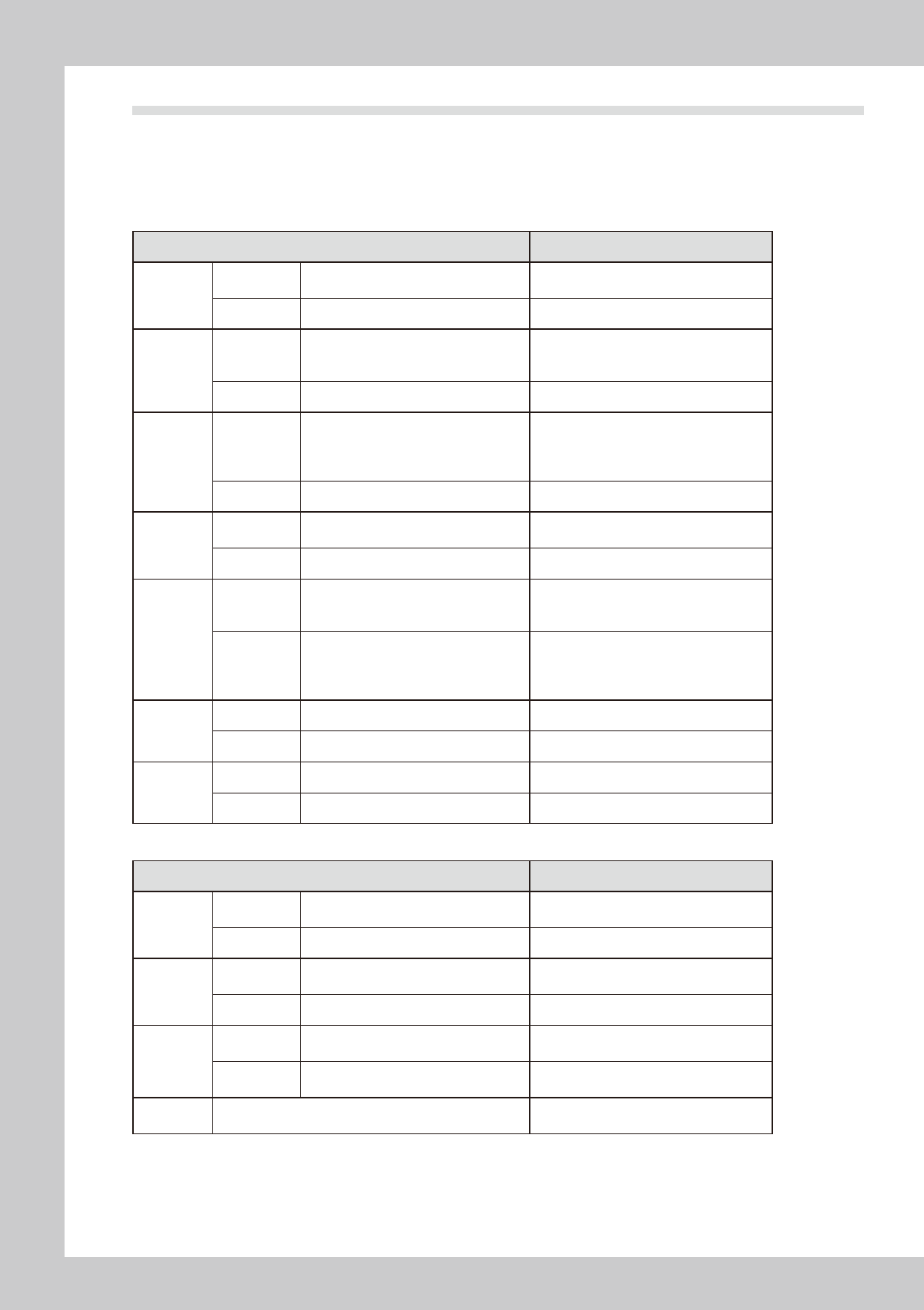
The following table shows which models of YAMAMA surface mounters and related machines are compatible
or incompatible with Factory Tools.
List of machines compatible or incompatible with Factory Tools
n
List of machines compatible or incompatible with P-Tool and M-Tool
Machine model Remarks
YS series
Compatible
YS12, YS100, YS88, YS12F,
YS12P, YS24, YS24X, YSP
Incompatible None
YG series
Compatible
YG100, YG100R, YG12, YG88, YG88R,
YG200, YG200L, YG300, YHP-2, YGD,
YGP, YG12F
Incompatible None
Xg series
Compatible
YV100Xg, YV100XgP, YV100XgC,
YV88Xg, YV100XTg, YV180Xg,
THREEM, THREEM2, HSDXg,
YVP-Xg, YCP, YCP-II
Incompatible None
X series
Compatible
YV100X, YV88X, YV100XT, YV180X,
YV100Xe, HSDX
Incompatible None
I/II series
Compatible
YV100-II, YVL88-II, YV112-III, YV64,
YV64D, HSD, YV100, YVL88, YVL80,
YV100D/86D
• VIOS must be Ver. 1.3 or later.
• Machines prior to VIOS Ver. 1.3 will be
compatible by upgrading to Ver. 1.3.
Incompatible
Machines of VIOS Ver. 1.0, Ver. 1.1 or
Ver. 1.2
YVL80 (VIOS Ver.0.8/0.9)
YV120, YV112-I/II
YM series
Compatible None
Incompatible HYPER, TRAD
Others
Compatible None
Incompatible YVP, YHP-1
n
List of machines compatible or incompatible with S-Tool
Machine mode Remarks
YS series
Compatible
YS12, YS100, YS88, YS12F,
YS12P, YS24, YS24X, YSP
Incompatible None
YG series
Compatible
YG100, YG100R, YG88, YG88R,
YG200, YG200L, YG300, YG12F
Incompatible YHP-2, YGD, YGP
Xg series
Compatible
YV100Xg, YV100XgP, YV100XgC,
YV88Xg, YV100XTg
Incompatible
YV180Xg, THREEM, THREEM2,
HSDXg, YVP-Xg, YCP, YCP-II
Others Incompatible
X series, I/II series, YM series, YVP,
YHP-1 etc.
v
Before using Factory Tools
3.3 Board data format
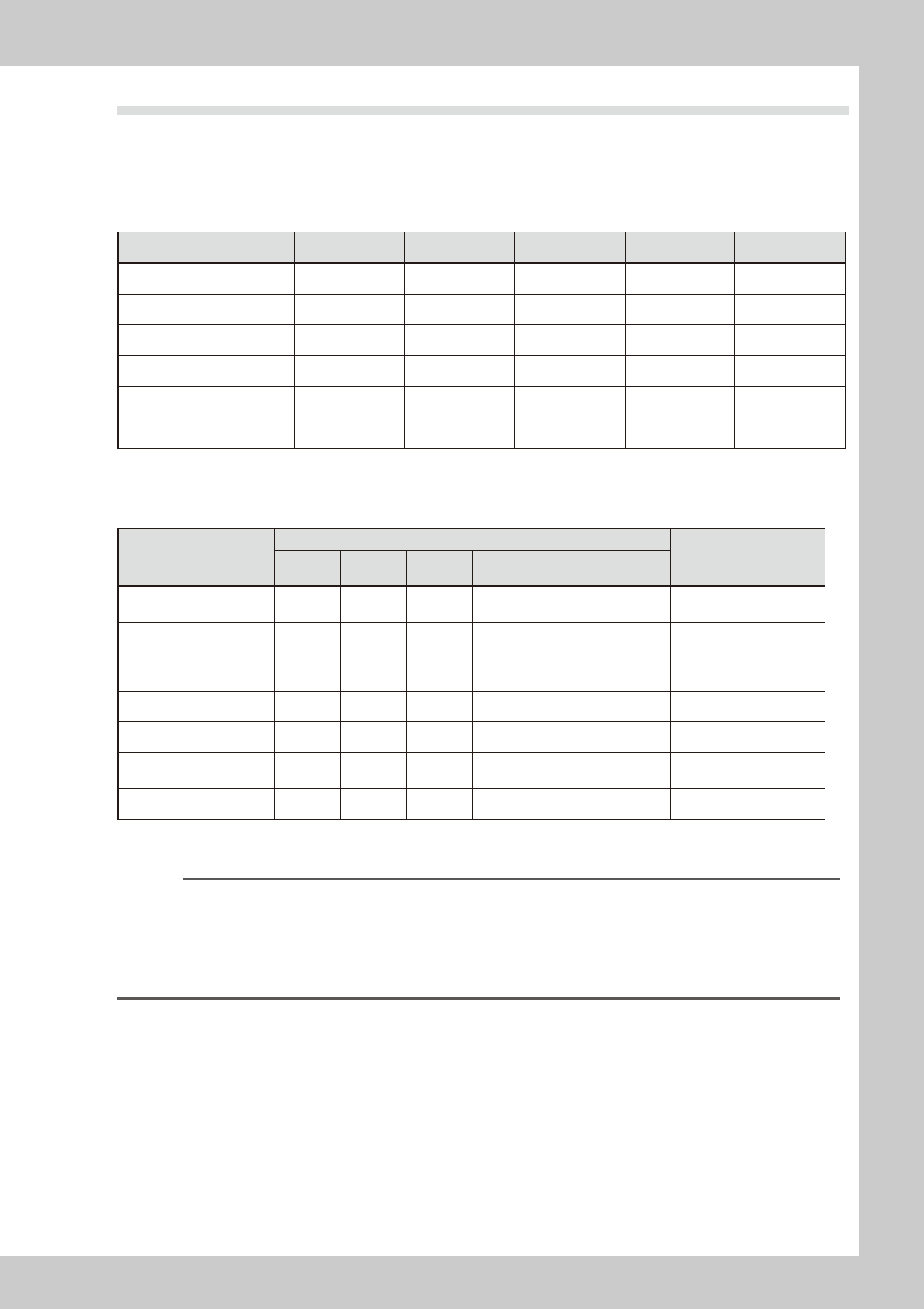
Factory Tools can handle YGX and Printer text and YGZ format board data, as well as VIOS and VIOS text
formats that have been handled with YGOS V1.xx.
The following tables show data formats that can be handled with Factory Tools, Factory Tools.xx,YGOS V1.xx
and YVOSX, and also show data formats that can be used with each machine model.
n
Data formats handled with software
Data format Factory Tools Factory Tools.xx YGOS V1.xx YVOSX V3.xx YVOSX V2.xx
YGX Yes Yes No No No
YGX (Combined) Yes No No No No
VIOS
*1
Yes Yes Yes Yes Yes
VIOS Text Yes Yes Yes Yes Yes
YGZ
*1
Yes, (NO)
*2
Yes No No No
Printer Text
*1
Yes, (NO)
*2
Yes No No No
*1:UsedwithYVP-XgandYGPandYCP.
*2:UnavailableontheS-Tool.
n
Data formats used with each machine model
Machine model
Data type
Remarks
YGX
YGX
(Combineda)
VIOS
VIOS
Text
YGZ
Printer
Text
YS series
Dual Lane
Yes Yes
s s
No No
s
Usable, but part of data
cannot be saved.
YS series mounters,
YG series mounters
(except YG200/YG200L)
YHP-2, YGD
Yes No
s s
No No
s
Usable, but part of data
cannot be saved.
YG200/YG200L Yes No Yes Yes No No
YVP-Xg, YCP, YCP-II No No No No No Yes
YGP, YSP No No No No Yes
s
s
Usable, but part of data
cannot be saved.
I/II/X/Xg series No No Yes Yes No No
* For compatibility of each machine model with Factory Tools, see the "List of machines compatible or incompatible with
Factory Tools" in the previous section 3.2, "Applicable models".
Reference
If "SAUTO SETUP" is selected when registering a machine or "Default" is selected when saving board data, the following
data formats are automatically specified.
• YVP-Xg, YCP : Printer text
• YGP : YGZ
• YHP-2, YGD : YGX
• Other machines : VIOS or YGX