EUS0153210_YFact_Standard_E.pdf - 第97页
2-63 2 Board Explorer 5.4.2 Settings In the Option Setting, please select excluding “Not Use” at “Use Database”. Option Setting 64290-S0-00 If you want to do “Database Matching by Shape Name” and “Database Matching from …
2-62
2
Board Explorer
n
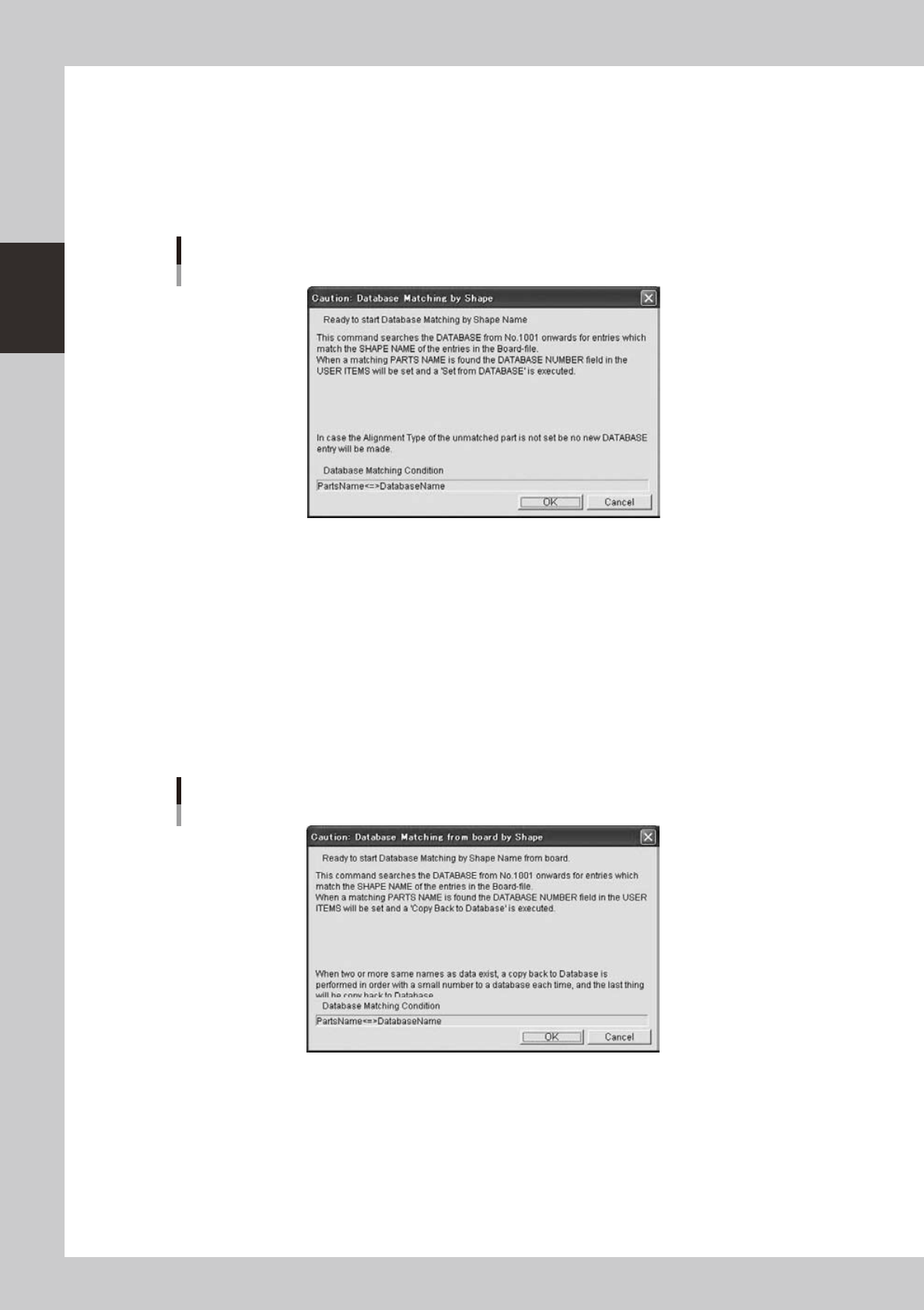
Database Matching by Shape Name
“Database Matching by Shape Name” is performed by batch for the board specified in the Database Utility
window or the board selected using the Board Explorer.
Whenyouclickthe[DatabaseMatchingbyShapeName]buttonintheDatabaseUtilitywindow,the
processing starts after a confirmation dialog is displayed. The same operation can be performed by selecting
the board using the Board Explorer and selecting “Database Matching by Shape Name” “Database Board”
fromtheright-clickcontextmenuoftheBoardExplorer.
Database Matching by Shape Name
64287-S0-10
Ifyouclick[OK]button,itwillstart.
The following dialogs are similar to those in the section “
n
Set from Database All”.
n
Database Matching from board by Shape Name
“Database Matching from board by Shape Name” is performed by batch for the board specified in the Database
Utility window or the board selected using the Board Explorer.
Whenyouclickthe[DatabaseMatchingfromboardbyShapeName]buttonintheDatabaseUtilitywindow,
the processing starts after a confirmation dialog is displayed. The same operation can be performed by
selecting the board using the Board Explorer and selecting “Database Matching by Shape Name” “Board
Database”fromtheright-clickcontextmenuoftheBoardExplorer.
Database Matching from board by Shape Name
64288-S0-10
Ifyouclick[OK]button,itwillstart.
The following dialogs are similar to those in the section “
n
Set from Database All”.
2-63
2
Board Explorer
5.4.2 Settings
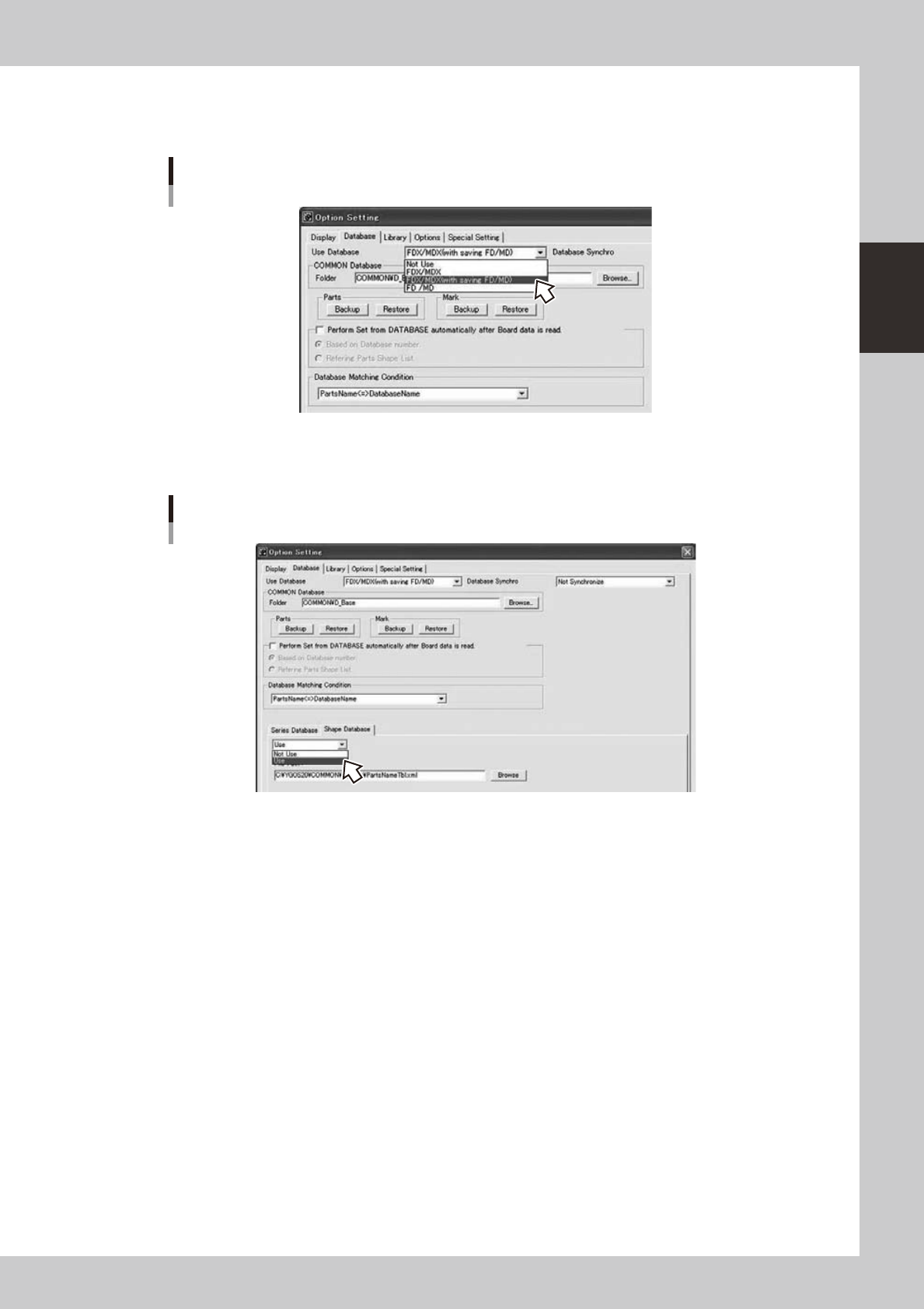
In the Option Setting, please select excluding “Not Use” at “Use Database”.
Option Setting
64290-S0-00
If you want to do “Database Matching by Shape Name” and “Database Matching from board by Shape Name”,
please select “Use” at “Shape Database”.
Select “Use” for “Shape Database”
64291-S0-00
5.4.3 Limitations
• It doesn’t correspond to the Inspection Database for Printer.
• It doesn’t correspond to the Parts Library and Mark Library.
• Only the board data that exists under the Factory Folder and the under folder can operate the Database.
• When “Copy Back to Database ALL” is done from the Board Explorer, following
Database No. used by system is skipped.
· PartsDatabaseNo.ofYAMAHAarea.(No.980to1000)
· Parts Database No. using Multi max.
· MarkDatabaseNo.ofYAMAHAarea.(No.280to300)
· Mark Database No. using Bad Mark for BNC.
· Mark Database No. using Nozzle Station MACS.
* It is possible from the Board Editor.
2-64
2
Board Explorer
5.5
'Database Set All' function when Board data is copied from Board Explorer to floppy disk
This function conducts “Database Set All” when Board Data is copied from Board Explorer to a floppy disk as a
wayofmakingBoardDataasup-to-dataaspossibleinDatabase.
Database Set All is conducted when board data is moved from board explorer to machine with a floppy disk,
etc.tomakeBoardDataasup-to-dataaspossibleinDatabase.
n
Content of operation
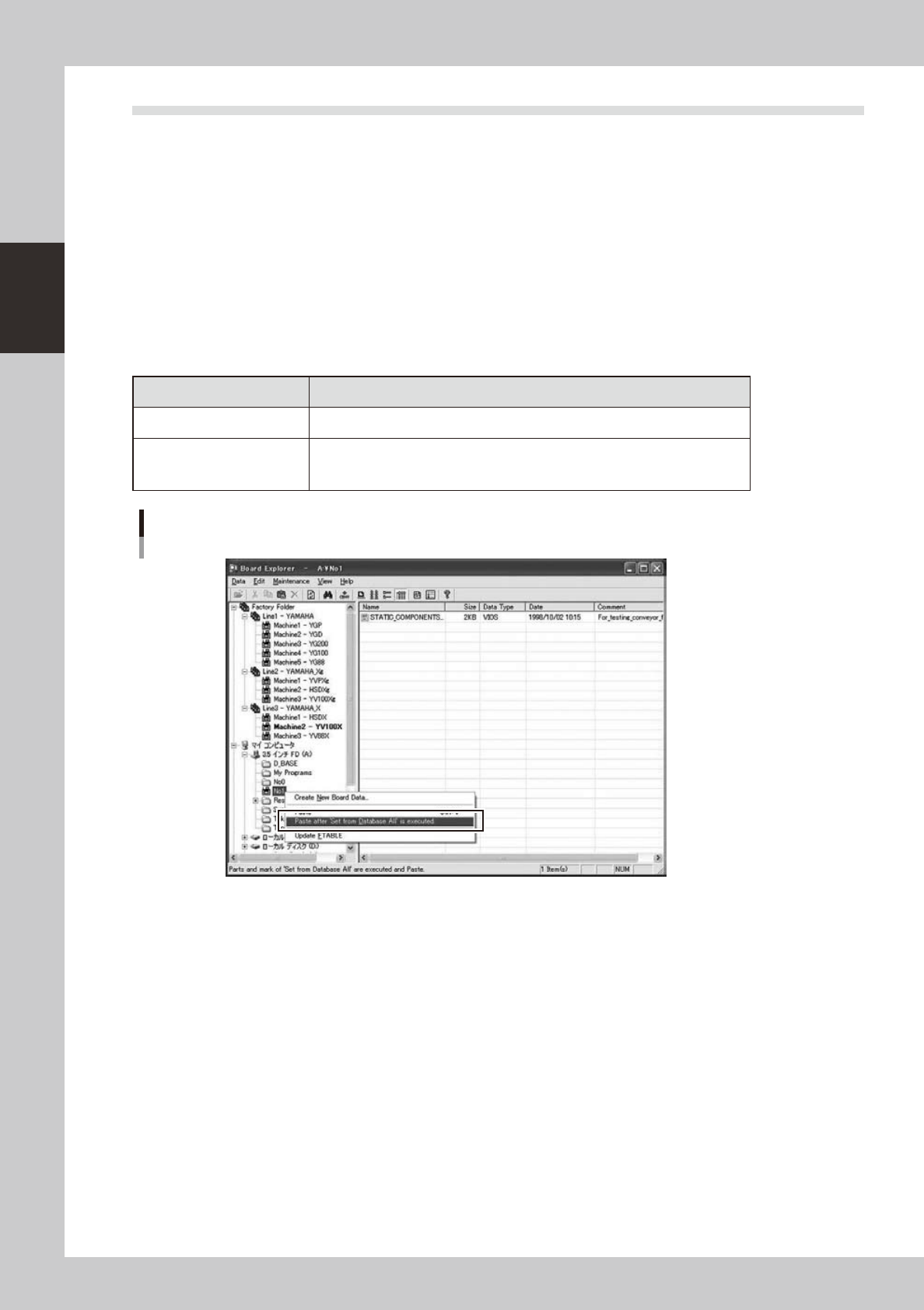
Specifyboarddataofthemachinefolder(inthefactoryfolder)with“Copy”andright-clickthemachinefolder
in the My Computer or My Network and “Paste after Set from Database All” will be displayed in addition to the
old “Paste” menu.
Whenyouselect“PasteafterSetfromDatabaseAll”,“DatabaseSetAll”willbeexecutedtotheboarddata
specified with the “Copy” menu and the board data will be saved to the paste destination.
n
Menu and content of operation for paste
Right-clicking menu Content of operation
Paste
The board data of the copy origin is paste and it copies it.
Paste after Set from
Database All
Conducts “Database Set All” to the board data specified with the “Copy” menu
and saves the board data to the paste destination.
(The board data of the copy origin doesn't change)
Paste after 'Set from Database All'
64292-S0-00
n
About notes in operation
1.“PasteafterDatabaseSetAll”allowscopybytheunitofone-machineboarddatabyselectingamachinefolderinthe
factory folder and copy by the unit of line board data by selecting a line folder in the factory folder.
2. “Paste after Database Set All” menu is displayed only when the paste destination of the board data is My computer, My
Network folder or under them except the factory folder.
3. “Database Set All” works on Parts database and Mark database with the database setting specified in the “Option
Setting”.
4.AnerrorisdisplayedwhenboarddataforwhichtheDatabaseisspecifiedincorrectlyisspecifiedandthecopyof
board data will not be executed. Please refer to the contents of error for database specification.
5.The size of available board data in paste destination should be larger than that of the copy source data to execute
“Paste after Database Set All”. Secure enough empty capacity before operation.