sh030106u.pdf - 第140页
4. STA RTUP 4 - 15 4.5.1 Test op erat ion mode i n MR Conf igurator 2 POINT When the tes t oper atio n mode is select ed with the tes t opera tio n select s witch (SW2-1), the S SCNET III/ H commu nicatio n for the ser v…
4. STARTUP
4 - 14
4.4 Test operation
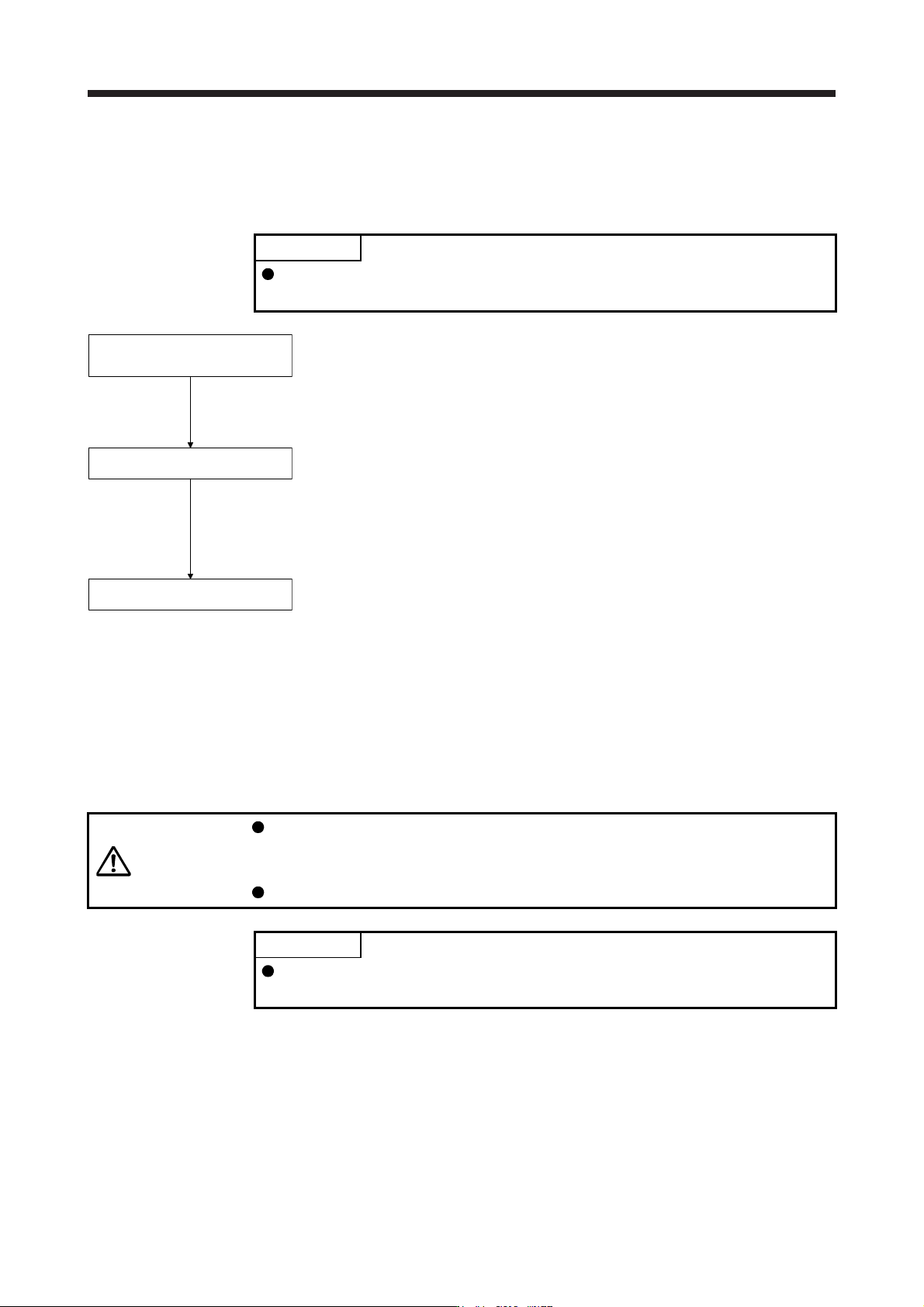
Before starting actual operation, perform test operation to make sure that the machine operates normally.
Refer to section 4.2 for the power on and off methods of the servo amplifier.
POINT
If necessary, verify controller program by using motor-less operation. Refer to
section 4.5.2 for the motor-less operation.
Test operation of the servo motor
alone in JOG operation of test
operation mode
Test operation of the servo motor
alone by commands
Test operation with the servo motor
and machine connected
In this step, confirm that the servo amplifier and servo motor operate
normally. With the servo motor disconnected from the machine, use the test
operation mode and check whether the servo motor rotates correctly. Refer
to section 4.5 for the test operation mode.
In this step, confirm that the servo motor rotates correctly under the
commands from the controller.
Give a low speed command at first and check the rotation direction, etc. of
the servo motor. If the machine does not operate in the intended direction,
check the input signal.
In this step, connect the servo motor with the machine and confirm that the
machine operates normally under the commands from the controller.
Give a low speed command at first and check the operation direction, etc. of
the machine. If the machine does not operate in the intended direction,
check the input signal.
Check any problems with the servo motor speed, load ratio, and other status
display items with MR Configurator2.
Then, check automatic operation with the program of the controller.
4.5 Test operation mode
CAUTION
The test operation mode is designed for checking servo operation. It is not for
checking machine operation. Do not use this mode with the machine. Always use
the servo motor alone.
If the servo motor operates abnormally, use EM2 (Forced stop 2) to stop it.
POINT
The content described in this section indicates that the servo amplifier and a
personal computer are directly connected.
By using a personal computer and MR Configurator2, you can execute jog operation, positioning operation,
output signal (DO) forced output program operation without connecting the servo system controller.
4. STARTUP
4 - 15
4.5.1 Test operation mode in MR Configurator2
POINT
When the test operation mode is selected with the test operation select switch
(SW2-1), the SSCNET III/H communication for the servo amplifier in the test
operation mode and the following servo amplifiers is blocked.
(1) Test operation mode
(a) Jog operation
Jog operation can be performed without using the servo system controller. Use this operation with
the forced stop reset. This operation may be used independently of whether the servo is on or off
and whether the servo system controller is connected or not.
Exercise control on the jog operation screen of MR Configurator2.
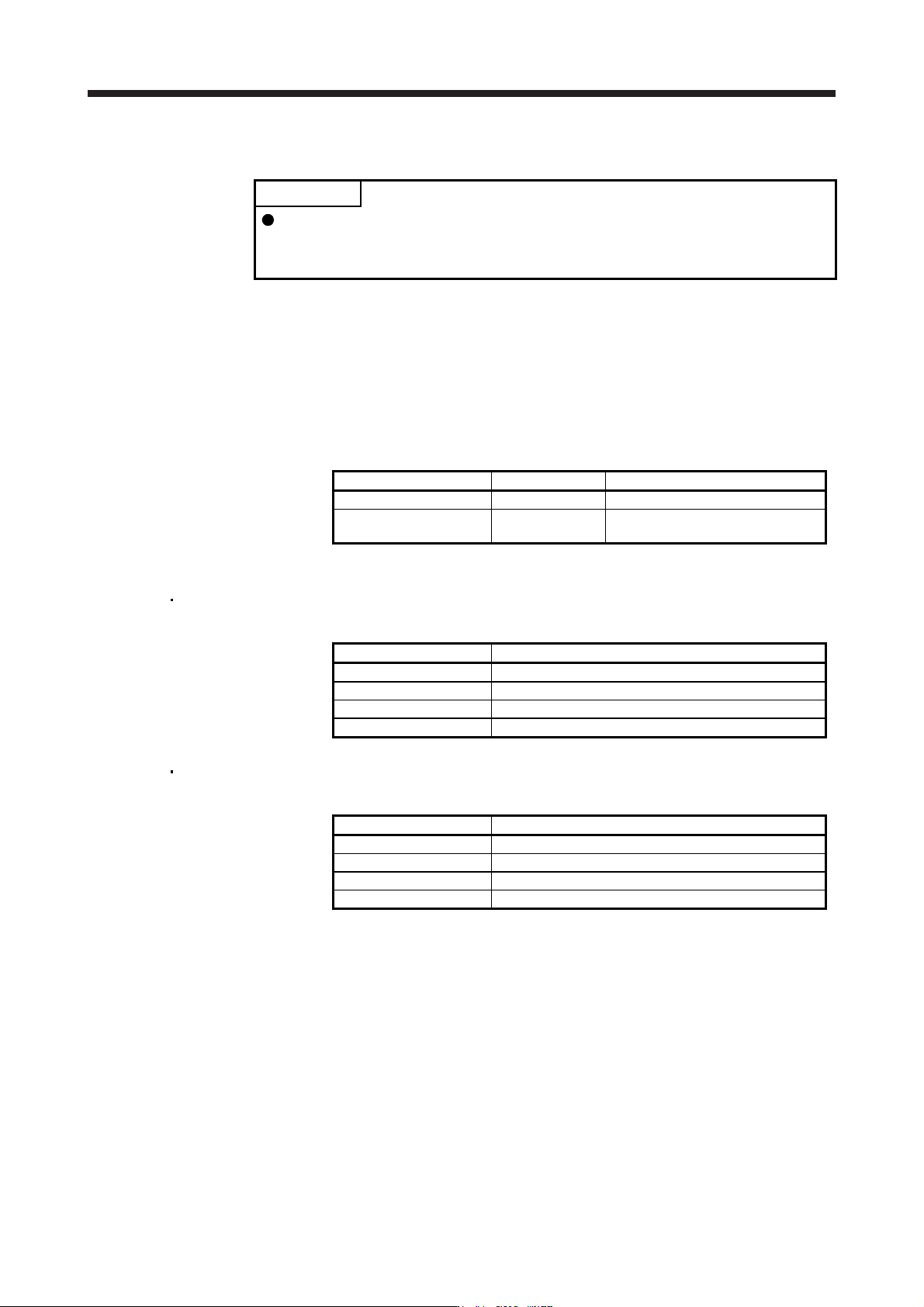
1) Operation pattern
Item initial value Setting range
Speed [r/min] 200 0 to max. speed
Acceleration/deceleration
time constant [ms]
1000 0 to 50000
2) Operation method
When the check box of "Rotation only while the CCW or CW button is being pushed." is
checked.
Operation Screen control
Forward rotation start Keep pressing "Forward".
Reverse rotation start Keep pressing "Reverse".
Stop Release "Forward" or "Reverse".
Forced stop Click "Forced stop".
When the check box of "Rotation only while the CCW or CW button is being pushed." is not
checked.
Operation Screen control
Forward rotation start Click "Forward".
Reverse rotation start Click "Reverse".
Stop Click "Stop".
Forced stop Click "Forced stop".
4. STARTUP
4 - 16
(b) Positioning operation
Positioning operation can be performed without using the servo system controller. Use this operation
with the forced stop reset. This operation may be used independently of whether the servo is on or
off and whether the servo system controller is connected or not.
Exercise control on the positioning operation screen of MR Configurator2.
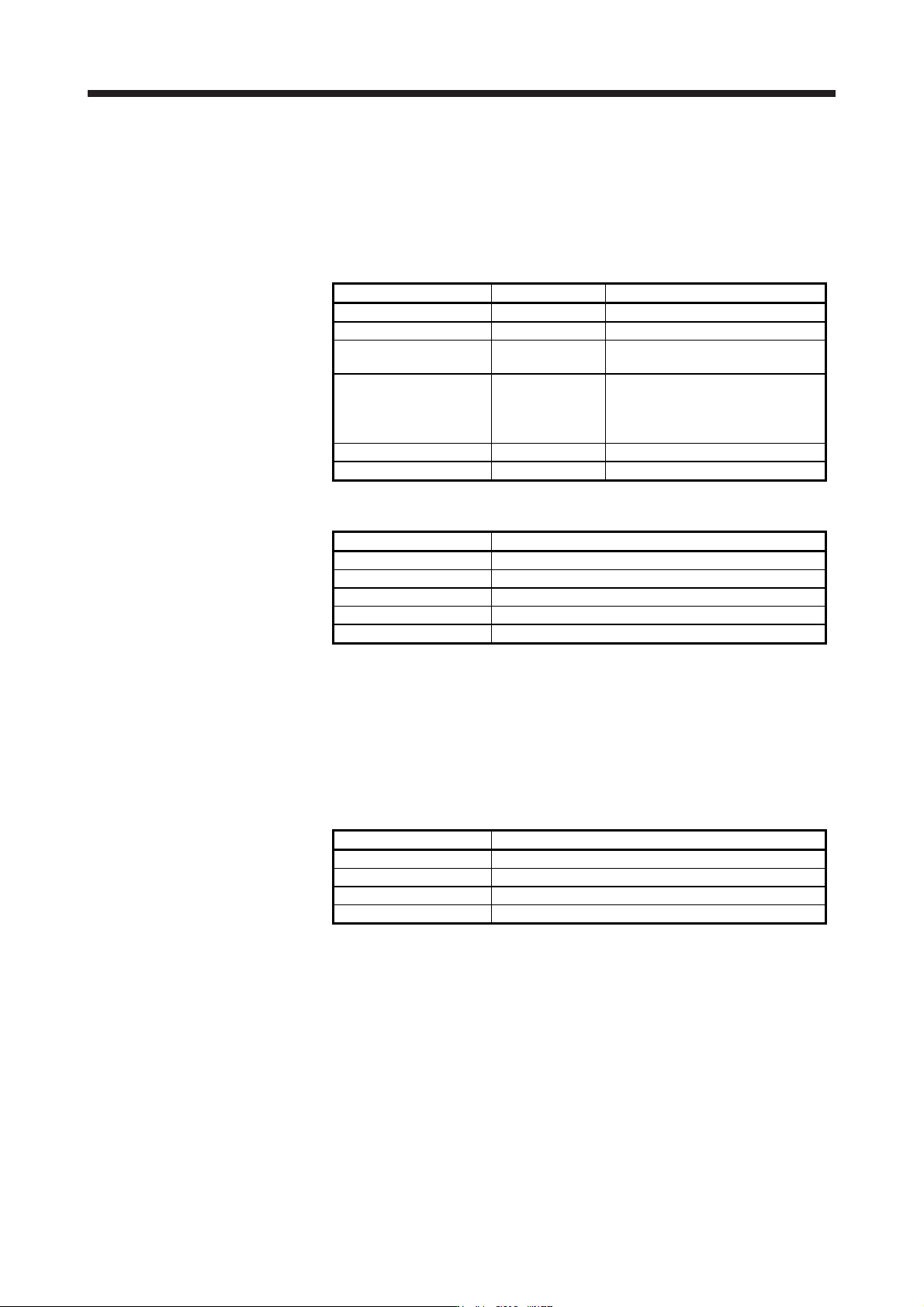
1) Operation pattern
Item initial value Setting range
Travel distance [pulse] 4000 0 to 99999999
Speed [r/min] 200 0 to max. speed
Acceleration/deceleration
time constant [ms]
1000 0 to 50000
Repeat pattern
Fwd. rot. (CCW) to
rev. rot. (CW)
Fwd. rot. (CCW) to rev. rot. (CW)
Fwd. rot. (CCW) to fwd. rot. (CCW)
Rev. rot. (CW) to fwd. rot. (CCW)
Rev. rot. (CW) to rev. rot. (CW)
Dwell time [s] 2.0 0.1 to 50.0
Number of repeats [time] 1 1 to 9999
2) Operation method
Operation Screen control
Forward rotation start Click "Forward".
Reverse rotation start Click "Reverse".
Pause Click "Pause".
Stop Click "Stop".
Forced stop Click "Forced stop".
(c) Program operation
Positioning operation can be performed in two or more operation patterns combined, without using
the servo system controller. Use this operation with the forced stop reset. This operation may be
used independently of whether the servo is on or off and whether the servo system controller is
connected or not.
Exercise control on the program operation screen of MR Configurator2. For details, refer to Help of
MR Configurator2.
Operation Screen control
Start Click "Start".
Pause Click "Pause".
Stop Click "Stop".
Forced stop Click "Forced stop".
(d) Output signal (DO) forced output
Output signals can be switched on/off forcibly independently of the servo status. Use this function for
output signal wiring check, etc. Exercise control on the DO forced output screen of MR
Configurator2.