sh030106u.pdf - 第557页
17. APPLICATIO N OF FUNCTIONS 17 - 6 (2) Mode selec tion using th e applic ation "MR- J4( W)-B mo de selec tion" or "MR M ode Chan ge" You can s et the f actory s etting, J4 mode/J 3 comp atibi lity m…
17. APPLICATION OF FUNCTIONS
17 - 5
17.1.4 How to switch J4 mode/J3 compatibility mode
There are two ways to switch the J4 mode/J3 compatibility mode with the MR-J4W_-_B servo amplifier and
MR-J4-_B_(-RJ) servo amplifier.
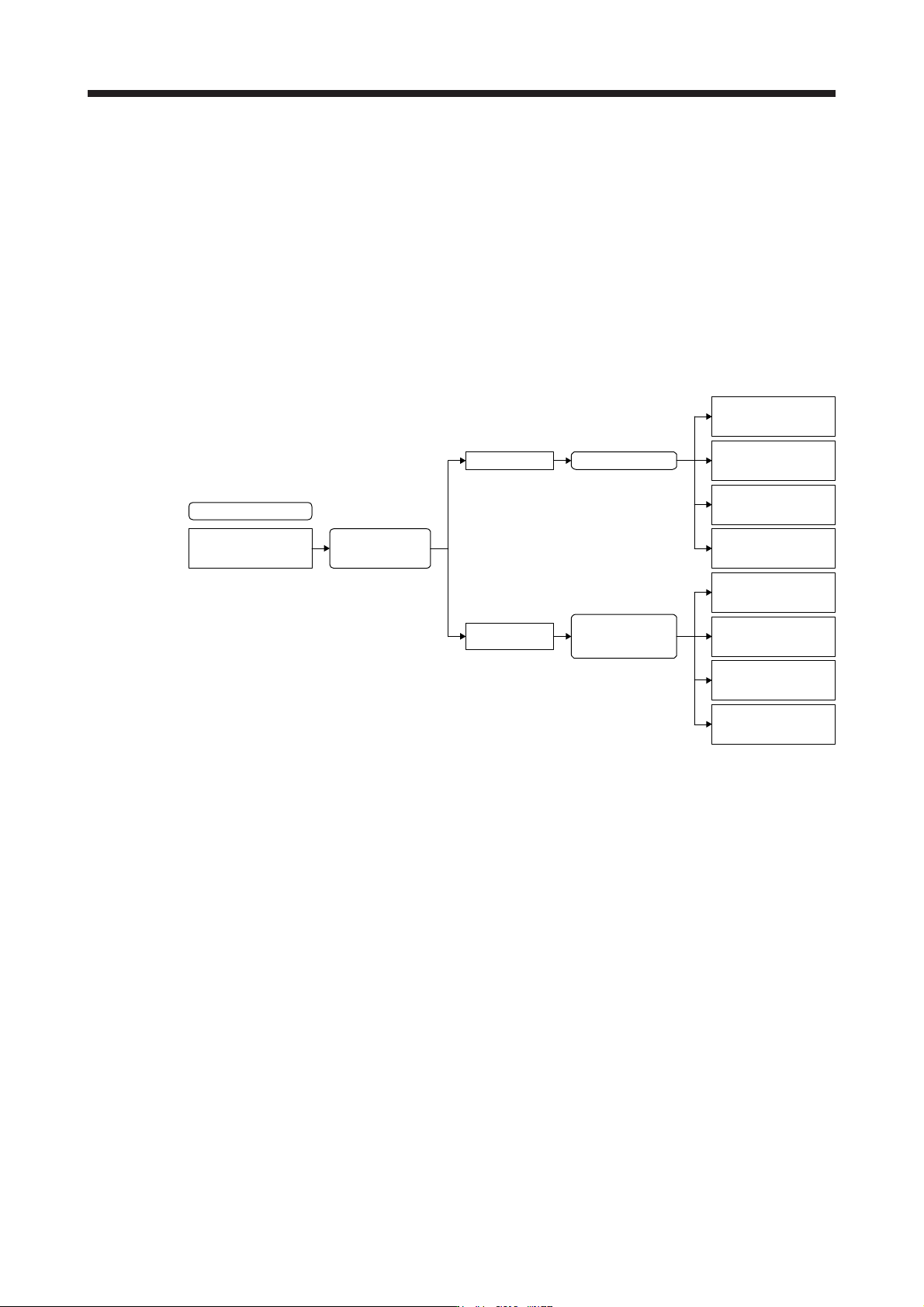
(1) Mode selection by the automatic identification of the servo amplifier
J4 mode/J3 compatibility mode is identified automatically depending on the connected controller.
When the controller makes a connection request with SSCNET III/H communication, the mode will be
"J4 mode". For SSCNET communication, it will be "J3 compatibility mode".
For the J3 compatibility mode, standard control, linear servo motor control, or direct drive motor control
will be identified automatically with a motor (encoder) connected to the servo amplifier. For the J4 mode,
the operation mode will be the setting of [Pr. PA01].
J4 mode/J3 compatibility
mode automatic
identification
Controller
connection check
J4 mode
J3 compatibility
mode
Connected encoder
check (automatic
identification)
Standard control
(rotary servo motor)
Direct drive motor
control
Factory setting
Linear servo motor
control
Fully closed
loop control
[Pr. PA01] setting
Standard control
(rotary servo motor)
Direct drive motor
control
Linear servo motor
control
Fully closed
loop control
17. APPLICATION OF FUNCTIONS
17 - 6
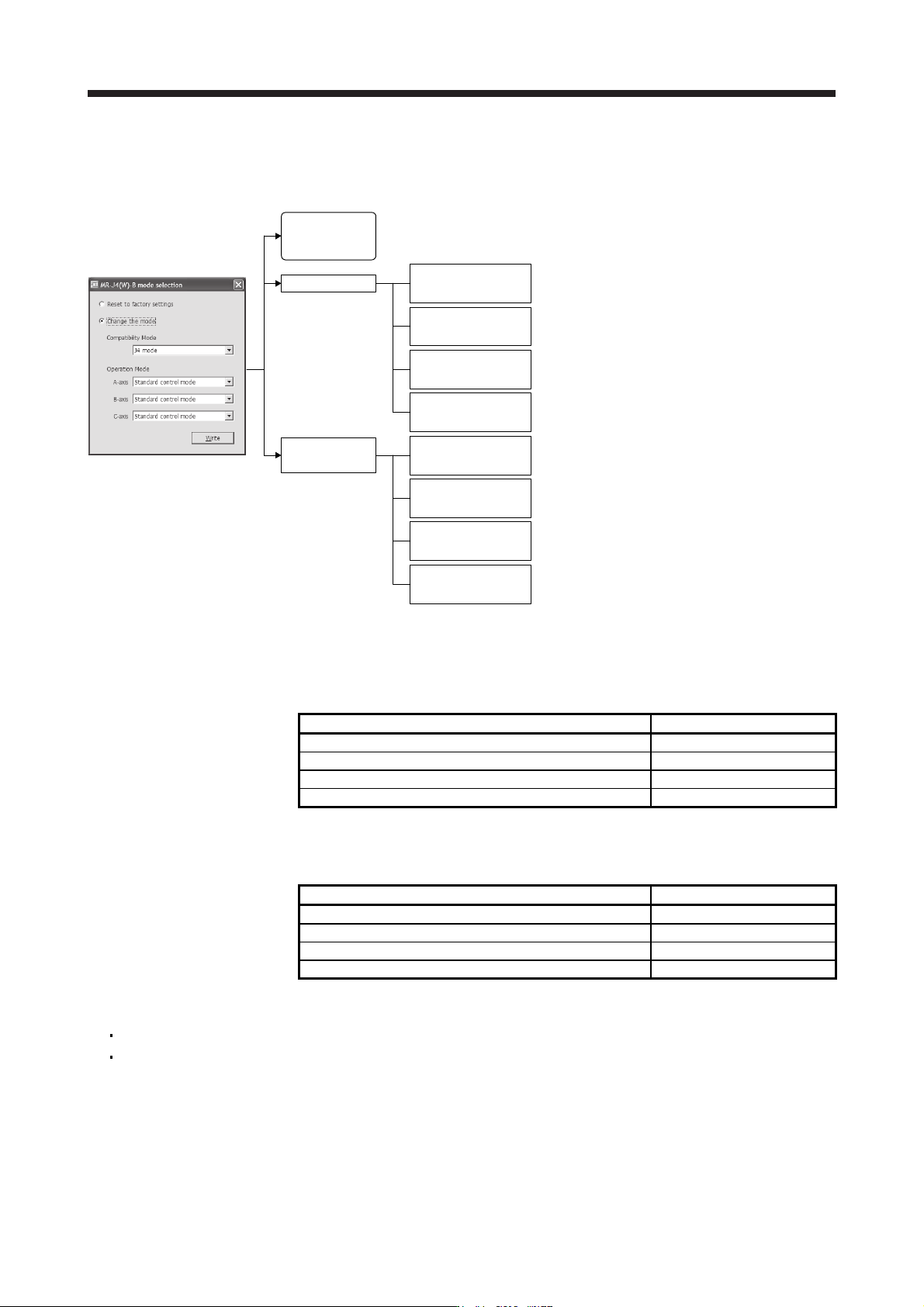
(2) Mode selection using the application "MR-J4(W)-B mode selection" or "MR Mode Change"
You can set the factory setting, J4 mode/J3 compatibility mode, and operation mode with the dedicated
application.
"MR-J4(W)-B mode selection"
or "MR Mode Change"
J4 mode
J3 compatibility
mode
J4 mode/J3
compatibility mode
automatic
identification
Standard control
(rotary servo motor)
Direct drive motor
control
Linear servo motor
control
Fully closed loop
control
Standard control
(rotary servo motor)
Direct drive motor
control
Linear servo motor
control
Fully closed loop
control
Factory setting
Fixed to the J4 mode (Standard control (rotary servo
motor))
Fixed to the J4 mode (Fully closed loop control)
Fixed to the J4 mode (Linear servo motor control)
Fixed to the J4 mode (Direct drive motor control)
Fixed to the J3 compatibility mode (Standard control
(rotary servo motor)) [Equivalent to MR-J3-B]
Fixed to the J3 compatibility mode (Fully closed loop
control) [Equivalent to MR-J3-B-RJ006]
Fixed to the J3 compatibility mode (Linear servo motor
control) [Equivalent to MR-J3-B-RJ004]
Fixed to the J3 compatibility mode (Direct drive motor
control) [Equivalent to MR-J3-B-RJ080W]
17.1.5 How to use the J3 compatibility mode
(1) Setting of the controller
To use in the J3 compatibility mode, select MR-J3 series in the system setting window.
Operation mode in J3 compatibility mode System setting
MR-J3-B standard control mode (rotary servo motor) Select MR-J3-_B.
MR-J3-B fully closed loop control mode Select MR-J3-_B fully closed.
MR-J3-B linear servo motor control mode Select MR-J3-_B linear.
MR-J3-B DD motor control mode Select MR-J3-_B DD motor.
(2) Setting of MR Configurator
To use in the J3 compatibility mode, make the system setting as follows.
Operation mode in J3 compatibility mode System setting
MR-J3-B standard control mode (rotary servo motor) Select MR-J3-_B.
MR-J3-B fully closed loop control mode Select MR-J3-_B fully closed.
MR-J3-B linear servo motor control mode Select MR-J3-_B linear.
MR-J3-B DD motor control mode Select MR-J3-_B DD motor.
Cautions for using MR Configurator
The gain search cannot be used. You can use the advanced gain search.
The C-axis of MR-J4W3-_B cannot be set with MR Configurator. Use MR Configurator2 for it.

17. APPLICATION OF FUNCTIONS
17 - 7
(3) Setting of MR Configurator2
To use in the J3 compatibility mode, make the system setting as follows.
Operation mode in J3 compatibility mode System setting
MR-J3-B standard control mode (rotary servo motor) Select MR-J3-_B.
MR-J3-B fully closed loop control mode Select MR-J3-_B fully closed.
MR-J3-B linear servo motor control mode Select MR-J3-_B linear.
MR-J3-B DD motor control mode Select MR-J3-_B DD motor.
Cautions for using MR Configurator2
Use MR Configurator2 with software version 1.12N or later. Older version than 1.12N cannot be used.
Information about existing models (MR-J3) cannot be updated with the parameter setting range update
function. Register a new model to use.
The alarm will be displayed by 3 digits.
The robust disturbance compensation cannot be used.
17.1.6 Cautions for switching J4 mode/J3 compatibility mode
The J3 compatibility mode of the operation mode is automatically identified by factory setting depending on a
connected encoder. If a proper encoder is not connected at the first connection, the system will not start
normally due to a mismatch with a set mode with the controller. (For the J4 mode, you can set the operation
mode with [Pr. PA01].) For example, if the controller is connected without connecting a linear encoder at
linear servo motor driving, the servo amplifier will be the standard control mode (rotary servo motor). The
system will not start because the controller is connected with the linear servo motor driving amplifier.
When the operation mode mismatches, the servo amplifier will display [AL. 3E.1 Operation mode error].
Restore the factory settings or configure the correct settings (J4 mode/J3 compatibility mode and operation
mode) using the application "MR-J4(W)-B mode selection" or "MR Mode Change" described in section
17.1.1.