sh030106u.pdf - 第561页
17. APPLICATIO N OF FUNCTIONS 17 - 10 (b) Operati on when usin g a ser vo amplif ier after cha nge of spec ificat ions For the co ntrollers in whic h "Not r equired" is des cribed to con troller reset i n table…
17. APPLICATION OF FUNCTIONS
17 - 9
17.1.8 Change of specifications of "J3 compatibility mode" switching process
(1) Detailed explanation of "J3 compatibility mode" switching
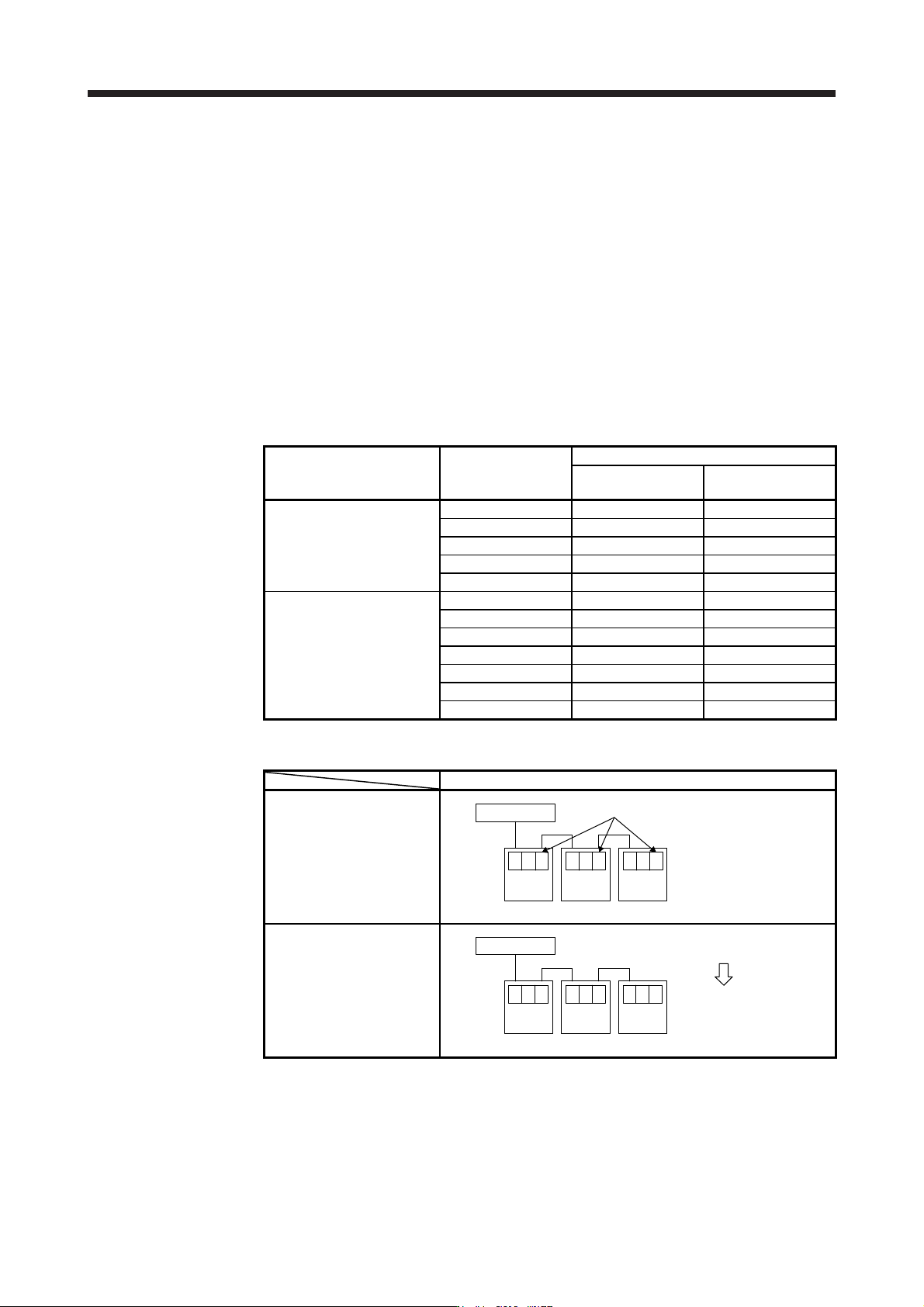
(a) Operation when using a servo amplifier before change of specifications
For the controllers in which "Not required" is described to controller reset in table 17.1, the mode will
be switched to "J3 compatibility mode" for all axes at the first connection. However, it takes about 10
s per axis for completing the connection.
For the controllers in which "Reset required" is described in table 17.1, the operation at the first
connection is shown in table 17.2. The LED displays will be "Ab." for all axes at the first connection
to the controller as shown in table 17.2. After that, resetting controller will change the 1-axis to "b01".
The 2-axis and later will not change from "Ab.". After that, one axis will be connected per two times
of controller reset.
Table 17.1 Controller reset required/not required list (before change of specifications)
Controller Model
Controller reset required/not required
Single-axis
connection
Multi-axis connection
Motion controller
R_MTCPU Not required Not required
Q17_DSCPU Not required Not required
Q17_DCPU Not required Not required
Q17_HCPU Not required Not required
Q170MCPU Not required Not required
Simple motion module
Positioning module
RD77MS_ Not required Not required
QD77MS_ Not required Not required
LD77MS_ Not required Not required
QD75MH_ Not required Not required
QD74MH_ Reset required Reset required
LD77MH_ Not required Not required
FX3U-20SSC-H Not required Reset required
Table 17.2 Controller connection operation before change of specifications
Before change of specifications (software version A4 or earlier)
First connection of controller
Controller
Axis
No. 1
b.A
Axis
No. 2
b.A
Axis
No. 3
b.A
"Ab." is displayed and stops
After controller reset
Controller
Axis
No. 1
01b
Axis
No. 2
b.A
Axis
No. 3
b.A
"b01" is displayed on axis No. 1, "Ab." is
displayed on axis No. 2 and later.
One axis is connected
per reset.
17. APPLICATION OF FUNCTIONS
17 - 10
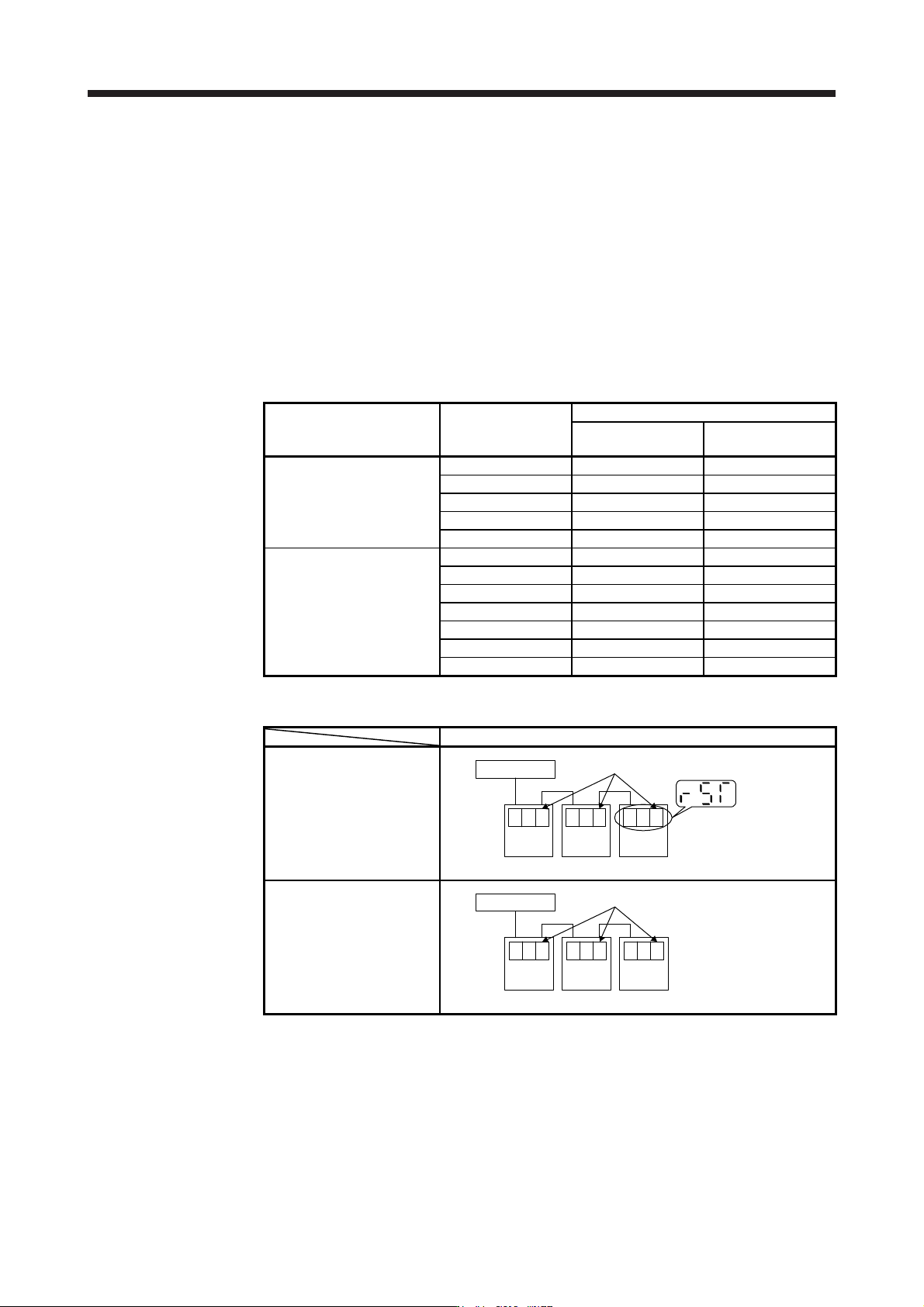
(b) Operation when using a servo amplifier after change of specifications
For the controllers in which "Not required" is described to controller reset in table 17.3, the mode will
be switched to "J3 compatibility mode" for all axes at the first connection. It takes about 10 s for
completing the connection not depending on the number of axes.
For the controllers in which "Reset required" is described in table 17.3, the operation at the first
connection is shown in table 17.4. The servo amplifier's mode will be "J3 compatibility mode" and the
LED displays will be "rST" for all axes at the first connection to the controller as shown in table 17.4.
At the status, resetting controller once will change the display to "b##" (## means axis No.) for all
axes and all axes will be ready to connect.
(One controller reset enables to all-axis connection.)
Table 17.3 Controller reset required/not required list (after change of specifications)
Controller Model
Controller reset required/not required
Single-axis
connection
Multi-axis connection
Motion controller
R_MTCPU Not required Not required
Q17_DSCPU Not required Not required
Q17_DCPU Not required Not required
Q17_HCPU Not required Not required
Q170MCPU Not required Not required
Simple motion module
Positioning module
RD77MS_ Not required Not required
QD77MS_ Not required Not required
LD77MS_ Not required Not required
QD75MH_ Not required Not required
QD74MH_ Reset required Reset required
LD77MH_ Not required Not required
FX3U-20SSC-H Reset required Reset required
Table 17.4 Controller connection operation after change of specifications
After change of specifications (software version A5 or later)
First connection of controller
Controller
Axis
No. 1
STr
Axis
No. 2
STr
Axis
No. 3
STr
"rST" is displayed only for the first connection.
After controller reset
Controller
Axis
No. 1
01b
Axis
No. 2
02b
Axis
No. 3
03b
All axes are connected by one reset.
(c) Using servo amplifiers before and after change of specifications simultaneously
When using servo amplifiers before change of specifications and after change of specifications
simultaneously, controller reset is necessary for number of connecting axes of servo amplifiers.
17. APPLICATION OF FUNCTIONS
17 - 11
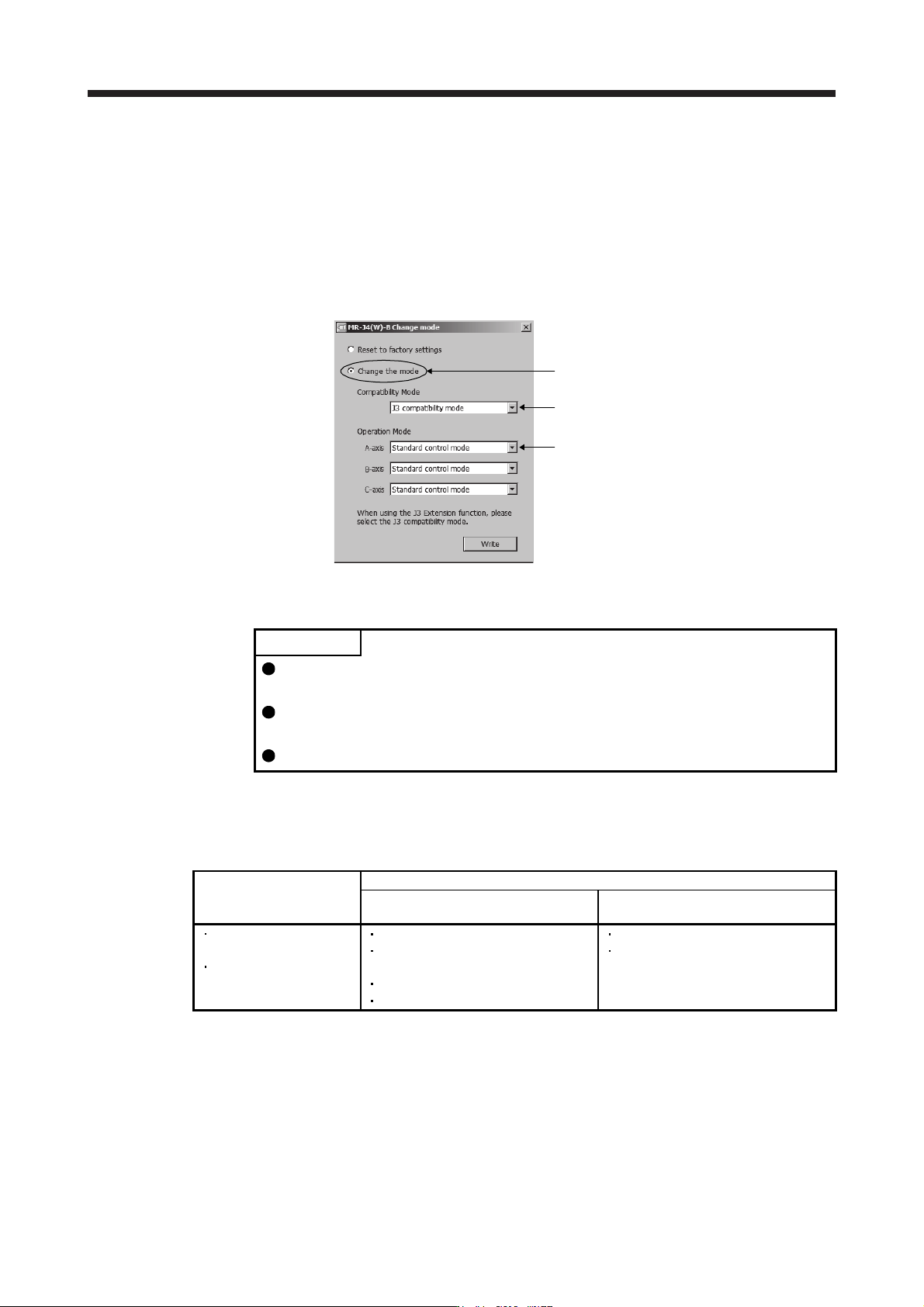
(2) How to select "J3 compatibility mode" using the application "MR-J4(W)-B mode selection" or "MR Mode
Change"
The application "MR-J4(W)-B mode selection" or "MR Mode Change" included in MR Configurator2 can
be used to manually switch the servo amplifier mode to "J3 compatibility mode" beforehand. Use it for a
solution when it is difficult to reset many times with your "Reset required" controller such as "QD74MH_".
The application "MR-J4(W)-B mode selection" and "MR Mode Change" are also available by
downloading the free trial version of MR Configurator2 from the "Mitsubishi Electric FA site". The
application "MR-J4(W)-B mode selection" and "MR Mode Change" do not have an expiration date.
Select "Change the mode".
Select "J3 compatibility mode".
Select "Operation Mode" .
17.1.9 J3 extension function
POINT
The J3 extension function is used with servo amplifiers with software version B0
or later.
To enable the J3 extension function, MR Configurator2 with software version
1.25B or later is necessary.
The J3 extension function of the amplifier differs from MR-J3-B in motion.
The J3 extension function is for using functions of J4 mode with J3 compatibility mode.
By enabling the J3 extension function, control response will be equal to MR-J4 series using a controller
compatible with SSCNET III.
J4 mode
J3 compatibility mode
J3 extension function enabled:
[Pr. PX01] = "_ _ _ 1"
J3 extension function disabled:
[Pr. PX01] = "_ _ _ 0"
SSCNET III/H
communication
MR-J4-B function
SSCNET III communication
The same parameter ordering as MR-
J3-B
MR-J4-B control function
Parameter added
SSCNET III communication
The same parameter ordering as MR-
J3-B