sh030106u.pdf - 第589页
17. APPLICATIO N OF FUNCTIONS 17 - 38 8) Initia lizing o ne-to uch tunin g Clicking " Return to initial va lue" in th e one-to uch tunin g win d ow of MR Config urator2 ena bles t o return the p arame ter to th…

17. APPLICATION OF FUNCTIONS
17 - 37
Display Name Error detail Corrective action example
C006
Amplifier command start
error
One-touch tuning was attempted to start in
the amplifier command method under the
following speed condition.
Servo motor speed: 20 r/min or higher
Execute the one-touch tuning in the amplifier
command method while the servo motor is
stopped.
C007
Amplifier command
generation error
1. One-touch tuning was executed in the
amplifier command method when the
permissible travel distance is set to 100
pulses or less in the encoder pulse unit, or
the distance is set not to increase the
servo motor speed to 150 r/min (mm/s) (50
r/min for direct drive motor) or higher at the
time of load to motor inertia ratio
estimation.
Set a permissible travel distance to 100
pulses or more in the encoder pulse unit, or a
distance so as to increase the servo motor
speed to 150 r/min (mm/s) (50 r/min for direct
drive motor) or higher at the time of load to
motor inertia ratio estimation, and then
execute the one-touch tuning. Set a
permissible travel distance to four or more
revolutions as a guide value.
Load to motor inertia ratio will be estimated
when "0000" or "0001" is set in [Pr. PA08
Auto tuning mode] at the start of one-touch
tuning.
If the permissible travel distance is short and
the servo motor speed cannot be increased to
150 r/min (mm/s) (50 r/min for direct drive
motor) or higher, select "Auto tuning mode 2
(_ _ _ 2)", "Manual mode (_ _ _ 3)", or "2 gain
adjustment mode 2 (_ _ _ 4)" of "Gain
adjustment mode selection" in [Pr. PA08].
2. An overspeed alarm detection level is set
so that the servo motor speed becomes
150 r/min (mm/s) (50 r/min for direct drive
motor) or less at the time of load to motor
inertia ratio estimation.
When estimating the load to motor inertia
ratio, set the overspeed alarm detection level
so that the speed becomes 150 r/min or
more.
3. The torque limit has been set to 0.
Set the torque limit value to greater than 0.
C008 Stop signal
EM2 was turned off during one-touch tuning in
the amplifier command method.
Review the one-touch tuning start position
and permissible travel distance for the
amplifier command method.
After ensuring safety, turn on EM2.
C009 Parameter
Parameters for manufacturer setting have
been changed.
Return the parameters for manufacturer
setting to the initial values.
C00A Alarm
One-touch tuning was attempted to start in
the amplifier command method during alarm
or warning.
Alarm or warning occurred during one-touch
tuning by the amplifier command method.
Start one-touch tuning when no alarm or
warning occurs.
Prevent alarm or warning from occurring
during one-touch tuning.
C00F
One-touch tuning
disabled
"One-touch tuning function selection" in [Pr.
PX13] is "Disabled (_ _ _ 0)".
Select "Enabled (_ _ _ 1)".
6) If an alarm occurs
If an alarm occurs during the one-touch tuning, the tuning will be forcibly terminated. Remove the
cause of the alarm and execute one-touch tuning again. When executing one-touch tuning in the
amplifier command method again, return the moving part to the tuning start position.
7) If a warning occurs
If a warning which continues the motor driving occurs during one-touch tuning by the user
command method, the tuning will be continued. If a warning which does not continue the motor
driving occurs during the tuning, one-touch tuning will be stopped.
One-touch tuning will be stopped when warning occurs during one-touch tuning by the amplifier
command method regardless of the warning type. Remove the cause of the warning, and return
the moving part to the tuning start position. Then, execute the tuning again.
17. APPLICATION OF FUNCTIONS
17 - 38
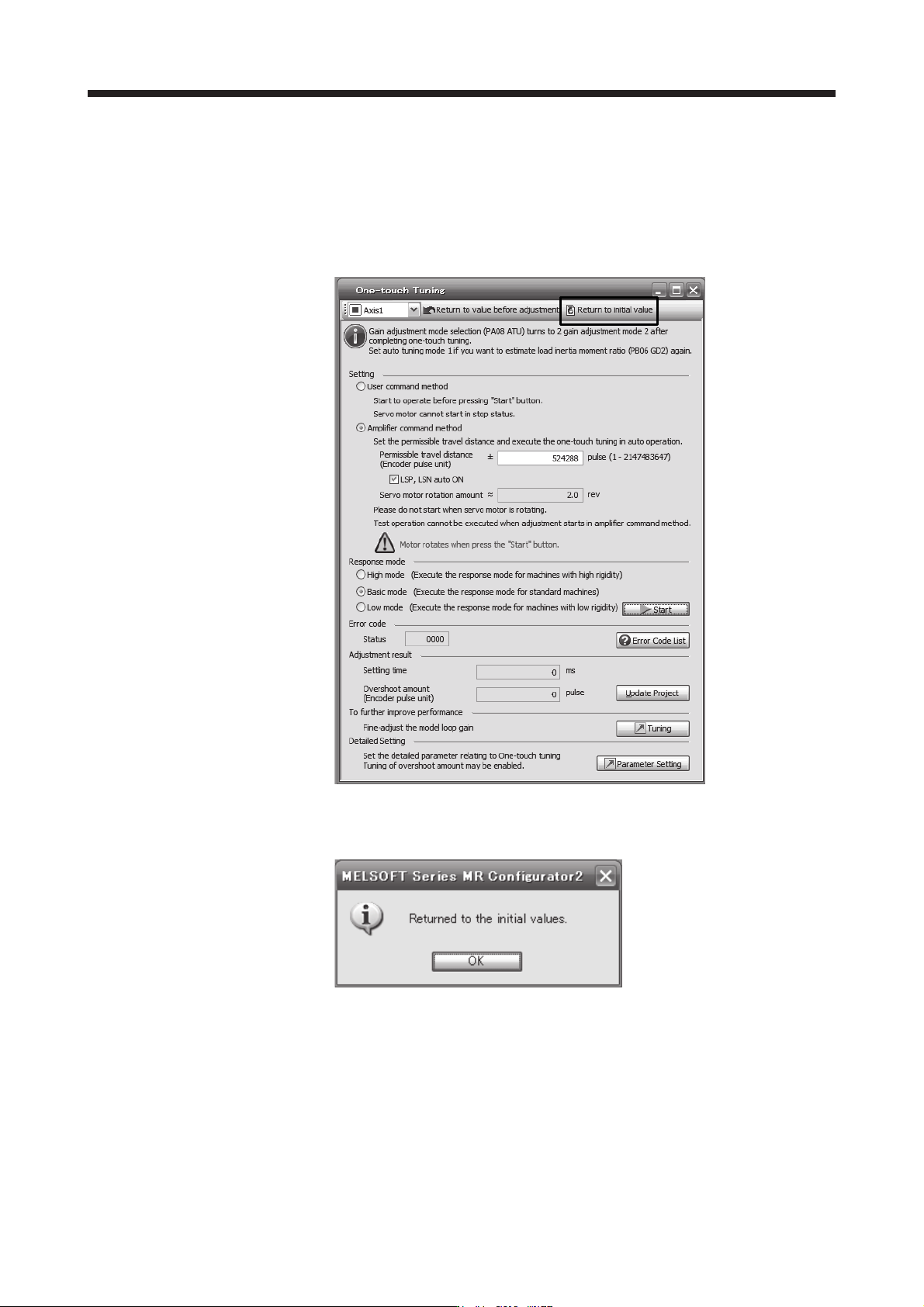
8) Initializing one-touch tuning
Clicking "Return to initial value" in the one-touch tuning window of MR Configurator2 enables to
return the parameter to the initial value. Refer to table 17.5 for the parameters which you can
initialize.
Clicking "Return to value before adjustment" in the one-touch tuning window of MR Configurator2
enables to return the parameter to the value before clicking "start".
When the initialization of one-touch tuning is completed, the following window will be displayed.
(returning to initial value)

17. APPLICATION OF FUNCTIONS
17 - 39
(c) Caution for one-touch tuning
1) Caution common for user command method and amplifier command method
a) The tuning is not available in the torque control mode.
b) The one-touch tuning cannot be executed while an alarm or warning which does not continue
the motor driving is occurring.
c) The one-touch tuning cannot be executed during the following test operation mode.
Output signal (DO) forced output
Motor-less operation
d) If one-touch tuning is performed when the gain switching function is enabled, vibration and/or
unusual noise may occur during the tuning.
2) Caution for amplifier command method
a) Starting one-touch tuning while the servo motor is rotating displays "C006" at status in error
code, and the one-touch tuning cannot be executed.
b) One-touch tuning is not available during the test operation mode. The following test operation
modes cannot be executed during one-touch tuning.
Positioning operation
JOG operation
Program operation
Machine analyzer operation
c) After one-touch tuning is executed, control will not be performed by commands from the servo
system controller. To return to the state in which control is performed from the servo system
controller, reset the controller or cycle the power of the servo amplifier.
d) During one-touch tuning, the permissible travel distance may be exceeded due to overshoot,
set a value sufficient to prevent machine collision.
e) When Auto tuning mode 2, Manual mode, or 2 gain adjustment mode 2 is selected in [Pr.
PA08 Auto tuning mode], the load to motor inertia ratio will not be estimated. An optimum
acceleration/deceleration command will be generated by [Pr. PB06 Load to motor inertia
ratio/load to motor mass ratio] at the start of one-touch tuning. When the load to motor inertia
ratio is incorrect, the optimum acceleration/deceleration command may not be generated,
causing the tuning to fail.
f) When one-touch tuning is started by using USB communication, if the USB communication is
interrupted during the tuning, the servo motor will stop, and the tuning will also stop. The
parameter will return to the one at the start of the one-touch tuning.
g) When one-touch tuning is started via the controller, if communication between the controller
and the servo amplifier or personal computer is shut-off during the tuning, the servo motor will
stop, and the tuning will also stop. The parameter will return to the one at the start of the one-
touch tuning.
h) When one-touch tuning is started during the speed control mode, the mode will be switched to
the position control mode automatically. The tuning result may differ from the one obtained by
executing tuning by using the speed command.