00194086-01.pdf - 第61页
User Manual SIPLAC E CS 3 Technical data Software Vers ion SR.408.xx 03/2006 U S Edition 3.1 Descript ion of the machine 61 3 T echnical dat a 3.1 Description of the machine The auto matic pla cement sys tem is a high-pe…
2 Operational safety User Manual SIPLACE CS
2.10 ESD guidelines Software Version SR.408.xx03/2006 US Edition
60
Do not allow modules with chargeable and highly insulating materials to touch one another, e.g.
plastic films, insulating table surfaces or items of clothing made from synthetic fibers.
Always place the modules on a conductive surface (table with an ESD coating, conductive ESD
foam, ESD bag or container).
Do not bring modules near visual display units, monitors or televisions. Keep them at least 10 cm
away from the screen.
2.10.4 Measurements and modifications to ESD modules
Do not take measurements on such modules unless
– the measuring device is earthed (e.g. via PE conductors) or
– you discharge the measuring head just before taking measurements with a potential-free mea-
suring device (e.g. by touching an unpainted metal part of the controller casing).
Æ Always use an earthed soldering iron if you carry out any soldering work.
2.10.5 Dispatching ESD modules
Always store modules and components in conductive packaging (e.g. metallized plastic bags or
metal sleeves) and dispatch them in conductive packaging.
If the packaging is not conductive, place the modules in a conductive envelope before packag-
ing. Use conductive expanded rubber, ESD bags, domestic aluminum foil or paper, for example.
NEVER use plastic bags or film.
If the module has integral batteries, ensure that the conductive packaging does not touch or
short-circuit the battery terminals and, if necessary, first cover the terminals with insulating tape
or material.
User Manual SIPLACE CS 3 Technical data
Software Version SR.408.xx 03/2006 US Edition 3.1 Description of the machine
61
3 Technical data
3.1 Description of the machine
The automatic placement system is a high-performance placement system with two gantries.
A PCB camera and a 6-segment Collect&Place-head are mounted on each gantry.
3
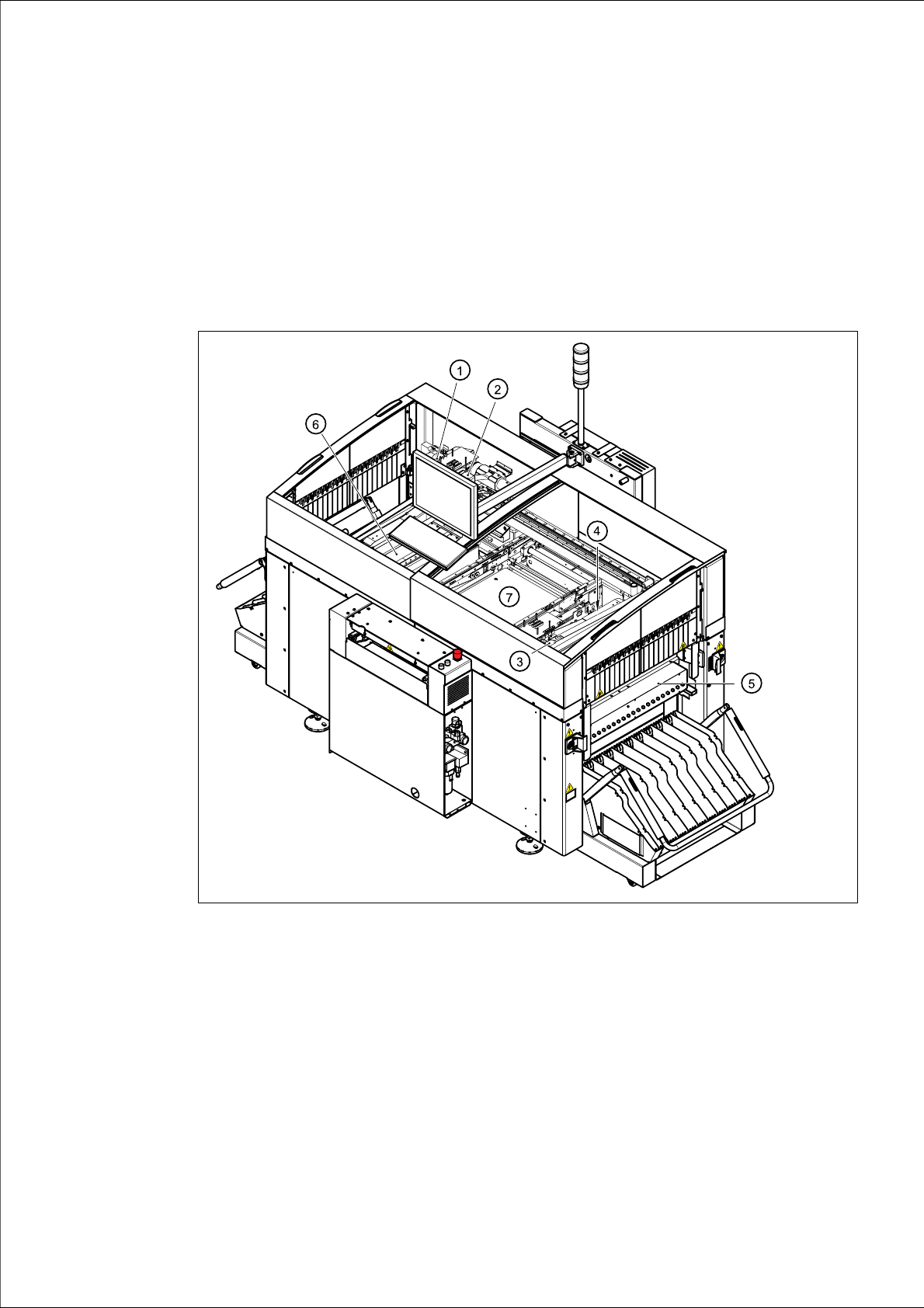
Fig. 3.1 - 1 Overall view of the placement system
(1) 6-segment Collect&Place head with component camera (gantry 1)
(2) Gantry 1 with PCB camera
(3) 6-segment Collect&Place head with component camera (gantry 2)
(4) Gantry 2 with PCB camera
(5) Stationary component supply (location 1)
(6) Stationary component supply (location 3)
(7) PCB conveyor
3 Technical data User Manual SIPLACE CS
3.1 Description of the machine Software Version SR.408.xx03/2006 US Edition
62
The placement heads pick up components from stationary feeders and use them to populate the
PCB clamped on the PCB conveyor. 6-segment Collect&Place heads equipped with a compo-
nent camera can process size 0201 to 18.7 mm x 18.7 mm components.
The concept behind the automatic placement system
– with its stationary feeders,
– PCBs that do not move during placement
– and positionable placement heads
has a number of significant benefits:
– For example, the flexible 6-segment Collect&Place heads combined with automatic nozzle
changers enable the nozzle configuration to be changed temporarily and automatically
adapted to receive different component sizes. You can also optimize the traversing paths and
the placement sequence.
– With stationary feeders, even the tiniest components are picked up reliably.
– The components cannot slip on the PCB during placement (as is often the case with moving
PCBs) since the PCB does not move.
– Sophisticated optical centering systems (vision modules) for components and PCBs also en-
sure high component positioning accuracy.
– Components can be topped up and tapes can be spliced without stopping the machine.
– Prepared component trolleys enable the placement system to be retooled without long stop-
pages.