SI-F130 Manual(EN)_jpg_ Rev1.pdf - 第101页
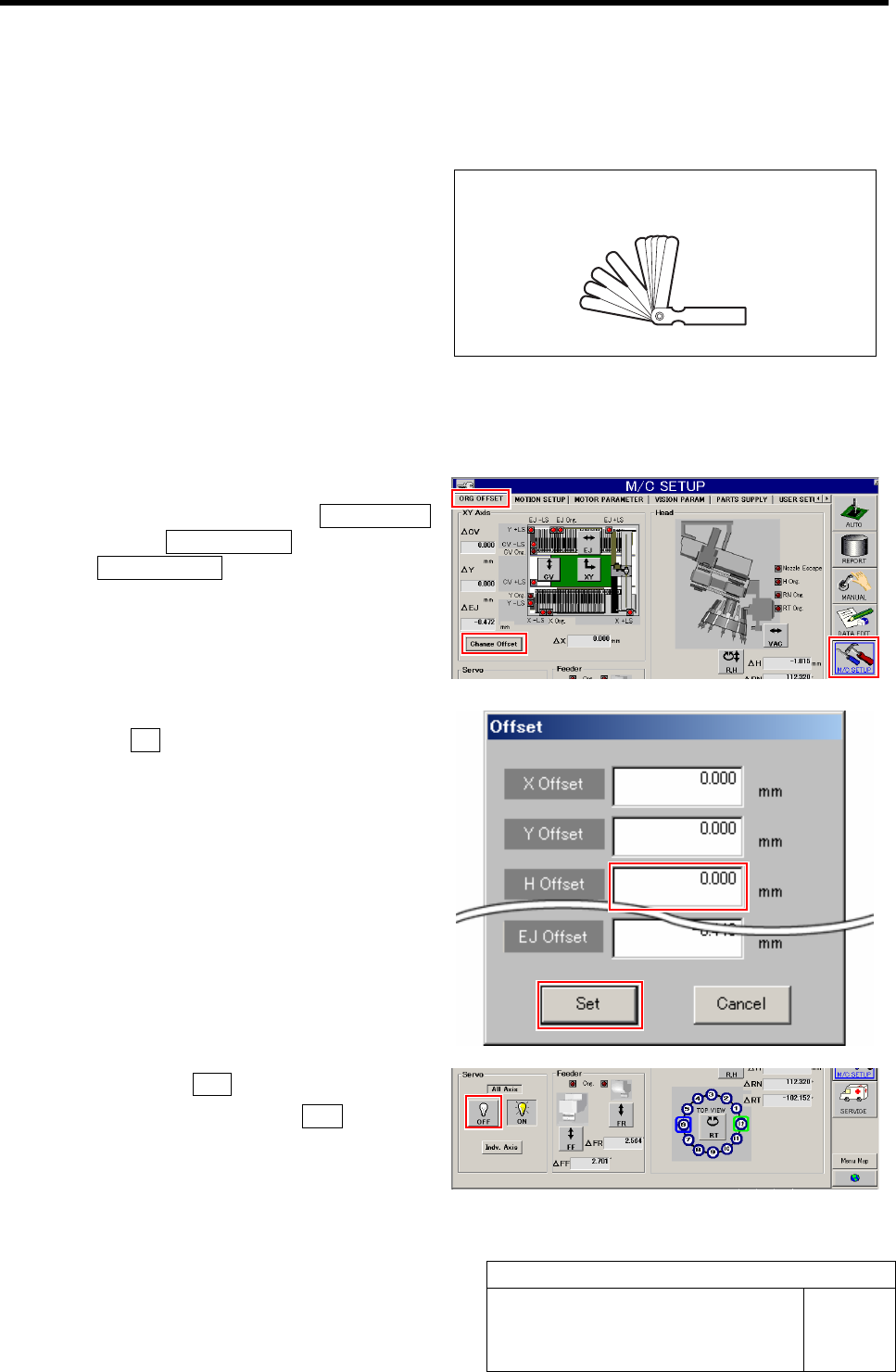
H Axis Gear Z-phase Matching HLF-10403-01 H A xis Gear Z-phase Matchi ng SHEET 1/4 H Axis Gear Z-phase Matching [Necessary jigs] • Thickness gauge (t=1.0 m m) [Procedure] 1 Set the H Axis offset to "0". 1. Clic…

Matching of Y Axis Z-Phase
HLF-10402-01
Matching of Y Axis Z-Phase
SHEET
3/3
8 Turn the emergency stop switch in the arrow direction to release the emergency stop state.
9 Press the ORG button on the operation panel to perform origin position return.
10 Check the Z-phase set-up position.
1. Measure the distance from the LM guide rail end to the LM guide face with a scale.
Suppose that this measured value is A.
2. Measure the dog detection position of the ORG sensor with a scale.
Suppose that the measured value is B.
Check that a relation is obtained as A (Z-phase set-up position) = B - 5 mm (Z-phase set-up movement amount)
Tolerance level : ±1 mm
H Axis Gear Z-phase Matching
HLF-10403-01
H Axis Gear Z-phase Matching
SHEET
1/4
H Axis Gear Z-phase Matching
[Necessary jigs]
• Thickness gauge (t=1.0 mm)
[Procedure]
1 Set the H Axis offset to "0".
1. Click in an order of the M/C SETUP
menuÎORG OFFSET tabÎ
Change Offset button.
Offset screen is displayed.
2. Input "0" in the H Offset box, and click
the Set button.
H offset value is set, and the Offset screen closes.
2 Click the servo OFF button for all axes.
1. Click the all axes servo OFF button on
the ORG. OFFSET screen.
Servos for all axes are turned off.
Thickness gauge (t=1.0mm)
H Axis Gear Z-phase Matching
HLF-10403-01
H Axis Gear Z-phase Matching
SHEET
2/4
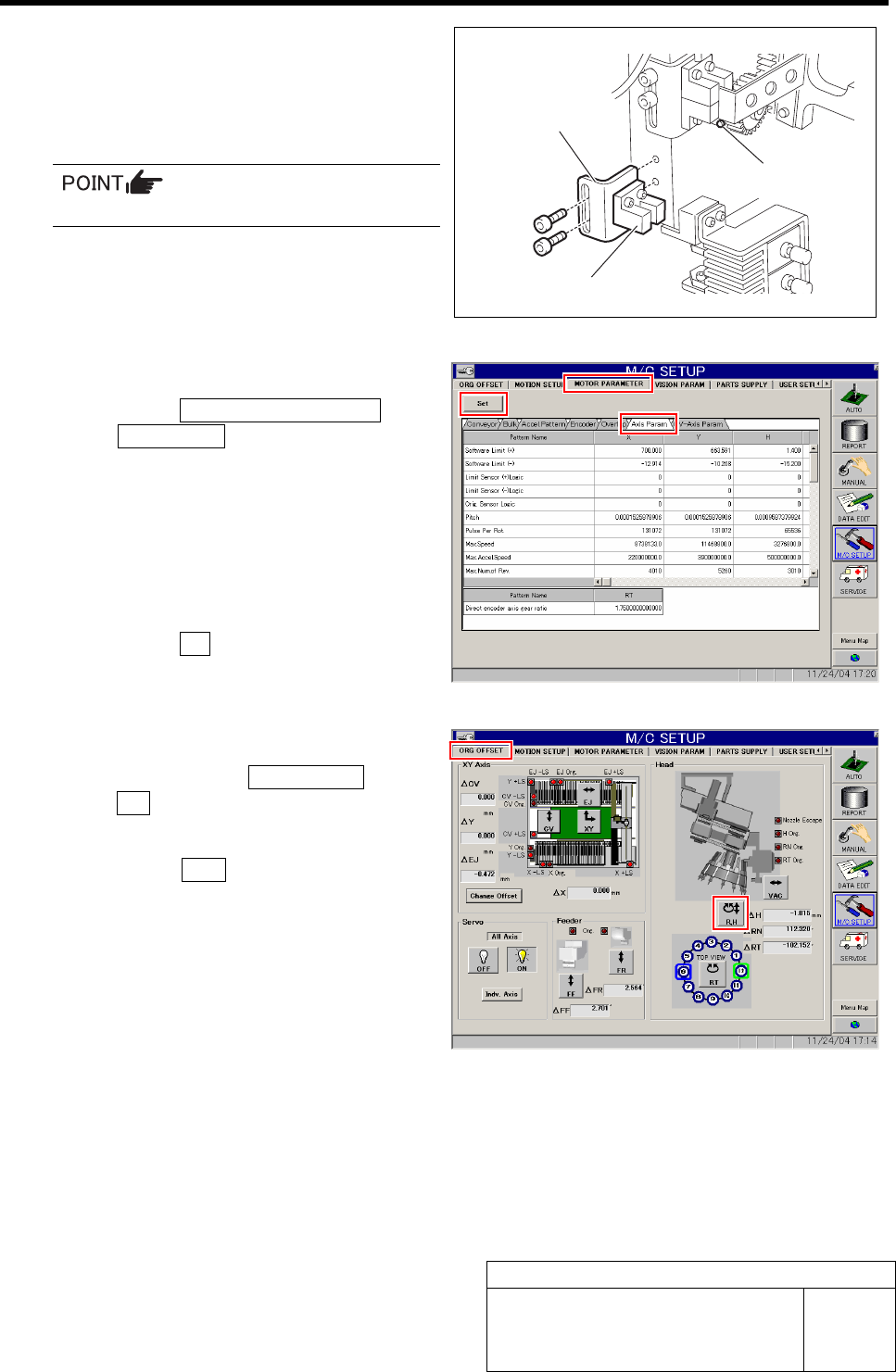
3 Remove the lower end sensor (H-CW) to-
gether with the bracket.
4 Loosen split fastening screw on the H axis
motor pinion to make free from motor shaft.
Rotate pinion for easy access of alain key.
5 Change the servo parameter for the H axis.
1. Click the MOTOR PARAMETER tab
ÎAxis Param. tab.
2. Change the next servo parameter for
the H axis.
Speed loop gain : 260.0 Î 50
Speed loop integral time
constant : 3.07 Î 12.73
Position loop gain : 371.4 Î 78.54
3. Click the Set button.
The changed parameters are set.
6 Perform origin position return for H axis only.
1. Click in an order of ORG OFFSET tab
ÎR.H button.
RN/H Axis screen is displayed.
2. Press the ORG button on the operation
panel with the RN/H Axis screen being
displayed.
Origin position return is performed for the H axis
only.
Bracket
Lower end sensor (H-CW)
Split fastening screw