EUKYX-199-4110_G5S2_Instruction_Vol4_E.pdf - 第131页
EUKYX 2-2 199-4100 2. Management Information 2. M anagement Information 2. 1 "Management Information" Windo w When normal recov e ry do es not occur a fter a mistake i n t he ma ch ine opera tion or an error , …
EUKYX
2-1199-4100
1. Descriptions for Troubleshooting
1. Descriptions for Troubleshooting
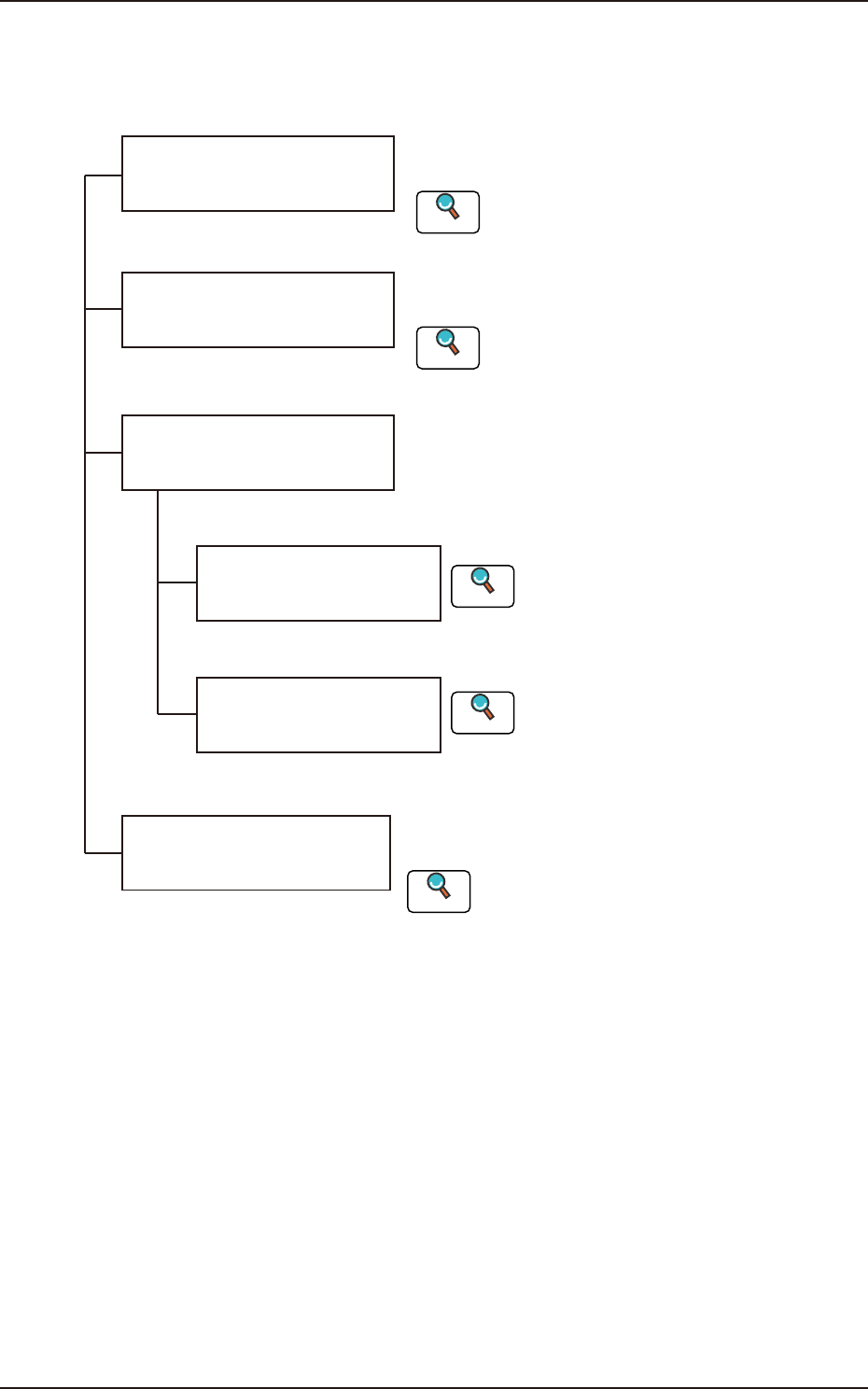
The troubleshooting windows are composed as follows.
This section describes the remedial procedure from
the window indicating "Machine Information".
Troubleshooting from
"Management Information"
Window
Troubleshooting from
"Machine Information" Window
Troubleshooting from
"Error" Window
Troubleshooting based on
"Recognition Error ID"
(8 digits)
Troubleshooting based on
"Error ID"
The troubleshooting operation varies depending on
the difference in Error ID or Recognition Error ID.
Troubleshooting on
Component Pick-up and
Placement
The causes of "General pick-up error and placement
error" and remedial procedures are described.
This section describes the remedial procedure from
the window indicating "Management Information".
Refer to "2. Management Information"
in this chapter for details.
Reference
Refer to "3. Machine Information"
in this chapter for details.
Reference
Refer to “Chapter 3 Troubleshooting based
Error ID" for details.
Reference
Refer to “Chapter 4 Troubleshooting from
Recognition Error IDs" for details.
Reference
Refer to “Chapter 5 Troubleshooting on
Component Picks and Placement.
Reference
F4B1
EUKYX
2-2199-4100
2. Management Information
2. Management Information
2.1 "Management Information" Window
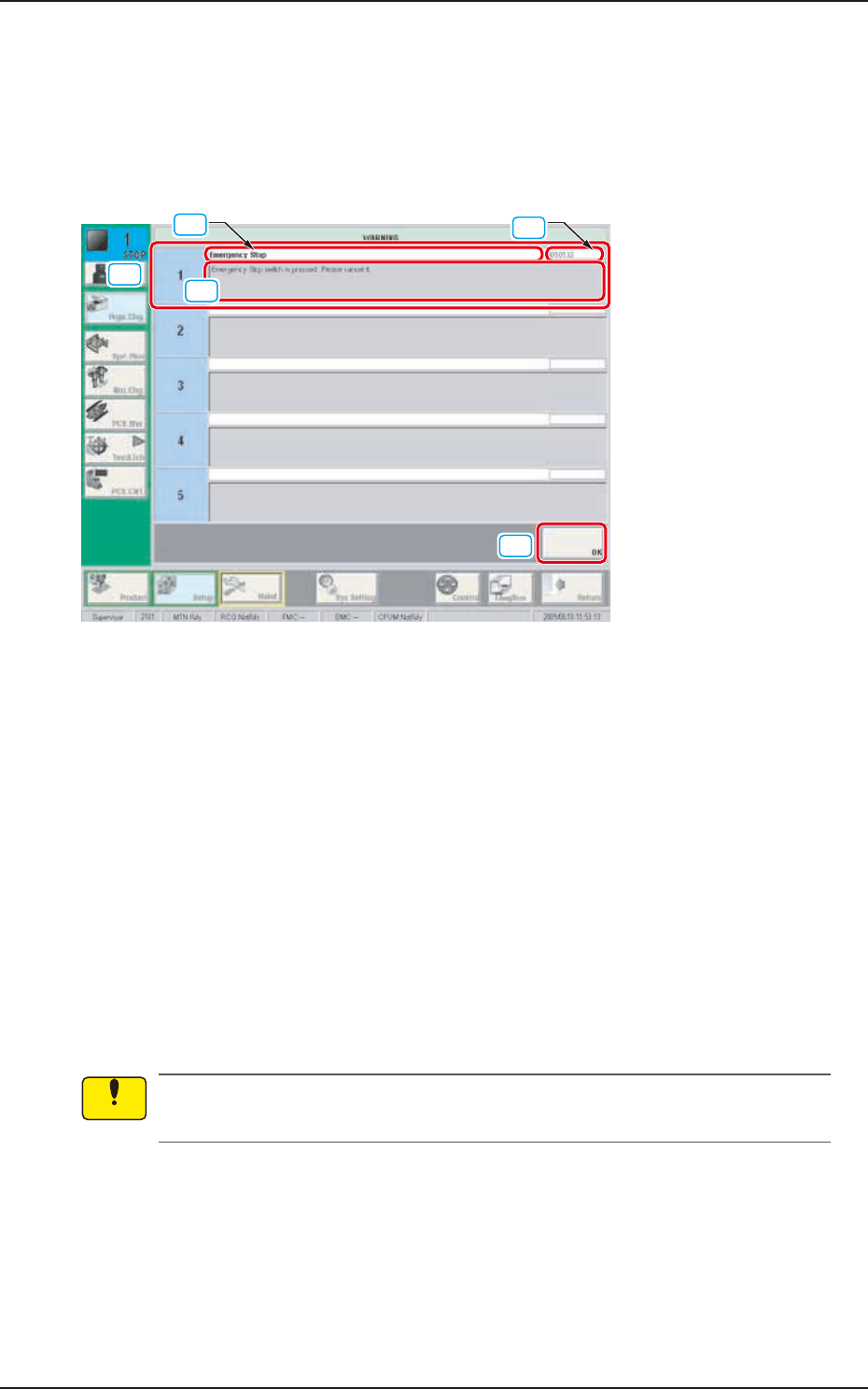
When normal recovery does not occur after a mistake in the machine operation or an error, the
following management information window appears.
[1]
[4]
[3]
[2]
[5]
F4B2
[1] Management Information
In this window, the management information is displayed.
[2] Management Information Code
In this window, the management information code is displayed.
[3] Display Area A
The outline of the management information is displayed in this area.
[4] Display Area B
The details of the management information are displayed in this area.
[5] [OK] Button
The window returns just prior to the "Management Information" by pressing this button.
• Remedial Procedure from “Management Information” Window
(1) Make a note of the management information.
If you forget the Management Information, correct recovery can not be performed. Therefore,
make sure to make a note.
(2) Press the [OK] button to return to the original window.
(3) Perform the correct recovery based on the Management Information.
Notice
EUKYX
2-3199-4100
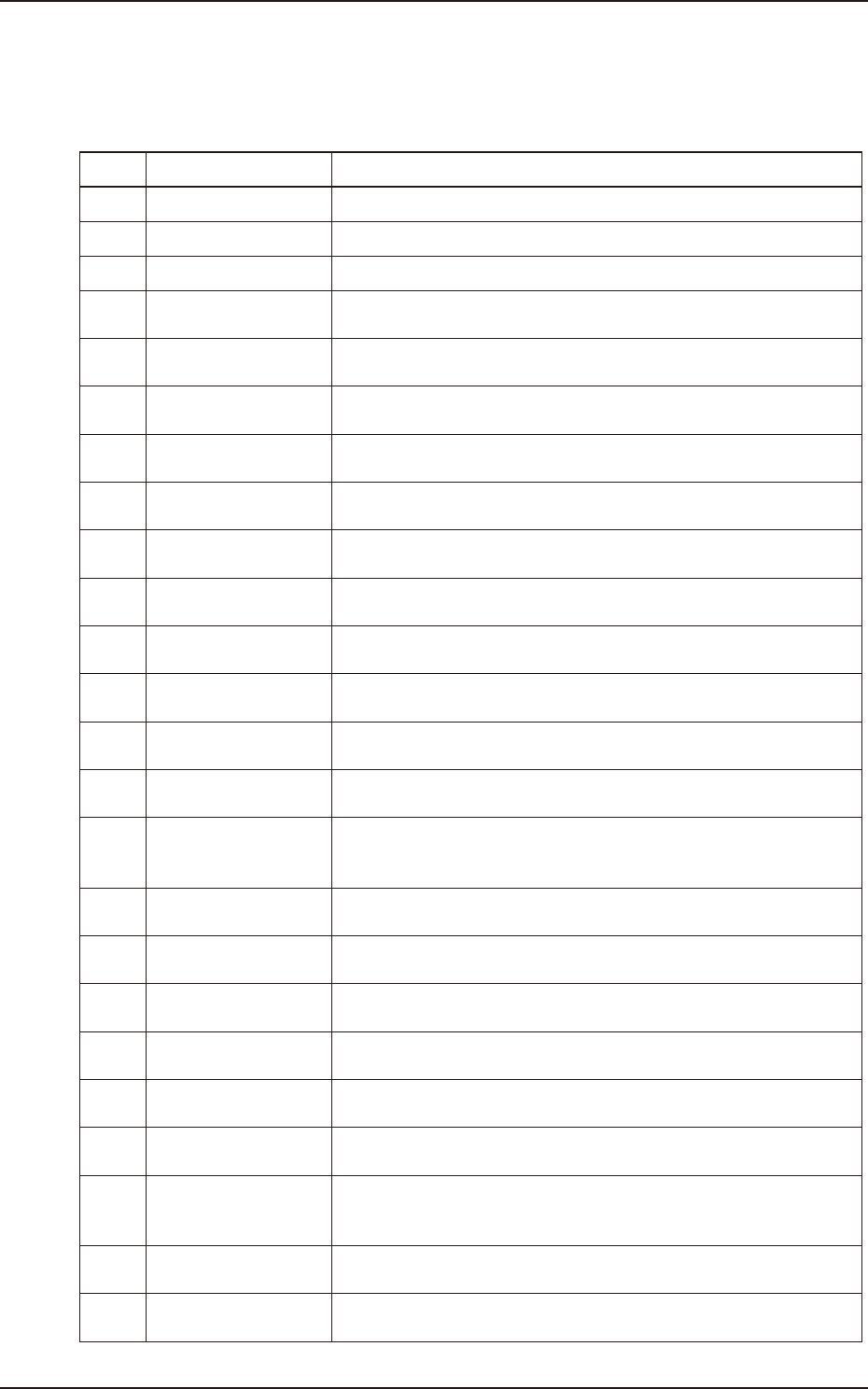
2.2 Management Information list
Code Display Area A Display Area B
10101 Emergency Stop Press [POWER ON] button to activate Load Power circuit.
10103 Emergency Stop Emergency Stop switch is pressed. Please cancel it.
10201 Air Pressure Drop Air Pressure Drop is detected
10401
Safety cover lock
confirm
Please close and lock the safety cover.
10402
Safety cover lock
confirm
Operate it after close and lock the safety cover.
10403
Safety cover lock
confirm
Operate after close and lock the safety cover.
10404
Safety cover lock
confirm
The safety cover is in unlock. Please complete to unlock and operate
it.
10503
Beam XY main circuit
OFF
Beam XY main circuit Error
10801
Feeder base confirm
(Block1)
Set the feeder cart (Block1) and connect cable.
10802
Feeder base confirm
(Block1)
Cannot set Feeder Cart downward to detect Elevator Unit (Block1).
Operate after remove it .
10803
Feeder base confirm
(Block1)
Elevator Unit (Block1) is not connected. Please connect to it with "Unit
Exchange Menu".
10804
Feeder base confirm
(Block1)
Batch Connector of Elevator Unit (Block1) is not connected. Please
check connection.
10805
Feeder base confirm
(Block1)
Feeder cart (Block1) is not upper position. Push Feeder Ready Switch.
10806
Feeder base confirm
(Block1)
Push Feeder Ready SW.
10807
Feeder base confirm
(Block1)
Feeder base power or Feeder power is "OFF". Please press "Feeder
Ready" switch (Block1), and put it up again after putting Feeder Cart
(Block1) down.
10901
Feeder base confirm
(Block2)
Set the feeder cart and connect cable. (Block2)
10902
Feeder base confirm
(Block2)
Cannot set Feeder Cart downward to detect Elevator Unit (Block2).
Operate after remove it.
10903
Feeder base confirm
(Block2)
Elevator Unit (Block2) is not connected. Please connect to it with "Unit
Exchange Menu".
10904
Feeder base confirm
(Block2)
Batch Connector of Elevator Unit (Block2) is not connected. Please
check connection.
10905
Feeder base confirm
(Block2)
Feeder cart (Block2) is not upper position. Push feeder ready sw.
10906
Feeder base confirm
(Block2)
Push feeder ready sw.
10907
Feeder base confirm
(Block2)
Feeder base power or Feeder power is "OFF". Please press "Feeder
Ready" switch (Block2), and put it up again after putting Feeder Cart
(Block2) down.
10b01
Feeder is not ready
(Block1)
Please turn on the Feeder Ready SW (Block1).
10c01
Feeder is not ready
(Block2)
Please turn on the Feeder Ready SW (Block2).
2.2 Management Information list
The following is the management information list by code.