EUKYX-199-4110_G5S2_Instruction_Vol4_E.pdf - 第144页
EUKYX 2-15 199-4100 2.2 Management Information list Code D isp lay Ar ea A Di spl ay Are a B 50404 Manual transfer PCB (X > 260 m m) whi ch is s et by PP data i s unab le to b e take n in Inp ut Conveyo r . 50405 Manu…
EUKYX
2-14199-4100
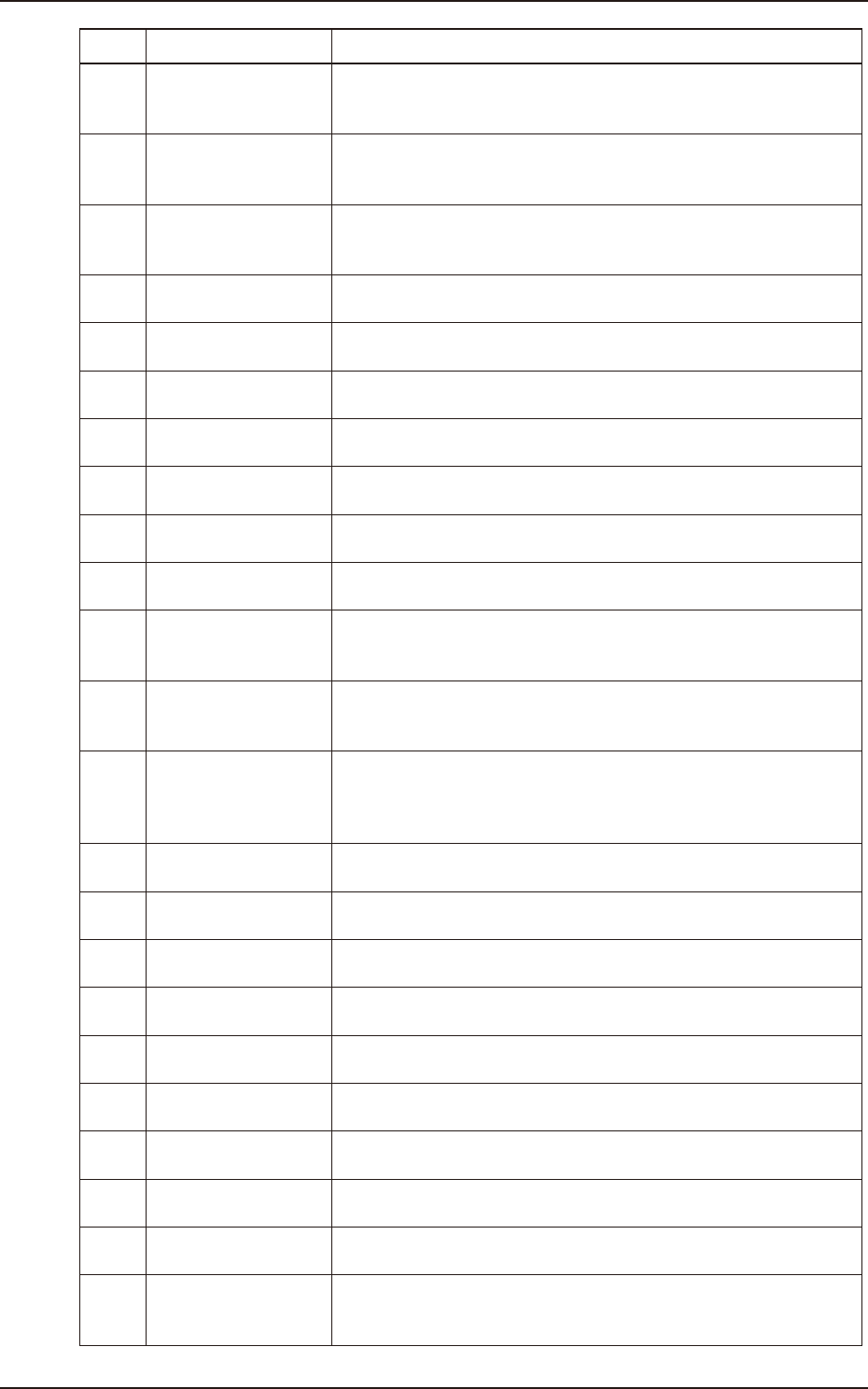
2.2 Management Information list
Code Display Area A Display Area B
50209
Confirmation of PCB
existence
There is a possibility that there are 2 sheets of PCB on the output
conveyor in Lane B. Please remove PCB from Deceleration Sensor, or
move it to Stop sensor, or delete the PCB memory information.
5020a
Confirmation of PCB
existence
There is a possibility that there are 2 sheets of PCB on the shuttle
conveyor in input side. Please remove PCB from Deceleration Sensor,
or move it to Stop sensor, or delete the PCB memory information.
5020b
Confirmation of PCB
existence
There is a possibility that there are 2 sheets of PCB on the shuttle
conveyor in output side. Please remove PCB from Deceleration Sensor,
or move it to Stop sensor, or delete the PCB memory information.
5020c
Confirmation of PCB
existence
There is PCB on the input sensor of Lane A. Please return PCB to the
input conveyor and run it.
5020d
Confirmation of PCB
existence
There is PCB on the input sensor of Lane B. Please return PCB to the
input conveyor and run it.
5020e
Confirmation of PCB
existence
There is PCB on the input sensor. Please return PCB to the input
conveyor and run it.
5020f
Confirmation of PCB
existence
There is no PCB in the machine. Please position a PCB.
50210
Confirmation of PCB
existence
Please put PCB on the positioning conveyor, and start it.
50 211
Confirmation of PCB
existence
Please remove PCB from input position. Cutout PCB cannot be
transferred from input position.
50212
Confirmation of PCB
existence
Please remove the substrate at the upstream position. The substrate
for weight to exceed 2.5 kg cannot be transported simultaneously.
50213
Confirmation of PCB
existence
Please remove the substrate at A lane upstream position. The
substrate for weight to exceed 2.5 kg cannot be transported
simultaneously.
50214
Confirmation of PCB
existence
Please remove the substrate at B lane upstream position. The
substrate for weight to exceed 2.5 kg cannot be transported
simultaneously.
50215
Confirmation of PCB
existence
After a PCB disappears from the input conveyor of output machine,
please perform (PCB clip lump prevention).
Please switch on a power supply, when the power supply of output
machine is not on.
50216
Confirmation of PCB
existence
Please cancel positioning of a PCB and perform in the state where
there is no PCB.
50220
Confirmation of PCB
existence
2 PCB are between the input conveyor and the upstream position. Take
PCB in a one side.
50221
Confirmation of PCB
existence
A stop place of a PCB is unsettled. Please establish PCB memory
information.
50222
Confirmation of PCB
existence
A PCB is on the upstream position stop sensor. Please put a PCB in
the location an upstream stop sensor doesn’t turn on.
50223
Confirmation of PCB
existence
It is not possible to operate, because there is a PCB in the upstream
position.
50224
Confirmation of PCB
existence
Please put a P.C.B. in the location a deceleration sensor of a input
conveyor turns on.
50301
Confirmation of
Firmware version
Firmware of transfer driver is not the latest version. Please update it.
50401 Manual transfer
PCB (X > 260 mm) which is set by PP data is unable to be taken in
Input Position.
50402 Manual transfer
Please operate after removing PCB from output conveyor. There is a
possibility of pushing and rising with Stopper.
50403 Manual transfer
It is impossible to take from Sensor Detection of Input Position. Please
put PCB on Input Conveyor, or move it to Output position in Recovery
Menu.
EUKYX
2-15199-4100
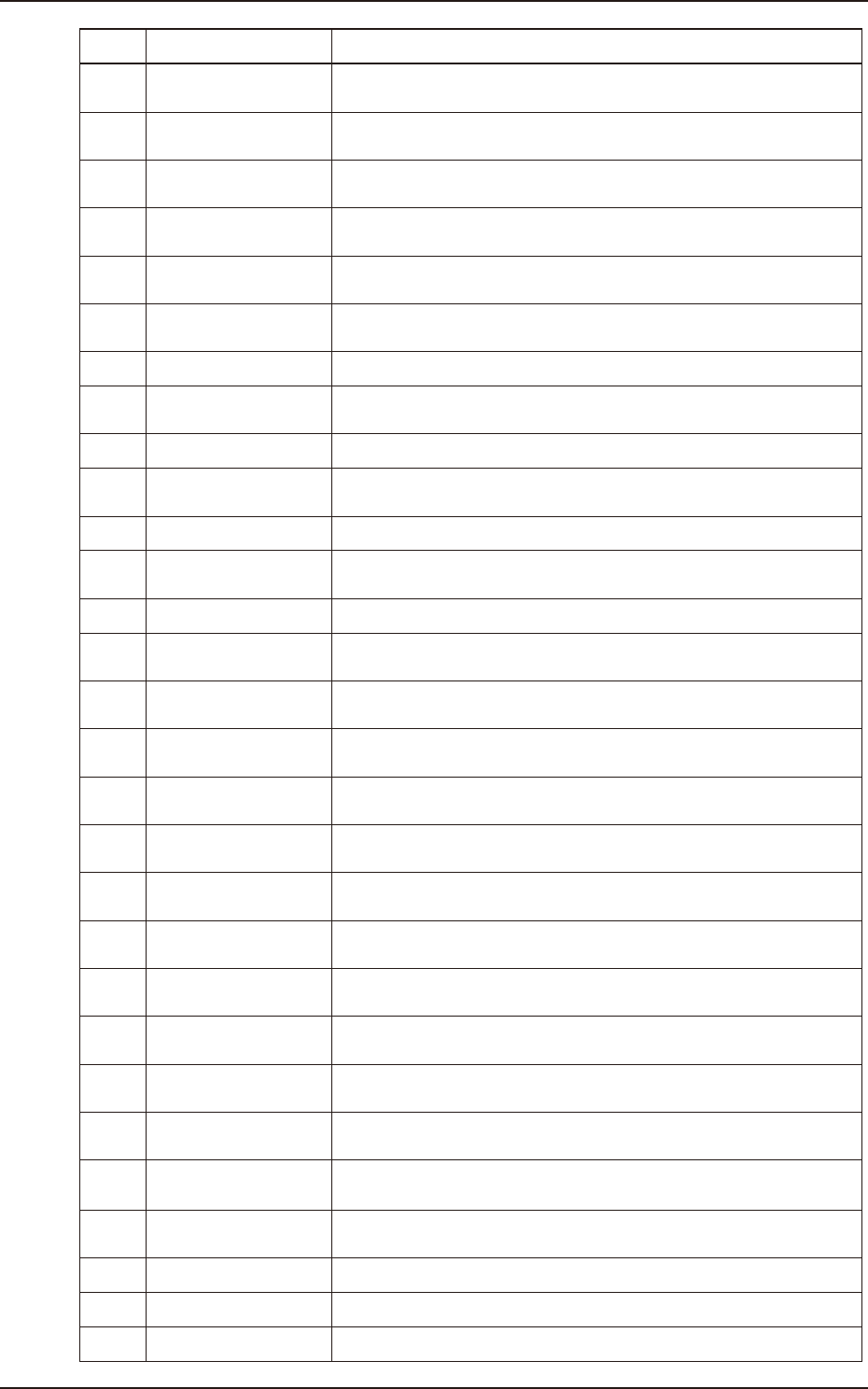
2.2 Management Information list
Code Display Area A Display Area B
50404 Manual transfer
PCB (X > 260 mm) which is set by PP data is unable to be taken in
Input Conveyor.
50405 Manual transfer
There is PCB on Deceleration Sensor of Input Conveyor. There is a
possibility that PCB is inserted.
50406 Manual transfer
There is PCB on Deceleration Sensor of Shuttle Conveyor in Output
side. There is a possibility that PCB is inserted.
50407 Manual transfer
Lane A is not able to be set in Current Program. Please change
Current Program or change to Lane B.
50408 Manual transfer
Lane B is not able to be set in Current Program. Please change
Current Program or change to Lane A.
50409 Manual transfer
PCB Y size and Conveyor Width in Current Program are not equal.
Please change Current Program.
5040a Manual transfer Cutout PCB cannot be taken in input position.
5040b Manual transfer
Please remove PCB from input position. Cutout PCB cannot be
transferred from input position.
5040c Manual transfer It is not possible to transport it to the specified position.
5040d Manual transfer
It is not possible to operate because it interferes in the adsorption
treatment device.
5040e Manual transfer It composes the device, and it is not possible to operate.
5040f Manual transfer
PCB (X > 280 mm) which is set by PP data is unable to be taken in
Input Position.
50410 Manual transfer Output a PCB after interrupting operation.
50 411 Manual transfer
It is not possible to operate, because there is a PCB in the upstream
position. Please take a PCB from upstream position.
50412 Manual transfer
It is not possible to operate, because there is a P.C.B. in the input
conveyor. Please take a P.C.B. in the input conveyor.
50501 Convert Width Setup
Please set conveyor width 49.5 ~ 461.5 mm. The total of PCB size/
offset/clearance is over movable range.
50502 Convert Width Setup
Please set conveyor width 49.5 ~ 382.5 mm. The total of PCB size/
offset/clearance is over movable range.
50503 Convert Width Setup
Movable Range for the destination of W1 is set. Please check PCB
size/offset/clearance of Lane A.
50504 Convert Width Setup
Movable Range for the destination of W1 is set. Please check PCB
size/offset/clearance of Lane A.
50505 Convert Width Setup
Movable Range for the destination of W2 is set. Please check PCB
size/offset/clearance of Lane A
50506 Convert Width Setup
Movable Range for the destination of W2 is set. Please check PCB
size/offset/clearance of Lane A.
50507 Convert Width Setup
Movable Range for the destination of W3 is set. Please check PCB
size/offset/clearance of Lane B.
50508 Convert Width Setup
Movable Range for the destination of W3 is set. Please check PCB
size/offset/clearance of Lane B.
50509 Convert Width Setup
These is a possibility of the interference with W1 and W2. Please
check PCB size/offset/clearance of Lane A.
5050a Convert Width Setup
There is a possibility of the interference with W2 and W3. Please
Check PCB size/offset/clearance of Lane A/B.
5050b Convert Width Setup
There is an interference between object position of Conveyor and
Support Pin. Please exchange Support Pin.
50510 Convert Width Setup Zeroing of W1 axis is not finished. Please perform zeroing of W1 axis.
50 511 Convert Width Setup Zeroing of W2 axis is not finished. Please perform zeroing of W2 axis.
50512 Convert Width Setup Zeroing of W3 axis is not finished. Please perform zeroing of W3 axis.
EUKYX
2-16199-4100
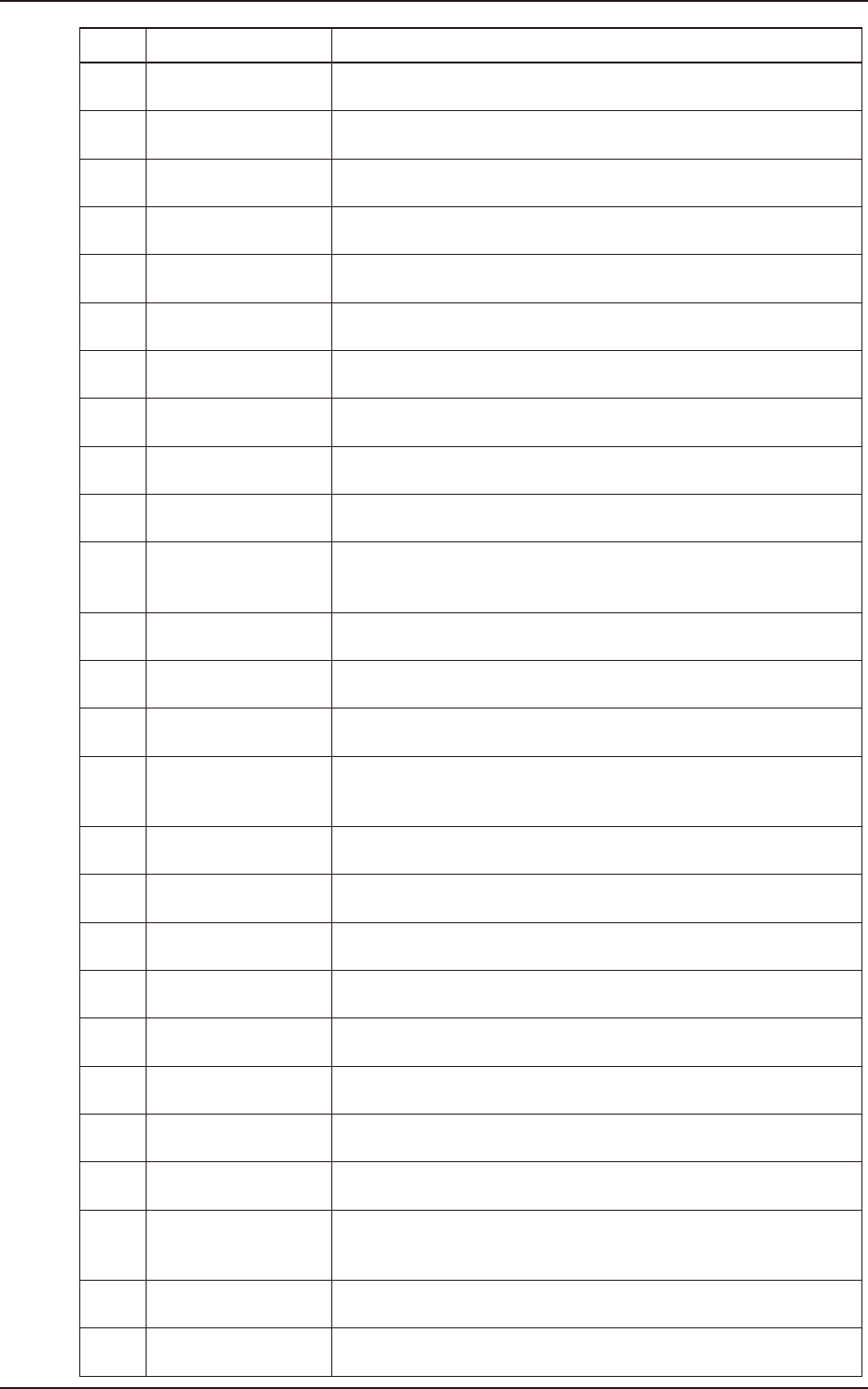
2.2 Management Information list
Code Display Area A Display Area B
50513 Convert Width Setup
The set value of W1 axis exceeds the soft limit. Please determine the
value within the range from 300.5 mm to 468.5 mm.
50514 Convert Width Setup
The set value of W1 axis exceeds the soft limit. Please determine the
value within the range from 368.5 mm to 536.5 mm.
50515 Convert Width Setup
The set value of W2 axis exceeds the soft limit. Please determine the
value within the range from 250.5 mm to 418.0 mm.
50516 Convert Width Setup
The set value of W2 axis exceeds the soft limit. Please determine the
value within the range from 284.5 mm to 452.0 mm.
50517 Convert Width Setup
The set value of W3 axis exceeds the soft limit. Please determine the
value within the range from 49.5 mm to 382.5 mm.
50518 Convert Width Setup
The set value of W3 axis exceeds the soft limit. Please determine the
value within the range from 83.5 mm to 416.5 mm.
50519 Convert Width Setup
There is an interference between W1 axis and W2 axis. Please change
the value or separate the interfering axis.
5051a Convert Width Setup
There is an interference between W2 axis and W3 axis. Please change
the value or separate the interfering axis.
5051b Convert Width Setup
Please set conveyor width 83.5~511.5 mm. The total of PCB size/
offset/clearance is over movable range.
5051c Convert Width Setup
Please set conveyor width 49.5~511.5 mm. The total of PCB size/
offset/clearance is over movable range.
50601 Convert Width Setup
Rotation Direction set of Middle Conveyor in supply side differs from
Main Device transfer direction. Please change the rotation direction of
Middle conveyor.
50602 Convert Width Setup
Emergency Stop switch of middle conveyor in supply side is pressed.
Please cancel it.
50603 Convert Width Setup
Safety Cover of middle conveyor in supply side is open. Please close
it.
50604 Convert Width Setup
Input Machine communication mode is set [PUSHER]. Cannot use
[PUSHER] mode when Middle Conveyor is contacted.
50 611 Convert Width Setup
Rotation Direction set of Middle Conveyor in output side differs from
Main Device transfer direction. Please change the rotation direction of
Middle conveyor.
50612 Convert Width Setup
Emergency Stop switch of middle conveyor in output side is pressed.
Please cancel it.
50613 Convert Width Setup
The Safety Cover of middle conveyor in output side is open. Please
close it.
050701 Convert Width Setup
Emergency Stop Switch of Shuttle Conveyor in Input side is pressed.
Please cancel it.
050702 Convert Width Setup
The safety cover of Shuttle Conveyor in Input side is open. Please
close it.
050703 Convert Width Setup
Deceleration sensor of Shuttle Conveyor in Input side is detected.
Please remove PCB because there is a possibility that it is inserted.
050704 Convert Width Setup
Deceleration Sensor of Input Conveyor is detected. Please remove
PCB because there is a possibility that it is inserted.
050705 Convert Width Setup
Deceleration Sensor of Input Conveyor in Lane A is detected. Please
remove PCB because there is a possibility that it is inserted.
050706 Convert Width Setup
Deceleration Sensor of Input Conveyor in Lane B is detected. Please
remove PCB because there is a possibility that it is inserted.
050707 Convert Width Setup
Set Value of Delivery Position of Device System/Input Machine PCB is
not in the Movable Range. Please set the value 467 mm and less
whose value is the sum with Y size of PCB.
050708 Convert Width Setup
Please set [SMEMA] Mode for Device System/Input Machine Output.
And, Please confirm that Inp/Outp Machine Signal is set as [Enable].
050709 Convert Width Setup
Please set the same value in Lane A / Lane B of Delivery Position of
Device System/Input Machine PCB.