EUKYX-199-4110_G5S2_Instruction_Vol4_E.pdf - 第359页
EUKYX 5-1 1 199-4100 3.1 Cause and Remedy of Placement Errors (2 - 2) Machine-Based Factors Shown belo w are the assumab le mai n factors base d on the mac hine. When trouble occu rs in some of the components ( the compo…
EUKYX
5-10199-4100
3.1 Cause and Remedy of Placement Errors
(2) Missing Components on PCB
(2-1) Situational Grasp of Error Generation
The following three symptoms can be assumed regarding why some components are missing.
• Some components were lifted up during placement.
• Some components sprang out due to vibrating PCB or vacuum break during placement.
• A component sprang out while the PCB is being discharged after placement.
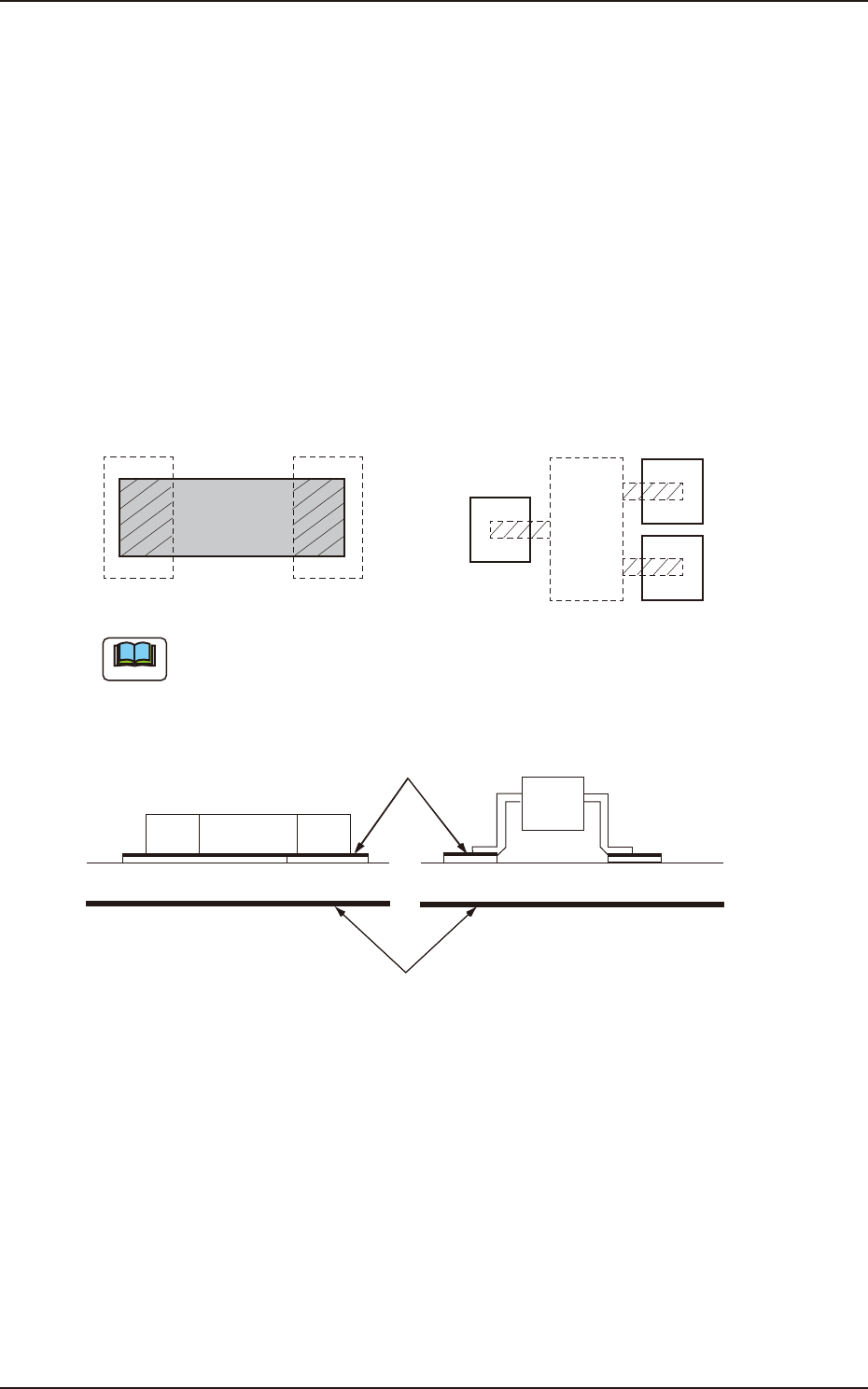
The smaller the touch area with the PCB (solder paste) is in comparison with the component size,
the more frequently this type of failure occurs.
This applies commonly to these symptoms.
As shown in Fig. “F4E9”, power enough to hold a component will be given when square
components (resistors, capacitors, etc.) are used. However, the above symptoms may appear more
frequently when leaded components (transistors, diodes, etc.) are handled because of the small
touch areas.
Note
Square Component Leaded Component
The hatched area above shows the contact surface between component and solder paste.
PCB
Solder Paste
F4E9
EUKYX
5-11199-4100
3.1 Cause and Remedy of Placement Errors
(2-2) Machine-Based Factors
Shown below are the assumable main factors based on the machine.
When trouble occurs in some of the components (the components of the same type that have been
used in the past actual production), check for the following factors.
• Worn, Clogged, or Dirty Vacuum Nozzle
• Vacuum Nozzle Up/Down Movement Error
• Flow Rate of Broken Vacuum and Performance Error
• Improper Placement Height Level
• Imperfect Holding Power for Z Clamping
• Dirt and/or Nicks on Side View Camera
(3) Other Factors
The factors other than the machine-based ones are assumed to be the shape of the component, the
condition of the PCB, or the condition of solder paste or glue.
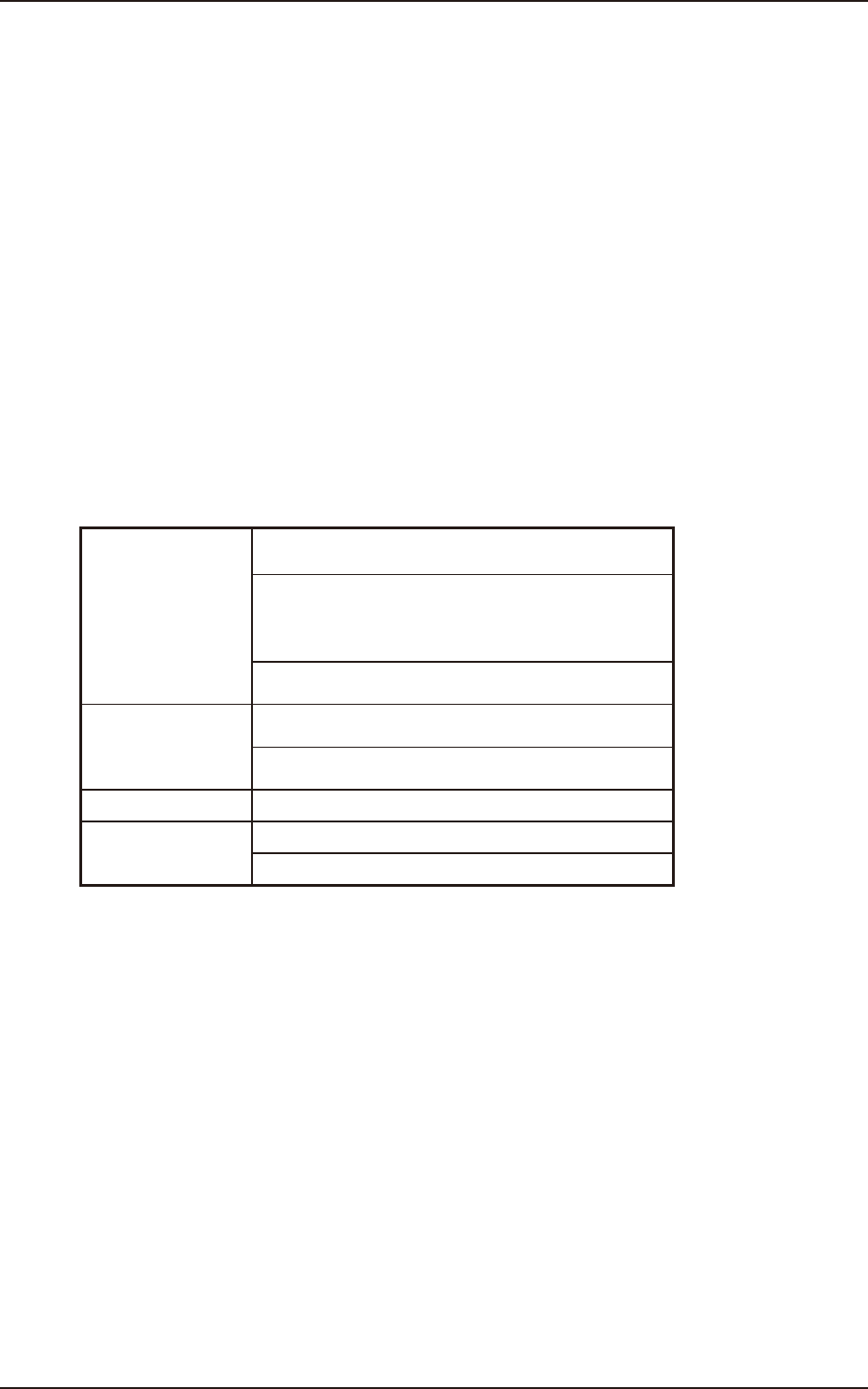
The factors are shown in the table below.
Check each item and take measures if necessary.
If no quick improvement can be made due to the condition of the PCB or solder paste, failures can
be avoided by slowing down the speed of the component placement or the PCB transfer.
Component
A foreign object exists on the upper surface of a
component and adheres to the vacuum nozzle.
There is a protruding portion on the upper surface of a
component, causing the lower surface of the vacuum
nozzle to wear out and an error during the teaching
operation through component recognition lighting.
Oil or mold lubricant adheres to the lower surface of a
component.
PCB Some PCBs vibrate during component placement
because the warpage is great.
Some PCBs are fixed imperfectly due to variations in
shape.
Glue
Shortage of Applied Glue
Solder Paste
Shortage of Applied Solder Paste
Shortage of Adhesion
EUKYX
5-12199-4100
3.2 Symptom-Based Troubleshooting
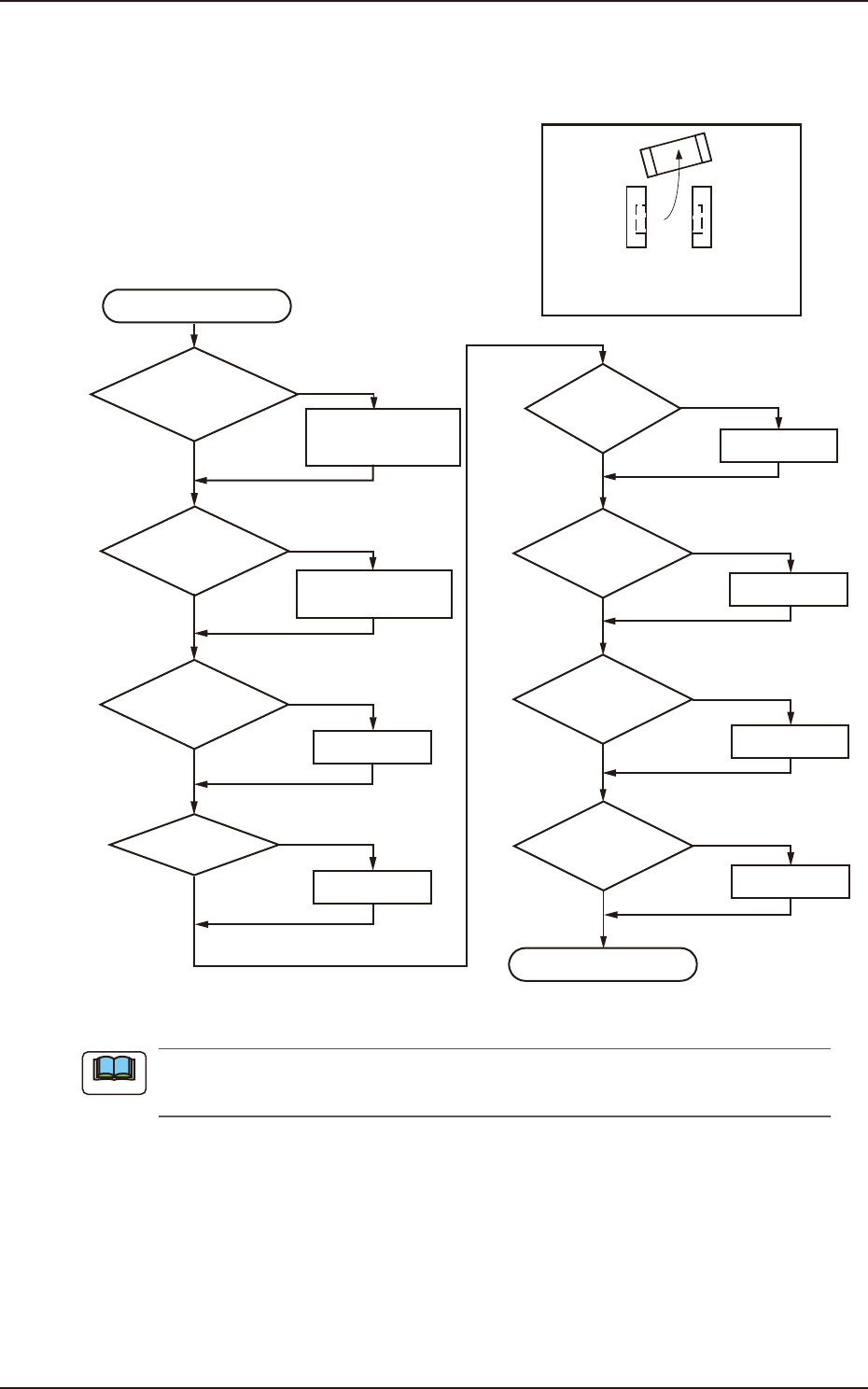
3.2 Symptom-Based Troubleshooting
(1)
Component Placement Marks at Specified Positions on PCB Lands
NG
OK
OK
OK
NG
NG
OK
NG
END
OK
OK
NG
NG
Correction
OK
NG
Replacement
NG
Note
OK
Dirt, Magnetization,
and/or Electrification
on Vacuum Nozzle
Cleaning,
Demagnetization,
and/or Deelectrification
Dirt on Vacuum
Filter and Attachment
Cleaning,
Replacement, or Repair
Verification of PCB
Thickness Data
Z Clamping
Correction
Adjustment
PCB Positioning
Vacuum Valve
ON/OFF
Switching
Component
Library Data
Improvement
Adhesion of
Solder Paste
Re-Setting
START
Component Placement Marks on
Solder Paste at Specified Positions
on PCB Lands
F4E10
Check the vacuum ON/OFF switching in the "Output Chk" tab sheet in the "I/O DIAG"
window. (Operation Sequence: [MAINT] Button
→
[DVC CHK] Button
→
"Output Chk" Tab)
Note