00196351-06_UM_ACT_DE_EN.pdf - 第127页
ACT - Accurac y Check Tool / User Manual 09/2015 Edition 37 4.1.3.1 Creating the Setup – Tray Changer (TC) The ACT tray may be used, but has to be positi oned in line with t he waffle - pack tray carrier ( WTC, tray hold…
ACT - Accuracy Check Tool / User Manual 09/2015 Edition
36
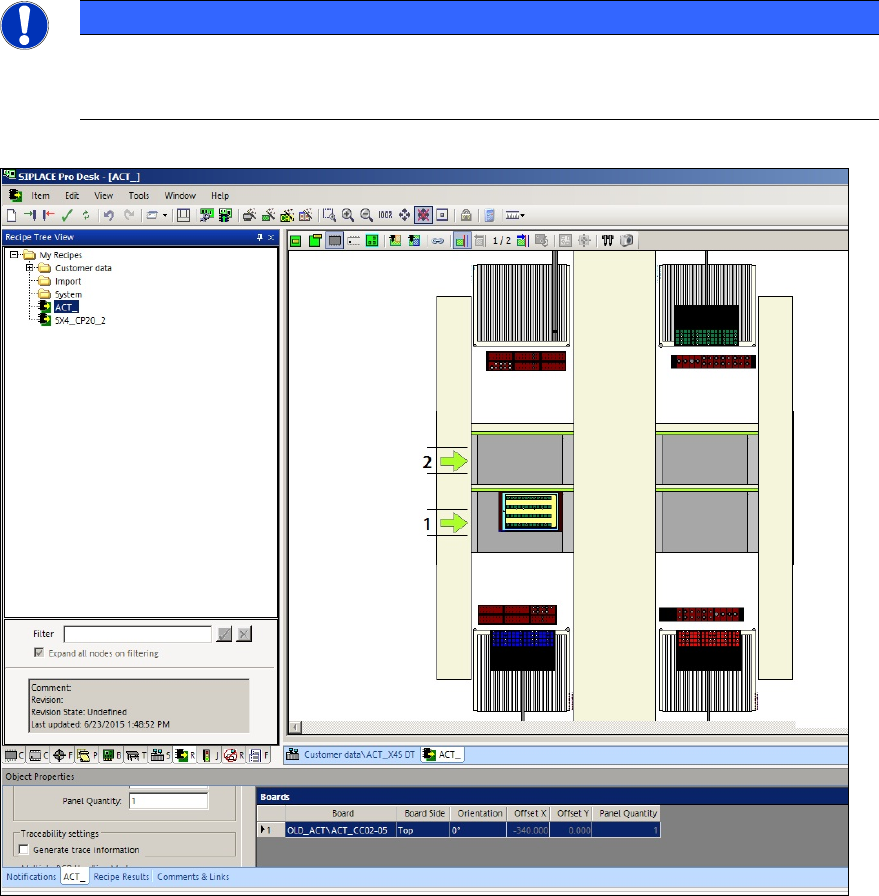
The next screen displays an example of a recipe:
NOTICE
The different ACT glass component types are displayed in different colors. For a
successful download to the station, the colors of the components in the tray and on the
board have to match each other. This is visible in the recipe.
Figure 4-7: Example of a recipe with ACT board and glass components (CC02-05)
► Make sure that the number of required nozzles is available in the nozzle changer for the head
to be measured, i.e. in accordance with the number of segments of the head to be measured.
ACT - Accuracy Check Tool / User Manual 09/2015 Edition
37
4.1.3.1 Creating the Setup – Tray Changer (TC)
The ACT tray may be used, but has to be positioned in line with the waffle-pack tray carrier (WTC,
tray holder).
Some examples can be found in SIPLACE Pro under My tables \ ACT \ TC \.
CAUTION
In order to place the ACT tray mechanically safe, it has to be positioned at the stop on
the side without pockets. It can be fastened wit
h two holding magnets (see the marker in
Figure 4-8).
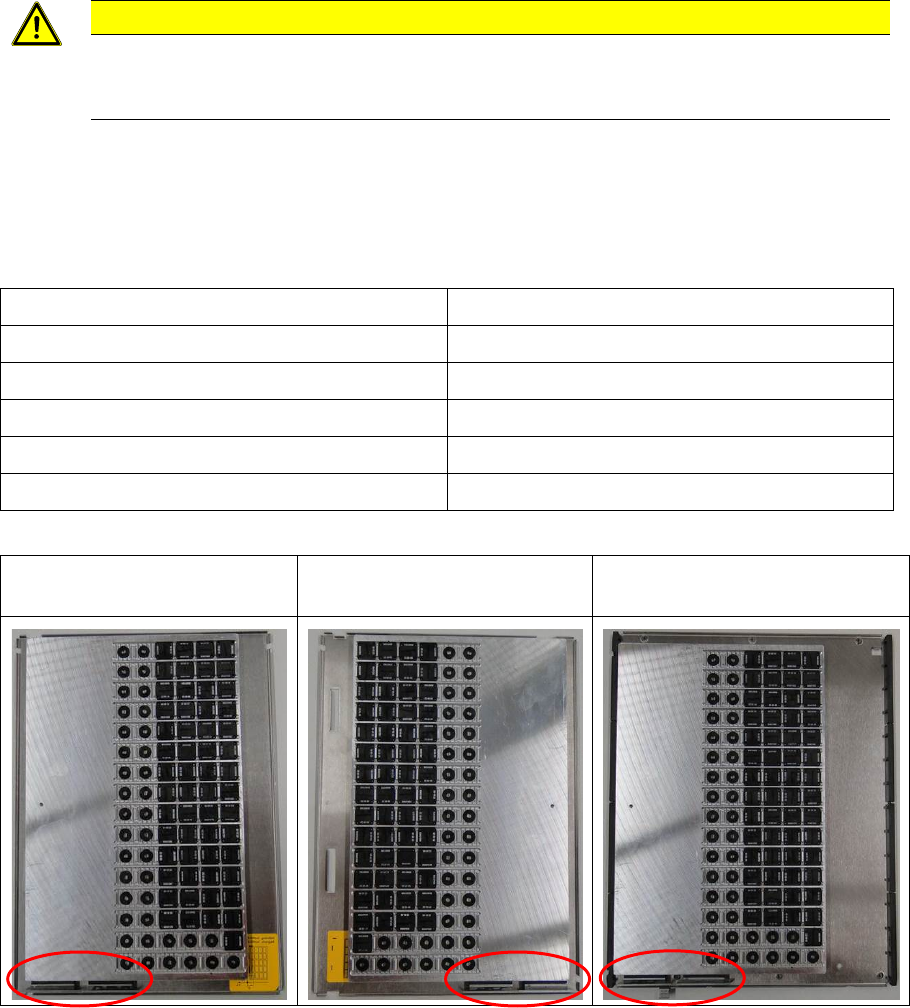
In SIPLACE Pro under My waffle-pack trays \ ACT \ xxx_L ; xxx_R the tray has to be set-up on the
waffle-pack tray carrier depending on if the tray changer has a left or a right stop.
Overview of tray changers with left and right stops
Tray changer Where is the stop?
WPC4 Left ( ACT \ xxx_L)
WPC4 – SIPLACE D3 Left ( ACT \ xxx_L)
WPC 5 Right ( ACT \ xxx_R)
WPC 6 Right ( ACT \ xxx_R)
MTC2 Left ( ACT \ xxx_L)
Table 4-3: Tray changers with left or right stops
FMT WPC4
Left ( ACT \ xxx_L)
FMT WPC5 + WPC6
Right ( ACT \ xxx_R)
MTC2
Left ( ACT \ xxx_L
Figure 4-8: ACT tray on waffle-pack tray carrier
ACT - Accuracy Check Tool / User Manual 09/2015 Edition
38
4.1.3.2 Pass-through
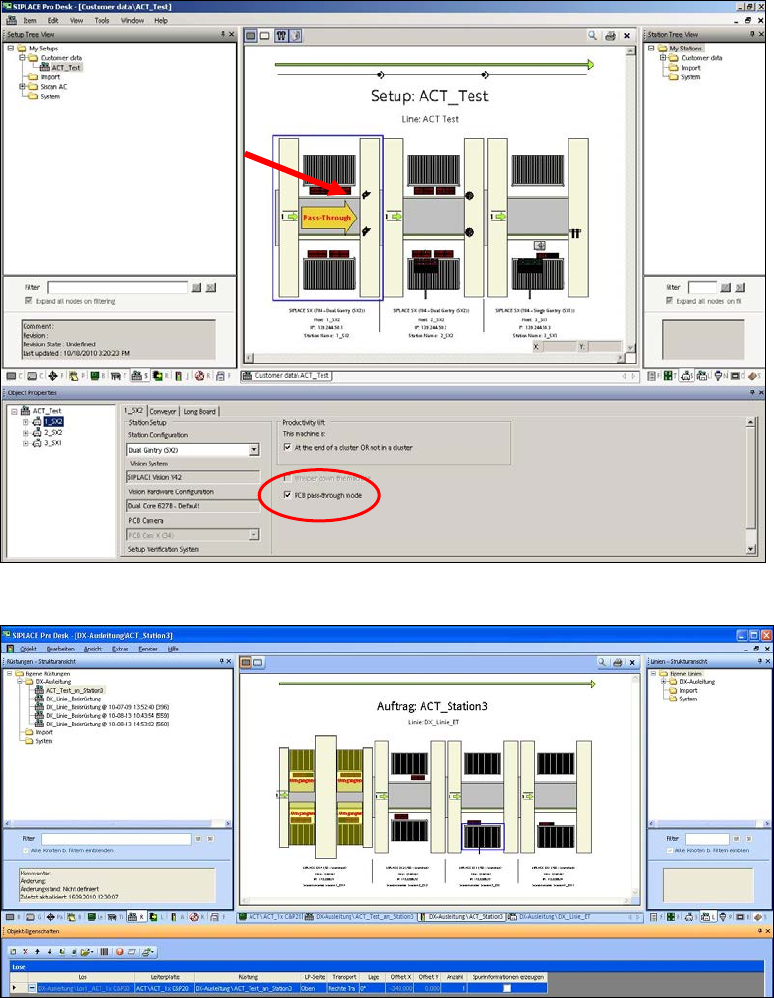
If there are multiple machines in the line, the ACT plate has to be transported through single
machines either before or after the machine to be measured.
The Pass-through function can be activated and deactivated in the setup of the respective station.
Figure 4-9: Pass-through function
Figure 4-10: Specification in Line Control GUI with DX4 in Pass-Through mode