252301 Issue 2.0.pdf - 第145页
GEM Manual for DEK Printers Additional Capabilities I ssue 2.0 June 9th, 2011 page 145 of 156 Start Modif ication >>> 10.4 Proce ss Verific ation Functionality is provided to allow the host computer to monitor t…
GEM Manual for DEK Printers Additional Capabilities
Issue 2.0 June 9th, 2011 page 144 of 156
Equipment to Host Message Structure:
Stream 13 Function 6
L,4
1. <HANDLE>
2. <ACKC13>
3. <CKPNT>
4. <FILDAT>
Host to Equipment Message Structure:
Stream 13 Function 7
L,1
1. <HANDLE>
Equipment to Host Message Structure:
Stream 13 Function 8
L,2
1. <HANDLE>
2. <ACKC13>

GEM Manual for DEK Printers Additional Capabilities
Issue 2.0 June 9th, 2011 page 145 of 156
Start Modification >>>
10.4 Process Verification
Functionality is provided to allow the host computer to monitor the printer regarding the type of certain
consumable items. Consumable items to be monitored will be fitted with RFID tags. RFID antenna
located in appropriate places within the machine will be able to read the consumable identification
information stored in the tag and relay it to the factory host. The host is notified of the consumable
item ID using collection events. When the host is notified of the ID it can verify whether the item is
suitable for the current process and respond with a message indicating whether the item is correct.
If Process Verification is enabled all consumable items must be of the required type before the item can
be used. For example a print run or paste dispense will be prevented from starting if the transfer
material is of the wrong type.
The consumable items that can be monitored are:
• Transfer Material – e.g. flux or solder when applied via a Paste Dispenser or ProFlow.
There are a number of Process Verification related configuration parameters. These are detailed in the
table below:
DISPLAY NAME DESCRIPTION Value Range
Max Tag Read Attempt Used to control the maximum number of RFID
Tag read attempts. If the printer fails to read a
tag it will retry until this limit is reached.
1- 3 - 10000
SC Verif Timeout Used to control the maximum response time for
the host to return a verification verdict. The
timer is started when the printer notifies the host
of the read RFID Tag data
1- 120 - 600 s
Max SC RFID Notifies Used to control the maximum number of times
the printer attempts to notify the host of the read
RFID Tag data in the event of the host failing to
reply within the SC Verif Timeout period.
1- 3 - 10000
Note: Default values are shown bold.
10.4.1 Enable / Disable Item Verification
In order to enable or disable material verification the host must set an Equipment Constant to the
appropriate value. ECV = 0, verification disabled, ECV = 1, verification enabled. The EC value can
also be changed via the corresponding configuration parameter.
GEM Manual for DEK Printers Additional Capabilities
Issue 2.0 June 9th, 2011 page 146 of 156
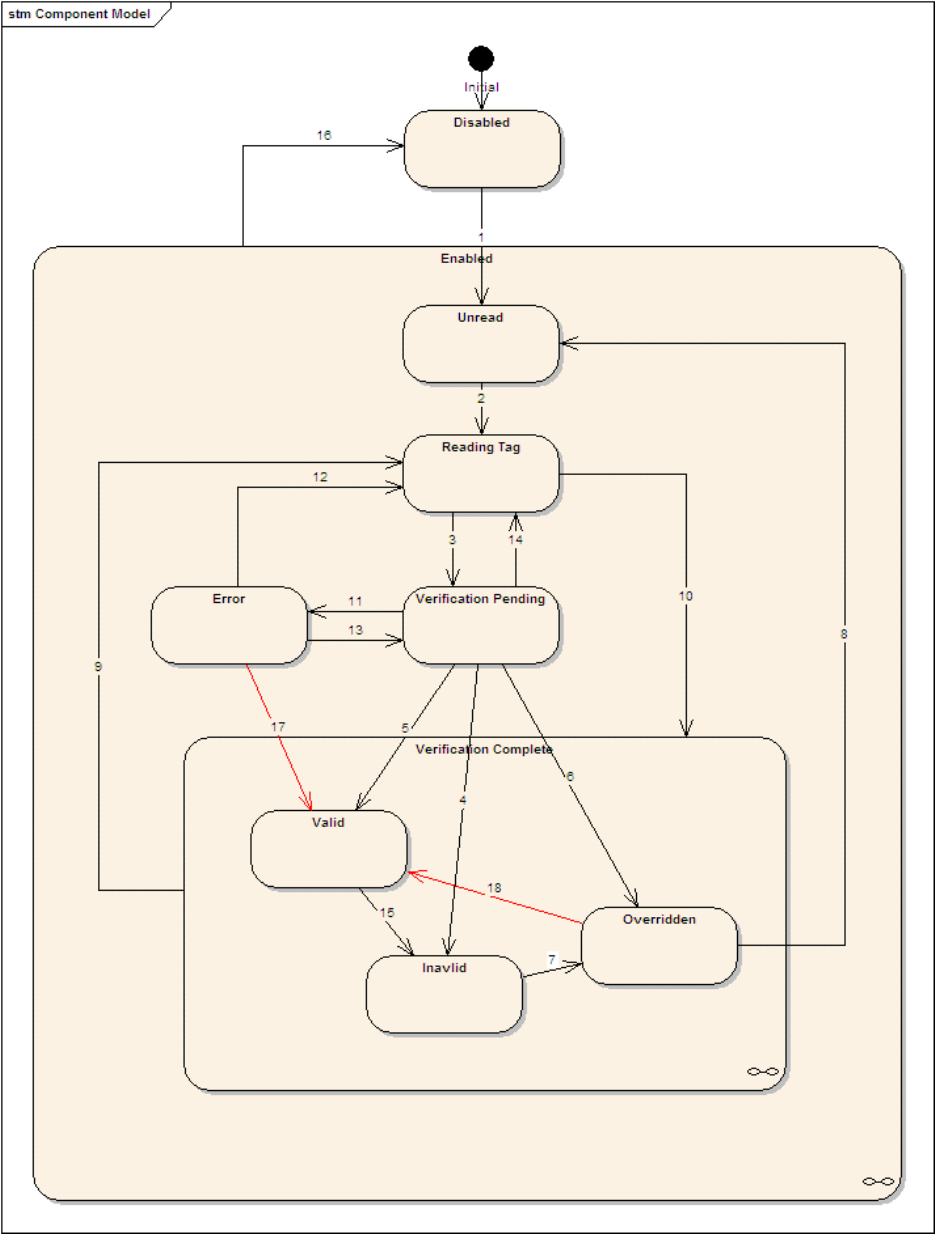
10.4.2 Verification State Model
Each verifiable item maintains a state machine in order to track its status. The model is used to
synchronise the actions of the host and printer. The following diagram illustrates the form of the state
machine.