00195406-01_Version Description Setup Center 2.3_ger eng.pdf - 第34页
Existing Restrictions Known Facts / Problems (General) Recovery Placement 34 Software Version Description SIPLACE Setup Center 2.3 7.1.10 Recovery Placement Setup Center 2.3 cannot work with modus Recovery Placement. 7.2…
Existing Restrictions
Download Partial Setup Restrictions
Software Version Description SIPLACE Setup Center 2.3
33
7 Existing Restrictions
7.1 Restrictions
7.1.1 Download Partial Setup
Setup Center 2.3 cannot work with modus Download Partial Setup.
7.1.2 Repair splice
When using splice sensors don't repair damaged packaging unit with splice because repair splice points
cannot be distinguished from the normal splice points.
7.1.3 Online Help
This version does not have an Online Help.
7.1.4 Operating mode
Mixed use of labels with „unique barcode“ and „Identical Component Lot unit“ is not supported.
7.1.5 Traceability
The component level indicator for the machines of the S-, F-, HS- and HF-Series recognizes identical
packaging unit information and ignores it. The menu field „Unique ID“ must therefore always be
transferred into a Traceability data field.
The settings „Identical Component Lot for linear feeders“ and „Identical Component Lot for tray
changers“ record the scanned „Unique ID“ in the data field „Batch“. The Traceability data for the
configured „Unique Id“ and „Batch“ barcodes will therefore both show the „Unique ID“.
Although Setup Center supports the management of packaging units with splice residues (packaging
unit with 3 tape segments), this leads to incorrect Traceability data for the residual segments. In the
Traceability data, this splice residue is shown as part of the packaging unit last refilled.
7.1.6 Tear down
The Machines of S-, F-, HS, and HF-Series do not yet support removal of packaging units. During
manual tear down, Setup Center sets packaging unit levels at the machine to zero and expects
threshold control to disable the tracks at the station. It is therefore important to enable threshold
control at the station, otherwise production can be continued in Setup Center, despite manual tear
down having been performed.
7.1.7 Barcode labels
The barcode fragment ExpiryDate (component expiry date on the packaging unit) is not evaluated
by Setup Center (no notification when time is exceeded).
7.1.8 Setup list
When SIPLACE Pro 4.1 is used, the setup lists printed out do not contain graphics of the
components.
7.1.9 Splice monitoring
The splice sensor functionality at the X-feeder requires an upgrade resp. exchange of soft- and
hardware which will be available in 10/2007. Until then this function is deactivated.
Existing Restrictions
Known Facts / Problems (General) Recovery Placement
34 Software Version Description SIPLACE Setup Center 2.3
7.1.10 Recovery Placement
Setup Center 2.3 cannot work with modus Recovery Placement.
7.2 Known Facts / Problems (General)
7.2.1 Setup Verification
It is a requirement that feeders are not pulled out or switched during setup verification. To put it
differently, as long as setup verification takes place for a single track, the feeder and the
corresponding packaging units must remain in the same location.
Urgent recommendation: when splicing a reel it must be verified immediatly (refill mode). A danger
exsit when extremely bad pickup rates occur and the CLI has small threshold values then unverified
components maybe placed. If a Splice is detected, the "active" function is available on the station
computer but should not be used. If no Splice sensors are installed the remaining quantity of a tape
running should be checked and corrected before splicing.
Use of the table check causes active component data to be overwritten at the station. This can reslt
in the lost of trace data if two reels are active on the track.
7.2.2 Quantity management
Quantity management for tray loaders is not supported.
If a reel does not have a unique ID barcode, the system can not differentiate between two elements
with identical quantities. If the packaging unit is taken from the feeder, information about the
remaining level is lost or unclear. It is no longer possible to monitor the quantities on the reels. If a
reel which was in this setup is then set up again, the user will need to manually correct the
component level with the help of the Component Level Indicator (CLI).
Wenn keine Gebindegröße als Barcode definiert ist, wird die Mengenangabe der Bauelemente aus
SIPLACE Pro verwendet. Die Mengeninformationen der Gehäuseform aus SIPLACE Pro werden
ignoriert.
7.2.3 Feeder
Tray feeders only support one component per level in the towers.
It is not possible to refill a level in an MTC or WPC. Refilling can only take place by replacing the
whole tray.
During Online Verification, the tray feeders WPC and MTC1 will only support a limited, forced setup
verification, since levels could otherwise be released by activation at the station.
The tape feeder 12/16 mm S tape feeder module and 24/32 mm S tape feeder module are only
supported, if the feeder type (e.g. 12mm S) remains the same in all setups used.
After a foil got torn at an X-feeder the new packaging unit will get activated without any new
verification. This is also the case when forced verification is activated. The activation can be
configured with or without scanning.
7.2.4 Line computer
The line computer is not supported.
Existing Restrictions
SIPLACE Pro Known Facts / Problems (General)
Software Version Description SIPLACE Setup Center 2.3
35
7.2.5 SIPLACE Pro
The station-wise download of SIPLACE Pro is not supported.
The barcode modus of SIPLACE Line Control 2.x is not supported.
SIPLACE Pro 4.0 is not supported by Setup Center 2.3.
Setup Center references objects in SIPLACE Pro by names and is therefore unable to find them
again, if the names are subsequently changed.
The names of SIPLACE Pro objects in Setup Center are case-sensitive. Always observe the correct
case!
In general, Setup Center doesn’t actively react to changes made in SIPLACE Pro. This means that
all actions like renaming, moving, changing objects are not tracked by Setup Center. After having
done changes in SIPLACE Pro, Setup Center needs to reload the setups. In case of Online
Verification, Setup Center has to be restarted, in case of Offline Verification it is sufficient to close
and reopen the setup. In case of renaming of lines the line configuration must be modified in the
setting dialog. Currently, only change that is actively recognized is the addition of a barcode to a
component.
SIPLACE Pro Server Selection Tool The SIPLACE Pro Server Selection Tool does not support
SIPLACE Pro 4.1 and higher.
7.2.6 Length of setup names
The length of setup names is limited to 20-50 characters, i.e. only the first 20 or 50 characters are
looked at when there is a setup change.
7.2.7 SMV
Do not use special characters [ \ / : * ? „ < > | ] for the names of setups, lines and stations, as SMV
is unable to process these. SMV interface is used in the machines of the S-, F-, HS- and HF-Series.
7.2.8 Docking Station
A CAN-Bus – PCI Card is necessary to connect the docking station. This card enables you to
connect a maximum of 8 docking stations. The card supports 2 CAN-Busses so that 4 docking
stations can be connected to each bus. A maximum of one CAN-Bus – PCI Card per computer is
possible.
If the CAN Bus is not properly terminated, problems may arise when trying to connect.
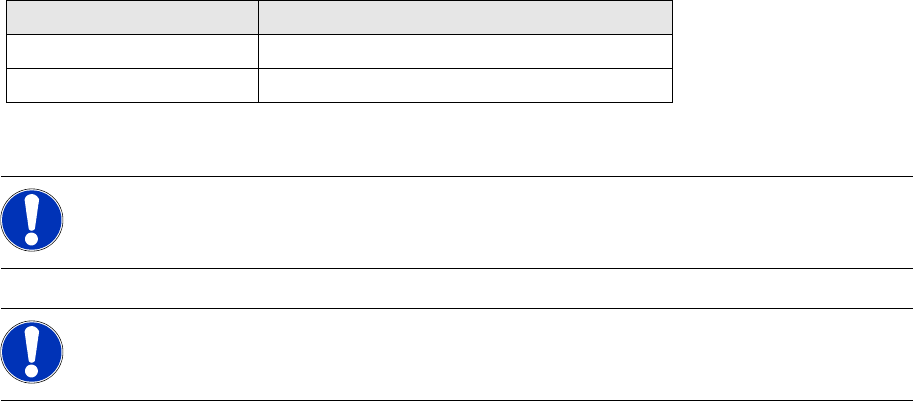
Stationssoftware Max. length of setup names
407 / 503 20 characters excluding path data
408 / 505 / 601 / 604 50 characters including path data
NOTE:
We recommend entering a unique setup name in SIPLACE Pro. Otherwise a setup change is
not recognized by Setup Center.
NOTE:
The station name must be unique within a line. The line name must be unique throughout the
TraceHost system.