Spectrum Operating Manual - 第120页
S2-9 XX X Se ri es Disp ensi n g Syst em IOM Man ual Maintenance 6-8 © 2023 Nordson Corporatio n 6.7 Ver ifying Interlo c k Fun ctionality To verify inte rlock functionality: 1. Power on th e dis p ensing system , see 4.…
S2-9XXX Series Dispensing System IOM Manual Maintenance
© 2023 Nordson Corporation 6-7
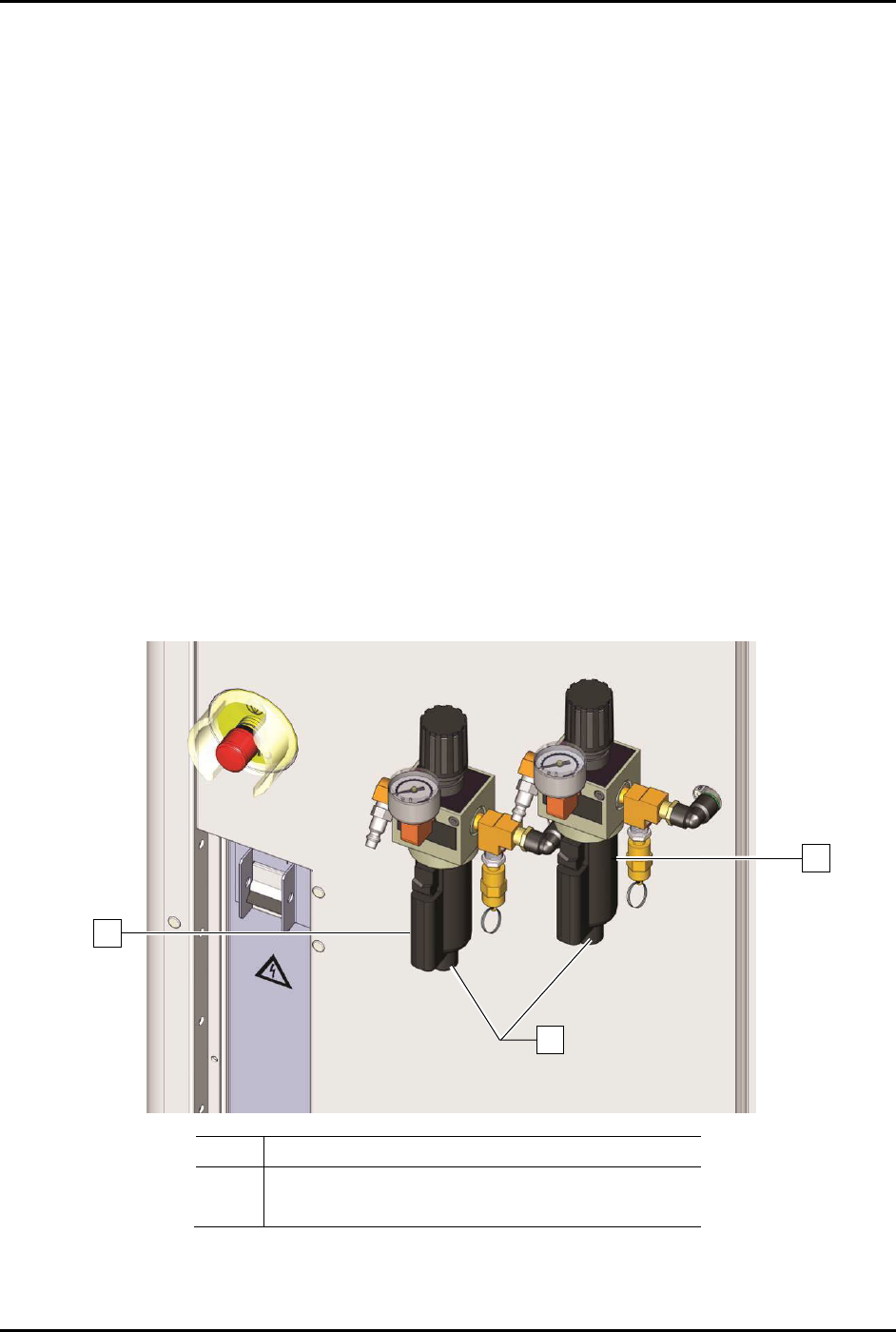
6.6 Draining the Water Trap
The facility air supply may contain moisture that can damage the dispensing system, the dispensing
system is equipped with two water traps that condense this moisture before it enters the pneumatic
system. The operator or technician must drain the water trap weekly or whenever it is full.
Tools and Materials Needed:
• Container for wastewater
To drain the water traps (Figure 6-3):
NOTE The following procedure is for the water traps at the rear of the dispensing system. If the
system water traps are connected to a bulk reservoir, the bulk reservoir should be drained
as needed.
1. Locate the water traps at the rear of the system.
2. Shut off facility air pressure and disconnect the facility air supply from the main air
pressure regulator inlet.
3. Hold a container under the water traps to catch the water and open the water drain knob by
turning counterclockwise.
4. After the trap has been drained, close the water trap drain knob by turning clockwise.
5. Reconnect the facility air supply to the main air pressure regulator inlet.
Item
Description
1 Water Trap
2 Drain Knobs
Figure 6-3 Draining the Water Traps
1
2
1
S2-9XXX Series Dispensing System IOM Manual Maintenance
6-8 © 2023 Nordson Corporation
6.7 Verifying Interlock Functionality
To verify interlock functionality:
1. Power on the dispensing system, see 4.3 Powering on the Dispensing System.
2. Start Fluidmove. Refer to the Fluidmove User Guide or Fluidmove Online Help.
3. Open the Fluidmove Jog window and use the position controls to move the dispensing head
in the X, Y, and Z-axes.
4. Open the dispensing area door.
Confirm that the light beacon is yellow and that there is a Fluidmove message
indicating that the dispensing area door is open.
5. Manually move the dispensing head in the X, Y, and Z-axes.
Confirm that the dispensing head moves freely (motors are not producing force).
6. While observing the dispensing head, close the dispensing area door and acknowledge the
Fluidmove error message.
Confirm that the dispensing head moves to the position it was in prior to opening the
dispensing area door.
WARNING! Immediately remove the dispensing system from service if the light beacon is not
yellow or the dispensing head does not move freely when the dispensing area
door is open.
S2-9XXX Series Dispensing System IOM Manual Maintenance
© 2023 Nordson Corporation 6-9
6.8 Computer Battery Reset
To extend the life of the battery, it is recommended that you perform the following procedure every six
months.
To reset the battery:
1. Click
Start > Control Panel on the Windows Taskbar.
The Windows Control Panel opens.
2. Select
Power Options > Power Manager > Launch Power Manager > Battery
Information > Battery Maintenance
.
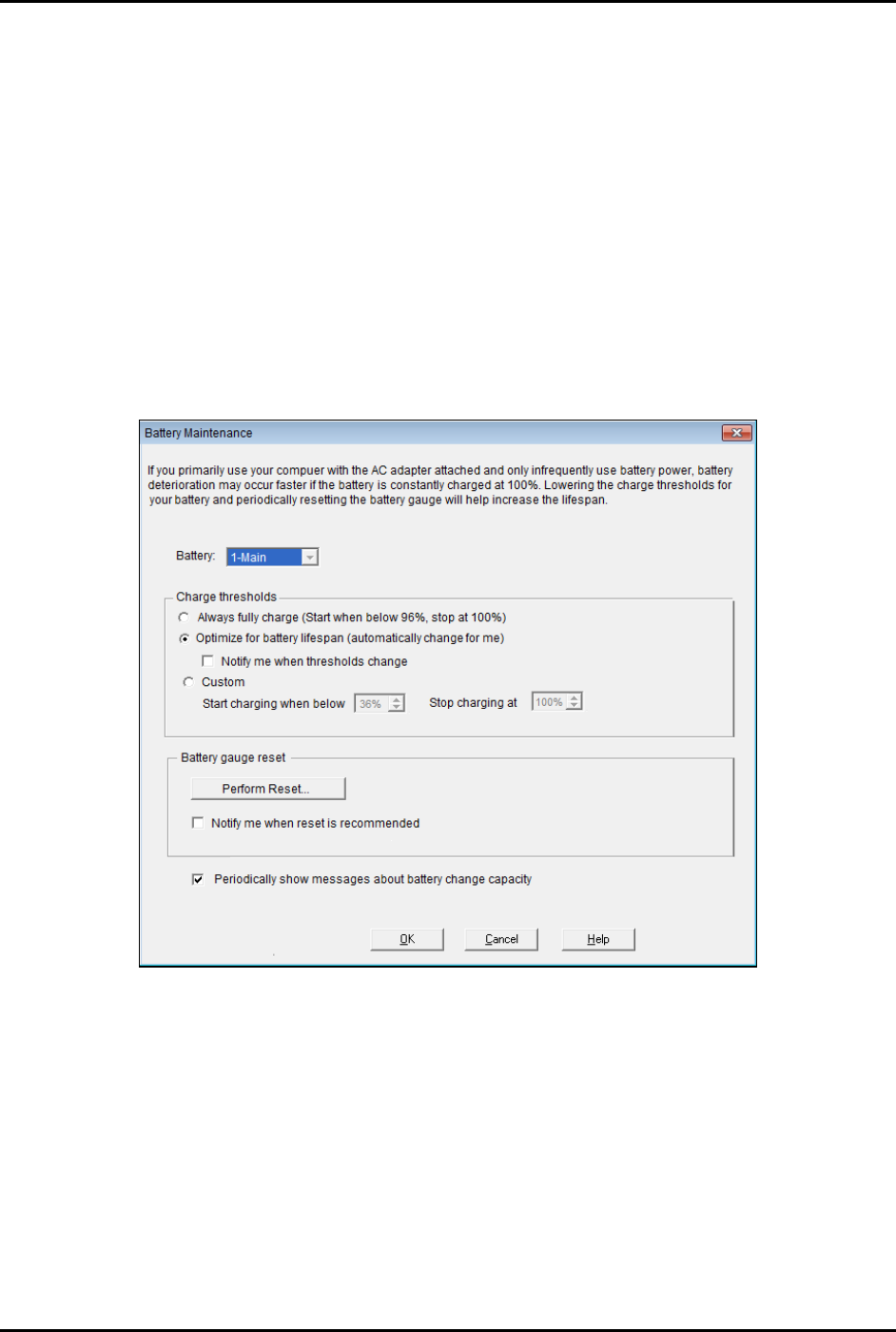
The Battery Maintenance window opens (Figure 6-4).
3. Verify the settings are as shown in Figure 6-4.
Figure 6-4 Battery Maintenance Window