Spectrum Operating Manual - 第141页
S2-9 XXX Se ri es Dispensing Sys te m IOM Man ual Troubleshootin g © 2023 Nordson C orpor ation 7-3 7.4.2 Conveyor Table 7-2 Co nve yor Trouble shoo ti ng Symptom Poss ible Cause Recovery Rails or belt wil l not mo ve E …

S2-9XXX Series Dispensing System IOM Manual Troubleshooting
7-2 © 2023 Nordson Corporation
7.4 Basic System Troubleshooting
7.4.1 System Power
Table 7-1 System Power Troubleshooting
Symptom Possible Cause Recovery Procedures
No power to major
system components
The ON (l) button has not been
pressed.
Press ON (l) on the front panel. The green
button illuminates green as an indicator the
machine is on.
A circuit breaker has been tripped.
The dispensing system incorporates circuit
breakers with a “push to reset” feature rather
than fuses. There are also branch circuit
breakers which could cause the laptop to lose
AC power and/or the 48V servo power supply
to lose power. For detailed troubleshooting of
power related issues, contact Asymtek
Technical Support.
A branch circuit breaker in one of
the conveyor modules has been
tripped.
Main power cable is disconnected.
Check that the main power cable is connected
to an AC source.
Main power circuit breaker turned
OFF.
Turn ON the main power circuit breaker at the
rear of the system. The sub-systems receive
electrical power entirely through the power
manager, accessible from the rear of the
machine. The main circuit breaker switch is the
only mechanism for completely powering down
the system, including power to the laptop.
EMO button has been activated.
1. Turn all EMO buttons clockwise until they
pop out. The EMO buttons at the front and
rear of the system interrupt power to all
power connections except the laptop
computer, light beacon and camera.
2. Press
ON
(
l
) on the front panel.
Interlock circuit is interrupted.
Make sure the dispensing area door is closed.
The interlock places the servo control system
in a low power state that is just sufficient to
hold the positioner in place for syringe
changes. Opening the dispensing area door
does not completely power down the
dispensing system and does not power off the
laptop.
Ventilation Time Delay (Flux
Applications).
The dispensing system turns on after an
approximate 60-second vent air time delay.
A fuse on the Main PWA may have
blown.
Replace fuse, see 8.16 Replacing Fuses.
System fails to start
Power controls cable disconnected.
Verify the power controls cables are properly
routed and connected from the power
manager to the front panel switches.
Button failure. Contact Asymtek Technical Support.
Safety Interlock fails to
reset
Interlock activated.
Make sure the hood is closed. If the interlock
still fails to reset, contact Asymtek Technical
Support.
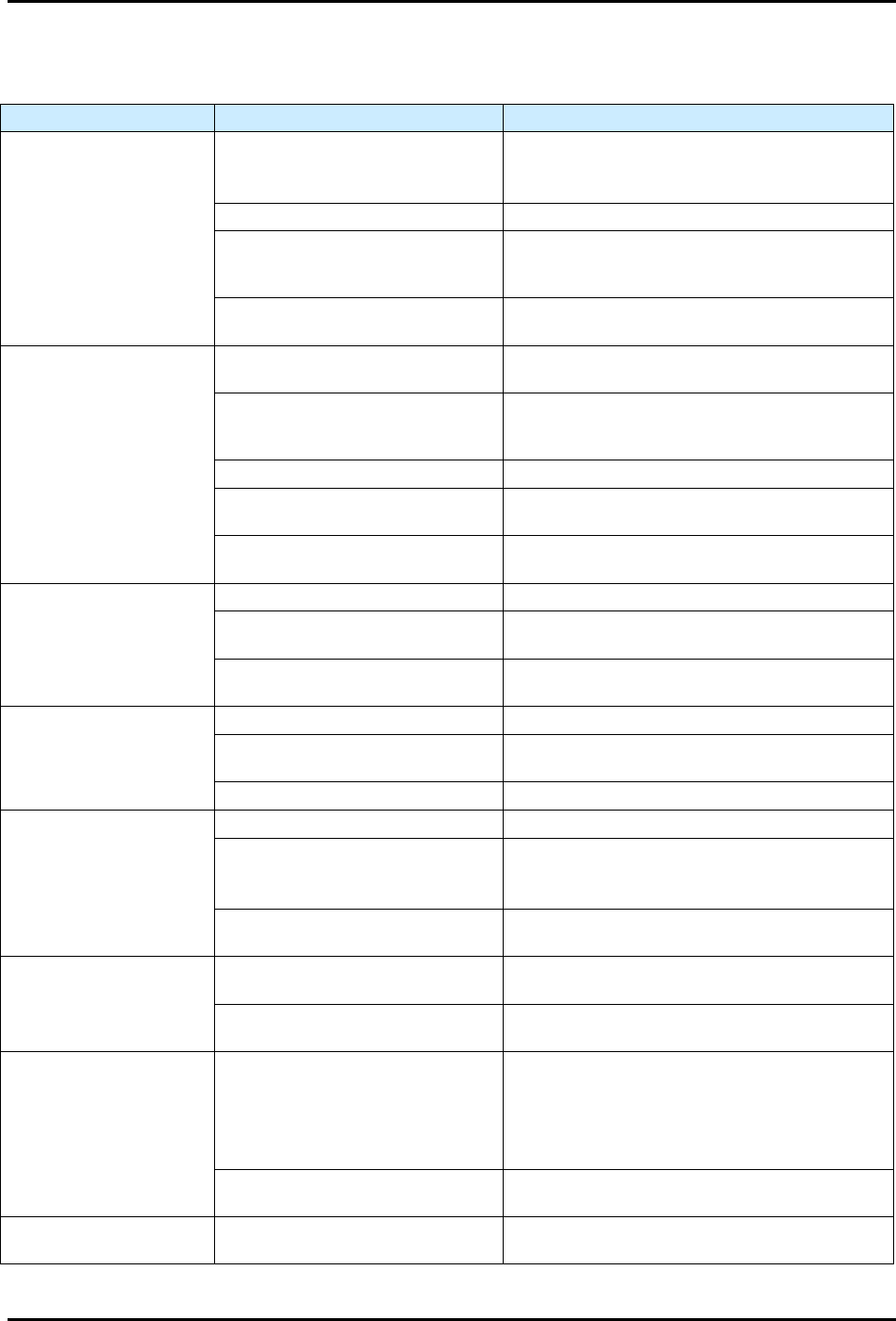
S2-9XXX Series Dispensing System IOM Manual Troubleshooting
© 2023 Nordson Corporation 7-3
7.4.2 Conveyor
Table 7-2 Conveyor Troubleshooting
Symptom
Possible Cause
Recovery
Rails or belt will not move
EMO button has been activated.
1. Turn the EMO button clockwise until it pops
back into position.
2. Press ON (I) on the operator’s console.
X or Y Motor cables are loose. Contact Asymtek Technical Support.
Fuse is blown in conveyor/heater
controller power supply.
Check the fuses by the heater power
connections on the conveyor controller and
replace if necessary, see 8.16 Replacing Fuses.
Conveyor/heater controller
malfunction.
Contact Asymtek Technical Support.
Stop pins, lift tables or
clamps are inoperative
Tooling air pressure is too low.
Adjust tooling air pressure regulator to supply
275 kPa (40 psi).
There is an air leak in a pneumatic
line or component.
Leaking component or line must be located and
repaired or replaced. Contact Asymtek Technical
Support.
The pneumatic device has failed. Contact Asymtek Technical Support.
Solenoid valve is defective.
The solenoid valve must be replaced. Contact
Asymtek Technical Support.
Conveyor may not be properly
configured in Fluidmove.
Contact Asymtek Technical Support.
Conveyor does not
transfer parts from
upstream to downstream
machines
Workpiece or carrier is jammed. Contact Asymtek Technical Support.
SMEMA interface is not functioning
properly.
Contact Asymtek Technical Support.
Incorrect alignment of upstream or
downstream machine.
The machines must be realigned. Contact
Asymtek Technical Support.
Board sensors not
sensing when board is
present
Board sensor is not active. Contact Asymtek Technical Support.
Board sensor is dirty.
Clean board sensors with a soft cloth or with
blown air.
Board sensor is out of adjustment. Contact Asymtek Technical Support.
Board will not index to
correct position
Stop pin is not receiving air. Contact Asymtek Technical Support.
Board sensor is dirty, not active or
out of adjustment.
Clean board sensor.
If no improvement, contact Asymtek Technical
Support.
Gap between conveyor rails is too
narrow
Check conveyor width and readjust as
necessary.
Conveyor does not move
at all (with Fluidmove
position controls)
Conveyor/heater controller has
no power.
Verify that the AC power cable is connected to
the module and to the facility power source.
Branch circuit breaker in 30A
power manager tripped.
Reset circuit breaker.
Conveyor jams or does
not move
Gap between conveyor rails is too
wide.
1. Stop the dispensing program.
2. Realign the workpiece on the conveyor belt.
3. Use the Fluidmove position controls to adjust
the rail gap.
4. Restart the dispensing program.
The carrier is bent.
Stop the dispensing program and remove the
carrier.
Fails to find width Home
The width “home” sensor has
failed.
Contact Asymtek Technical Support.

S2-9XXX Series Dispensing System IOM Manual Troubleshooting
7-4 © 2023 Nordson Corporation
7.4.3 Dispense Head Controller Connections and Functions
Table 7-3 Dispensing Head Troubleshooting
Symptom Possible Cause Recovery
Dispense Head
Controller fails to initialize
during Fluidmove startup
CAN terminator not present. Verify presence of CAN terminator.
Corrupt firmware or incorrect revision.
CAN firmware may need to be flashed to the
correct or latest firmware. Contact Asymtek
Technical Support.
Failed dispense head controller.
Verify DHC power indicator LEDs for
3.3V, -12V, and 12V are illuminated.
A fuse on the PDHC may have blown.
If power indicator lights on PDHC are not
illuminated, replace fuse, see 8.16 Replacing
Fuses.
Dispenses at wrong
Z-Axis position
Height sensor has been adjusted or is
loose.
Adjust height sensor and tighten locking screw,
see 5.12 Adjusting the Height Sensor Probe
(Option).
Nozzle/needle has been changed.
Perform a “Valve Offsets” or “Calculate Master
Offsets” routine in Fluidmove. For assistance,
refer to the Fluidmove User Guide or Fluidmove
Online Help.
No fluid dispensing
Valve setup incorrect.
Verify the valve type set in Fluidmove matches
the dispensing valve, and that the valve is
plugged into the pump connector on the
dispense head.
Valve Fatal Following Error (FFE).
1. Ensure valve does not have cured material
inside of it.
2. Exit Fluidmove, cycle power to the machine,
and retry.
3. PID parameters are not correct. Contact
Asymtek Technical support for correct PID
parameters for the particular pump being
used (applicable to the DV-7000, DV-8000,
and DP-2000 only).
Z-Axis Noise
Z counterbalance springs are not set
up correctly.
With the dispensing area door open, manually
lower the valve about 25 mm (1 in). When you
let go of the valve, it should neither rise nor fall.
If it does, you will need to adjust the Z-head
counterbalance, see 5.7 Adjusting the Z-Head
Counterbalance Force.
Wrong tuning file is loaded into the
machine.
The tuning values are set at the factory
according to the system configuration (single
valve vs. dual valve set up). To change tuning
files, contact Asymtek Technical Support.