Spectrum Operating Manual - 第88页
S2-9 XX X Se ri es Disp ensi n g Syst em IOM Man ual Calibration and Adj us tment 5-12 © 2023 Nordson Corporatio n 5.8 Adjustin g the Board Sensor s B oa rd s ens o rs are optica l sensors located a long the length of th…
S2-9XXX Series Dispensing System IOM Manual Calibration and Adjustment
© 2023 Nordson Corporation 5-11
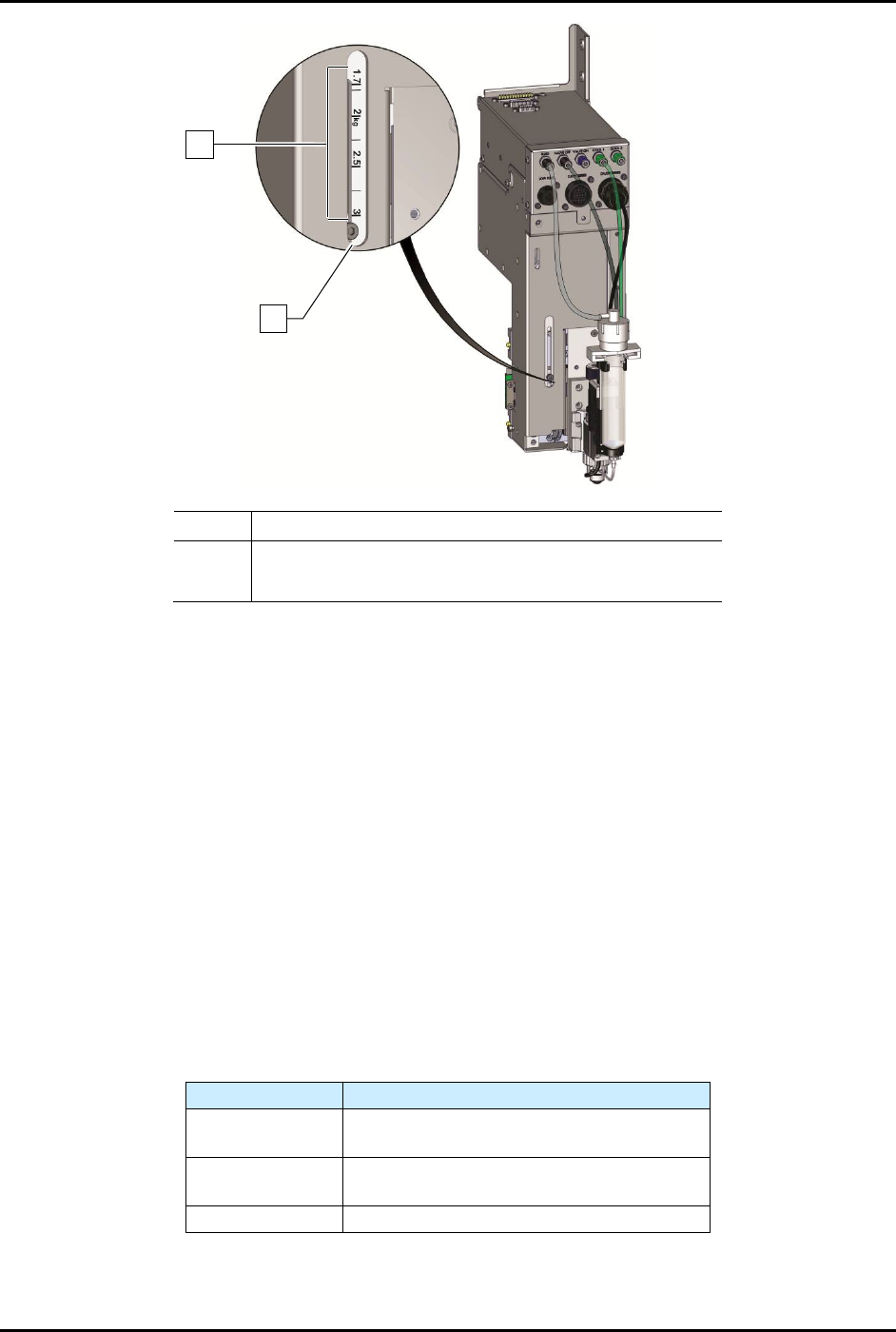
Item Description
1 Payload Settings
2 Adjustment Screw
Figure 5-12 Z-Head Counterbalance Force Adjustment
8. Reinstall the camera and bracket.
9. Reconnect the camera and light source cables.
10. Close the dispensing area door.
11. Recalibrate the camera, see 5.6 Calibrating the Scale.
12. Perform a machine offsets procedure.
Refer to the Fluidmove User Guide or Fluidmove
Online Help to perform the offset procedures.
To test counterbalance tension:
1. Place valve on Z-head and move the valve to middle of dispense area.
2. Open the dispensing area door.
The Z-head should not rise or drop more the 6.3 mm (1/4 inch).
3. Readjust tension if necessary.
Table 5-1 Counterbalance Spring Settings
Z-payload (kg)
Typical Applications
0 - 1.7
Standard (i.e. single valve)
Standard with laser height sensor
1.7 - 2.2
Dual action
Dual action with laser height sensor
2.2 - 3
Any custom tooling exceeding 2.2-kg
NOTE The settings in Table 5-1 are for reference purposes only. Certain applications may
require different settings.
2
1
S2-9XXX Series Dispensing System IOM Manual Calibration and Adjustment
5-12 © 2023 Nordson Corporation
5.8 Adjusting the Board Sensors
Board sensors are optical sensors located along the length of the front conveyor rail. The sensors detect
the presence of the workpiece and report it to the conveyor controller. Board sensor sensitivity should be
adjusted after initial installation and if the sensors fail to sense the presence of a workpiece. Depending on
whether the system has a single-lane or dual-lane conveyers, there may be as many as six downward-
facing board sensors (pre-dispense, dispense, and post-dispense station for each conveyor). Sensitivity
adjustments for downward-facing board sensors are made on fiber optic amplifiers mounted under the
dispensing area front cover.
5.8.1 Standard Operation and Tuning
To install the board sensor (Figure 5-13):
1. Unlock the fiber lock (UP position). Insert ferrule ends until the fiber cords are fully seated.
Lock the fiber lock down into position on the conveyor rail.
NOTE Fiber ends are not designated as send or receive. Each ferrule can be used in
either amplifier position.
2. Verify that the digital value of the amplifier is less than 100 with the fiber array pointed
away from any objects (within 6 inches). This ensures array “cross-talk” will not
significantly degrade the signal.
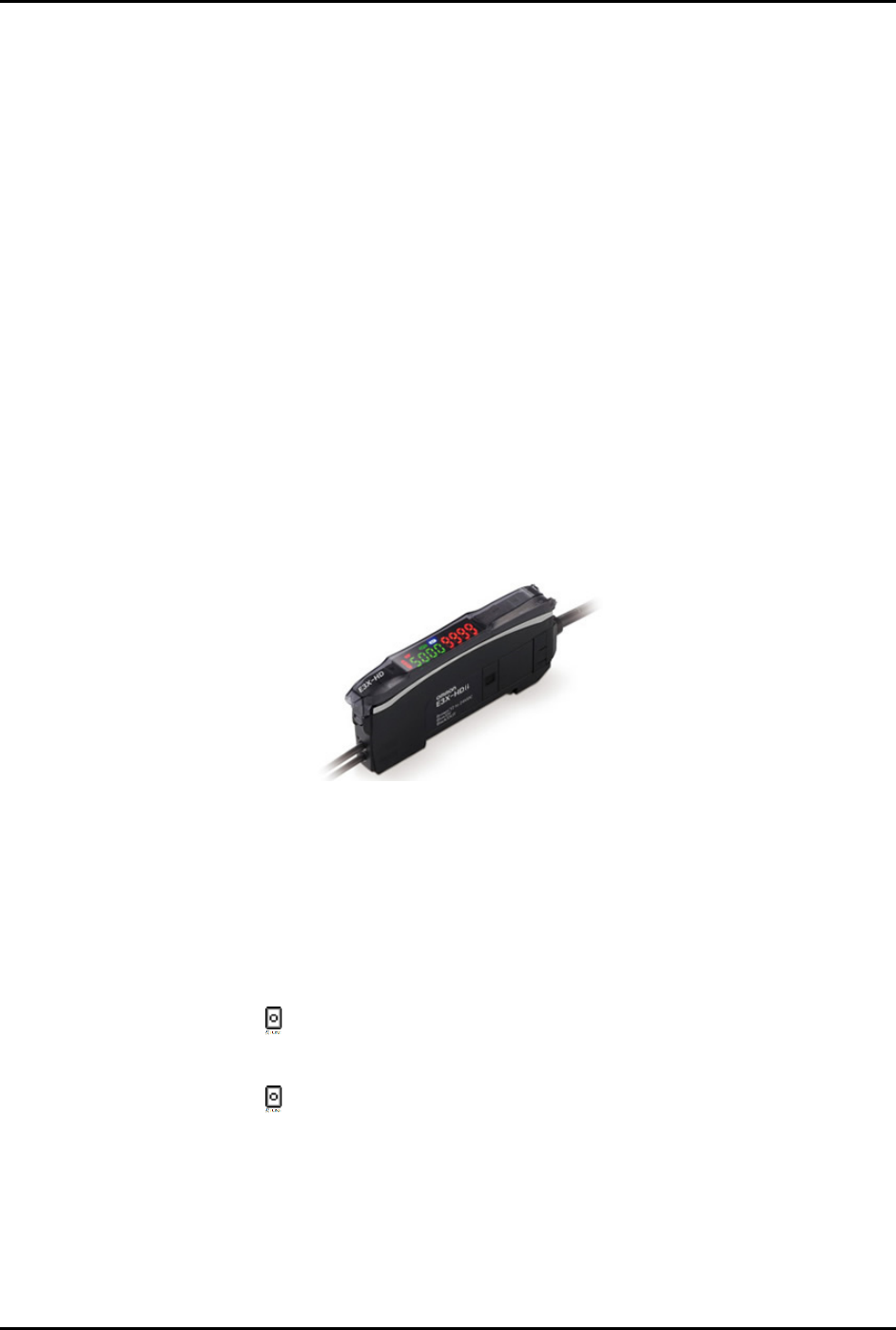
Figure 5-13 E3X-HD Board Sensor
To adjust for workpiece presence/absence (Figure 5-14):
NOTE The E3X-HD 11 sensor requires only one button; place the part/board over the sensor and
push
STune and then move the part/board away from the sensor and push STune again.
1. With the dispensing system on and the fiber installed into the amplifier, place the
carrier/board on the conveyor so that it is breaking the fiber optic sensor beam.
2. Press the
STune button once.
3. Move the carrier/board so that it is clear of the fiber optic sensor beam.
4. Press the
STune button again.
5. Ensure the threshold level (number in red after inverting display, green if normal display) is
between the board present/not present range.
6. If the threshold number is in range, standard tuning is complete.
S2-9XXX Series Dispensing System IOM Manual Calibration and Adjustment
© 2023 Nordson Corporation 5-13
7. If the threshold value is not in the range of the present/not present values, follow the steps
below to adjust the light level. Step 7a through Step 7e are only required if the board sensor
does not respond correctly after adjustment.
a. Press and hold the
Mode button for 3 seconds until [Func dFLt] (or [Func oPt])
begins to blink on the display.
b. Click
Mode button once. You will see [HS] followed by a number.
c. Click the (
+) button until you see [Stnd]. Press and hold Mode until the two sets of
numbers appears again.
d. If the threshold number is still not within the range of values, repeat Step 7b and
Step 7c, but this time click the (
+) button until you see [GIGA].
e. If threshold is still not within range, the fiber optic sensor will need to be moved closer
to the carrier/board.
Power Tuning
When Light
Level is
Saturated
Setting Reset
Key Lock
Zero Reset
MODE
MODE
L/D
UP/DOWN
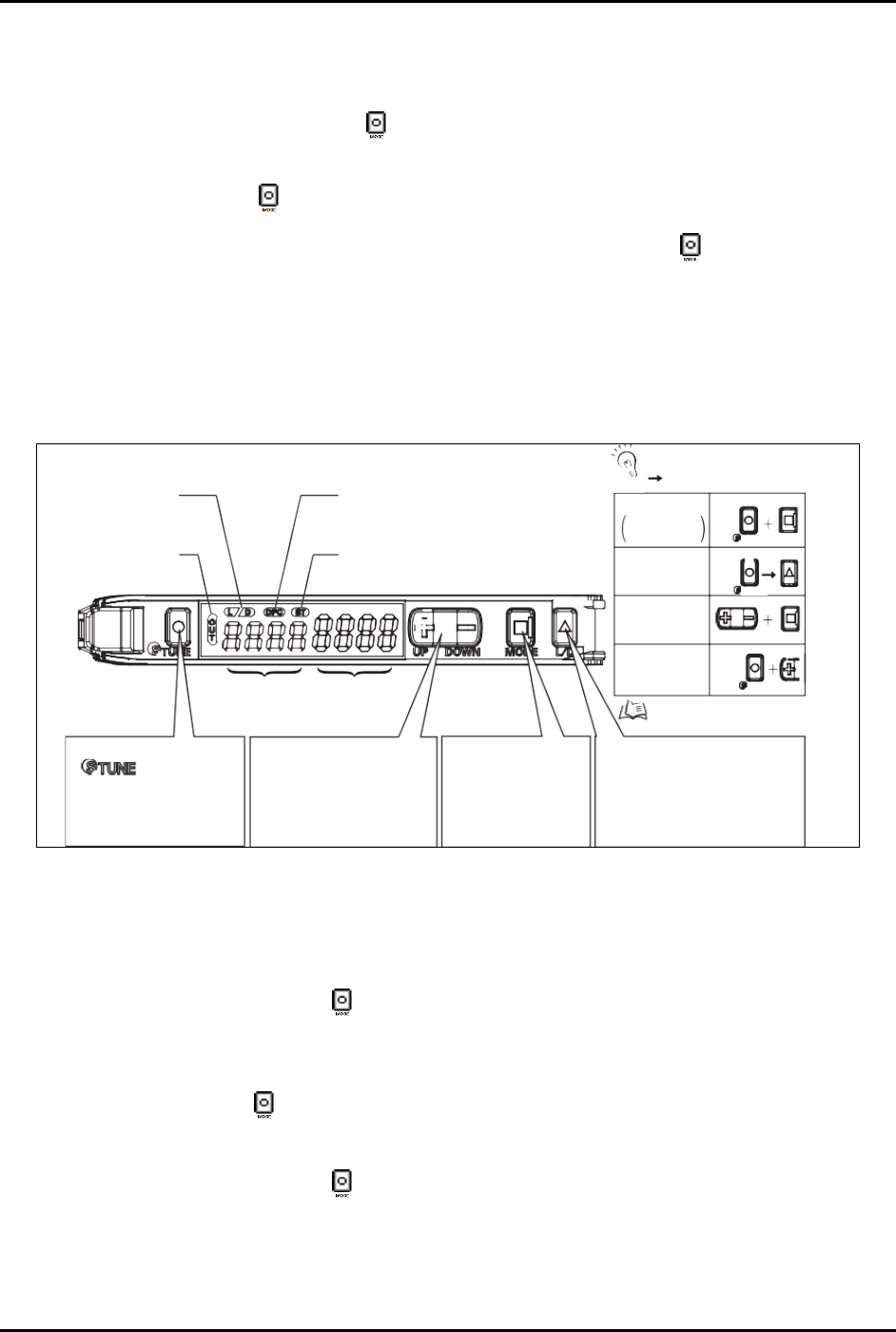
[DPC Indicator]
Turns ON when Dynamic Power Control is
effective.
[ST Indicator]
Turns ON when Smart Tuning is in progress.
Refer to “Convenient
Setting Features”.
TUNE
TUNE
TUNE
Output Switch
[LD] Button
A single press switches between
Light ON/Dark ON. [L/D] indicator
changes.
Mode Change
[MODE] Button
Switches between SET
mode and RUN mode by
a long press (3 seconds
or longer) of the key.
Sensitivity Setting
[
] Button
A single press for each setting
with/without a workpiece.
[ST Indicator] turns ON.
Minute Threshold
Adjustment
[UP/DOWN] Button
The green digital value changes.
Threshold Level
Green Digital Display
Incident Light
Level
Red Digital Display
[LD Indicator]
Displays
Light ON/Dark O setting.
[OUT Indicator]
Turns ON when Output is
ON.
+
: Press both
: Press both in sequence
UP
CHECK!
Figure 5-14 Board Sensor Setting and Display Overview
5.8.2 Inverting the Display
To invert the display (Figure 5-14):
1. Press and hold the
Mode button for 3 seconds until [Func dFLt] begins to blink on the
display.
2. Click the
Up (+) button once so that [Func oPt] appears.
3. Press the
Mode button until [rEv oFF] is shown.
4. Click the
Up (+) button once so that [rEv on] appears.
5. Press and hold the
Mode button for 3 seconds until the two sets of numbers appear.
After inverting the display, the above diagram will be reversed; the green numbers will
represent the current light level and the red numbers will represent the threshold.