YG200_YG200L_Mainte_E.pdf - 第32页
Chapter 2 Daily maintenance items Contents 1 . C h e c k i n g t h e n o z z l e 2 - 1 1 . 1 C h e c k w i t h s o f t w a r e 2 - 1 1 . 2 C h e c k i n g t h e n o z z l e s v i s u a l l y 2 - 3 2 . C h e c k i n g t h…
1-11
1
Maintenance
n
Safety goggles and mask
Name
Description
Dust-proof goggles
Always wear these goggles and mask when using an air blow gun or IPA.
Dust-proof mask
2-1
2
Daily maintenance items
1. Checking the nozzle
Solder sticking to the nozzle tip or a clogged nozzle hole can cause component pickup errors and
recognition errors. Poor nozzle spring action can also cause pickup and mounting errors. To prevent such
problems periodically inspect and clean each nozzle.
1.1 Check with software
n
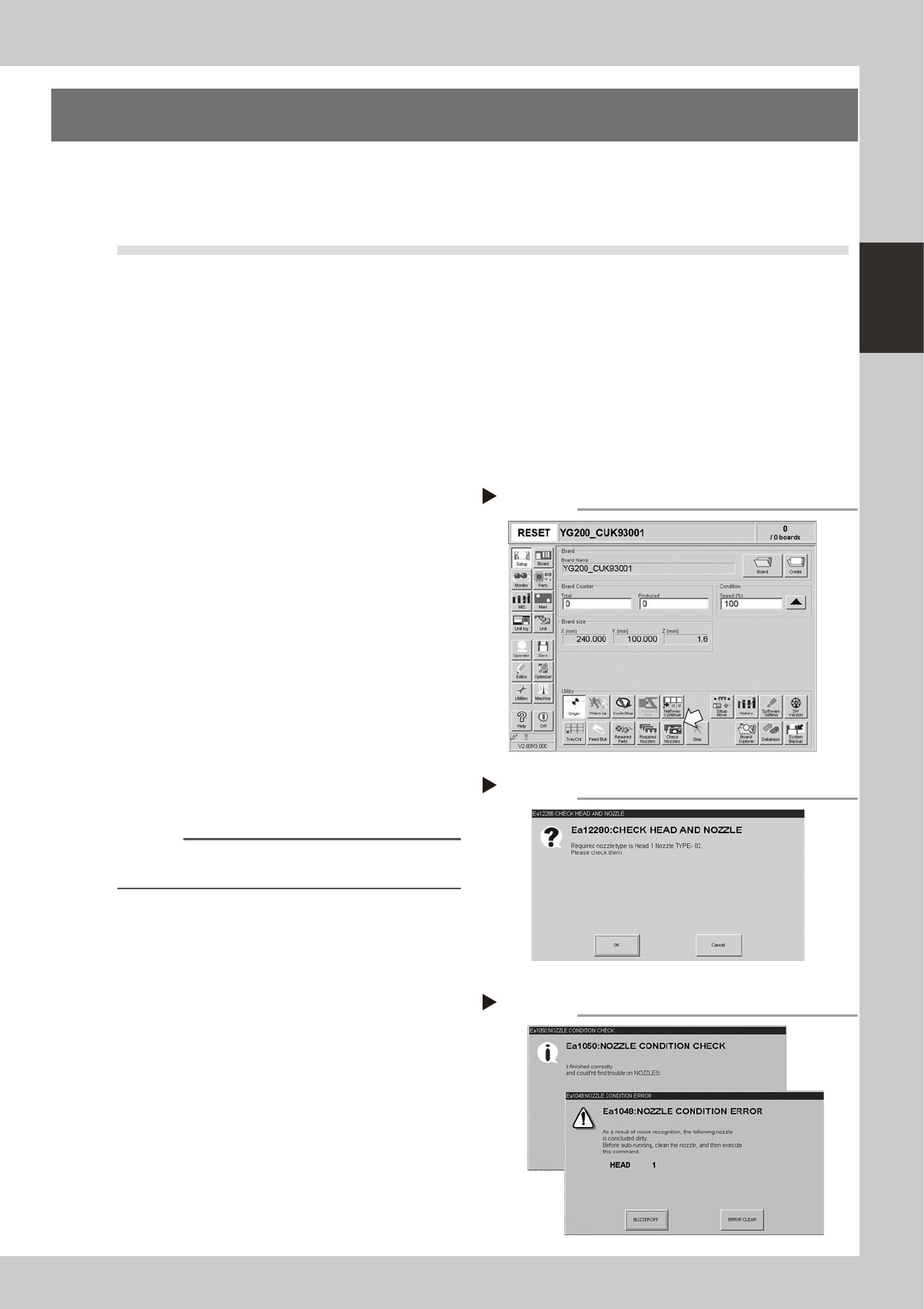
How to check for a dirty nozzle (with the [Check Nozzle] button)
The term "dirty nozzle" as used here indicates shiny material such as solder adhering to the nozzle tip. This shiny portion
might be mistaken for a component and cause recognition errors. To check for this problem, press the [Check Nozzles]
button on the [Setup] screen while the nozzle tip picks up no components. The multi-vision camera finds the extent of
grime or dirt on the nozzle tip.
1
Move the head.
e
Press the emergency stop button and move
the head so the nozzle is at a position where
it can be easily replaced.
2
Press the [Check Nozzles] button as
follows.
1. Cancel emergency stop.
2. Open the [Setup] screen and press the
[Check Nozzles] button in "Utilities".
54200-F8-00
3
Change the nozzle.
Press the [OK] button for nozzle change
while following the message on the screen.
Nozzle change begins after pressing the last
[OK] button.
54201-F8-00
4
Check the message.
Clean the nozzle if the check shows it is dirty.
54202-F8-00
n
NOTE
The "Check Nozzles" function is usually set for "Type 202A
nozzles" before shipment.
[Check nozzles] button
Step 2
Message for checking head and nozzle
Step 3
Nozzle check results
Step 4
OK
NG