YG200_YG200L_Mainte_E.pdf - 第35页
2-3 2 Daily maintenance items 1 . 2 C h e c k i n g t h e n o z z l e s v i s u a l l y U s e e i t h e r o f t h e f o l l o w i n g t w o m e t h o d s t o c h e c k t h e n o z z l e t i p v i s u a l l y . n Re m o v…
2-2
2
Daily maintenance items
n
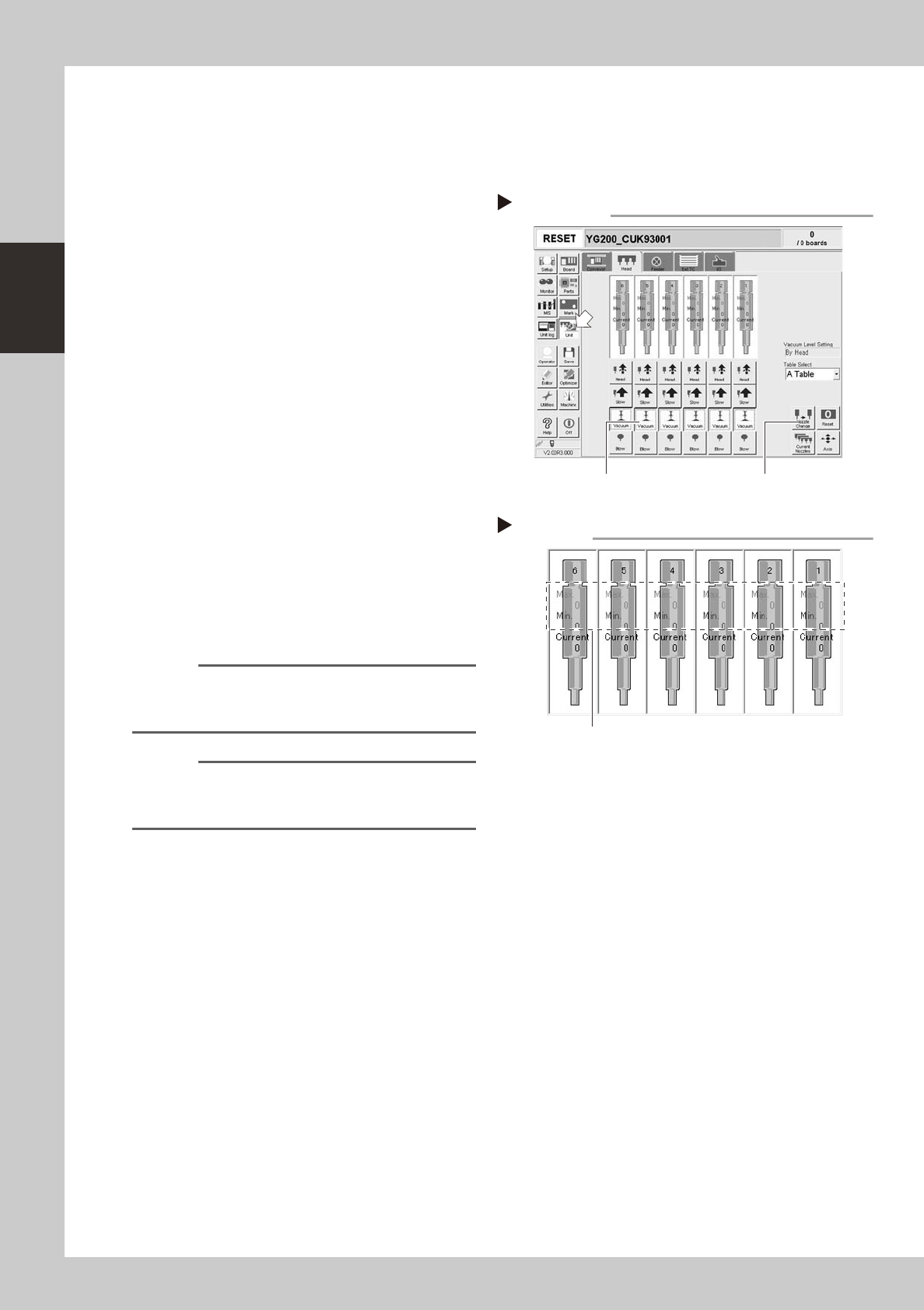
How to check for clogged nozzles (on the [Unit] tab screen)
The term "clogged nozzle" used here indicates that material such as solder is adhering to the nozzle hole, causing a rise
in negative pressure even if there are no components present. This state might cause problems such as component
mounting errors. Check for clogged nozzles using the following procedure.
1
Attach the nozzle.
e
Press the emergency stop button and attach
Type 202A nozzles to all heads. When the
machine has a nozzle station, press the
[Nozzle Change] button to change the
nozzles.
54203-F8-00
2
Reset the numerical figure.
Press the [Reset] button on the lower right of
the screen to reset the pickup level values.
3
Generate negative pressure.
Select [Unit] - [Head], and set the [Vacuum]
buttons for all heads to ON. When this value
starts rising, wait 5 to 10 seconds and set to
OFF.
4
Note the vacuum level.
When a figure appears in red on the head
screen, make a note of the "Max" reading. If
this figure is 110 or below then it is within
normal range. If this figure exceeds 110 then
the nozzle hole might be dirty so clean it.
54204-F8-00
n
NOTE
The above example is for Type 202A nozzles so the
figures shown will be different for other types of nozzles.
(Example: Type 201A => 180)
n
NOTE
If a correct figure cannot be obtained after cleaning
even after performing steps 1 to 4, then the interior of
the spline shaft might be dirty.
Negative pressure generation
Step 1 to 3
[Nozzle Change] button [Vacuum] button
Negative pressure check
Step 4
Take note of these figures.
2-3
2
Daily maintenance items
1.2 Checking the nozzles visually
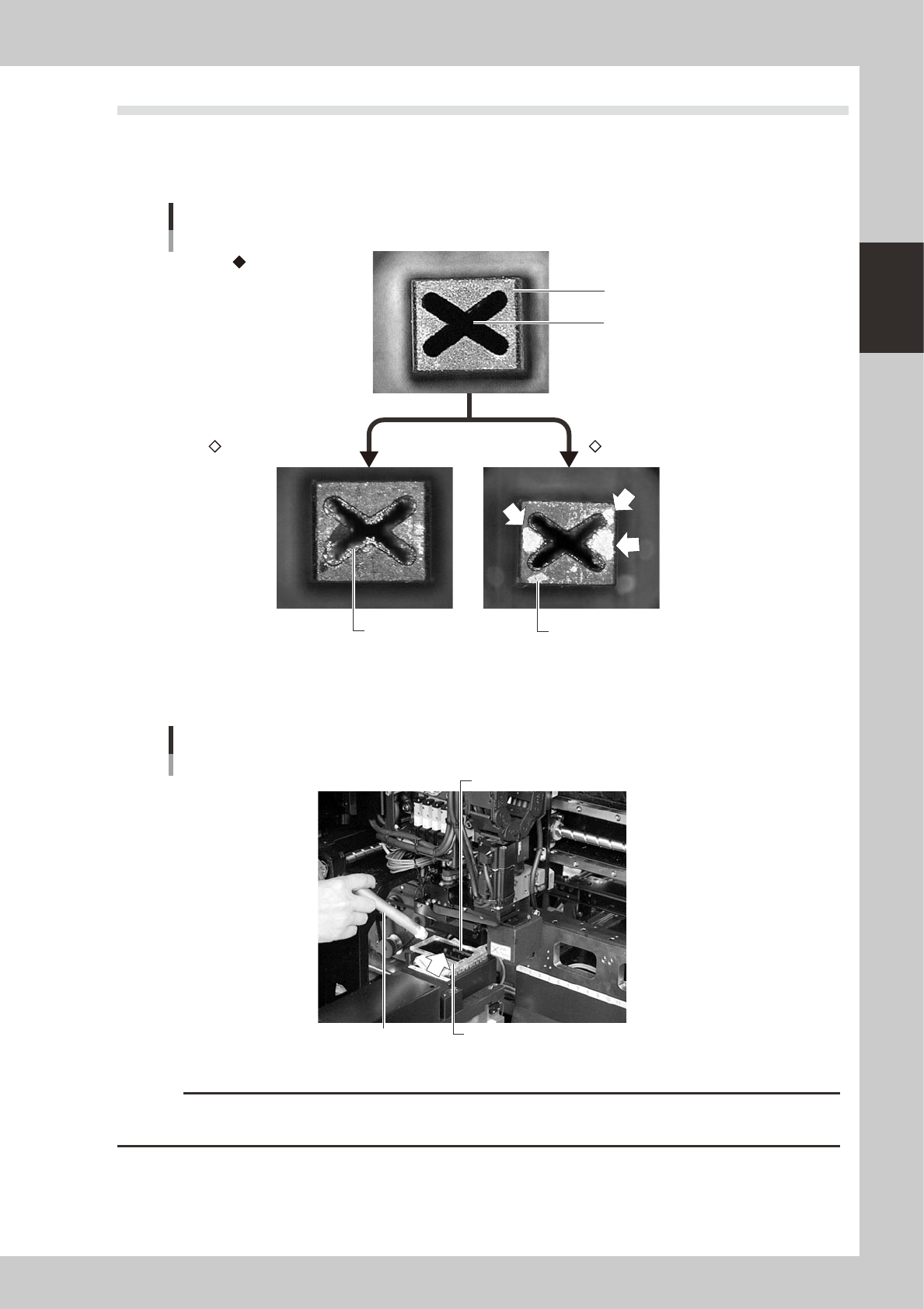
Use either of the following two methods to check the nozzle tip visually.
n
Remove the nozzle and check with a magnifying glass or similar tool.
Nozzle tip
Solder is adhering to nozzle hole
Solder is adhering to nozzle hole
Nozzle hole
Nozzle state
Normal condition
Clogged nozzle Shiny material on tip
53200-F8-00
n
Leave the nozzle installed and check with a hand mirror and flashlight.
Flashlight
Multi-vision camera
Hand mirror
Check with a hand mirror.
53201-F8-00
c
CAUTION
If the above check reveals a dirty or a clogged nozzle, promptly clean the nozzle by referring to "1.1 Cleaning "Type
A" nozzles" in Chapter 3.
2-4
2
Daily maintenance items
2. Checking the nozzle leaf springs
If nozzle leaf springs cannot hold a nozzle securely, this adversely affects pickup, recognition and mounting
operations. Periodically check the leaf springs for nozzle holding status.
n
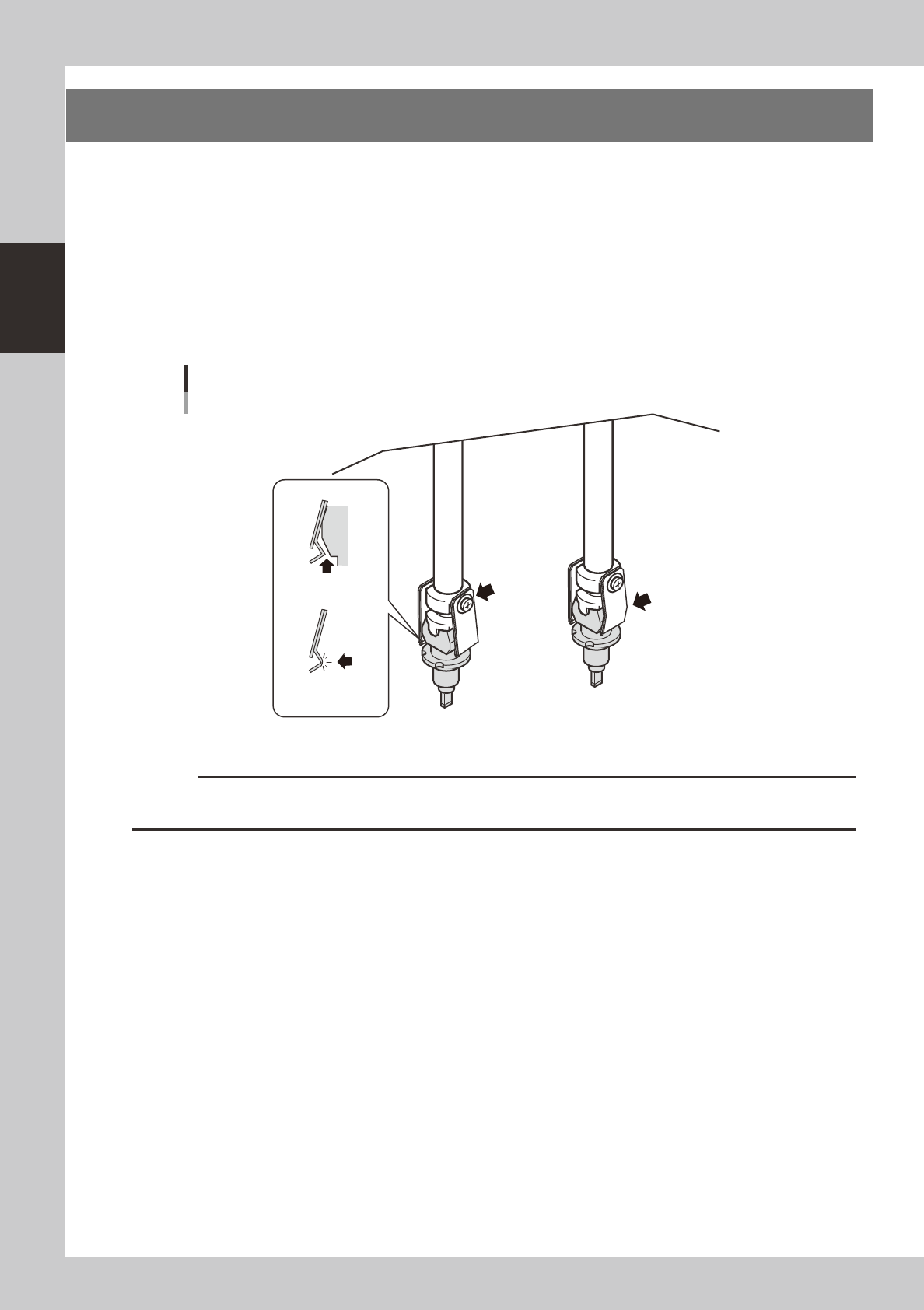
Leaf spring inspection points
Check the following points by removing the nozzle and reattaching it to the nozzle holder.
• The leaf spring has enough gripping force.
• There is no gap between the leaf springs and the nozzle.
• The leaf spring is not warped or deformed.
• The gripping part of the leaf spring is not frayed.
Checking the leaf spring condition
There should be
no gap.
Leaf spring should
not be frayed.
Screw should
be tightened.
Leaf spring should not be
warped or deformed.
53202-F8-00
c
CAUTION
If any of the above points is found to be a problem, remove the nozzle and replace the leaf springs as a pair, by
referring to "1. Nozzle leaf springs" in Chapter 4.