Specification SIPLACE CS-Speed - 第15页
13 Description The bar code scanner enables a quick and reliab le check of com- ponent set-up and refill. The bar codes of the tracks and the lo aded components assigned to the track s (bar code labels on tape s, Bulk Ca…
12
Description
Some local safety requirements
dictate that all feeder locations
must be equipped with feeders.
If the feeder set-up does not fill all
feeder locations, guards may be
used in place of the modules.
SAFETY
WARNING
Component Supply:
Guard for Feeder Locations
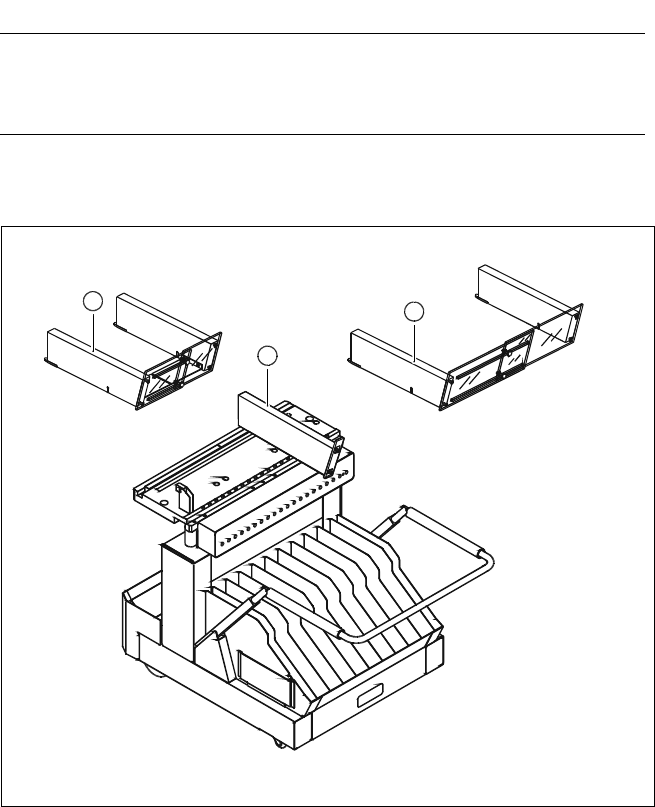
The following guard-variants can be used:
1 SIPLACE guard for 1 location
2 SIPLACE guard for 6 - 10 locations
3 SIPLACE guard for 11 - 20 locations
Various Guards for Feeder Locations
3
2
1
13
Description
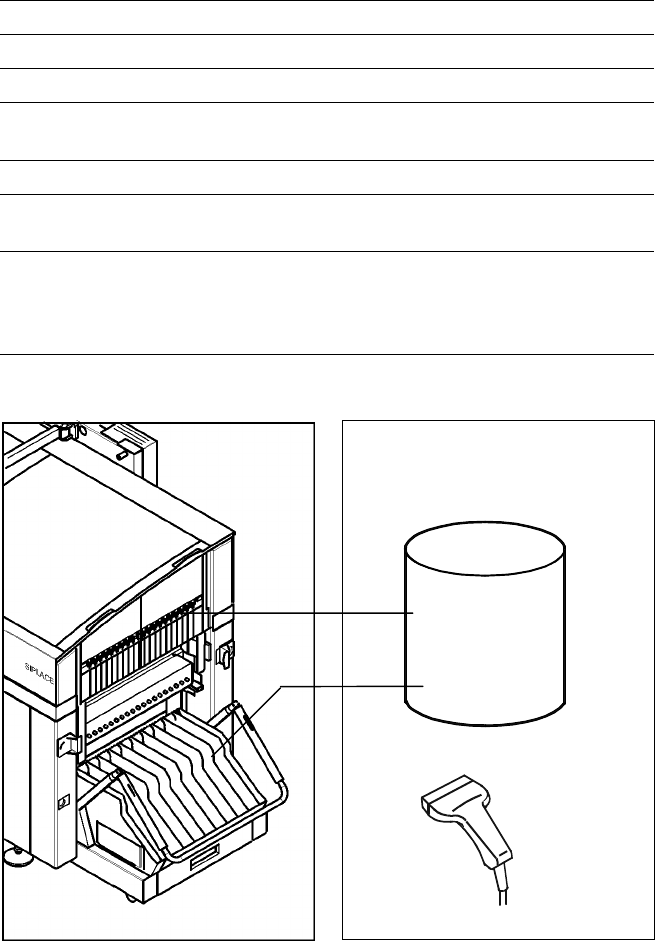
The bar code scanner enables a
quick and reliable check of com-
ponent set-up and refill. The bar
codes of the tracks and the loaded
components assigned to the
tracks (bar code labels on tapes,
Bulk Cases, etc.) are read in with
a hand scanner. An audible and
optical signal acknowledges a suc-
cessful reading operation. If the
label is damaged the bar code
can be entered at the keyboard.
The allocation of the components
to their respective track is de-
scribed in the set-up data. An error
message is displayed if the data
received from the bar code scan-
ner does not conform to the set-up
data.
If the set-up check is switched
on, it becomes a mandatory step
in the set-up process. If it is
switched off the set-up check
is optional.
Component Supply:
Component Bar Code Scanner for Set-Up and Refill Check
(Option)
Technical Data
Connection Station computer
Data input Bar code scanner or keyboard
Number of characters Max. 40
Restrictions Bar codes beginning with number 1 or 2
and with less than 5 characters
Number of bar codes Max. 6 per component
Number of filters
to extract relevant data Max. 1 per bar code
Preset code types Code 39 (standard or full ASCII),
Code 2 from 5 interleaved and normal,
Code 128, UPC/EAN/JAN codes
(more on request)
Scanner
Component
Control
Set-Up File
Track Bar Code
Scanner
Component
Bar Code
The scanner checks the corresponding track and the components
14
Description
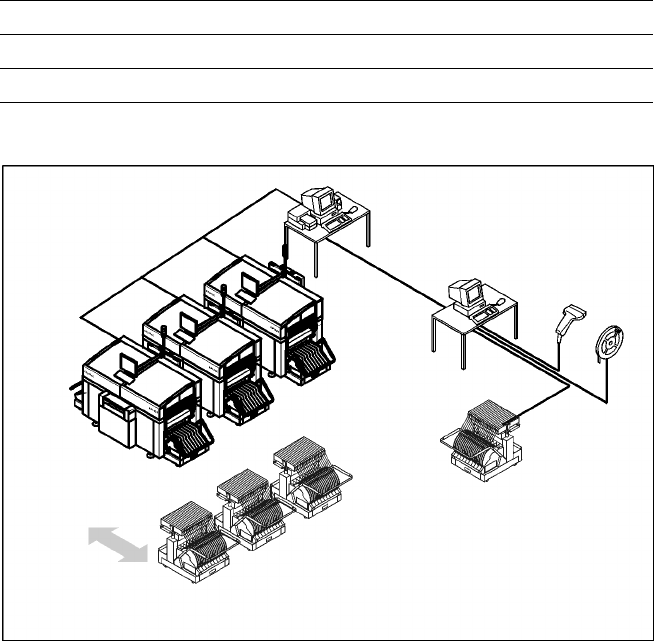
The component changeover tables
can be set up and checked at an
external SIPLACE set-up station
quickly and without machine idle
time. The costs for production in-
volving a wide variety of compo-
nents are greatly reduced. During
the bar code check outside the
machine, 10 minutes of machine
standstill are eliminated per set-up
change. All current data from up to
4 lines are accessible over a link to
the line computer via a Local Area
Network (LAN).
In the case of the SIPLACE CS a
component changeover table is
part of the standard equipment.
Additional changeover tables are
required for optimal use
of the set-up station.
Component Supply:
SIPLACE External Set-Up Station (Option)
Technical Data
Operating system Windows XP
Set-up check Per bar code scanner
Component table change Time expanded: 2 min / table side
Example for SIPLACE Set-Up Station
Line
LAN
SIPLACE C Pro
PC for External set-up
LAN Scanner
Serial Interface
Tape Reel
with
Bar Code
Mobile
Changeover
Table
Mobile
Changeover
Tables