MR8740T_user_manual_eng_20191016H.pdf - 第154页
149 Evaluating Calculation Results on a Pass/Fail Basis > [Calculation] > [Numerical calculation] 4 1 2 3 1 Click the [Judge stop condition] box, and then from the list, choose a stopping condition applied accordin…
148
Evaluating Calculation Results on a Pass/Fail Basis
7.3 Evaluating Calculation Results on a Pass/Fail
Basis
You can specify evaluation criteria ([Up] and [Low]) to evaluate numerical calculation results on a
pass/fail basis.
Each numerical calculation can has different evaluation criteria.
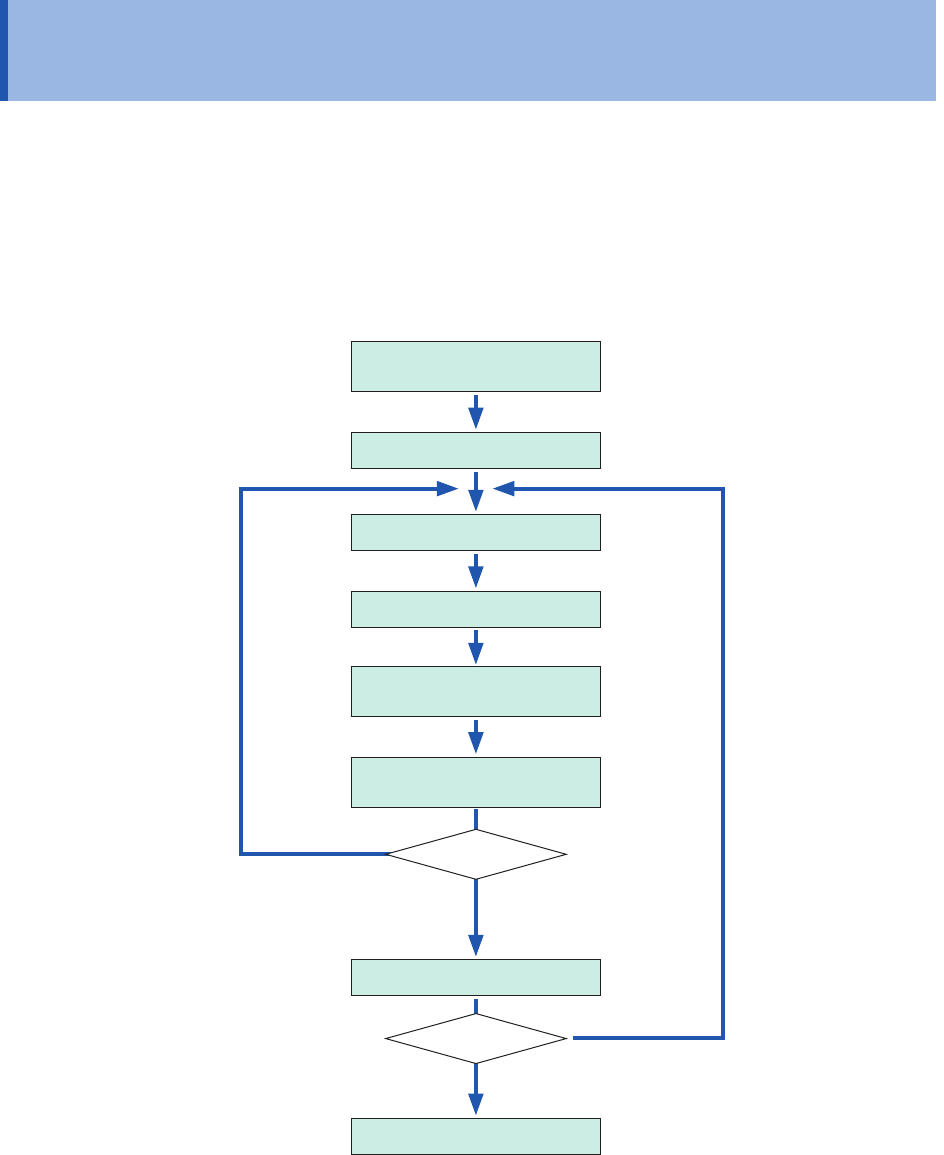
The waveform acquisition process varies depending on the recording mode setting ([Single] or
[Repeat]) and the stop condition specied to stop the measurement depending on an evaluation
([PASS], [FAIL], or [PASS & FAIL]).
Conguring the calculation
settings
Starting a measurement
Acquiring data
Calculation
Displaying calculation
results
Evaluating calculation
results
Saves data.
Finishing the measurement
Stop condition
Recording mode
No stop
condition is
satised.
A stop condition is satised,
or stop condition is set to
[PASS & FAIL].
[Repeat]
[Single]
Measurements repeat
until the stop condition is
satised.
Measurements repeat
until you click the stop
icon.
Auto-save is not carried out until the stop condition is satised at the end of calculation evaluation.
149
Evaluating Calculation Results on a Pass/Fail Basis
> [Calculation] > [Numerical calculation]
4
1
2
3
1
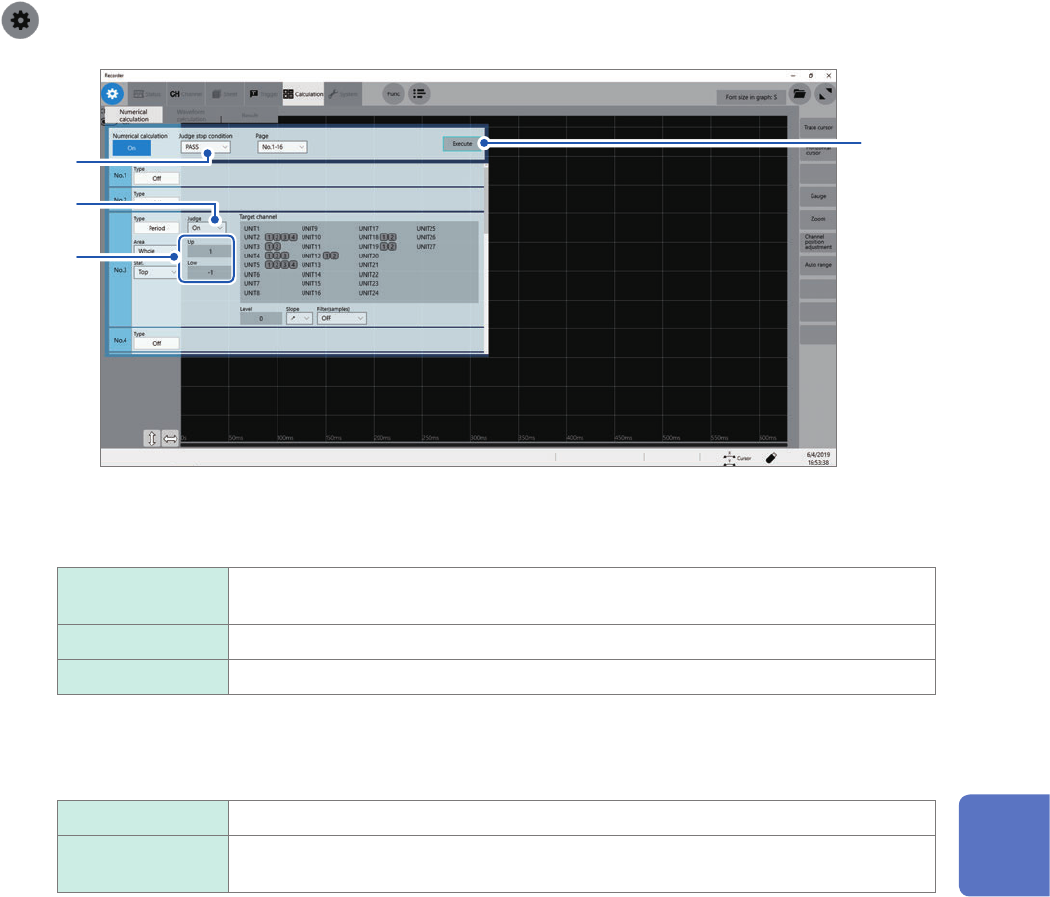
Click the [Judge stop condition] box, and then from the list, choose a stopping condition
applied according to judgments.
PASS Stops measurement when a calculation result falls within a criteria range (pass
judgment).
FAIL Stops measurement when a calculation result is outside a criteria range (fail judgment).
PASS & FAIL
Stops measurement regardless whether a pass or fail judgment is given.
2
Click the [Judge] box, and then from the list, choose whether or not to evaluate calculation
results.
Off
Evaluates calculation results.
On Yields a fail judgment if a result is outside a criteria range.
Calculated values in a channel with the fail judgment are highlighted in red.
3
Click the [Up] and [Low] boxes in turn, and then enter evaluation criteria values in each of
them.
Enterable range: −9.9999E+29 to −1.0000E29, 0, +1.0000E29 to +9.9999E-29
(To evaluate existing data)
Click [Execute].
(To automatically execute evaluation after measurement)
Click the start icon.
About upper and lower limit values
You cannot specify an upper limit value lower than a lower limit value.
Neither can you specify a lower limit value higher than a upper limit value.
To record all calculation results
Choose [PASS & FAIL] for the stopping condition.
7
Numerical Calculation Function
150
Evaluating Calculation Results on a Pass/Fail Basis
Displaying evaluation results and externally outputting signals
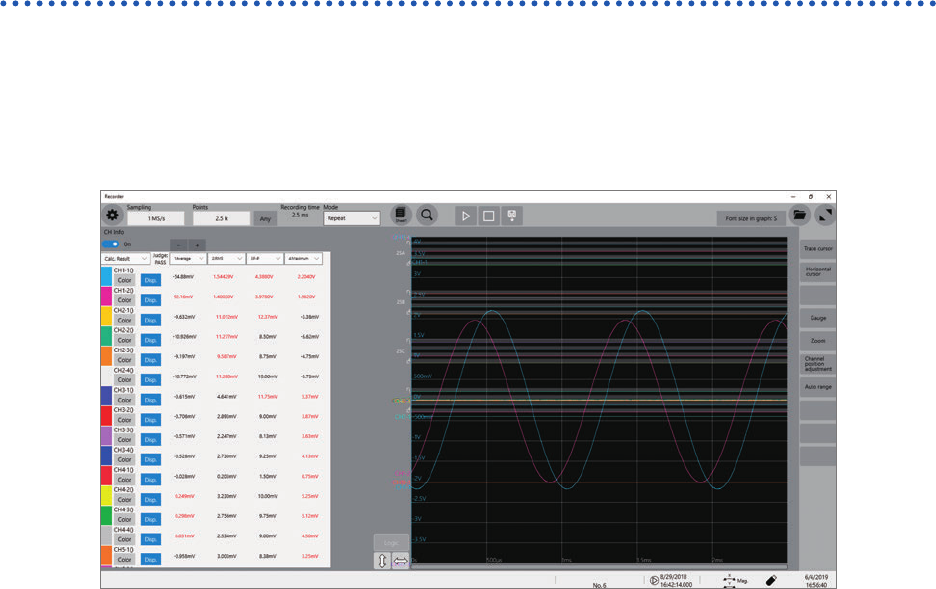
The numerical calculation result screen of the waveform screen displays numerical calculation
evaluation results.
Values that fall within an evaluation criteria range: Pass judgment
Values outside an evaluation criteria range: Fail judgment (highlighted in red)
When a pass judgment is given
When the external output terminals (OUT 1, OUT 2) are set to [Judge(Pass)], a PASS signal is
output from the external output terminals (OUT 1, OUT 2).
When a fail judgment is given
When the external output terminals (OUT 1, OUT 2) are set to [Judge(Fail)], a FAIL signal is output
from the external output terminals (OUT 1, OUT 2). A fail judgment is given when any one of the
channels is judged to be a fail.