MR8740T_user_manual_eng_20191016H.pdf - 第159页
154 Numerical Calculation T ypes and Descriptions Calculation type Description When a Y data point corresponds to an X data point s 0 Start point End point X-axis (Y = 0) Area S = s 0 s 0 End point Start point X-axis (Y …
153
Numerical Calculation Types and Descriptions
Calculation
type
Description
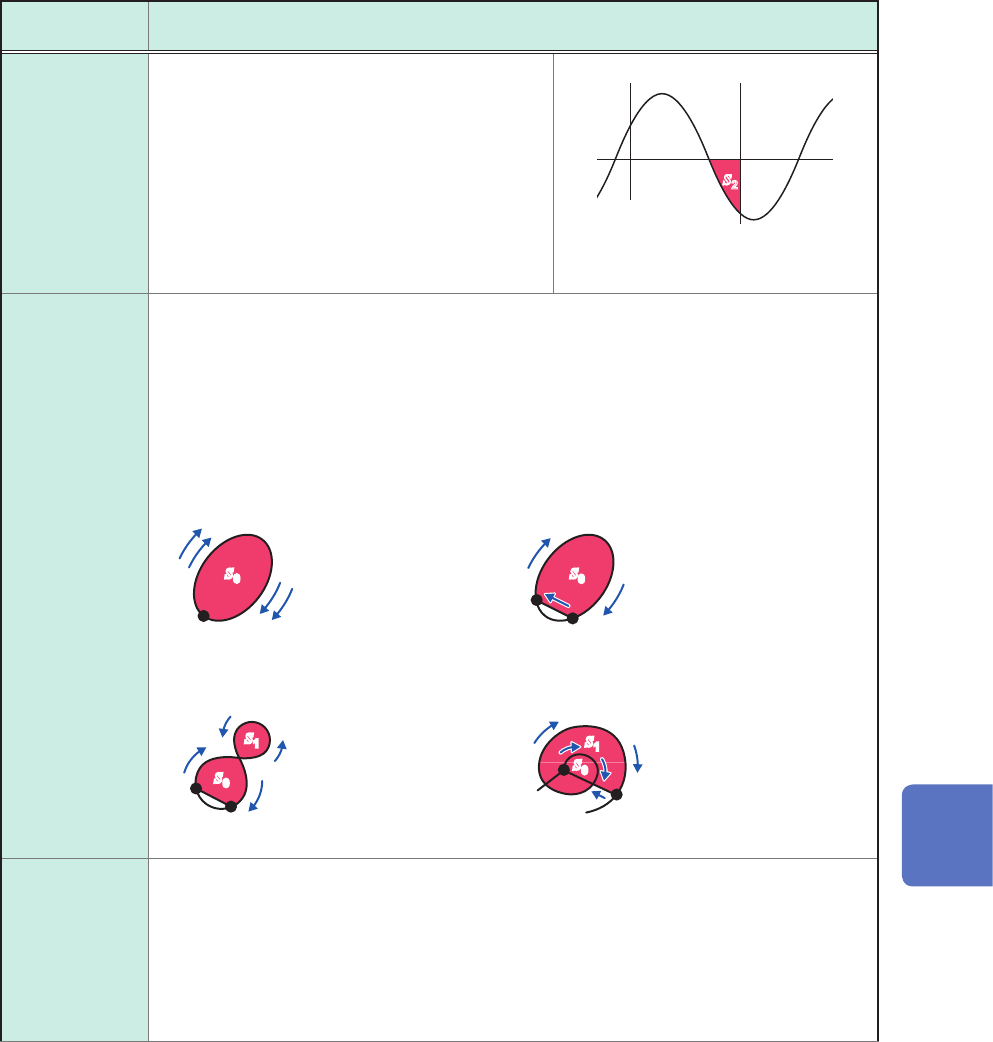
Area
Method:
Negative
(Only the
negative-
amplitude part)
Calculates an area enclosed by the zero-level
(zero-potential) line and the negative-amplitude
part of a signal waveform.
When the range is specied, calculates the area
between the cursors.
S
: Area
n
: Number of data points
di
:
i
th data point acquired
across the channel
h
=
Δt
: Sampling interval
di • h
S =
∑
i = 1, di < 0
n
sss
2
ss
2
Cursor A
Cursor B
S
= −
s
2
X-Y area
Method:
Coordinate
method
Calculates the area (unit: V
2
) of the gure enclosed by the X-Y composite curve. The
instrument calculates an area enclosed by the lines as illustrated below. An area can be
calculated even when no X-Y composite curve is displayed.
You can specify a calculation range on the horizontal axis (time-axis) waveform of each
channel with the cursors. The area of the X-Y composite curve is calculated within the
specied range (you cannot directly specify the range on the X-Y waveform with the
cursors).
Refer to “2.1 Reading Measured Values (Trace Cursors, Horizontal cursor)” (p. 20).
s
0
s
0
s
0
s
1
s
1
s
0
When multiple loops plot When an open curve plots
When a gure of eight plots When a spiral loop plots
S
=
n
×
s
0
S
: Area
n
: Number of loops
S
=
s
0
S
: Area
(Closed area is created
by connecting the start
and end points with a
straight line.)
Start point, end point
Start
point
End point
Start
point
End
point
Start
point
End point
S
= |
s
0
−
s
1
|
S
: Area
S
=
s
0
× 2 +
s
1
S
: Area
(The number of
overlapping segments
increases with a loop
count.)
X-Y area
Method:
Trapezoidal
approximation
Calculates an area (unit: V
2
) enclosed by an X-Y composite curve using the trapezoidal
approximation method. The instrument calculates an area enclosed by the lines as
illustrated below. An area can be calculated even when no X-Y composite curve is
displayed.
You can specify a calculation range on the horizontal axis (time-axis) waveform of each
channel with the cursors. The area of the X-Y composite curve is calculated within the
specied range (you cannot directly specify the range on the X-Y waveform with the
cursors).
7
Numerical Calculation Function
154
Numerical Calculation Types and Descriptions
Calculation
type
Description
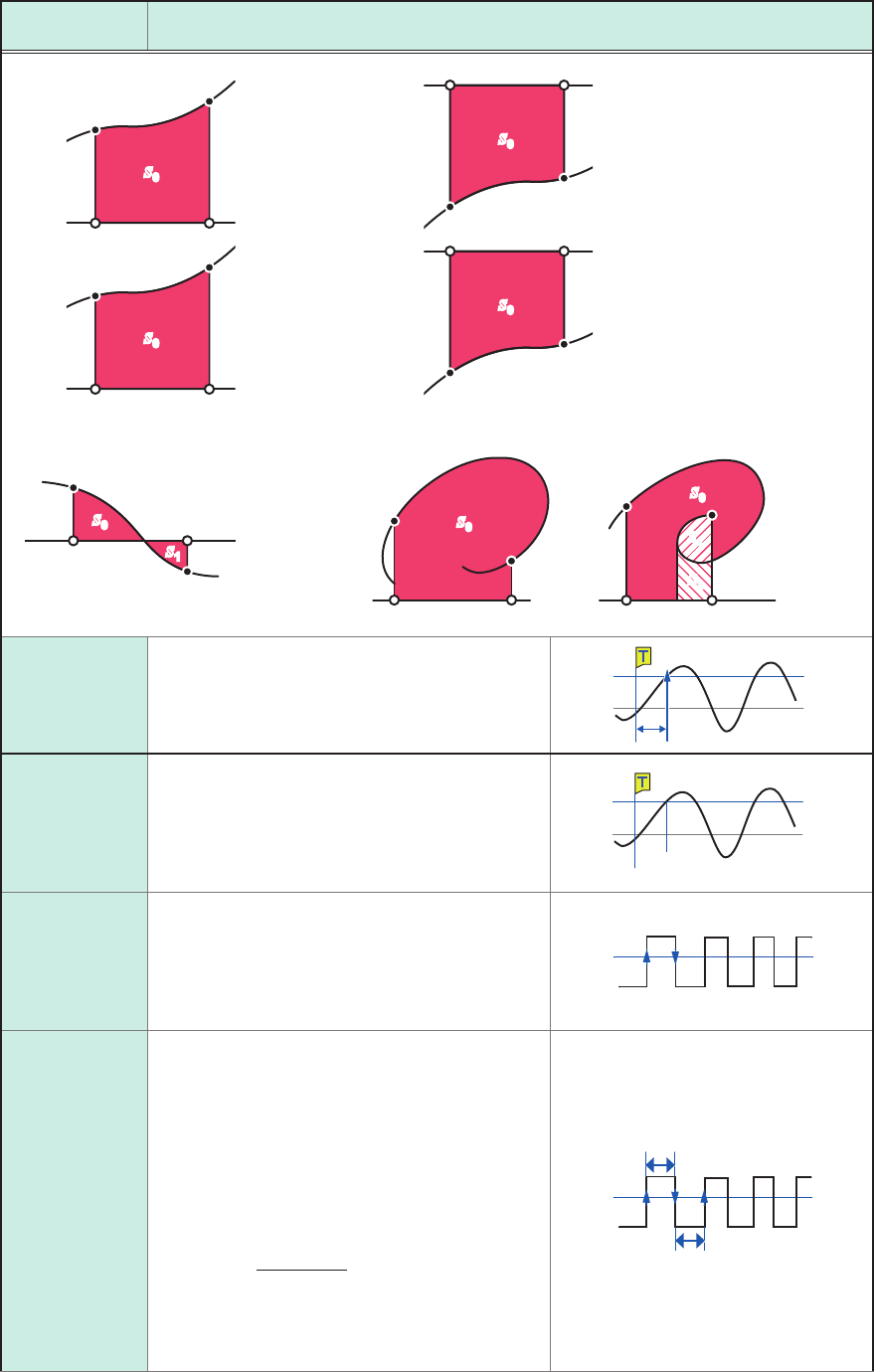
When a Y data point corresponds to an X data point
s
0
Start point
End point
X-axis (Y = 0)
Area
S
=
s
0
s
0
End point
Start point
X-axis (Y = 0)
Area
S
= −
s
0
s
0
Start point
End point
X-axis (Y = 0)
Area
S
= −
s
0
s
0
End point
Start point
X-axis (Y = 0)
Area
S
=
s
0
s
0
s
1
When a waveform includes negative
amplitude
Start point
End point
When multiple Y data points
correspond to an XY data point
X-axis (Y = 0)
Area
S
=
s
0
−
s
1
s
0
s
0
s
1
s
2
X-axis (Y = 0)
Area
S
=
s
0
X-axis (Y = 0)
Area
S
=
s
0
+
2
×
s
1
+
s
2
Time to level
Searches a calculation range from the beginning
for the time when a signal crossed the specied
level and calculates a period of time from a
trigger point to a point searched for.
Settings: Level, Slope, Filter
0
V
Level
Level at time
Calculates a level when the specied time has
elapsed from a trigger point.
You can also specify a time based on previously
calculated results.
Settings: Method (Time, Calc. No.), Time/
calculation number (No. 1 to No.107)
0 V
Level
T (Time)
Pulse width
Calculates a pulse width based on a time lag
between the time when a waveform crossed
the specied level in the positive (or negative)
direction and the time when it next crossed the
specied level in the opposite direction.
Settings: Level, Slope, Filter, Stat.
Level
Duty ratio
Calculates a duty ratio based on a time lag
between the time when a waveform crossed the
specied level in the positive direction and the
time when it next crossed the specied level in
the opposite direction, and a time lag between
the time when the waveform crossed the
specied level in the negative direction and the
time when it next crossed the specied level in
the opposite direction.
=
× 100 [%]
T
u-d
T
u-d
T
d-u
+
Duty ratio
T
u-d
: Time from rising edge to falling edge (unit: s)
T
d-u
: Time from falling edge to rising edge (unit: s)
Settings: Level, Filter, Stat.
Level
T
u-d
T
d-u
155
Numerical Calculation Types and Descriptions
Calculation
type
Description
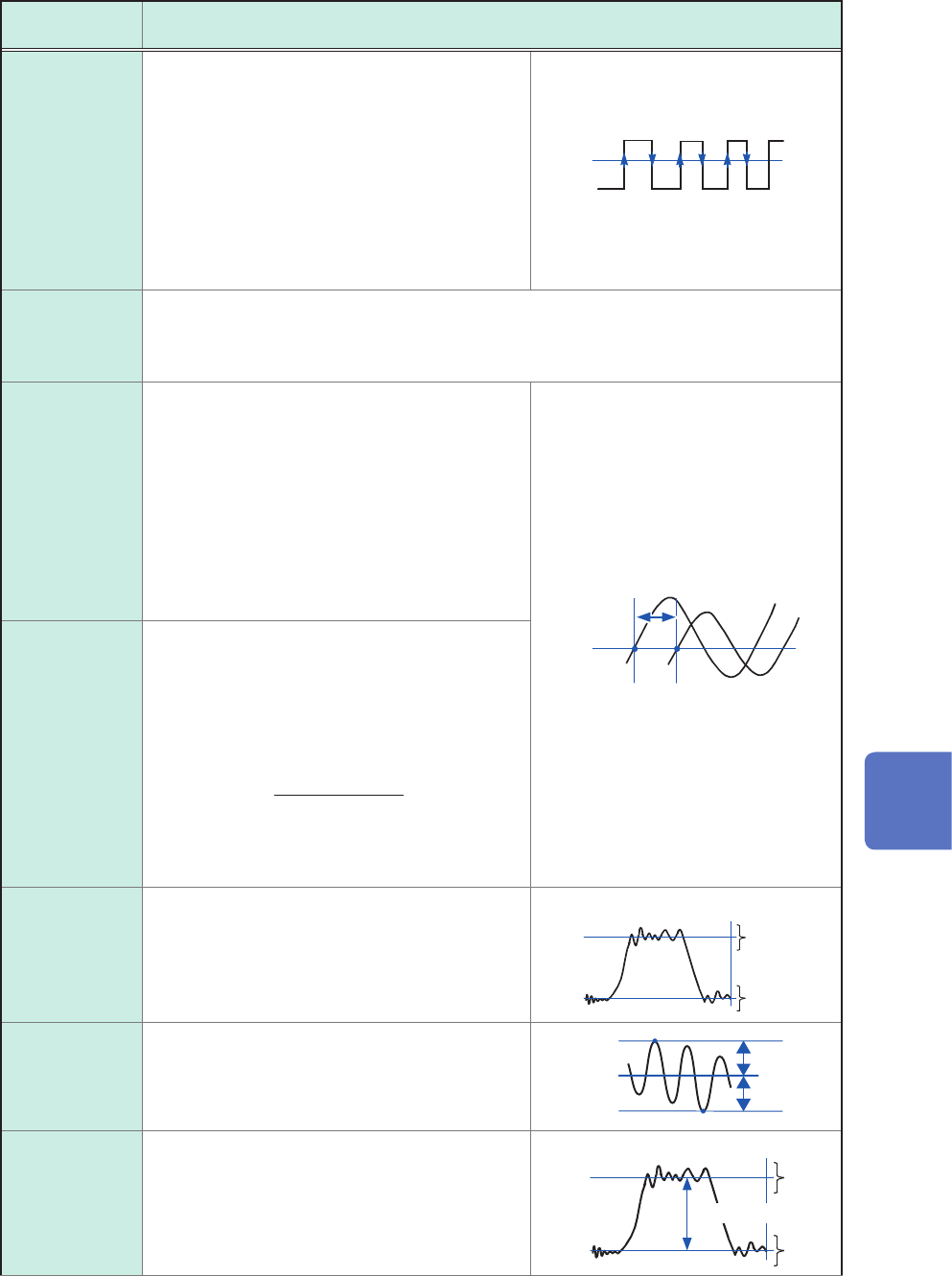
Pulse count
Counts the number of pulses that crossed the
specied level in the positive (or negative)
direction.
For the pulse counts, it is considered as one
count that a period between the point when a
pulse crossed the level in the positive direction
and the point when the pulse crossed the level
in the negative direction (otherwise, between
that in the negative direction and in the positive
direction).
Settings: Level, Slope, Filter
0
2 31
Level
Arithmetic
operations
Allows you to freely choose numerical calculation results and the instrument performs
arithmetic operations of the results of your choice.
Settings: Calculation number 1, Arithmetic operations (+, −, ×, ÷), Calculation number
2
Time difference
Calculates the time lag T (unit: s) between
when waveform A crossed the specied level
in the positive (or negative) direction and when
waveform B crossed it in the same direction.
(Time lag T) = (Time when waveform B crossed
the level) − (Time when waveform A crossed the
level)
(Time when waveform A crossed the level)
Settings: Waveform A (Reference channel,
Level, Slope, Filter); Waveform B
(Target channel, Level, Slope, Filter)
T
A B
Level
Phase contrast
Calculates a phase difference (unit: degree)
with reference to waveform A based on a time
lag between the time when waveform A crossed
the specied level in the positive (or negative)
direction and the time when waveform B crossed
it in the same direction.
Phase difference =
× 360 [°]
Time lag between
waveforms A and B
Period of Waveform A
Settings: Waveform A (Reference channel,
Level, Slope, Filter); Waveform B
(Target channel, Level, Slope, Filter)
High level
Low level
Calculates a low and high levels letting 0%
and 100% of acquired waveform data be them,
respectively, based on a histogram (frequency
distribution).
0%
100%
High
level
Low
level
Number of data points
Intermediate
value
Calculates the average of the maximum and
minimum values of waveform data.
[(Maximum value) + (Minimum value)] / 2
Maximum
Intermedi-
ate value
Minimum
Amplitude
Calculates a value (amplitude) between a low
and high levels letting 0% and 100% of acquired
waveform data be them, respectively, based on
a histogram (frequency distribution).
(High level) − (Low level)
0%
1
00%
High
level
Low
level
Number of data points
Amplitude
7
Numerical Calculation Function