MR8740T_user_manual_eng_20191016H.pdf - 第171页
166 Conguring W aveform Calculation Settings (T o manually specify the scale setting for the calculation result) (1) (2) (1) Click the arr ow butt ons t o choos e a calcula tion channel. (2) Click [Upper and lower limit…
165
Conguring Waveform Calculation Settings
11
Click the [Display] button to set it to [On] or [Off].
Off
Displays no calculated waveform.
On Displays a calculated waveform.
12
Click the color button to the right of the [Display] button, and then choose a waveform
display color from the color pallet.
13
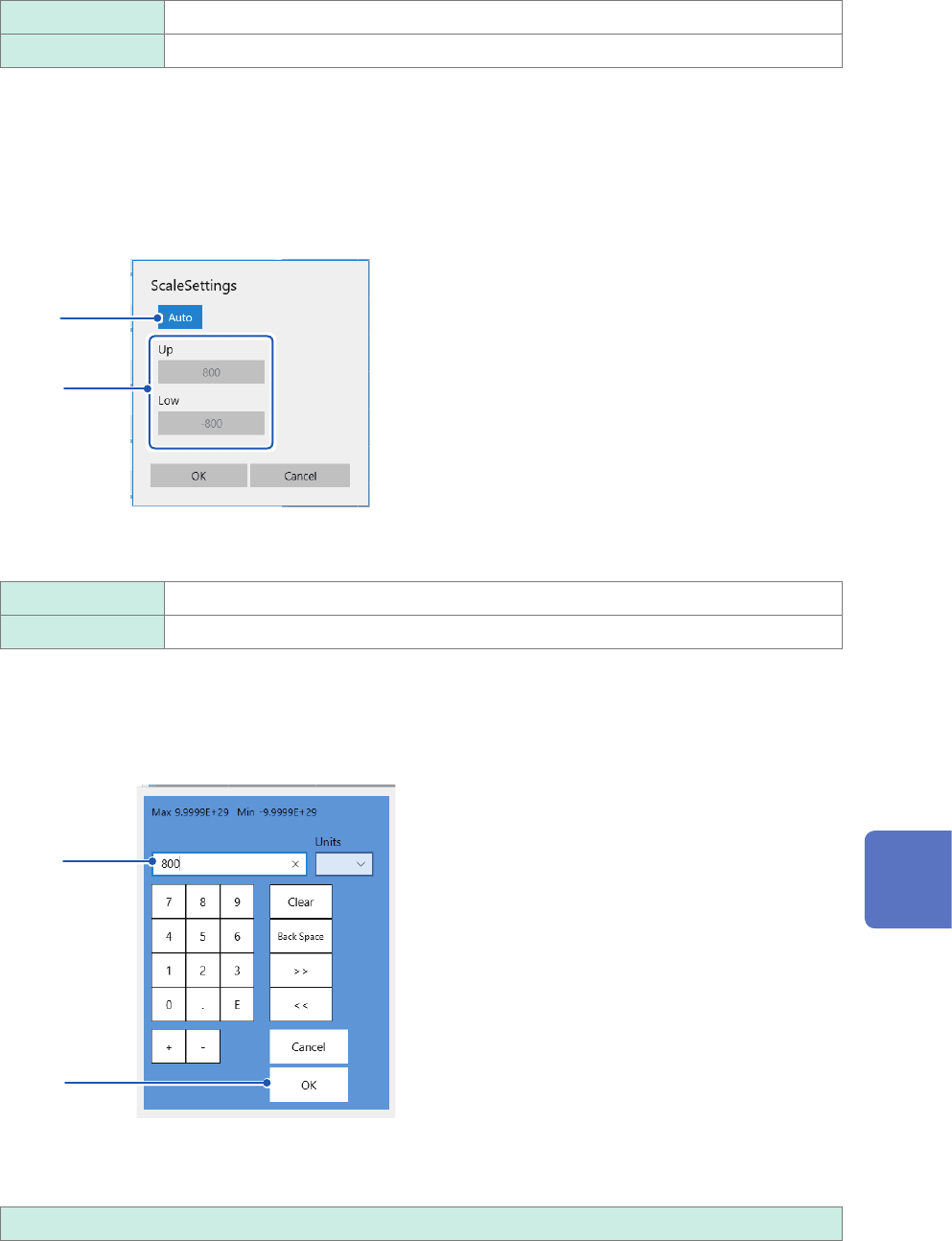
Click [Scale] to the right of the color button.
The scale setting dialog box appears.
14
15
14
Click the [Scale] button to set it to [Auto] or [Manual].
Auto Automatically scales a calculation result.
Manual Allows you to change the scale settings.
15
(When you choose [Manual] in the [Scale Settings] box.)
Click the [Up] or [Low] box.
The numerical entry dialog box appears.
(1)
(2)
(1) Enter an upper and lower value in each box.
Use the numerical keypad, [+] button, and [−] button to enter.
−9.9999E+19 to 9.9999E+19
(2) Click [OK].
The numerical entry dialog box closes.
8
Waveform Calculation Function
166
Conguring Waveform Calculation Settings
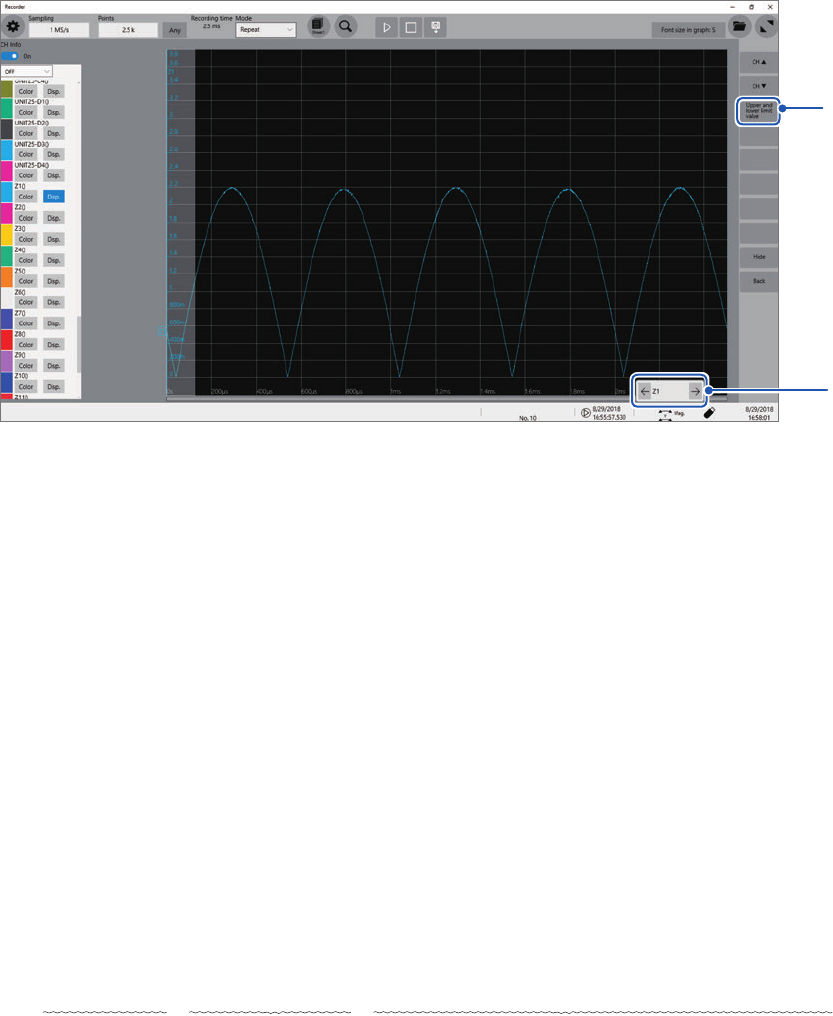
(To manually specify the scale setting for the calculation result)
(1)
(2)
(1) Click the arrow buttons to choose a calculation channel.
(2) Click [Upper and lower limit value] to specify the upper and lower limit values of the
calculation result.
16
(To making calculations using measured data)
Click [Execute].
(To make calculations during measurement)
Click the start icon.
Once the instrument has acquired waveforms, it displays waveforms calculated.
Entering arithmetic expressions
• The length of each arithmetic expression is limited to 80 characters.
• You can enter a 30-digit numbers or less in arithmetic expressions (for constants, 5-digit number
or less ).
• Use an asterisk (
*
) and slash (/) for multiplication and division, respectively.
• If an expression you enter includes an error (its frame is lled with red), all calculation results
become zero.
• Entering a complex, long arithmetic expression causes the frame of the entry box to become red.
Divide an expression into two or more.
ABS(CH(1,1)) + CH(1,2)
×
CH(1,3) − (CH(2,1) + CH(2,2))
×
ABS(CH(2,1))/DIF(CH(1,1),1)
1 2 3
• Making division by zero results in an output of an overowed value.
(for a positive divisor, +9.9999E+29; for a negative divisor, −99.9999E+29)
• You can use calculation result Zi in other calculations. Expression Zn, however, can include only
result Zn-1 or earlier.
Example: You can use results Z1, Z2, and Z3 for expression Z4)
167
Conguring Waveform Calculation Settings
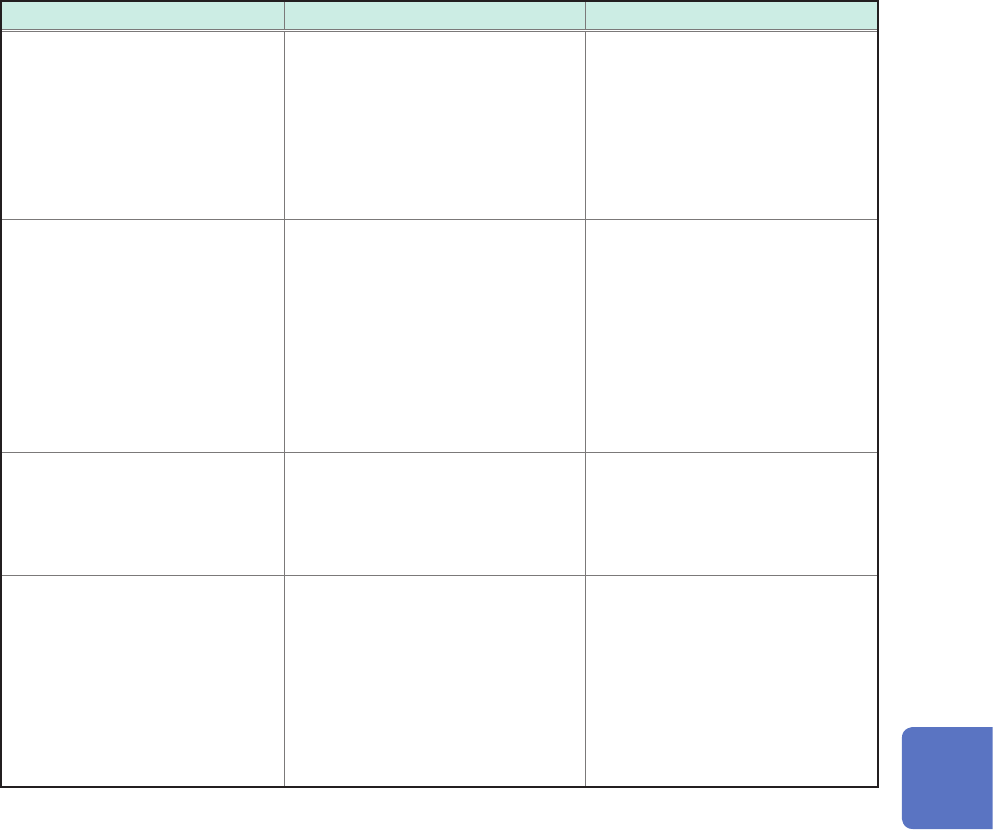
When an expression includes an operator MOV, SLI, DIF, DIF2, PLEVEL, or ATAN2 (about second
parameter)
The operators above require a comma and second parameter to follow the rst parameter, which is
enclosed in parentheses.
Examples of operators and settings
Operator Setting Setting example
MOV (moving average)
SLI (parallel move)
Specify the number of moving
points.
Setting range
MOV (moving average): 1 to 5000
SLI: −5000 to 5000
If you omit the second parameter,
the instrument species [1] to make
calculations.
To calculate a 10-point moving
average of the CH1 waveform
MOV(CH1,10)
DIF (differential)
DIF2 (2nd-order differential)
Specify a sampling interval for
differentials Normally specify “1.”
Specify a larger number, however,
to monitor the variation in a slowly
changing waveform.
Setting range for DIF and DIF2: 1
to 5000
If you omit the second parameter,
the instrument species [1] to make
calculations.
To calculate differentials of data
acquired across CH2 at intervals
of 20 sampled points.
MOV(CH2,20)
PLEVEL (level at time) Specify a time from a trigger point.
If you omit the second parameter,
the instrument species [0] to make
calculations.
Obtains the level a signal reaches
1 ms after the trigger point
generated from a signal acquired
across CH1-3.
PLEVEL(CH(1,3),0.001)
ATAN2 (2-argument arc tangent) When you type “ATAN2(y,x),”
the instrument calculates the
expression ATAN(y/x). (p. 170)
If you omit “x,” the instrument
makes calculations supposing
that x equals 1.0. You can specify
“CH,” “Z,” or a constant only at “x.”
No function or expression can be
specied. Not available
To calculate 2-argument arc
tangent of CH1-1 / CH1-2
ATAN2(CH(1,1),CH(1,2))
If a calculation result is overowing (OVER)
• The instrument regards a calculation result that falls within the following range as an overow.
1. Greater than +9.9999E+29
2. Less than −9.9999E+29
• The instrument assigns +9.9999E+29 to positive overows, and −9.9999E+29 to negative
overows.
• Trace cursors (A through H) read +9.9999E+29 at a positively overowing point, and
−9.9999E+29 at a negatively overowing point.
8
Waveform Calculation Function