MR8740T_user_manual_eng_20191016H.pdf - 第173页
168 Conguring W aveform Calculation Settings Calculation result Example: T o display the waveform processed through the absolute value calculation using a waveform acquired across CH1_1 Arithmetic expression Z1= ABS(CH(…

167
Conguring Waveform Calculation Settings
When an expression includes an operator MOV, SLI, DIF, DIF2, PLEVEL, or ATAN2 (about second
parameter)
The operators above require a comma and second parameter to follow the rst parameter, which is
enclosed in parentheses.
Examples of operators and settings
Operator Setting Setting example
MOV (moving average)
SLI (parallel move)
Specify the number of moving
points.
Setting range
MOV (moving average): 1 to 5000
SLI: −5000 to 5000
If you omit the second parameter,
the instrument species [1] to make
calculations.
To calculate a 10-point moving
average of the CH1 waveform
MOV(CH1,10)
DIF (differential)
DIF2 (2nd-order differential)
Specify a sampling interval for
differentials Normally specify “1.”
Specify a larger number, however,
to monitor the variation in a slowly
changing waveform.
Setting range for DIF and DIF2: 1
to 5000
If you omit the second parameter,
the instrument species [1] to make
calculations.
To calculate differentials of data
acquired across CH2 at intervals
of 20 sampled points.
MOV(CH2,20)
PLEVEL (level at time) Specify a time from a trigger point.
If you omit the second parameter,
the instrument species [0] to make
calculations.
Obtains the level a signal reaches
1 ms after the trigger point
generated from a signal acquired
across CH1-3.
PLEVEL(CH(1,3),0.001)
ATAN2 (2-argument arc tangent) When you type “ATAN2(y,x),”
the instrument calculates the
expression ATAN(y/x). (p. 170)
If you omit “x,” the instrument
makes calculations supposing
that x equals 1.0. You can specify
“CH,” “Z,” or a constant only at “x.”
No function or expression can be
specied. Not available
To calculate 2-argument arc
tangent of CH1-1 / CH1-2
ATAN2(CH(1,1),CH(1,2))
If a calculation result is overowing (OVER)
• The instrument regards a calculation result that falls within the following range as an overow.
1. Greater than +9.9999E+29
2. Less than −9.9999E+29
• The instrument assigns +9.9999E+29 to positive overows, and −9.9999E+29 to negative
overows.
• Trace cursors (A through H) read +9.9999E+29 at a positively overowing point, and
−9.9999E+29 at a negatively overowing point.
8
Waveform Calculation Function
168
Conguring Waveform Calculation Settings
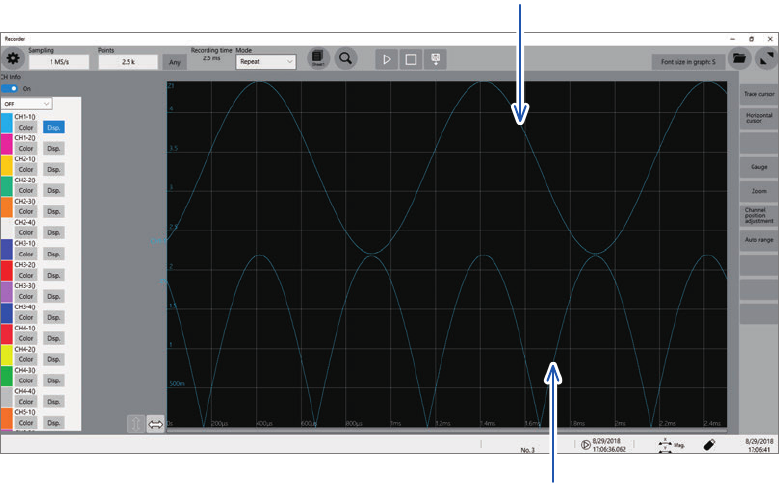
Calculation result
Example: To display the waveform processed through the absolute value calculation using a
waveform acquired across CH1_1
Arithmetic expression Z1= ABS(CH(1,1))
Waveform acquired across CH1-1
Calculated absolute value Z1

169
Operators of Waveform Calculation and Calculation Results
8.3 Operators of Waveform Calculation and
Calculation Results
b
i
:
i
th data point of calculation results,
d
i
:
i
th data point acquired across the source channel
Waveform calculation
type
Description
Four arithmetic
operations (+, −, ×, ÷)
Makes calculations using operators specied from the four arithmetic operations, which
consists of addition (+), subtraction (−), multiplication (×), and division (÷). Multiplication
signs (×) and division signs (÷) are represented as asterisks (*) and slashed (/),
respectively.
Absolute value (ABS)
b
i
= | d
i
| (i = 1, 2, . . . , n)
Exponent (EXP)
b
i
= exp (d
i
) (i = 1, 2, . . . , n)
Common logarithm
(LOG)
With
d
i
> 0 b
i
= log
10
d
i
With
d
i
= 0 b
i
= −∞
(Outputs overowing values)
With
d
i
< 0 b
i
= log
10
| d
i
| (i = 1, 2, . . . , n)
Note: The following expressions can convert common logarithms into natural
logarithms.
InX = log
e
X = log
10
X / log
10
e
1 / log
10
e ≈ 2.30
Square root
For
d
i
≥ 0 b
i
= √d
-
i
With
d
i
< 0 b
i
= −√
|
d
-
i
| (
i = 1, 2, . . . , n)
Cube root (CBR)
=
√
3
Moving average (MOV)
For this function, specify the number of moving points at the second parameter
k
.
When
k
is an odd number When
k
is an even number
−1
−1
∑
d
t
( = 1, 2, . . . , n)
d
t
. . . ,
d
t
:
t
th data point acquired across the source channel
k
: Number of moving point (1 to 5000)
Specify the constant
k
following a comma. Example: To calculate 100-point moving
averages of the Z1 data. MOV(Z1,100)
For each
k
/2 points of data at the beginning and end of the calculation interval, the
instrument makes calculations by plugging in zero for data-missing parts
Parallel move in the
time axis direction
(SLI)
For this function, specify the number of moving points at the second parameter k.
The instrument yields waveforms parallel moving in the time axis direction by the
specied number of points.
b
i
= d
i−k
(i = 1, 2, . . . , n)
k
: Number of moving point (−5000 to 5000)
Specify the constant
k
following a comma. Example: To move data Z1 by 100 points
SLI(Z1,100)
Note When waveforms are parallelly moved, the non-data parts at the beginning or
end of the calculation interval measure a voltage of 0 V.
Sine (SIN)
b
i
= sin(d
i
) (i = 1, 2, . . . , n)
For the trigonometric and inverse trigonometric functions, specify numbers in radians
(rad).
Cosine (COS)
b
i
= cos(d
i
) (i = 1, 2, . . . , n)
For the trigonometric and inverse trigonometric functions, specify numbers in radians
(rad).
Tangent (TAN)
b
i
= tan(d
i
) (i = 1, 2, . . . , n)
For the trigonometric and inverse trigonometric functions, specify numbers in radians
(rad).
8
Waveform Calculation Function