MR8740T_user_manual_eng_20191016H.pdf - 第73页
68 Conguring Generator-Module-Specic Settings Offset Allows you to set an offset of the output sine wave. Accuracy of the output voltage, which consists of amplitude and an offset value, is guaranteed in the range of −…
67
Conguring Generator-Module-Specic Settings
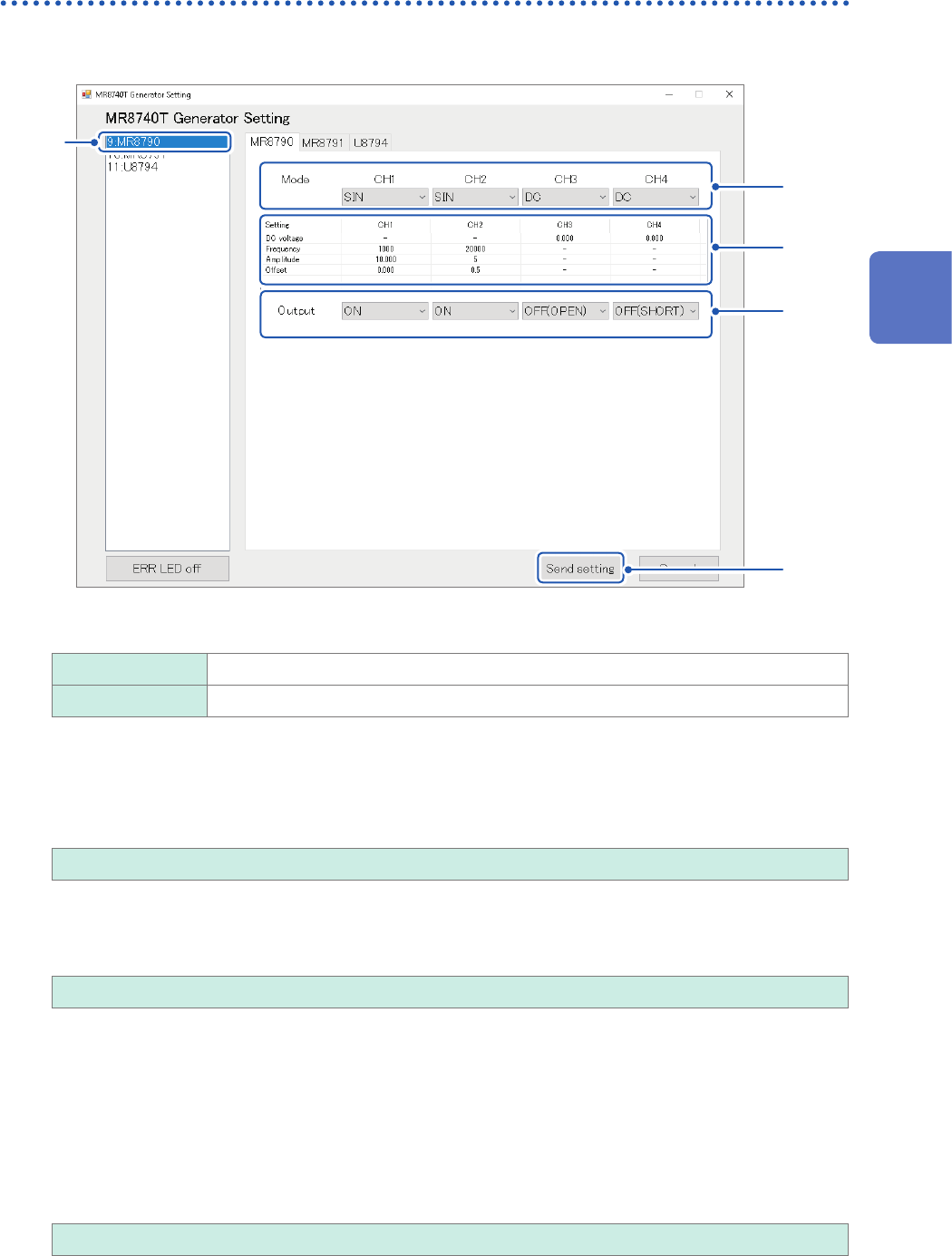
Conguring Model MR8790 Waveform Generator Unit setting
1
Click [MR8790].
5
1
3
2
4
2
Allows you to choose a waveform type
DC
Outputs a DC signal.
SIN Outputs a sine wave signal.
3
Congure the advanced output settings.
DC voltage
Allows you to enter a DC voltage.
−10.000 V to +10.000 V
Frequency
Allows you to enter a frequency of the output sine wave.
0 Hz to 20000 Hz
Amplitude
Allows you to enter an amplitude of the output sine wave.
Accuracy of the output voltage, which consists of amplitude and an offset value, is guaranteed in the
range of −10 V to +10 V.
An output waveform will appear with its upper parts limited to about +14 V and lower about
−14 V when the sum of the amplitude and offset value is set to out of the accuracy-guaranteed
range.
0.000 V p-p to 20.000 V p-p
3
Advanced Functions
68
Conguring Generator-Module-Specic Settings
Offset
Allows you to set an offset of the output sine wave.
Accuracy of the output voltage, which consists of amplitude and an offset value, is guaranteed in
the range of −10 V to +10 V.
An output waveform will appear with its upper parts limited to about +14 V and lower about −14 V
when the sum of the amplitude and offset value is set to out of the accuracy-guaranteed range.
−10.000 V to +10.000 V
4
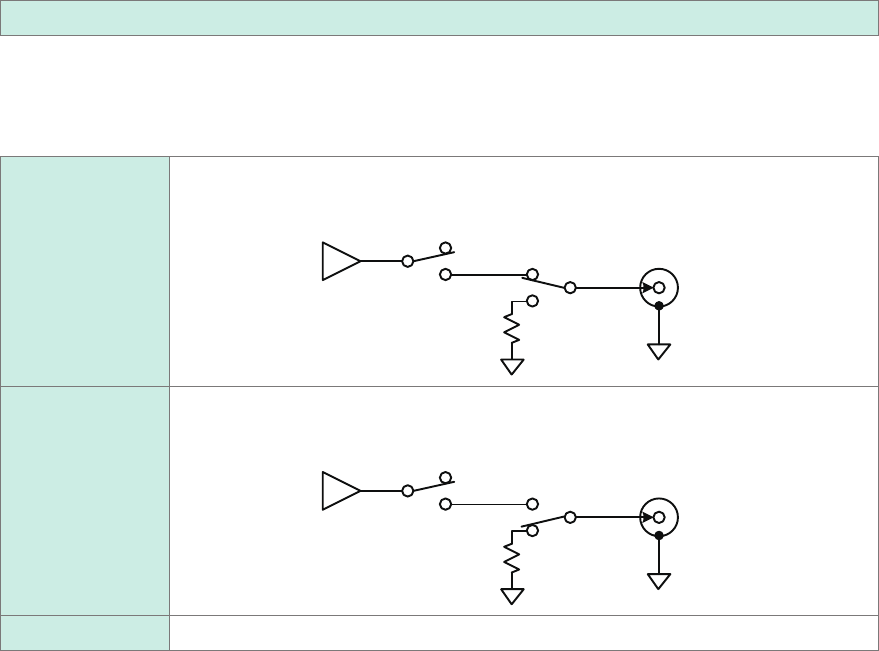
Choose whether to output a waveform.
Select a state at the time when no waveform is outputted
OFF (OPEN)
Does not output any waveform
Disconnect the output terminals from the internal circuit and short-circuits the terminal.
Internal
circuit
Output
terminal
OFF (SHORT)
Does not output any waveform
Disconnect the output terminals from the internal circuit and short-circuits the terminal.
Internal
circuit
About 20
Ω
Output
terminal
ON Outputs a waveform
5
Click [Send setting].
The instrument conrms the settings and outputs a waveform.
69
Conguring Generator-Module-Specic Settings
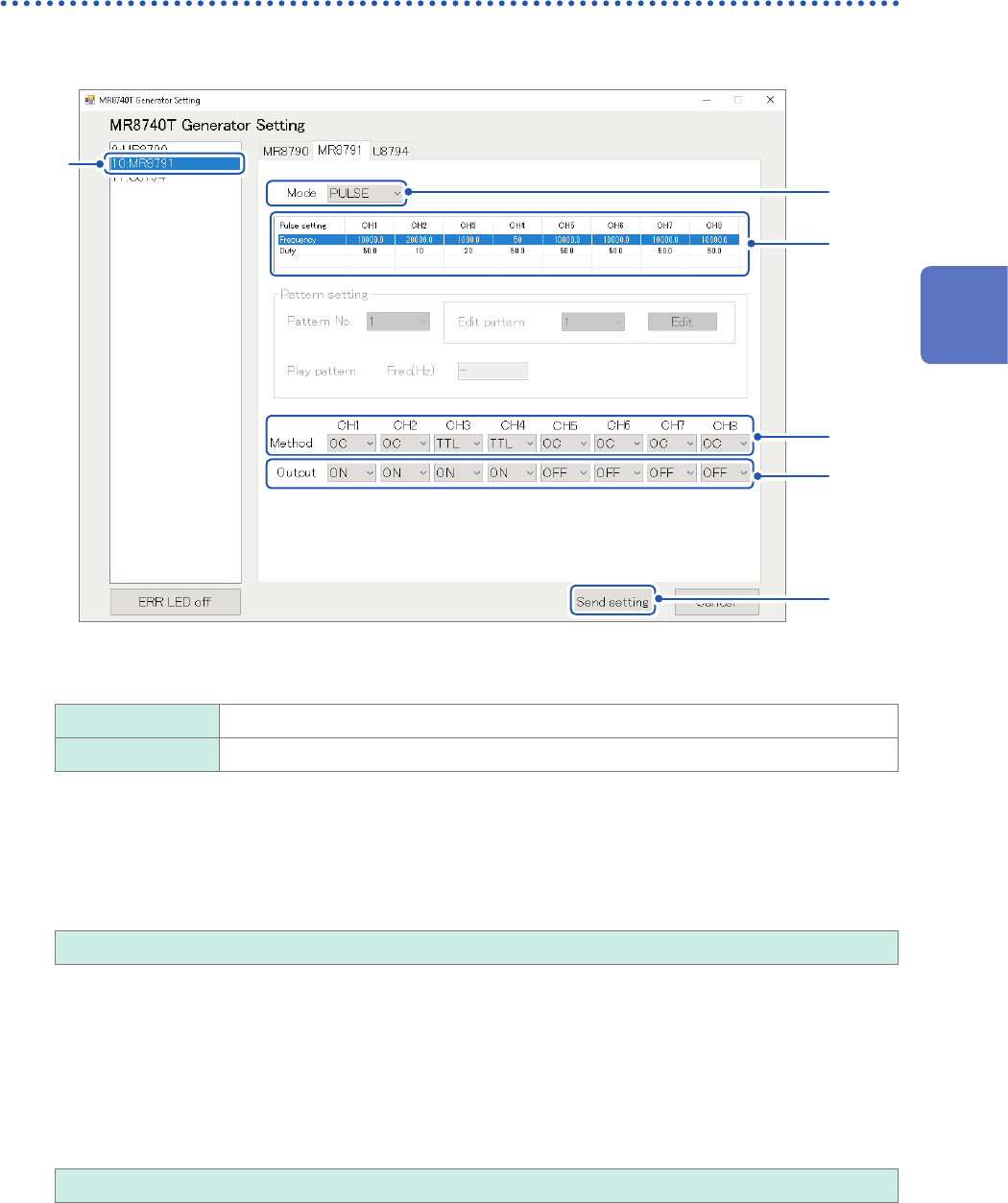
Conguring Model MR8791 Pulse Generator Unit settings
1
Click [MR8791].
6
1
3
4
5
2
2
Click the [Mode] box, and then choose an output type from the list.
PULSE
Outputs a pulse waveform.
PATTERN Outputs a pattern waveform.
3
Congure the pulse output settings.
Frequency
Allows you to enter a pulse output frequency. (In 0.1 Hz increments)
0.0 Hz to 20000.0 Hz
Duty ratio
Allows you to enter a pulse duty ratio. (In 0.1 percent point increments)
• With the 0% setting, the low-level signal is outputted; with the 100% setting, the high-level signal is
outputted. No pulse is outputted.
• With the 100% setting, the low-level signal is outputted even if the output setting is disabled.
• The output pulse width setting of 1 µs, which can be derived from the frequency and duty ratio settings, may
cause absence of pulses.
0.0% to 100.0%
3
Advanced Functions