MR8740T_user_manual_eng_20191016H.pdf - 第86页
81 4 Saving/Loading Data and Managing Files This chapter explains how to save and load data and manage les. Before saving data, select [Status] > [Save] , and congure the save setting. The le screen allows you to l…
80
Conguring Generator-Module-Specic Settings
81
4
Saving/Loading Data and
Managing Files
This chapter explains how to save and load data and manage les.
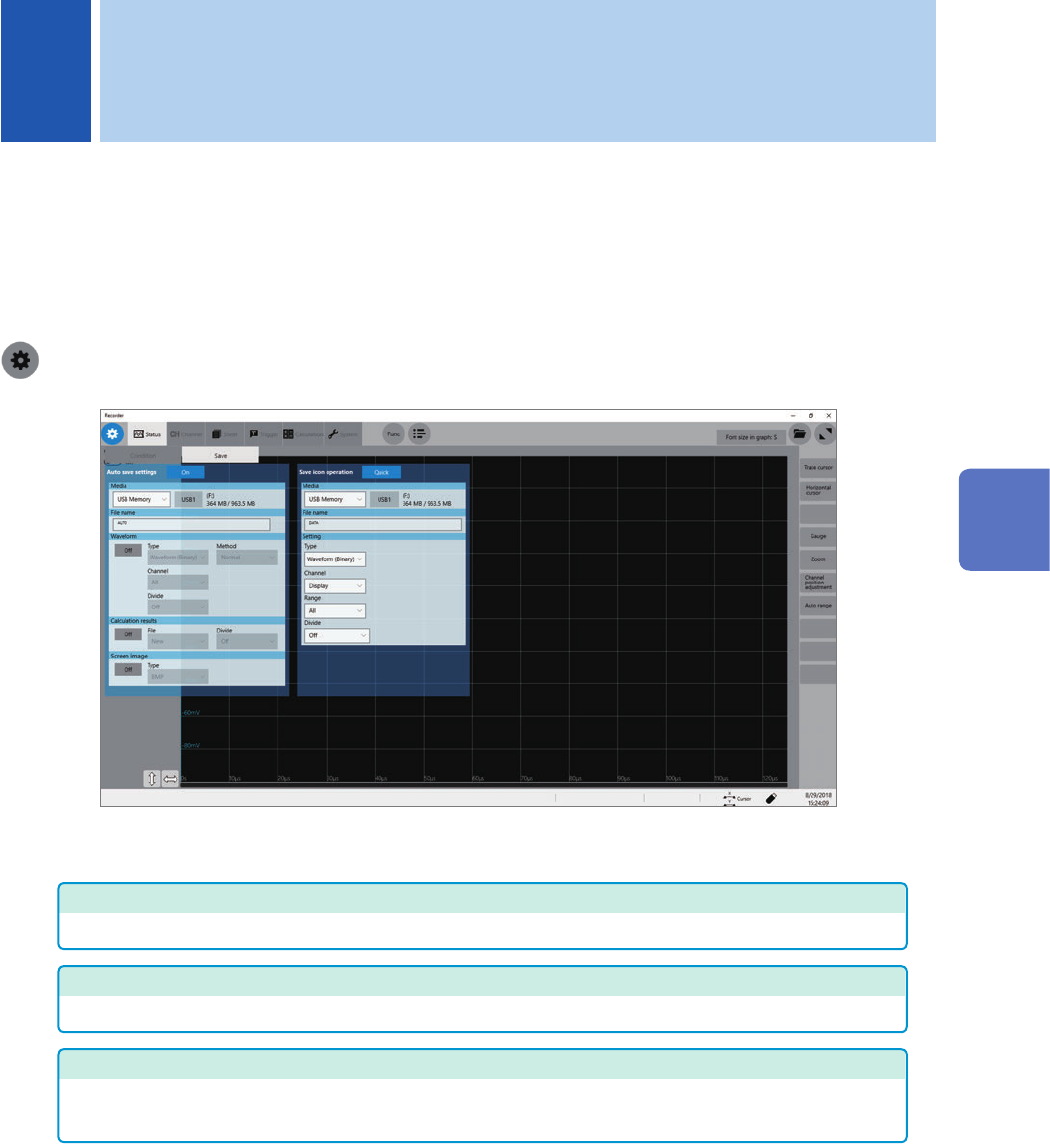
Before saving data, select [Status] > [Save], and congure the save setting.
The le screen allows you to load data.
The explorer allows you to manage les.
Refer to “4.4 Managing Files” (p. 96).
> [Status] > [Save]
Operation available on the [Save] screen
Auto-save
Specifying the auto-save method settings for measured data (p. 84)
Real-time save
Setting the method of saving waveform data in real time (p. 88)
Save icon operation
• Allows you to select an action to be taken when you click the save icon. (p. 90)
• Specifying contents to be saved when [Quick] is selected (p. 90)
4 Saving/Loading Data and Managing Files
4
Saving/Loading Data and Managing Files
82
Data That Can Be Saved and Loaded
4.1 Data That Can Be Saved and Loaded
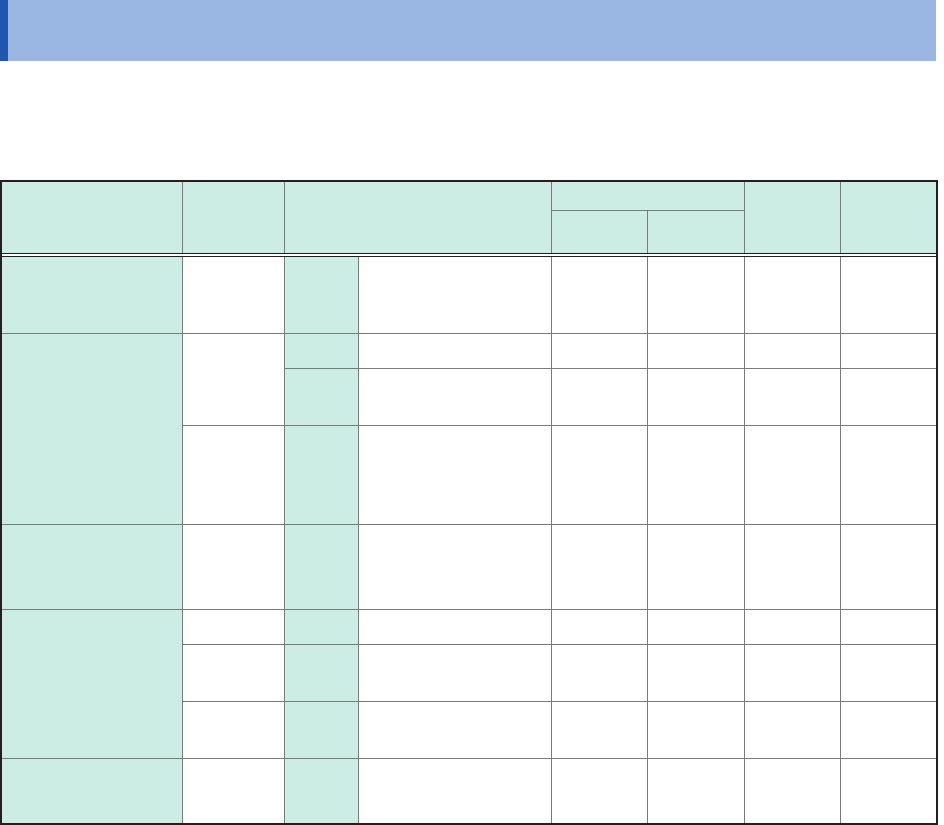
Files that exceed 2 GB cannot be saved.
Data saved with another instrument cannot be loaded onto the instrument.
:
Enable, ‒
:
Disable
File type
File
format
File extension and
description
Saving
Loading
Loading
on a
computer
Auto Manual
Setting data*
1
Binary .SET
Setting data
(measurement
conditions)
–
–
Waveform data*
2
The data of whole
waveforms or a part
of waveforms within
the range between
the trace cursors
(acquired in the
instrument)
Binary
MEM Binary data
‒ *
3
FLT
Waveform data in
oating-point format
– –
Text
CSV,
TXT
*
6
Text data
–
Waveform
managing data*
4
(Division save)
(Index le) IDX
Index data of the
division save
–
Screenshot,
waveform image
BMP*
5
BMP Image data
–
PNG*
5
PNG
Image data (PNG
format)
–
JPEG*
5
JPEG
Image data (JPEG
format)
–
Numerical
calculation result
Text
CSV,
TXT
*
6
Text data
–
*1: The instrument automatically loads data at the time of startup. (p. 84)
*2: To load data with the instrument: Save the data in binary format. Waveform data and a part of
measurement settings data are saved.
Save the data in binary format. Waveform data and a part of
measurement settings data are saved.
To load data with a computer: Save the data in text format. (p. 83)
To save a part of waveforms: Specify a saving range with trace cursors. (p. 20)
*3: Data can be loaded with Wave Viewer (Wv).
*4: To load divided waveform data, load the index data (IDX).
*5: BMP format: This is one of the standard Windows
®
image le format. Various graphics programs can
open these les.
PNG format: Internationally standardized image le format conforming to ISO/IEC15948
JPEG format: Internationally standardized image format conforming to ISO/IEC10918
*6: When you choose a separator other than [Comma ,] in [Region], les are saved with the .TXT extension.
(p. 179)