00191413-01.pdf - 第123页
User Manual Line Computer UNIX 4 Data Management Software Version 501.xx 01/99 Issue 4.3 User Interface of the Data Manager 4 - 13 4.3.3. 1 FI LE me nu - Opening A selec ted data par tner from t hose d isplayed i n the d…

4 Data Management User Manual Line Computer UNIX
4.3 User Interface of the Data Manager Software Version 501.xx 01/99 Issue
4 - 12
Command Area
The command area comprises the following components:
- Mouse function
Here you can define the mouse handling conventions and their meanings.
A selection can be made between copying and moving/renaming.
● Click on, for example, the Copy button. The files/directories selected by clicking the mouse
button are copied.
- Actions
This serves to specify whether actions are to be executed immediately
following the selection (e.g,
FILE --> Delete) or only after having been confirmed in a dialog box associated to the action to be
performed.
NOTE
The "Delete" action is always executed after
the verification query has been confirmed, even if the
button "Immediately" in the command area is activated.
● Click on, for example, the Confirm button.
Prior to the execution of an action involving selected "Files/directories", a dialog box associated to
the action to be performed is displayed where the action is to be confirmed.
● Click on OK in the dialog box.
The dialog box is closed and the action is executed.

User Manual Line Computer UNIX 4 Data Management
Software Version 501.xx 01/99 Issue 4.3 User Interface of the Data Manager
4 - 13
4.3.3.1 FILE menu
- Opening
A selected
data partner from those displayed in the display area can be opened.
● Click on data partner.
● Select menu option FILE --> Open ...
The main window of the selected data partner is opened (see example "master data" in Fig. 4.3.2).
- Closing the main window and all file windows that may be open
● Click on FILE --> Quit.
The main window of the data manager and all
file windows that were opened via the Data Mana-
ger are closed. The Data Manager is deactivated.
Upon restarting the Data Manager, the main window and all previously open windows of the data
partners are restored.
4.3.3.2 OPTIONS menu
- Saving default values
This serves to save to a configuration file all open main and file windows (incl. paths, positions and
display mode) so that all thus stored windows are automatically redisplayed on the screen when the
Data Manager is started up again (even if in the meantime the line computer session was temporarily
terminated and subsequently re-started).
● Click on OPTIONS --> Save default values.
- Confirm actions / Execute selection immediately (software switch)
Here the setting defining whether an action has to be confirmed first or is executed immediately can
be changed.
● Click on OPTIONS --> Confirm actions or Execute selection immediately.
4 Data Management User Manual Line Computer UNIX
4.3 User Interface of the Data Manager Software Version 501.xx 01/99 Issue
4 - 14
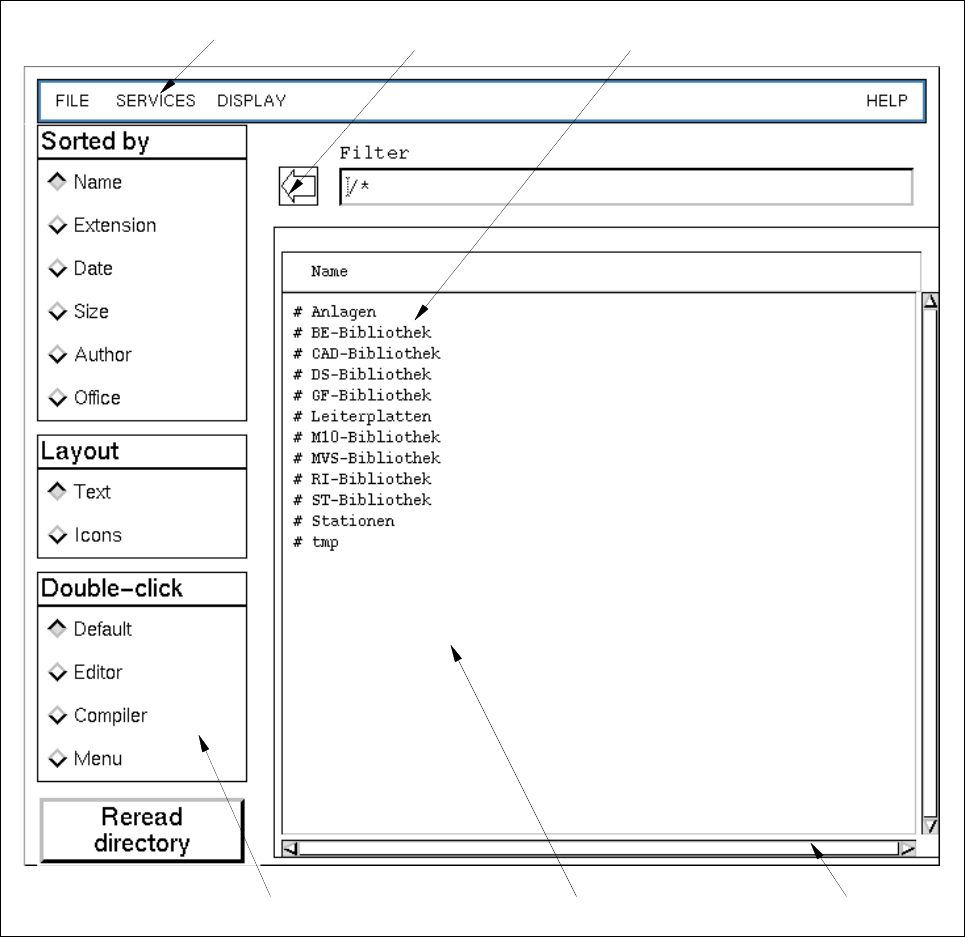
4.3.4 Main Window of a Data Partner
Fig. 4.3.2 Main Window of a Data Partner (example "Master Data")
The main window (see Fig. 4.3.2) is subdivided into the following areas:
- Menu bar
- Display area
- Command area
- Arrow button
menu bar arrow button directory/file
scroll bardisplay areacommand area