00191413-01.pdf - 第261页
User Manual Line Computer UNIX 8 Product / PCB Software Version 501.xx 01/99 Issue 8.1 PCB Editor 8 - 23 - cross highlighted in gray Identifi es plac ement pos itions al located to speci fic plac ement lev els. - cross h…
8 Product / PCB User Manual Line Computer UNIX
8.1 PCB Editor Software Version 501.xx 01/99 Issue
8 - 22
8.1.3.7 Colors and Their Meanings in the Structure Editor (Graphic Mode)
In the Graphic Mode of the Structure Editor several colors are used for the graphical elements displayed.
Depending on the status of the graphical elements (e.g. "blocked") the colors the colors have a different
meaning.
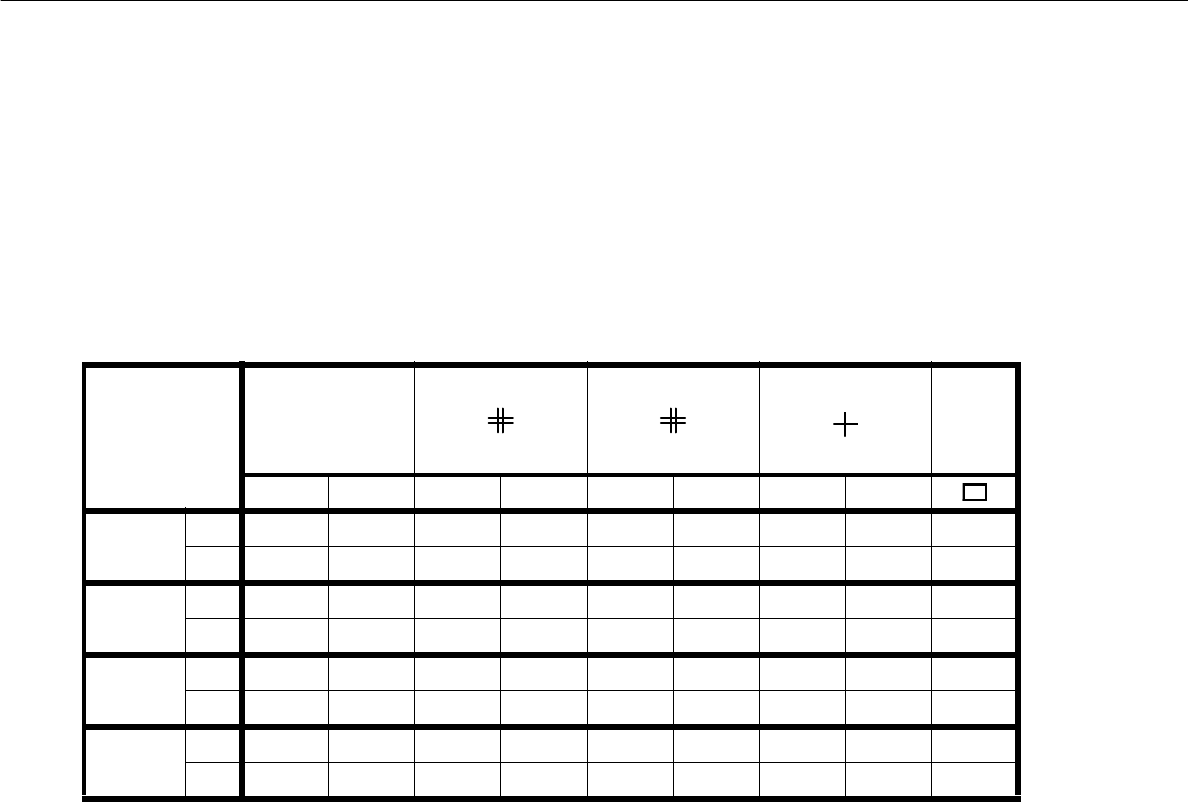
In the chart below the assignment of the colors to the status of the graphical elements displayed is shown.
Meaning of the colors:
- black indicates that this object is valid, i.e. effective, with respect to the respective substructure.
- gray indicates that this object is ineffective, i.e. owing to its own individual attribute, e.g.
blocked fiducial or ink spot.
- red indicates that this object is only ineffective on account of production details, e.g. a fiducial
is not blocked, yet PCB position recognition is turned off.
- green identifies the valid placement positions
Meaning of the colors with respect to the placement positions:
- green cross: Identifies valid placement positions.
- gray cross: Identifies placement positions that are assigned the attribute "s", i.e. they are blocked
(see section 8.1.6.3).
- red cross: Identifies placement positions that are only ineffective on account of production details.
This means that the cluster (partial structure) in which they are located is assigned the
attribute "omit" (see section 8.1.4.4).
Cluster data Ink spot
l
PCB fiducial PP fiducial PP pos.
Outline
blocked normal blocked normal blocked normal blocked normal
Ink spot
recocnition
yes gray black -------
nograyred-------
PCB pos.
recognition
yes - - gray black -----
no--grayred-----
PP pos.
recognition
yes----grayblack - - -
no----grayred---
Omitting
cluster
no------graygreenblack
yes------grayredred
Tab. 8.1 - 1 Colors and symbols and their meanings

User Manual Line Computer UNIX 8 Product / PCB
Software Version 501.xx 01/99 Issue 8.1 PCB Editor
8 - 23
- cross highlighted in gray Identifies placement positions allocated to specific placement levels.
- cross highlighted in blue Identifies placement positions allocated to the currently selected place-
ment level.
- cross highlighted in Identifies placement positions allocated to the placement level that, within
light blue the placement sequence, precedes the currently selected placement level.
Meaning of the Colors in the Structure Graphic:
- black the offset data of the substructure and all of its higher-level substructures are defined.
The substructure is already displayed in the Graphic Mode.
- red the offset data of the substructure are completely defined, not however, those of all supe-
rior substructures thereof. The substructure is not displayed in the Graphic Mode yet.
- gray the offset data of the substructure have not been completely defined yet. The substructure
is not displayed yet in the Graphic Mode, and any possible display of its lower-level sub-
structures is suppressed.
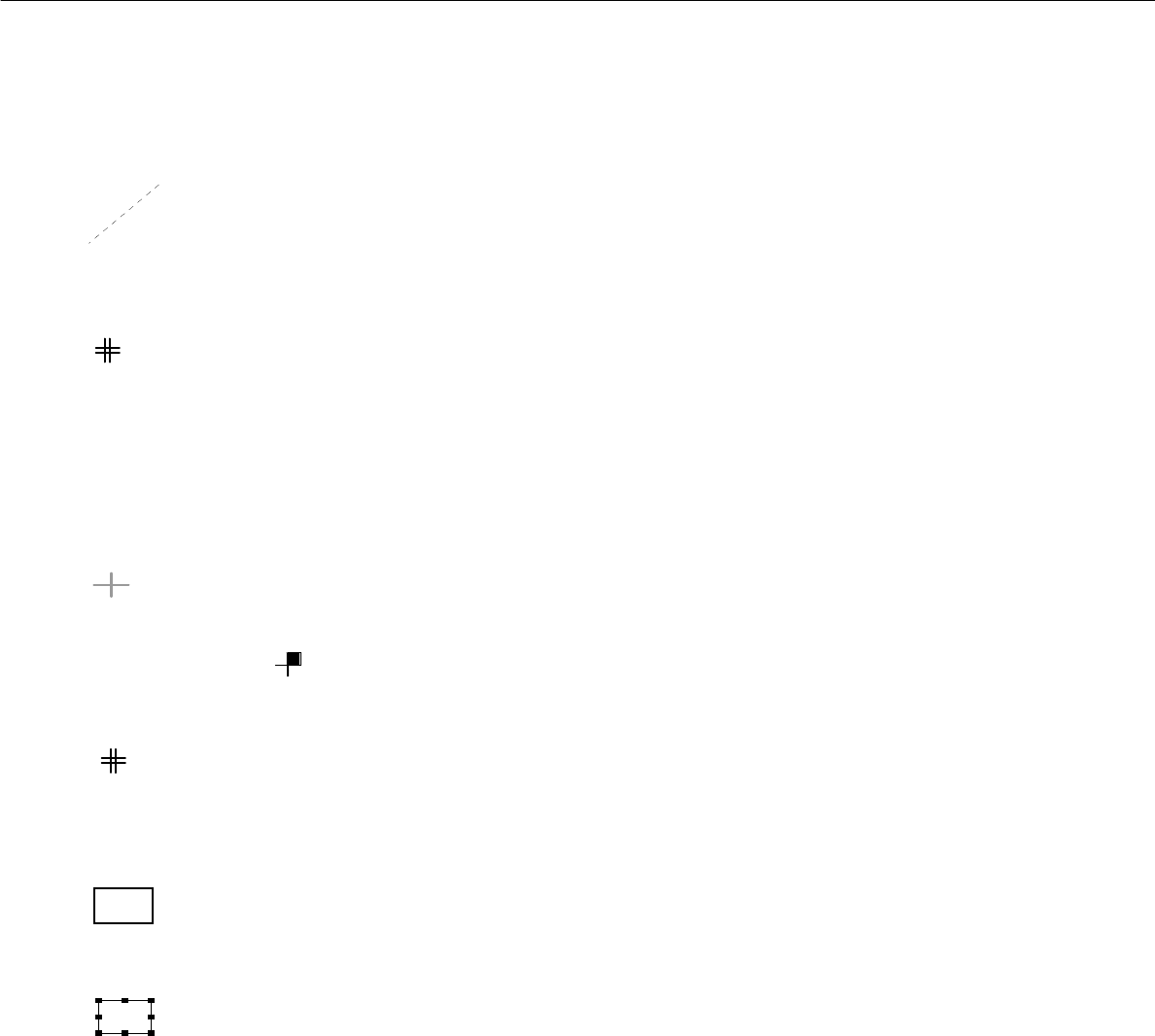
8.1.3.8 Symbols and Their Meanings in the Structure Editor (Graphic Mode)
In the Graphic Mode of the PCB Editor a series of symbols are used each of which has a different meaning.
In the following, the meaning of the symbols is explained.
Outline (dimensions) of the PCB
It is uniquely defined by the length and width of the PCB or substructure.
Name of the PCB or the PCB substructure (color blue)
<Name> The name is always displayed above the upper left corner of the outline, with the same orientation
as the substructure.
Zero point
This symbol identifies the zero point of the coordinate system of the PCB or substructure.
Coordinate system of a substructure
This graphic indicates the position of the coordinate system of the substructure.
The arrow marks the x-axis and always identifies the positive direction of the axis.
Dimensional vectors
They symbolize the two vectors from the PCB zero point to corner "1" and corner "2" of the PCB
outline (see graphical display on page 8 - 28).
8 Product / PCB User Manual Line Computer UNIX
8.1 PCB Editor Software Version 501.xx 01/99 Issue
8 - 24
Offset vector
connects the zero point of a substructure to the zero point of the superior substructure and hence
corresponds to the offset or displacement vector between the two coordinate systems of these
substructures.
PCB fiducial
This symbol indicates the position of a PCB-related fiducial.
It is always displayed in the shape of a double cross, irrespective of the actual shape of the fiducial.
Ink spot
l This symbol indicates the position of the fiducials defined as inkspots.
It is always displayed in the shape of a dot, irrespective of the actual shape of the fiducial.
Placement position (color green)
This symbol indicates the position of the placement position or the zero point of the coordinate
system of the placement position.
To identify the position of pin 1, the quadrant in which pin 1 is located is highlighted in solid color.
Example :
Placement position fiducial
This symbol indicates the position of a PP-related fiducial.
It is always displayed in the shape of a double cross, irrespective of the actual shape of the fiducial,
and it is significantly smaller than the symbol of a PCB fiducial.
Frame around a selected placement position and/or substructure
The frame marks the outline of the currently selected substructure.
The frame marks the currently selected placement position.
Frame around placement position(s) or a substructure
The frame marks the outline of a substructure which is linked to the currently selected sub-
structure.
The frame marks the placement positions which are linked to the currently selected placement
position.