00191413-01.pdf - 第269页
User Manual Line Computer UNIX 8 Product / PCB Software Version 501.xx 01/99 Issue 8.1 PCB Editor 8 - 31 NOTE Fiducial s within one PCB structur e are effe ctive i n ascend ing orde r (from the bottom to the top) . This …
8 Product / PCB User Manual Line Computer UNIX
8.1 PCB Editor Software Version 501.xx 01/99 Issue
8 - 30
8.1.5 Fiducial Editor Window
With the aid of the menu and the input fields of the Fiducial Editor the fiducials (for PCB position recognition)
and ink spots (to identify faulty clusters) required for a specific PCB type can be set or deselected.
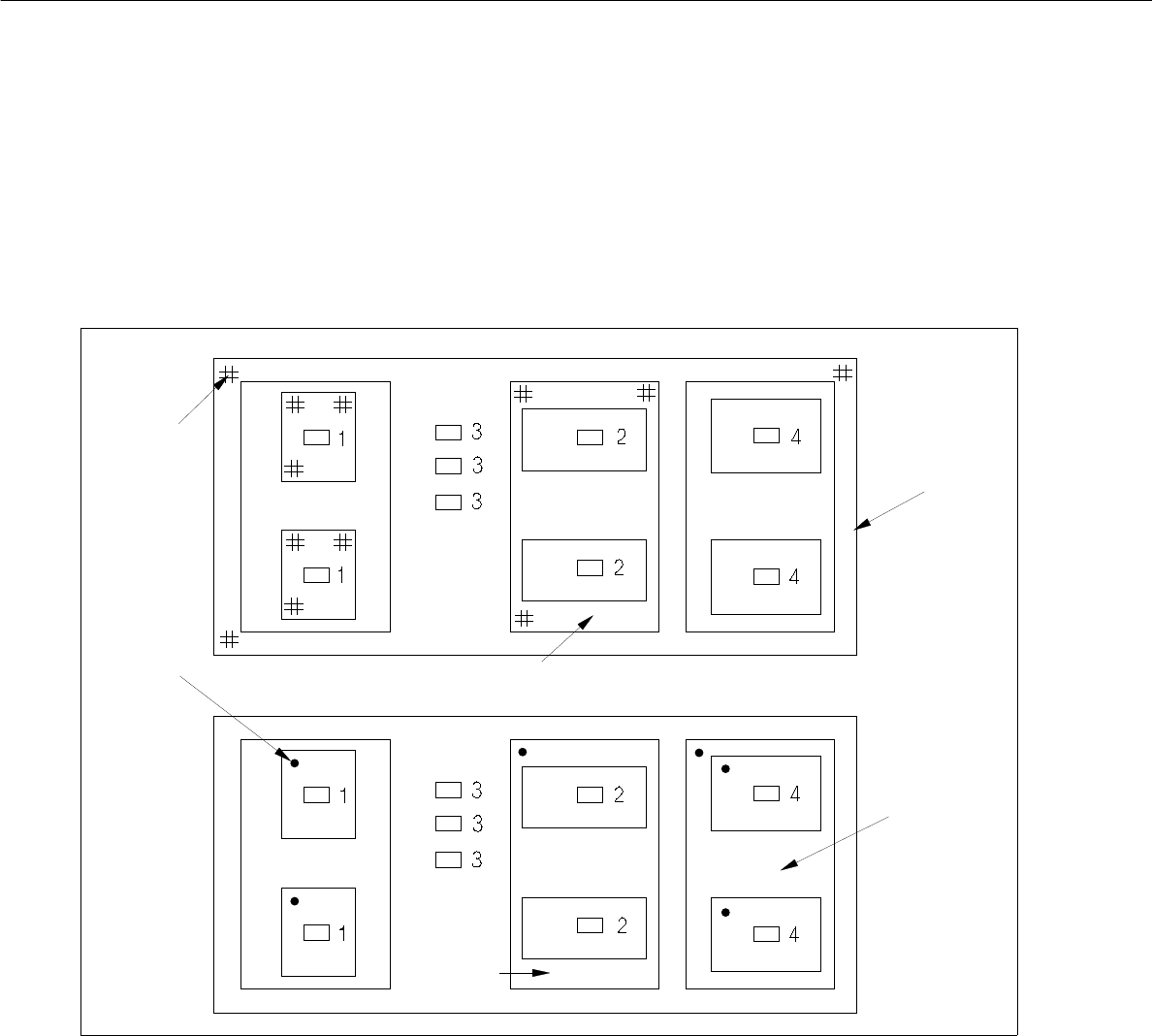
Examples of allocations of fiducials and ink spots are shown and described in the following.
Fig. 8.1.9 Allocation of Fiducial Sets for Position Recognition and Allocation of Ink Spots (example)
Fiducial set for position recognition:
Fiducial set of the single circuit applies to component 1.
Fiducial set of group 2 applies to components 2.
Fiducial set of group 1 applies to components 3.
Fiducial set of group 1 applies to components 4.
Ink Spots:
The ink spot of the single circuit applies to components 1.
The ink spot of group 2 applies to components 2.
No ink spot applies to components 3.
The ink spot of group 3 applies to components 3.
group 1
group 2
group 3
group 2
fiducial
ink dot
User Manual Line Computer UNIX 8 Product / PCB
Software Version 501.xx 01/99 Issue 8.1 PCB Editor
8 - 31
NOTE
Fiducials within one PCB structure are effective in ascending order (from the bottom to the top). This means,
for example, that for the position recognition of a component the fiducial set applies which is located closest to
the component (see Fig. 8.1.9).
Ink spots within a PCB structure are effective in descending order (from top to bottom). If, for example, an ink
spot was set within partial PCB structure which in turn contains substructures with ink spots, this (higher-
order) ink spot is decisive for the assembly of the PCB (see Fig. 8.1.9).
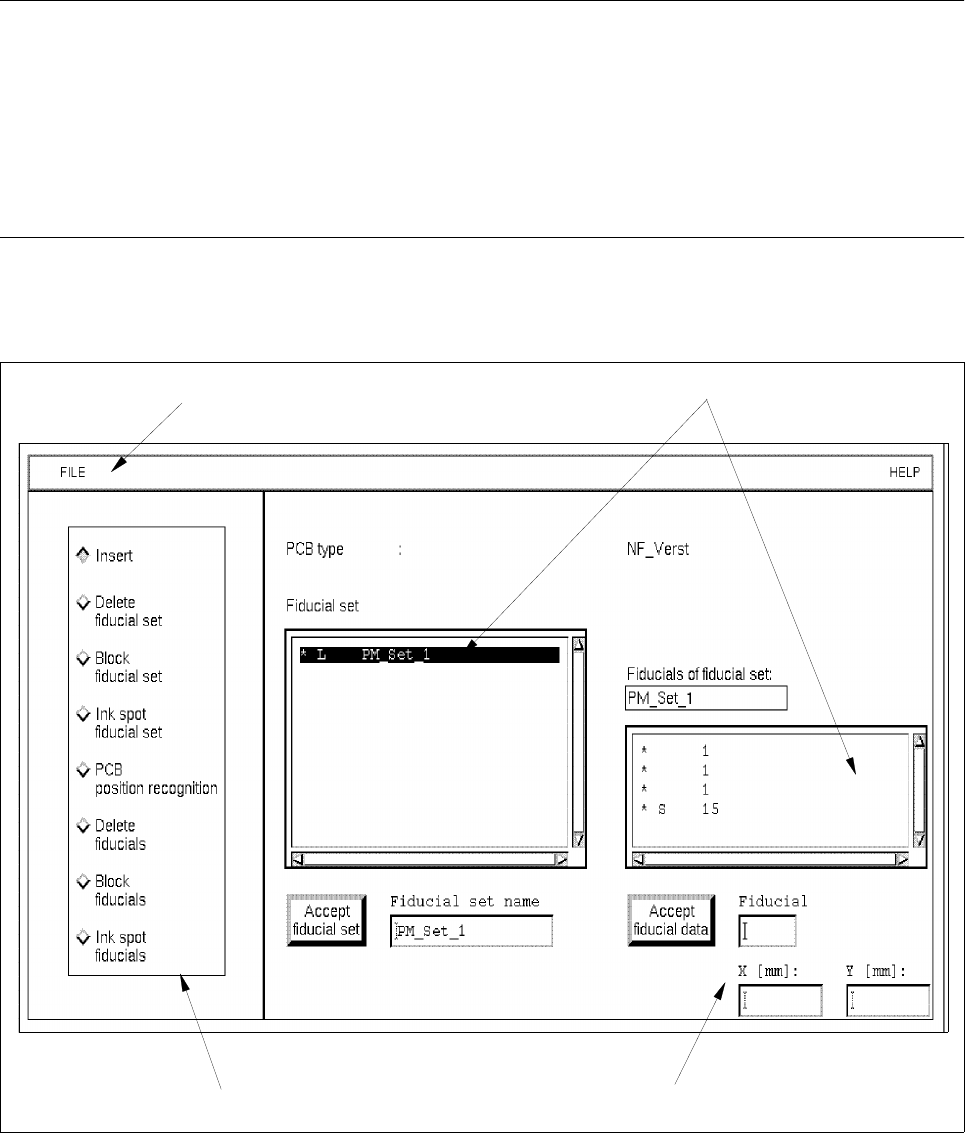
The Fiducial Editor (see Fig. 8.1.10) is called up from the window of the Cluster Editor (see Fig. 8.1.8) by clicking
on the field Edit fiducials.
Fig. 8.1.10 Window "Fiducial Editor"
menu bar
selection fields
editing area
command area

8 Product / PCB User Manual Line Computer UNIX
8.1 PCB Editor Software Version 501.xx 01/99 Issue
8 - 32
The window of the Fiducial Editor is subdivided as follows:
- Menu bar
- Display area
- Editing area
- Command area
Menu Bar
The menu bar contains the "FILE" and "HELP" menus.
NOTE
Since the functions and operation of the "FILE" and "HELP" menus are similar to those in other application
programs of the line computer, they are described comprehensively in chapt. 2.
Selection Fields
Two selection fields are contained in the window of the Fiducial Editor. The "Fiducial set" selection field contains
a listing of the names of already-defined fiducial sets. If a fiducial set has been selected, the fiducials contained
in the set are displayed in the "Fiducials of fiducial set" selection field (see Fig. 8.1.10).
Editing area (see section 8.1.5.1)
This area contains the editing field for the names of a fiducial set, the number of a fiducial and the x/y coordinates
for the definition of the fiducial position.
Command area (see section 8.1.5.2)
The respective actions to be performed on the fiducial sets and fiducials can be executed by activating the
buttons in the command area.
8.1.5.1 Editing Area of the Fiducial Editor
Fiducials and fiducial sets can be defined and edited in the editing area (see Fig. 8.1.10). The possibilities and
presettings are described in the following.
- Fiducial set name
This field serves to define the name of the fiducial set which may contain several fiducials. The name
can be composed of up to 17 characters. Characters used may only comprise letters, numbers and
underscores, e.g. PM_Set_1.
● Activate Insert in the command area.
● Enter fiducial set name.