00191413-01.pdf - 第291页
User Manual Line Computer UNIX 9 Production Tools / Feeders Software Version 501.xx 01/99 Issue 9.1 Feeder Editor 9 - 7 9.1. 3.1 S ERVI CES M enu The SERVI CES me nu contai ns the men u optio ns desc ribed in the followi…

9 Production Tools / Feeders User Manual Line Computer UNIX
9.1 Feeder Editor Software Version 501.xx 01/99 Issue
9 - 6
NOTE
In the case that one
station contained in one of the line configuration lists is not part of the configuration, all sta-
tion types of the ST-Bibliothek are displayed and the user is provided with a corresponding message contained
in a dialog box.
The station can be configured with the aid of the Station Editor (see chapt. 12). To integrate this subsequently
configured station into the Feeder Editor, it is required that the LC program be restarted (LC End/LC Start).
If the elements are selected in the display area with the mouse, they change color and are thus highlighted.
NOTE
Depending on where a machine type, for example, is clicked on, either the complete machine type or
merely a feeder part can be selected (see Fig. 9.1.2).
Selection Fields
Selection Field "Feeder"
In this field all feeders are displayed that were allocated.
Selection Field "Placeable feeders"
In this field all feeding equipment (feeders/waffle-pack trays) is displayed that can be set up in the feeder
part selected in the display area. Moreover, also "customer-specific types" are displayed that were created
based on "SIEMENS types" and that can be set up on the selected location. The customer-specific types
contain customer-specific data.
Filter Field
It is possible to limit the list of feeders in the selection field "Placeable feeders" by entering given character strings.
Example: *LIN* Only linear feeders are displayed.
* All feeders suitable for setting up are displayed.
Setting Area
With the aid of the buttons of this area (see section 9.1.3.3) the following options can be set:
Right side --> Subsequently defined allocations apply to the right side
(see Fig. 9.1.1) irrespective of the machine type.
Left side --> Subsequently defined allocations apply to the left side
(see Fig. 9.1.1) irrespective of the machine type.
Line --> Subsequently defined allocations apply without restrictions, irrespective
of the machine type (standard).
Command Area
This area contains commands which allow selections and allocations to be made and existing allocations to be
deleted. The function and execution of these commands are described in section 9.1.3.4.
User Manual Line Computer UNIX 9 Production Tools / Feeders
Software Version 501.xx 01/99 Issue 9.1 Feeder Editor
9 - 7
9.1.3.1 SERVICES Menu
The SERVICES menu contains the menu options described in the following:
- Lists
This menu option contains functions by means of which the current allocations of package forms or
components to a selected feeder or waffle-pack tray can be displayed in the form of listings. More-
over, the possibility exists to call up a list containing all defined package forms that have not been allo-
cated to a given feeder yet.
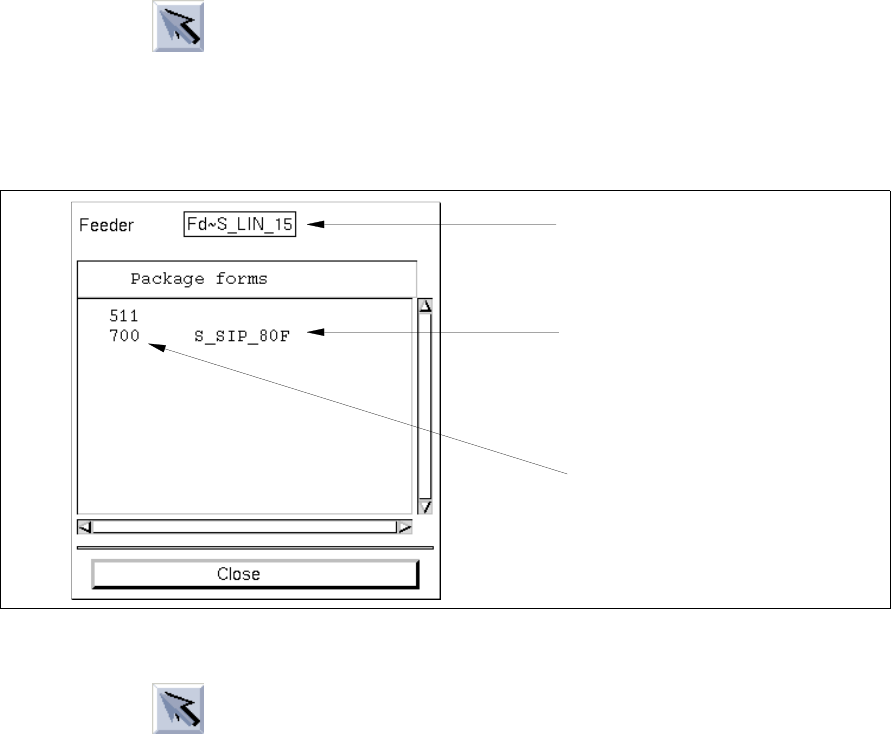
Calling up the list of allocated package forms:
● Click on icon in the command area (see section 9.1.3.4).
● Select a feeder or a waffle-pack tray from the selection field "Placeable feeders".
● Select the menu option SERVICES --> Lists --> GFs on feeders.
The list with the package form allocations for the selected feeder is opened.
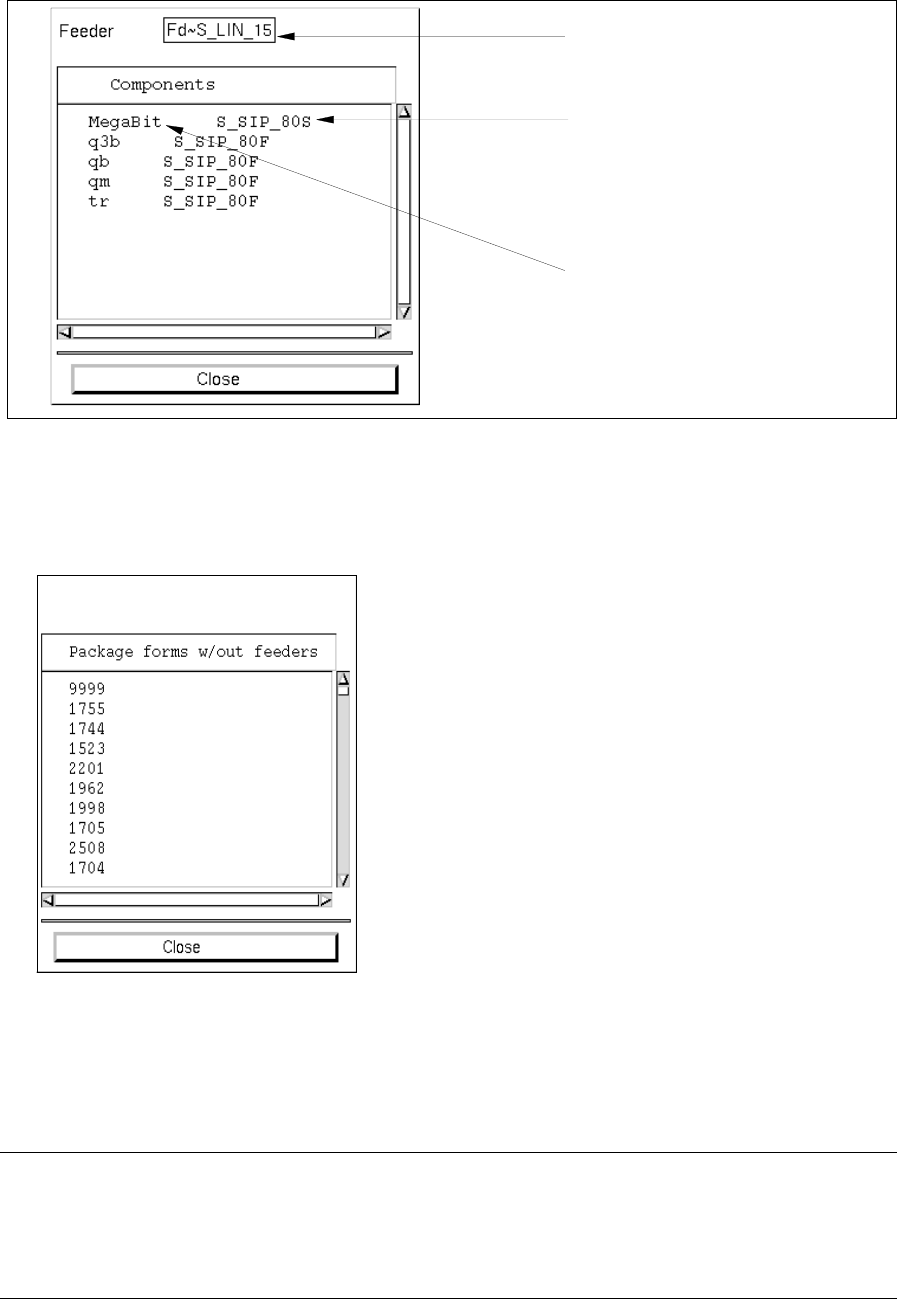
Calling up the list of the allocated components:
● Click on icon in the command area.
● Select a feeder or waffle-pack tray from the selection field "Placeable feeders".
● Select the menu option SERVICES --> Lists --> Comps. on feeders.
The list with the component allocations for the selected feeder is opened.
selected feeder
machine type (location)
allocated package form
9 Production Tools / Feeders User Manual Line Computer UNIX
9.1 Feeder Editor Software Version 501.xx 01/99 Issue
9 - 8
Calling up the list of package forms not allocated to any feeders yet:
● Select the menu option SERVICES --> Lists --> GFs w/out allocat.
All package forms are displayed that have not been allocated to any feeders yet.
- Allocations to GF
This function enables a list of the feeders or waffle-pack trays to be displayed that were allocated to
the current package form.
NOTE
The display of the list is useful if the user has selected a component (see section 9.1.3.2) and wishes
to inform himself of the allocations that have already been defined with respect to the package form of
this component.
selected feeder
machine type (location)
allocated component