00191413-01.pdf - 第326页
11 Production Tools / Optimization User Manual Line Computer UNIX 11.3 Setup Optimization Software Version 501.xx 01/99 Issue 11 - 6 11.3 Setup Optimization 11.3.1 Prer equisite s for Setup Optimization In order to b e a…

User Manual Line Computer UNIX 11 Production Tools / Optimization
Software Version 501.xx 01/99 Issue 11.2 Concept Used
11 - 5
The layers have intentionally been drawn one inside the other since interactions between the layers also occur
in the actual optimization problem. Even though the layers are dependent upon one another they should be
solved independently of one another. The optimization problem is thus rendered resolvable, although an error
will be produced. In order to keep the error as small as possible, the simplified assumptions of the higher-level
layers must be fulfilled by the lower layers, as far as possible. The individual layers must be so coordinated with
respect to one another that the error is of minor significance for the optimization result.
In Set-Up Optimization the tasks of the Clustering, Balancing and Track Allocation layers are processed. The
Placement Sequence layer is contained in the postprocessor for PCBs and is always then calculated when a
producibility check is activated or a job scheduled. The Placement Sequence cannot be calculated any earlier
since the current state of the data is needed as the basis. In particular, loading a new PCB causes a lot of
changes at the data base. Such changes can affect the placement sequence as well. This is the reason why a
placement sequence must not be calculated prior to this point.
When using the optimization option, the operator first determines the types and the number of the PCBs to be
assembled. Following a plausibility check, optimization starts. As a result of optimization, the optimization
processor then creates one or several setups (see section 11.3.2) which are stored in the master data storage
under the path „Anlagen/<line>.ak /<subline>.va/*. In addition, the lot file is modified. For each job (PCB type
and nominal lot size) contained in the lot file, the name of the line, the subline and the setup are entered. After
optimization has been completed successfully, the jobs contained in the modified lot file can be merged with
the job list of Job Control and subsequently be directly scheduled.
In order to retain the information between PCB and setup, the job will not be deleted from the job list following
its completion.
NOTE
No setup will be created if it were to contain a PCB for whose components and feeders there would not be
sufficient capacity on the line.

11 Production Tools / Optimization User Manual Line Computer UNIX
11.3 Setup Optimization Software Version 501.xx 01/99 Issue
11 - 6
11.3 Setup Optimization
11.3.1 Prerequisites for Setup Optimization
In order to be able to have Setup Optimization create a setup, a lot file must be available which is passed to
the optimization processor. Such a lot file (xx.lose) contains the following data:
- name of the line
- name of the subline
- jobs (including PCB types and desired sizes)
- name of fixed setup (optional)
- Name of initial setup (optional)
NOTE
Lot files are stored in the path Job data/Losplanung/* with the suffix .lose. The generation of a lot file is
described in chapt. 14.
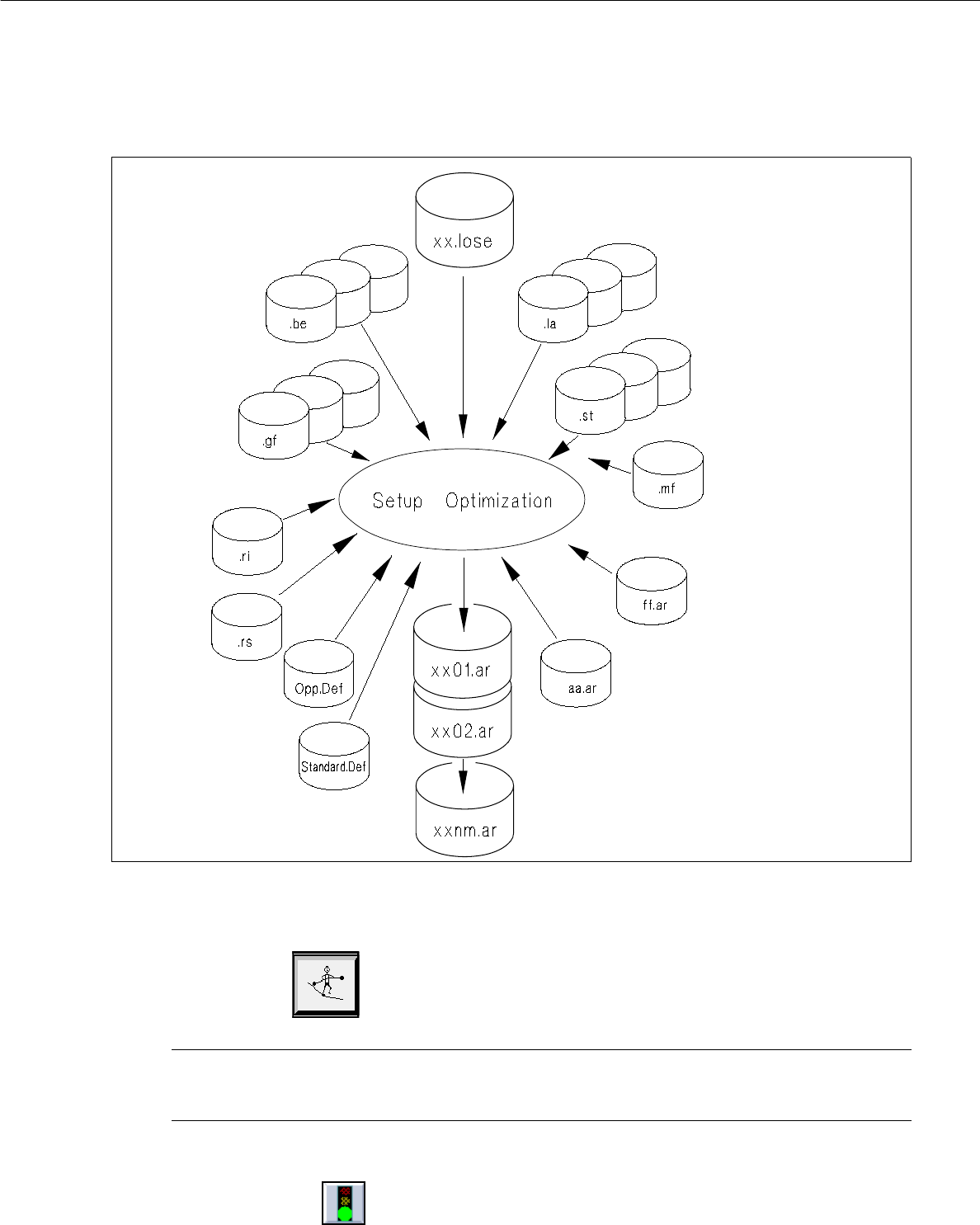
11.3.2 Data access during optimization run
When the optimization run for Setup Optimization is started (see section 11.3.2.1), the Setup Optimization
processor accesses the data listed in the following (see also Fig. 11.3.1) and creates the optimized setup data
therefrom.
File name File contents
- Lot file xx.lose Jobs
- PCB data .la Description of the PCBs
- Component data .be Description of the components
- Package form data .gf Description of the package forms
- Station data .st Description of the station configurations
- Material flow list .mf Description of the station structure of the
subline
- Setup information data .ri Long-term (type-related) restrictions
- Restriction data (optional) .rs Short-term (individual machine-related)
restrictions
- Setup data (optional; only if a fixed .ar Description of a fixed or initial setup (initial
setup is preset) setups are only taken into account in
conjunction with clustering!) setup is preset)
- Parameter file OPP.Def Optimization parameters for the job
Standard.Def Standard parameter file
The setup data (= result of the setup optimization) created by the optimization processor are saved in the path
Anlagen/<Line>.ak/<Subline>.va/* in the file xx01.ar ("xx" stands for the name of the lot file). If more than
one setup is involved, the number 01 will be incremented in the file name, i.e. 02, 03, etc.
User Manual Line Computer UNIX 11 Production Tools / Optimization
Software Version 501.xx 01/99 Issue 11.3 Setup Optimization
11 - 7
Fig. 11.3.1 Data access during optimization run
11.3.2.1 Starting the Optimization Run
● Click on the Opimization icon on the desktop (only applies to the „programming mode“).
NOTE
The procedure to be followed in the "control mode" is described in section 11.4.1.
The main window of the Optimization dialog is opened (see Fig. 11.4.1).
● Click on the the "Start optimization icon" in the "Actions" command area.
● From the „Lot file“ selection field select the desired xx.lose lot file.
The optimization run is started (see section 11.4).