00191413-01.pdf - 第374页
12 Production Tools / Station and Line Confi guration User Manual Line Computer UNIX 12.1 Configuration Edit or Software Version 501.xx 01/99 Issue 12 - 12 - Deleting This co mmand ca n be us ed to de lete ma chine optio…

User Manual Line Computer UNIX 12 Production Tools / Station and Line Configuration
Software Version 501.xx 01/99 Issue 12.1 Configuration Editor
12 - 11
12.1.2.6 Command Area of the Structure Editor
Depending on which command has been selected in the command area (see Fig. 12.1.1), the corresponding
action will be carried out with machine options selected in the selection area.
NOTE
To be able to create new machine options and allocate these to a given location, the rectangle of the machine
option to be created is to be clicked on by double-clicking in the display area (in the structure). This procedure
can be repeated as often as necessary. The thus created machine option(s) will be displayed in the selection
field "Placeable mach. opt." and is/are available for further actions.
If a machine option is clicked on that cannot be created because it is not part of the fixed (unchangeable)
configuration of the machine type loaded, an error message is displayed. It is impossible, for example, to
create a second gantry on an SIPLACE 80F machine, as this machine type does not allow for two gantries.
COMMANDS
The procedures for executing the commands are described in the following.
- Allocating
This command is used to allocate machine options to a location
● Activate Allocate in the command area.
● Select location to which the machine option is to be allocated.
● Click on machine option in the selection field "Placeable mach. opt.".
The machine option is now allocated to the selected location.
NOTE
If a machine option type is allocated to a given location more often than permitted by the preset maxi-
mum number, an error message is displayed.
- Releasing
Machine Options that have been placed at a location can be returned to the selection field of
placeable machine options and are thus available again for selection at any time.
● Activate Release in the command area.
● Select machine option in selection field "Machine Options at location" with a mouse-click.
The selected machine option is returned to the selection field "Placeable mach. opt.".

12 Production Tools / Station and Line Configuration User Manual Line Computer UNIX
12.1 Configuration Editor Software Version 501.xx 01/99 Issue
12 - 12
- Deleting
This command can be used to delete machine options from a location or from the selection field of
placeable machine options.
● Activate Delete in the command area.
● Select machine option to be deleted.
The selected machine option is deleted from the location or the selection field "Placeable mach. opt.".
ATTENTION
The "Delete" command must be cancelled by selecting a different command as otherwise also other
machine options will be deleted if clicked upon.
- Moving
Machine options can be moved from one location to another location.
● Activate Move in the command area.
● Click on machine option to be moved.
● Select location (target) to which you want the machine option moved.
The machine option is now displayed among the machine options of the location to which it was
moved.
- Copying
This command can be used to copy machine options from one location to another location.
● Activate Copy in the command area.
● Click on location containing the machine option to be copied.
● Select machine option .
● Select location (target) to which you want the machine option copied.
The copied machine option is now shown at the selected location.
User Manual Line Computer UNIX 12 Production Tools / Station and Line Configuration
Software Version 501.xx 01/99 Issue 12.1 Configuration Editor
12 - 13
12.1.3 Machine Options Editor
For each of the machine options "Station and Station Extension", "Head", "Adapter Changer" and "Nozzle
Changer" a separate Machine Options Editor can be opened. All component-specific data are entered in these
editors.
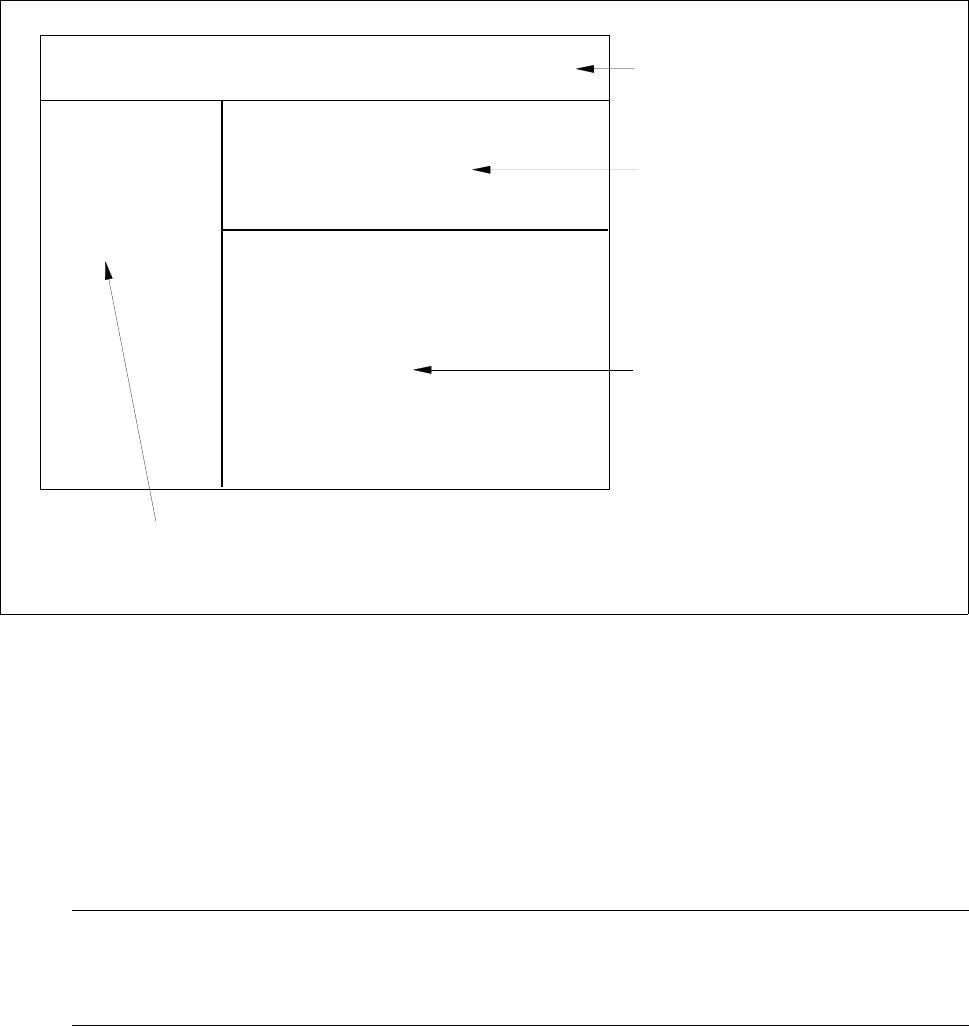
12.1.3.1 Window Layout of the Machine Options Editor
Fig. 12.1.3 Window Layout "Machine Options Editor"
The window of the Machine Options Editor is structured as follows:
- Menu bar
The menu bar contains the "FILE", "EDIT" and "HELP" menus.
A description of the "EDIT" menu is contained in section 12.1.3.2
NOTE
Since the functions and operation of the "OPTIONS" and "HELP" menus are similar to those in other
application programs of the line computer, they are described comprehensively in chapt. 2.
FILE EDIT HELP
menu bar
identification field
setting area
by Machine Options Editor for
"Station, StationExtension" and
"Head"
command area
(only by Machine Options Editor "Nozzle Changer")
or
selection fields
by Machine Options Editor for
machine option "Nozzle Changer"
Station:
Mach. Opt.:
Location: