00191413-01.pdf - 第377页
User Manual Line Computer UNIX 12 Production Tools / S tation and Line Configuration Software Version 501.xx 01/99 Issue 12.1 Configuration Editor 12 - 15 12.1.3.3 Main Window of Machine Options E ditor "Station and…
12 Production Tools / Station and Line Configuration User Manual Line Computer UNIX
12.1 Configuration Editor Software Version 501.xx 01/99 Issue
12 - 14
- Identification field
This field contains the following data:
Station: name of the station containing the component
Mach. Opt.: component name
Location: location of the component within the station
(no entry is contained on this line if the component is not set up).
- Setting area (depending on the type of machine option, see Fig. 12.1.4 to Fig. 12.1.6)
In this area the settings required for the respective machine option are selected.
● A setting is activated or deactivated by clicking on the appropriate button.
- Selection fields (see Fig. 12.1.7)
These fields are only available in the Machine Options Editor for the Adapter or Nozzle Changer.
In the left field the divisions of the changer are displayed, and in the right field the factory-defined
nozzle types are listed.
12.1.3.2 EDIT Menu
The menu only contains the "Reset" function. This function enables you to reset any settings you may have
selected to their initial state.
● Click on EDIT --> Reset.
The settings are reset to their factory-defined values.
User Manual Line Computer UNIX 12 Production Tools / Station and Line Configuration
Software Version 501.xx 01/99 Issue 12.1 Configuration Editor
12 - 15
12.1.3.3 Main Window of Machine Options Editor "Station and Station Extension"
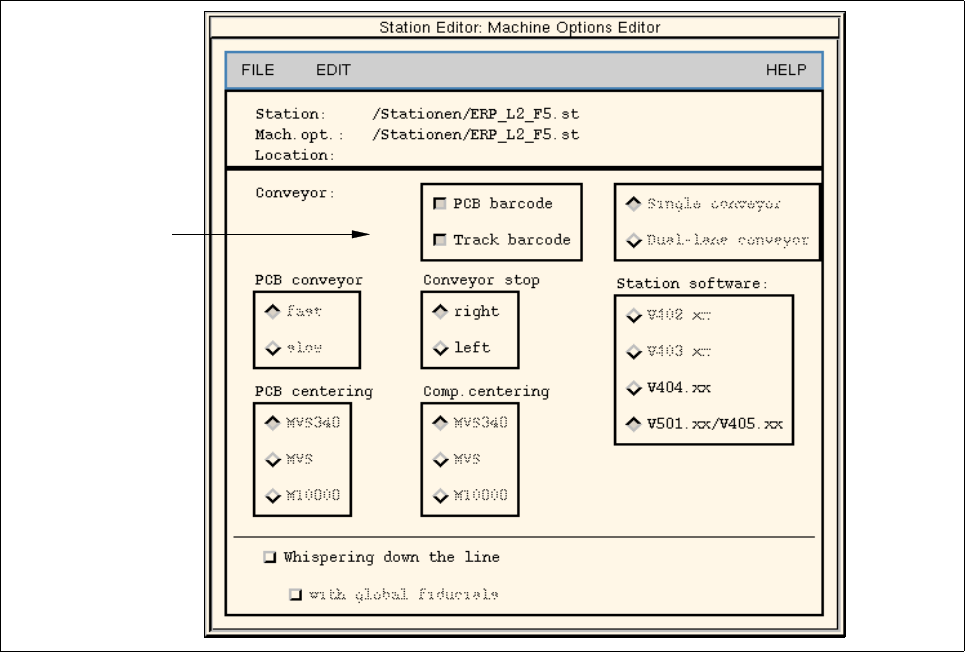
Fig. 12.1.4 Machine Options Editor "Station SIPLACE"
POSSIBLE SETTINGS for the machine option "SIPLACE station" (standard machine)
- Conveyor -> PCB barcode PCB recognition with/without barcode
- Conveyor -> Track barcode component type recognition for track-related refilling
with/without barcode
- Conv. limit stop -> right determining the right or left conveyor stop
Conv. limit stop -> left
- Station software -> V402.xx The data that are sent to the station are created in the
Station software -> V403.xx selected format (LRU.402.xx, LRU.403.xx, LRU.404.xx
Station software-> V404.xx or LRU.501xx/405.xx).
Station software-> V501.xx/405.xx
setting area

12 Production Tools / Station and Line Configuration User Manual Line Computer UNIX
12.1 Configuration Editor Software Version 501.xx 01/99 Issue
12 - 16
- PCB Centering -> MVS340 selection of image processing system type for PCB centering
PCB Centering -> MVS ("MVS" and "MVS340" for all-SIPLACE" lines,
PCB Centering -> MVS1000 MVS "M10000" for SIPLACE lines with HS-180)
- Comp Centering -> MVS340 selection of image processing system type for component
Comp Centering -> MVS centering ("MVS" and "MVS340" for "all-SIPLACE" lines,
Comp Centering -> MVS1000 "M10000" for SIPLACE lines with HS-180)
- Whispering down the line Fiducials defined as inkdots are only measured at the
first station. The measuring result is transferred to the
subsequent stations.
- with global fiducials Fiducials for PCB position recognition (including the fiducials
for inkdots) are only measured at the first station.
NOTE
The "Whispering down the line" (WDTL) option can only be used in more recent SIPLACE machine
generations such as 80S20 or 80F
4
(and later versions, with exception of HS-50).
It serves to reduce machine ancillary times (measuring times) during the processing of PCBs since the
position of all fiducials is determined only at the first station of a line.
At the subsequent stations merely two fiducials are measured, and the position of any other fiducials
that may be required is calculated from the measuring results transferred from the preceding station
in each case.
Only if the button for "Whispering down the line" is activated can the button "with global fiducials" be
activated in addition.
The setting of the "Whispering down the line" option must be the same on all stations.