00191413-01.pdf - 第394页
12 Production Tools / Station and Line Confi guration User Manual Line Computer UNIX 12.2 Line Editor Software Version 501.xx 01/99 Issue 12 - 32 Subseque ntly, the followi ng dialo g box is disp layed : ● Turn off all s…
User Manual Line Computer UNIX 12 Production Tools / Station and Line Configuration
Software Version 501.xx 01/99 Issue 12.2 Line Editor
12 - 31
12.2.3 Selecting the Production Line
The line computer can only control one line at a time. This overall line is referred to as production line. If several
lines are configured, the possibility exists to switch to a different production line. To do this, all stations must
be reset, the line computer must be shut down and restarted.
To select a new production line:
● On the menu bar on the desktop click on SERVICES --> Line configuration.
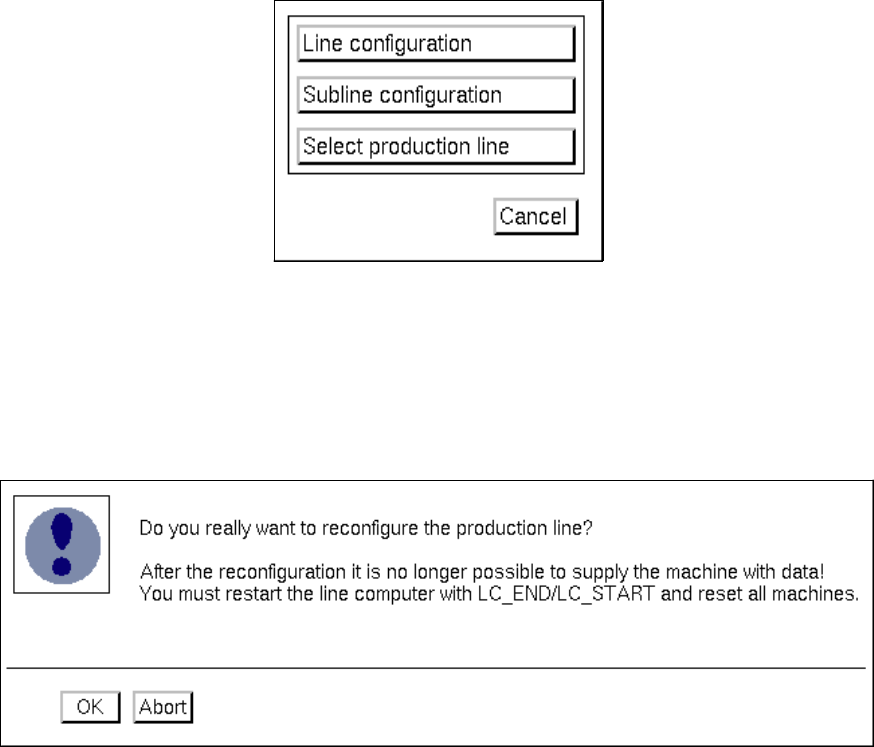
The "Line configuration" selection window opens.
● Click on the Select production line button.
The FSB containing the "Master data: Anlagen" directory opens.
All configured lines are displayed in the selection list.
● Select the desired line "xx.ak" by double-clicking.
The FSB closes and the following dialog box opens:
● Read the verification queries in the dialog box and confirm the new configuration of the produc-
tion line by selecting OK. The selected line is now configured as the production line.
12 Production Tools / Station and Line Configuration User Manual Line Computer UNIX
12.2 Line Editor Software Version 501.xx 01/99 Issue
12 - 32
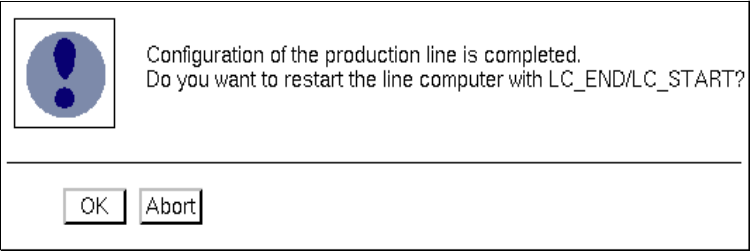
Subsequently, the following dialog box is displayed:
● Turn off all stations.
● Confirm the dialog box with OK.
The line computer session is automatically terminated and a new session is started with the
selected line as the production line.
● Turn the stations back on once the "desktop" is displayed on the screen.

User Manual Line Computer UNIX
Software Version 501.xx 01/99 Issue
13 - I
Contents
Page
Production Tools / Set-Up
13.1 Set-Up Editor (Feeder Part and WPC Editors) . . . . . . . . . . . . . . . . . . . . . . . . . . . . . . . . . 13 - 1
13.1.1 Feeder Part Editor . . . . . . . . . . . . . . . . . . . . . . . . . . . . . . . . . . . . . . . . . . . . . . . . . . . . . . . . 13 - 1
13.1.1.1 Starting the Feeder Part Editor. . . . . . . . . . . . . . . . . . . . . . . . . . . . . . . . . . . . . . . . . . . . . . . 13 - 1
13.1.1.2 Main Window of Feeder Part Editor . . . . . . . . . . . . . . . . . . . . . . . . . . . . . . . . . . . . . . . . . . . 13 - 2
13.1.2 WPC Editor. . . . . . . . . . . . . . . . . . . . . . . . . . . . . . . . . . . . . . . . . . . . . . . . . . . . . . . . . . . . . . 13 - 5
13.1.2.1 Starting the WPC Editor . . . . . . . . . . . . . . . . . . . . . . . . . . . . . . . . . . . . . . . . . . . . . . . . . . . . 13 - 6
13.1.2.2 Main Window of WPC Editor . . . . . . . . . . . . . . . . . . . . . . . . . . . . . . . . . . . . . . . . . . . . . . . . 13 - 6
13.1.2.3 Starting the WPC Editor for the Virtual Level of the HS180 . . . . . . . . . . . . . . . . . . . . . . . . 13 - 10
13.1.3 SERVICES Menu . . . . . . . . . . . . . . . . . . . . . . . . . . . . . . . . . . . . . . . . . . . . . . . . . . . . . . . . 13 - 12
13.1.3.1 Feeder list. . . . . . . . . . . . . . . . . . . . . . . . . . . . . . . . . . . . . . . . . . . . . . . . . . . . . . . . . . . . . . 13 - 13
13.1.3.2 Machine Options List . . . . . . . . . . . . . . . . . . . . . . . . . . . . . . . . . . . . . . . . . . . . . . . . . . . . . 13 - 15
13.1.3.3 Packaging Box/Packaging Editor . . . . . . . . . . . . . . . . . . . . . . . . . . . . . . . . . . . . . . . . . . . . 13 - 16
13.1.3.4 Packaging Editor for Feeders. . . . . . . . . . . . . . . . . . . . . . . . . . . . . . . . . . . . . . . . . . . . . . . 13 - 16
13.1.3.5 Packaging Editor for Waffle-Pack Trays. . . . . . . . . . . . . . . . . . . . . . . . . . . . . . . . . . . . . . . 13 - 20
13.1.3.6 Nozzle Changer / Machine Options Editor . . . . . . . . . . . . . . . . . . . . . . . . . . . . . . . . . . . . . 13 - 25
13.1.3.7 RV Head Nozzle Configuration / Machine Options Editor . . . . . . . . . . . . . . . . . . . . . . . . . 13 - 28
13.1.4 EDIT Menu . . . . . . . . . . . . . . . . . . . . . . . . . . . . . . . . . . . . . . . . . . . . . . . . . . . . . . . . . . . . . 13 - 30
13.1.4.1 RI-File. . . . . . . . . . . . . . . . . . . . . . . . . . . . . . . . . . . . . . . . . . . . . . . . . . . . . . . . . . . . . . . . . 13 - 30
13.1.5 Command area "Action" . . . . . . . . . . . . . . . . . . . . . . . . . . . . . . . . . . . . . . . . . . . . . . . . . . . 13 - 31