00191413-01.pdf - 第415页
User Manual Line Computer UNIX 13 Production Tools / Set-Up Software Version 501.xx 01/99 Issue 13.1 Set-Up Edit or (Feeder Part and WPC Editors) 13 - 17 Fig. 13.1.10 Packaging Editor for Feeders The Packaging Edi tor fo…

13 Production Tools / Set-Up User Manual Line Computer UNIX
13.1 Set-Up Editor (Feeder Part and WPC Editors) Software Version 501.xx 01/99 Issue
13 - 16
If the Feeder Part Editor was opened from the Configuration Editor, (see chapt. 12, section 12.1.2.4), the options
can be allocated to the tracks of the feeder parts, provided they are allowed to be set up there.
-
CC~S_O_FB_HS
Component centering station for HS180;
can be set up only once on the left feeder part of an HS180.
-
COPL~S_CO_HS180
Coplanarity module for HS180;
can be set up only once on the right feeder part on an HS180.
-
C-disp~S_HS180
Component disposal belt for HS180;
can be set up once on either feeder part of an HS180.
-
C-disp~S_SIP
Component disposal belt for Siplace;
can be set up once on either feeder part of a Siplace
80S-20/S-23/F4/F5.
-
NozC~S_HS180
Nozzle Changer for HS180;
can be set up only once on the left feeder part of an HS180.
-
NozC~S_HS180_AWB
Nozzle Changer for HS180 with reject box;
can be set up only once on the left feeder part of an HS180.
13.1.3.3 Packaging Box/Packaging Editor
Owing to variations of the exact position of components in the divisions and compartments of tape feeders and
waffle-pack trays it may be necessary to correct the packaging offsets or vibration times to ensure that the
components are picked up with absolute precision.
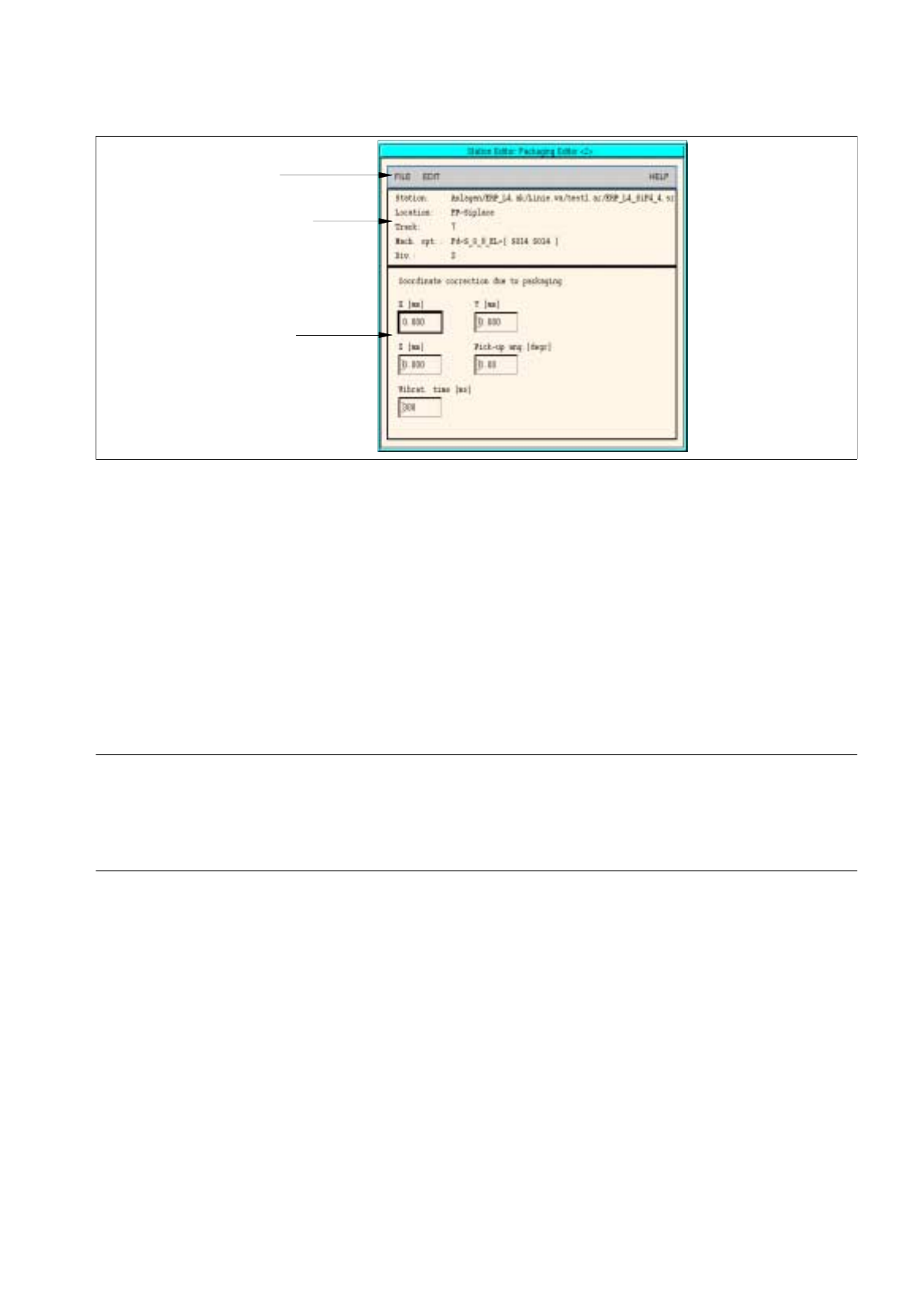
These corrections are entered in the Packaging Editor. The Packaging Editor is opened by clicking on the
"Packaging box" option on the SERVICES menu.
The Packaging box option is only actually activated when a feeder division or the compartments of a waffle-
pack tray are selected.
The editing area of the Packaging Editor is different for feeders and waffle-pack trays. Therefore, the Packaging
Editors for feeders and waffle-pack trays are described separately in the two sections that follow.
13.1.3.4 Packaging Editor for Feeders
If the coordinates, the pick-up angle or the vibration time of a given component are not accurate, this can be
corrected in the Packaging Editor. These corrections are made separately for each individual feeder division
(see Fig. 13.1.10).
The allocation of the division number to the feeder division is preset by the factory and cannot be changed. The
top division is division 1, the lower division is division 2. Where only one division is available, this division is
division number 1 (see also Fig. 13.1.2).
A separate Packaging Editor is opened for each division. In the title bar of the window, division 1 is identified
by <1> and division 2 by <2>.
User Manual Line Computer UNIX 13 Production Tools / Set-Up
Software Version 501.xx 01/99 Issue 13.1 Set-Up Editor (Feeder Part and WPC Editors)
13 - 17
Fig. 13.1.10 Packaging Editor for Feeders
The Packaging Editor for feeders is subdivided into the following areas:
-
Menu bar
-
Identification field
-
Editing area
Menu Bar
The menu bar contains the menus "FILE", "EDIT" and "HELP".
NOTE
The functions and the operation of the menus "FILE" and "HELP" are similar to those in other application
programs of the line computer and are described in detail in chapt. 2 "General Information on Using the
Program".
EDIT Menu
The EDIT menu contains the following options:
-
Reset data
The corrections are deleted from all editing fields. The factory-set default values are redisplayed.
-
Delete comp.
The component is deleted from the feeder division. This is indicated by a minus sign in the identifica-
tion field.
menu bar
identification field
editin
g
area
13 Production Tools / Set-Up User Manual Line Computer UNIX
13.1 Set-Up Editor (Feeder Part and WPC Editors) Software Version 501.xx 01/99 Issue
13 - 18
Identification Field
The identification field contains the following data which cannot be edited:
-
Station:
Name of the current station including "Anlagen/line/subline/set-up/station name"
-
Location:
Designation of the current feeder part
-
Track:
Number of the first track on which the selected feeder is set up
-
Mach. opt.:
Designation of the feeder and information on the components set up on it in both
divisions. A minus signifies that the division is not occupied.
-
Div.:
Number of the current feeder division
Editing Area
Corrections are entered in the editing area which are required for the accurate removal of the components.
When the Packaging Editor is opened, the factory-set default values or the values that were entered most
recently for a given component, are displayed in the editing fields.
The values in the editing area can be changed by clicking on the individual editing fields. The values are accepted
by pressing the Enter key after each correction made.
If the entries are not to be accepted, it is possible to reset the values on the EDIT menu to the default values
using the "Reset data" option.
-
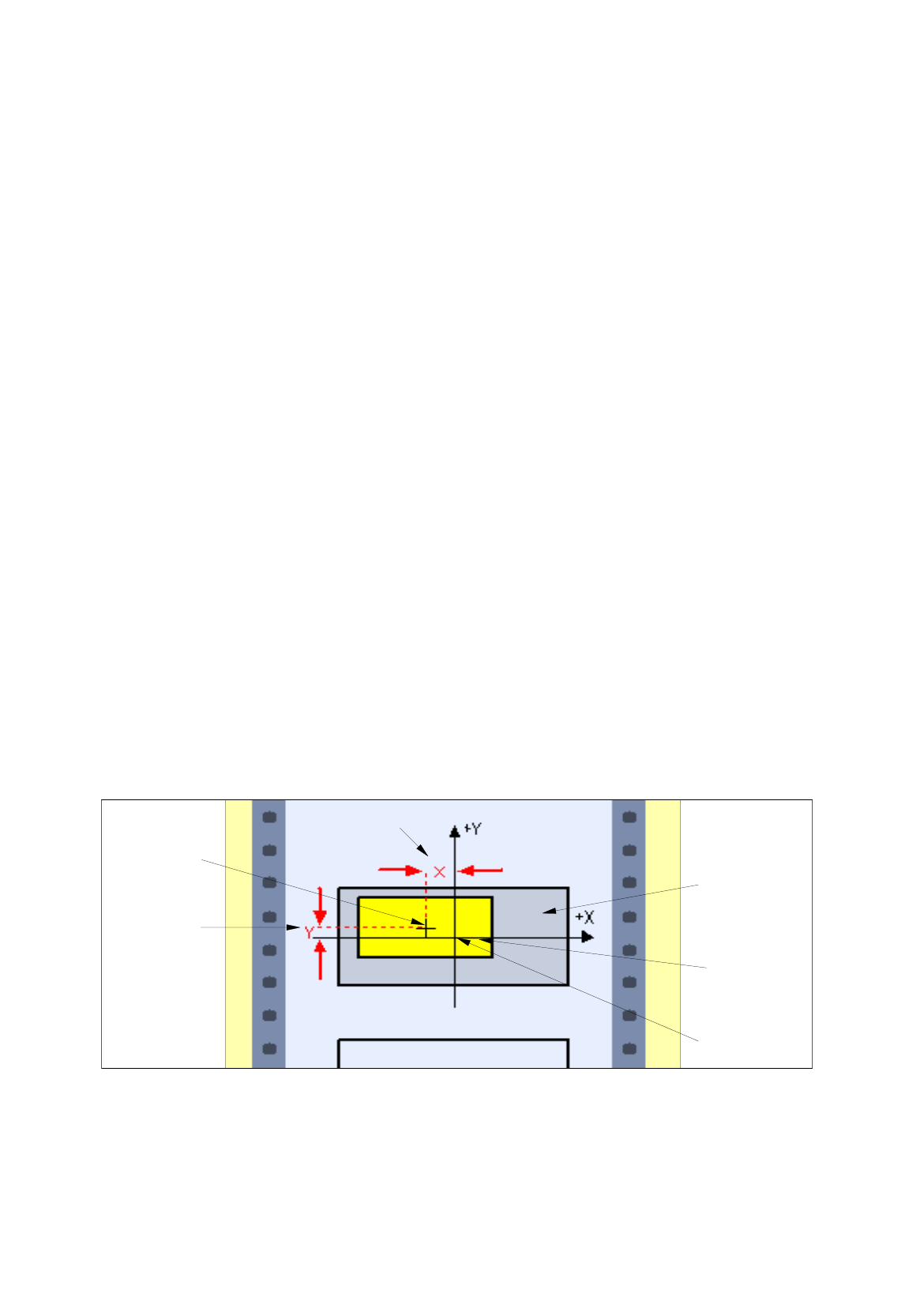
X [mm]
Correction of the pick-up position in X-direction: offset from the component center to the feeder divi-
sion center (default value: 0.000, corresponds to the feeder division center). See Fig. 13.1.11.
-
Y [mm]
Correction of the pick-up position in Y-direction: offset from the component center to the feeder divi-
sion center in Y-direction (default value: 0.000, corresponds to the feeder division center).
See Fig. 13.1.11.
Fig. 13.1.11 Correction of the Pick-Up Position in X-Direction and Y-Direction
X
[
mm
]
Y
[
mm
]
component
center
tape pocket
component
feeder
division cente
r