00191413-01.pdf - 第440页
14 Control / Cont rol Modules User Manual Line Computer UNIX 0.2 Job Control S oftware Version 501.xx 01/99 Issue 14 - 4 14.1.2 Processing of Jobs - A prod uction li ne is as signed j obs, cal led lots. - A job i s uniqu…
User Manual Line Computer UNIX 14 Control / Control Modules
Software Version 501.xx 01/99 Issue 0.2 Job Control
14 - 3
0.2 Job Control
The Job Control is the sole component within the LC system dealing with the creation and editing of jobs.
- All job data such as PCB type, lot size, line, set-up, etc. can be entered via the Job Control user
interface.
- The operator can insert, change, interrup and delete jobs as well as change their order of sequence.
- For the "with barcode" production mode, allocations of PCB types to barcodes can be entered.
- When the operator schedules a job for processing, a check is performed in the Job Control as to
whether all required data are available for the job to be processed and whether it can be produced
with the set-up of the current line. When these requirements are met, the job is passed on to the
stations via the station controllers. From this point onwards, the data of this job - with the exception of
the lot size and the lot type - can no longer be changed (see section 14.2.1).
- Moreover, the Job Control (via the user interface) provides the possibility to shift jobs between lot files
and/or job lists.
- All jobs are containd in a job list.
- For the transfer of job data within the LC system, lot files are used.
14 Control / Control Modules User Manual Line Computer UNIX
0.2 Job Control Software Version 501.xx 01/99 Issue
14 - 4
14.1.2 Processing of Jobs
- A production line is assigned jobs, called lots.
- A job is uniquely defined by its job name (lot name).
- A job comprises the following entries: PCB type, name of the line or subline, setup, lot type, priority,
nominal size and fixed allocation ("binding") to a station.
- Jobs can be scheduled for processing by the operator via the user interface of the Job Control, or by
an external CAX system.
- Job Control checks whether a job can be executed and ensures that the data required for processing
the job are available ("feasibility").
- The Job Control triggers the postprocessors generating both the job operation schedules required by
the machines, and the production data.
- Processing of the jobs is carried out on stations 1 ... n of a production line.
14.1.3 Starting the "Job Control" Application Program
Job Control is started by clicking on the Job icon (desktop), or via the Data Manager (see chapt. 4).
In addition, Job Control can also be started via the "Optimization" user interface for the creation or modification
of a lot file (see chapt. 11).
● Click on the Job icon on the desktop.
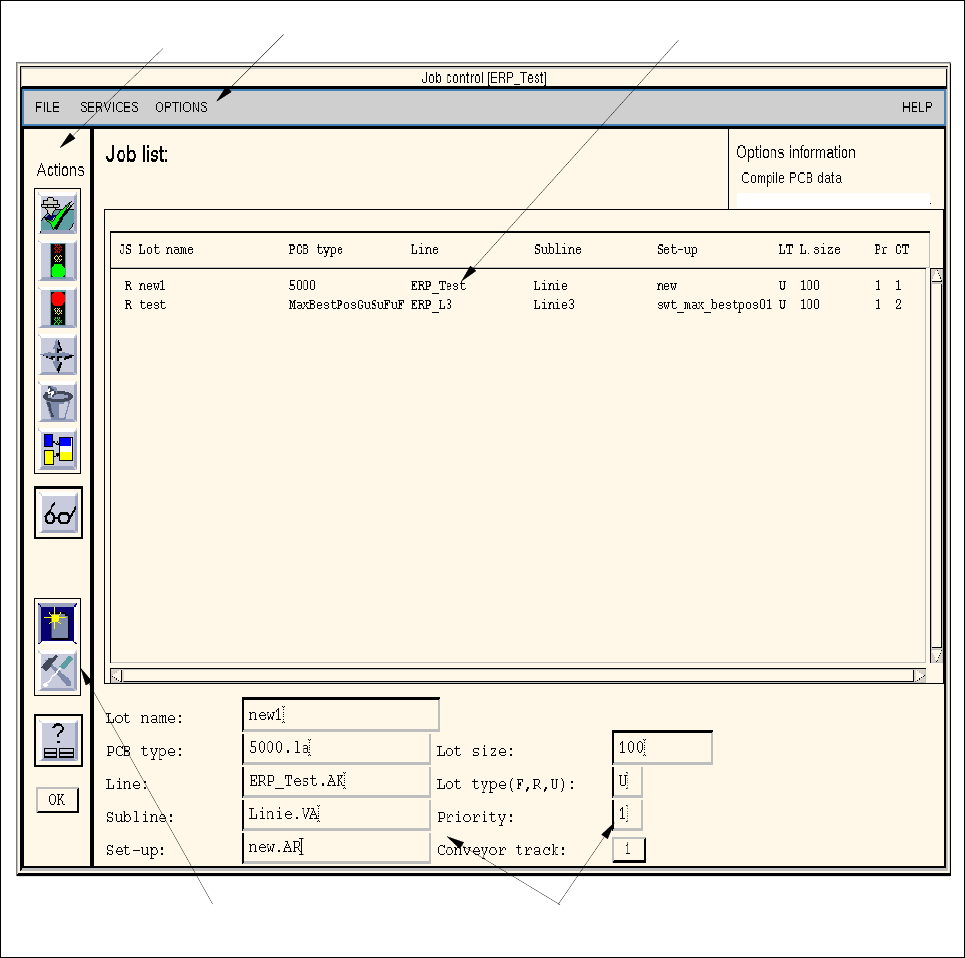
The main window of Job Control is opened (see Fig. 14.1.1).
User Manual Line Computer UNIX 14 Control / Control Modules
Software Version 501.xx 01/99 Issue 0.2 Job Control
14 - 5
14.1.4 Main Display Window of Job Control
The different areas of the main window of the Job Control and their functions are explained in the following.
Fig. 14.1.1 Main Window of the "Job Control"
The main window of the Job Control is subdivided as follows:
- Menu bar
- Display area
- Editing area
- Command area (section "Actions" and section "Edit")
editing area
command area
menu bar
display area
section "Edit"
command area
section "Actions"
Board Booster