00191413-01.pdf - 第513页
User Manual Line Computer UNIX 16 MaDaMaS Software Version 501.xx 01/99 Issue 16.2 MaDaMaS Evaluation User Interface 16 - 17 Fig. 16.2.2 Evaluation user interface - "Pick-up reliability" evaluation for all stat…
16 MaDaMaS User Manual Line Computer UNIX
16.2 MaDaMaS Evaluation User Interface Software Version 501.xx 01/99 Issue
16 - 16
16.2.6 "Overall view" Evaluation
When the MaDaMaS evaluation user interface is opened, the "Overall view" evaluation representing the current
status of the entire line is displayed as the initial evaluation screen.
Pick-up reliability, Availability and Performance are evaluated for the entire line and displayed in separate charts.
By clicking on given bars and symbols in the charts the respective evaluations can be displayed for the stations.
16.2.7 "Pick-up reliability" Evaluation
Pick-up reliability can be displayed for the entire line and every individual placement station.
Icon is highlighted in red if the limit value set under "Trend" is exceeded for the trend evaluation. The
tracks concerned can be analyzed in detail by means of the "Track information" and "Track trend" evaluation
types.
For the calculation of the pick-up reliability the following factors are taken into account:
- the reliable pick-up of the component from the feeder track
- the correct identity in terms of electrical characteristics (by CRDL measurement),
- the correct identity in terms of geometrical properties (by Vision System),
- the depositing of the components on the PCB (by vacuum check).
With reference to the selected time basis, the pick-up reliability is calculated as follows:
- Calling up the "Pick-up reliability" evaluation for the line
● On the menu bar select EVALUATIONS --> Overall view.
The "Overall view" evaluation type is displayed.
In the "Pick-up reliability" chart the calculated pick-up reliability is displayed for the entire line
(see Fig. 16.2.1).
- Calling up the "Pick-up reliability" evaluation for all stations
● Select EVALUATIONS --> Pick-up reliability.
Or else:
● Click on the green bar in the "Pick-up reliability" chart of the Overall View.
The "Pick-up reliability" evaluation is displayed for all placement stations.
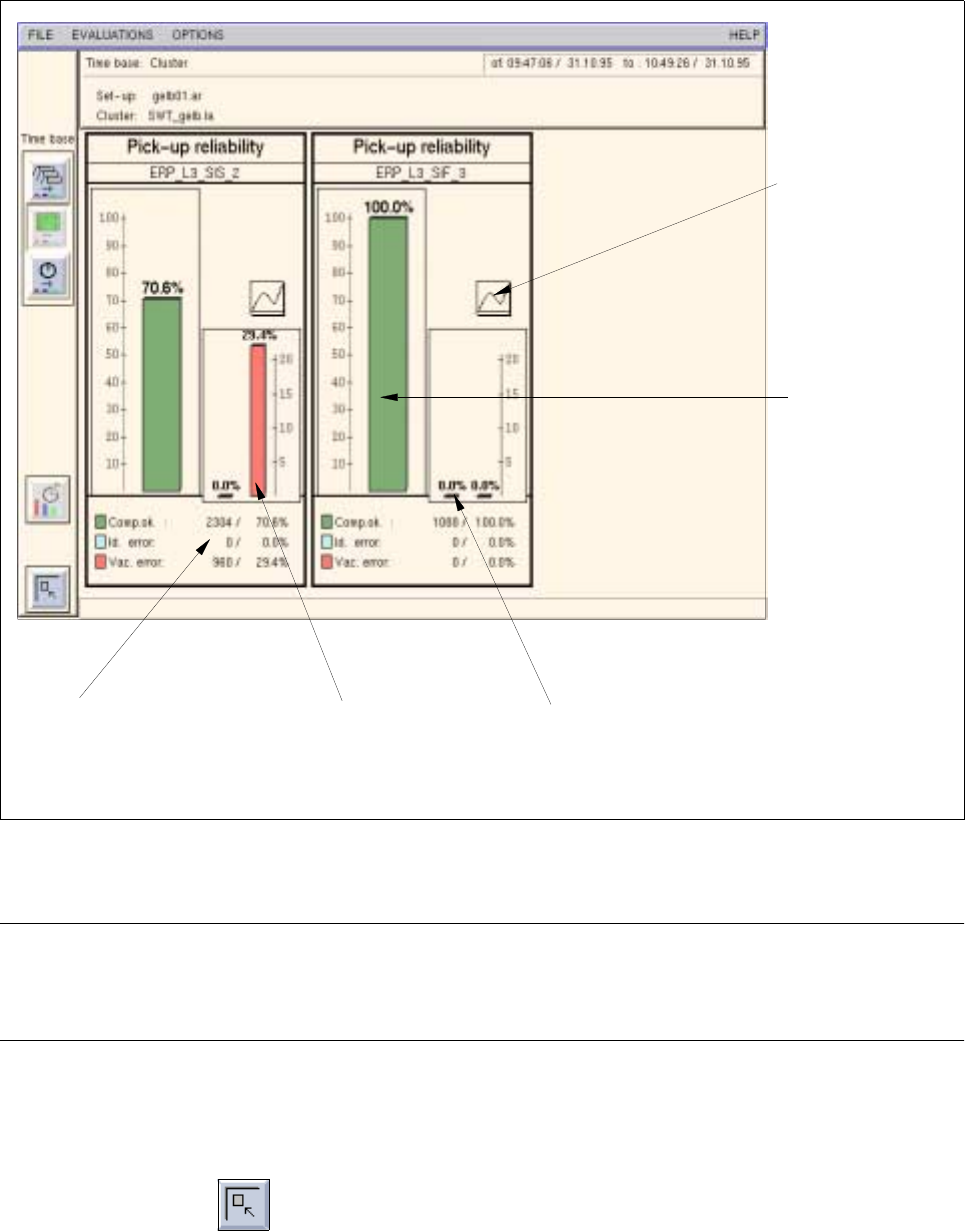
A chart containing the calculated pick-up reliability is displayed for every station (see Fig. 16.2.2).
Σ vacuum error + Σ CRDL error + Σ Vision error
Pick-up reliability [ % ] = 100 -
Σ placed components + Σ error
x 100
User Manual Line Computer UNIX 16 MaDaMaS
Software Version 501.xx 01/99 Issue 16.2 MaDaMaS Evaluation User Interface
16 - 17
Fig. 16.2.2 Evaluation user interface - "Pick-up reliability" evaluation for all stations
NOTE
If more stations exist than can be displayed in the view area, a scroll bar appears above the info line per-
mitting the display area to be scrolled.
- Exiting from the "Pick-up reliability" evaluation
● Click on the icon.
The "Overall view" evaluation is redisplayed.
bar for
vacuum errors
bar for
identity errors
bar representing
placed components
call-up of the
"Track trend"
and
call-up of
"Track information"
evaluation
evaluation
number / % of
placed components,
identity and vacuum errors
16 MaDaMaS User Manual Line Computer UNIX
16.2 MaDaMaS Evaluation User Interface Software Version 501.xx 01/99 Issue
16 - 18
16.2.7.1 "Track Trend" Evaluation
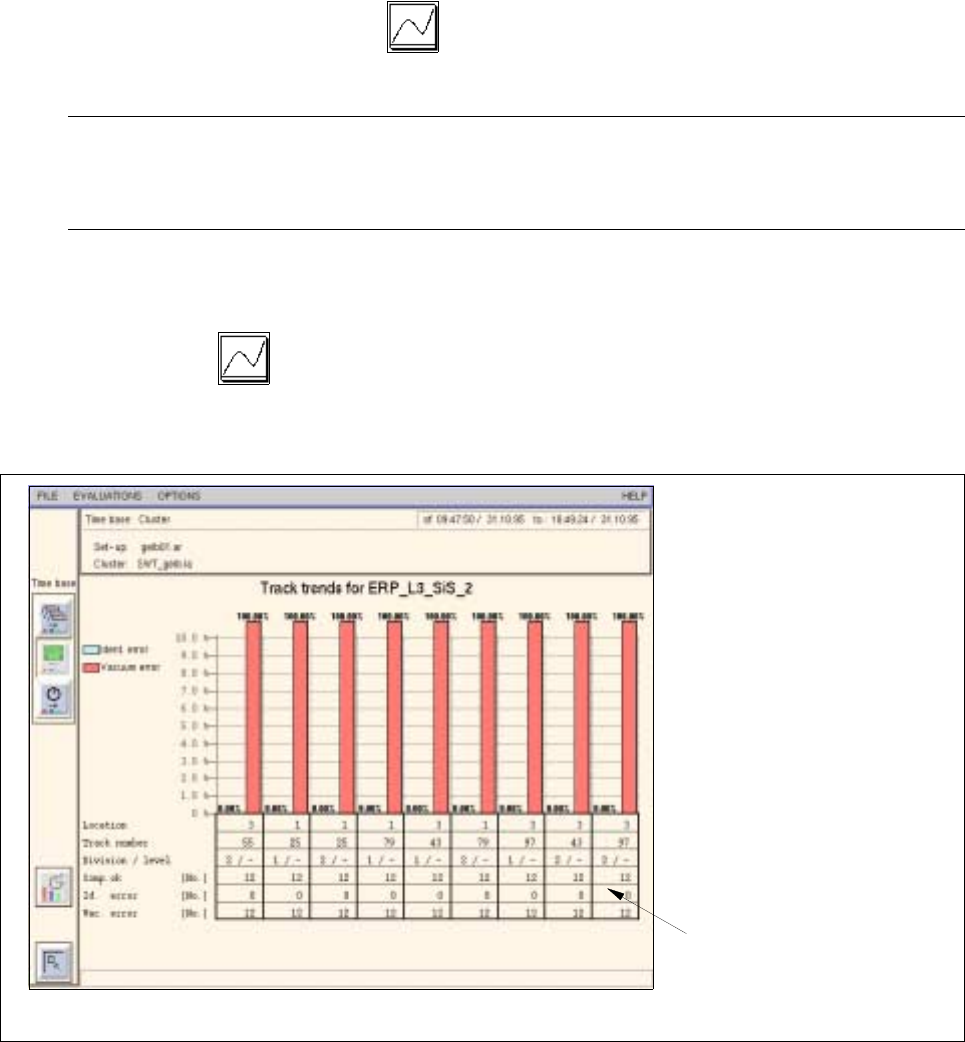
The "Track trend" type of evaluation allows the eight tracks with the highest identity and vacuum error rates to
be displayed for each station. In the view area the encountered vacuum and identity errors are displayed in
absolute values (text portion) as well as relative (bar chart) to the total number of components placed.
The "Track trend" evaluation is called up from the "Pick-up reliability" chart. This is only possible for placement
stations.
- Calling up the "Track trend" evaluation for all stations
● In the Overall View click on the icon in the "Pick-up reliability" chart.
The track trend evaluation is displayed for all stations.
NOTE
By scrolling the view area using the vertical scroll bar the track trend evaluation can be displayed for
every individual station.
- Calling up the "Track trend" for the individual stations
● Click on the icon in the "Pick-up reliability" evaluation of the diagram of the desired station
(see Fig. 16.2.2).
The track trend evaluation for the selected station is opened (see Fig. 16.2.3).
Fig. 16.2.3 Evaluation user interface - "Track trend" evaluation for a station
number of
components placed,
identity and vacuum errors