00191413-01.pdf - 第551页
User Manual Line Computer UNIX 17.3 Description of Components and PCBs Software Version 501.xx 01/99 Issue 17.3.1 PCB 1: sin g le circuit 17 - 1 9 39. On the FILE menu clic k on the Quit optio n . The Fiduc ial Edit or i…
17.3 Description of Components and PCBs User Manual Line Computer UNIX
17.3.1 PCB 1: sin
g
le circuit Software Version 501.xx 01/99 Issue
17 - 18
No ink spot present.
No clusters and sin
g
le circuits
present.
FILE
Save
FILE
Quit
Entering placement
positions
Defining ink spot
Saving PCB data
Creating clusters and
single circuits
continued from pa
g
e 17-16
PCB Description
Placement Position Editor
User Manual Line Computer UNIX 17.3 Description of Components and PCBs
Software Version 501.xx 01/99 Issue 17.3.1 PCB 1: sin
g
le circuit
17 - 19
39. On the
FILE
menu click on the
Quit
option.
The Fiducial Editor is closed.
40. In the Cluster Editor click on the
Quit
option on the
FILE
menu.
The Cluster Editor is closed.
Defining ink spot:
non ink spot present.
Creating clusters and single circuits:
no clusters and sin
g
le circuits present.
To enter placement positions, proceed as follows:
41. In the PCB Editor activate the Select icon .
42. Click on the PCB
(
rectan
g
le
)
.
The rectan
g
le is hi
g
hli
g
hted in
g
reen.
43. On the
SERVICES
menu click on the
Placement Position Editor...
option.
The Placement Position Editor is opened.
44. Position the cursor in the entr
y
field and enter placement positions in accordance with Section Tab. 17.3-
2. The
individual entries are to be separated b
y
a blank. Confirm each line b
y
pressin
g
the Enter ke
y
.
45. When entr
y
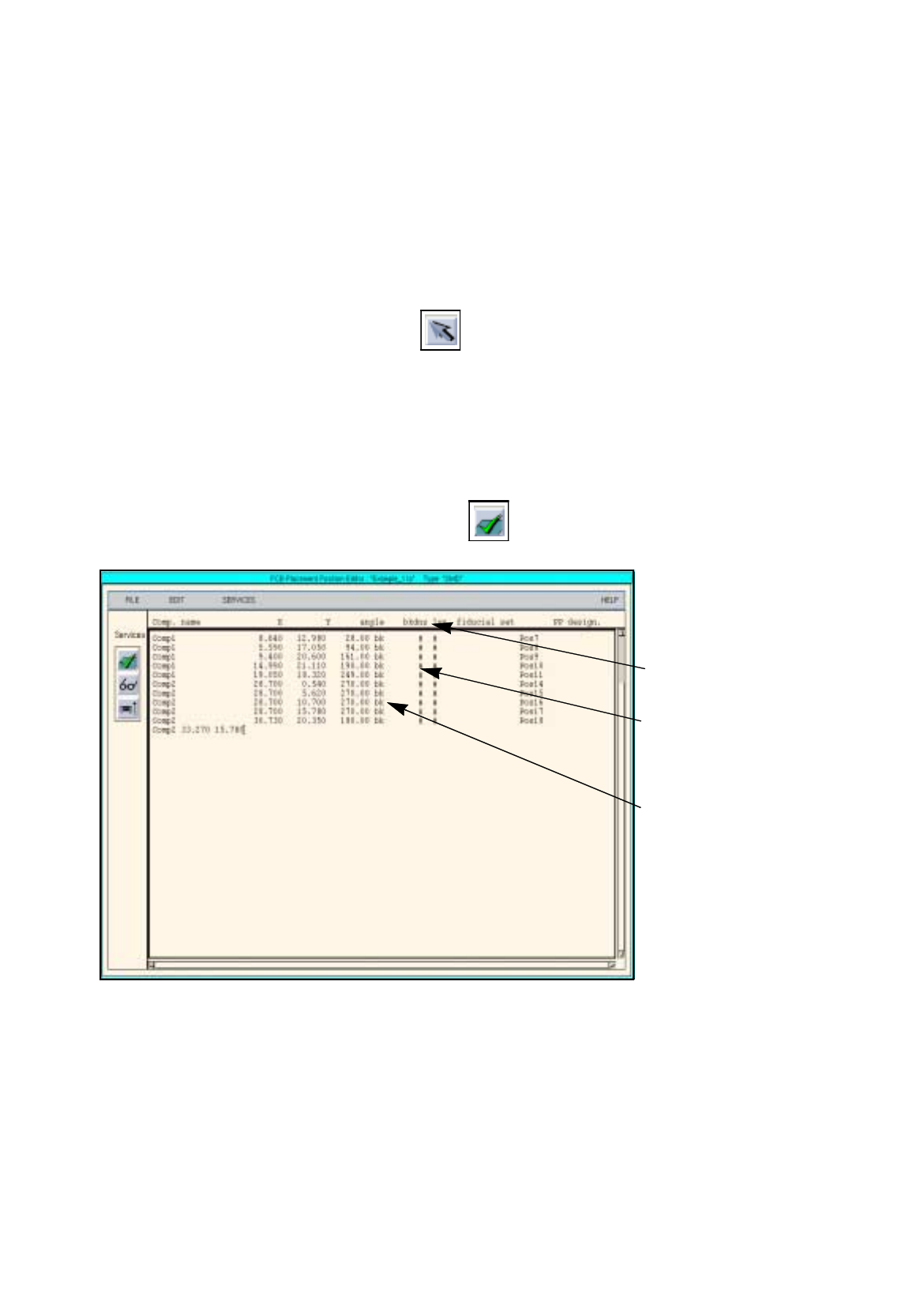
is complete, activate the Check icon .
The entered values are checked and arran
g
ed in columns
(
see Fi
g
. 17.3.3
)
.
Fig. 17.3.3 Placement Position Editor for PCB 1
46. Click on the
Quit
option on the
FILE
menu.
The Placement Position Editor is closed.
To save the PCB data, proceed as follows:
47. In the PCB Editor, click on the
Save
option on the
FILE
menu.
The PCB data are now saved.
48. On the
FILE
menu click on the
Quit
option.
Enter fiducial set name
# = no fiducials defined for the
placement position
b = placin
g
k =
g
luein
g
d = dispensin
g
(
solder paste
)
n = reworkin
g
s = blockin
g
(
from placement
)
Enter number of placement
level
# = no level defined for the pla-
cement position
17.3 Description of Components and PCBs User Manual Line Computer UNIX
17.3.2 PCB 2: Focus on Packa
g
e Form Description Software Version 501.xx 01/99 Issue
17 - 20
PM1
PM2
PM3
Ink spot
PCB zero
40
96
5
5
30
86
15
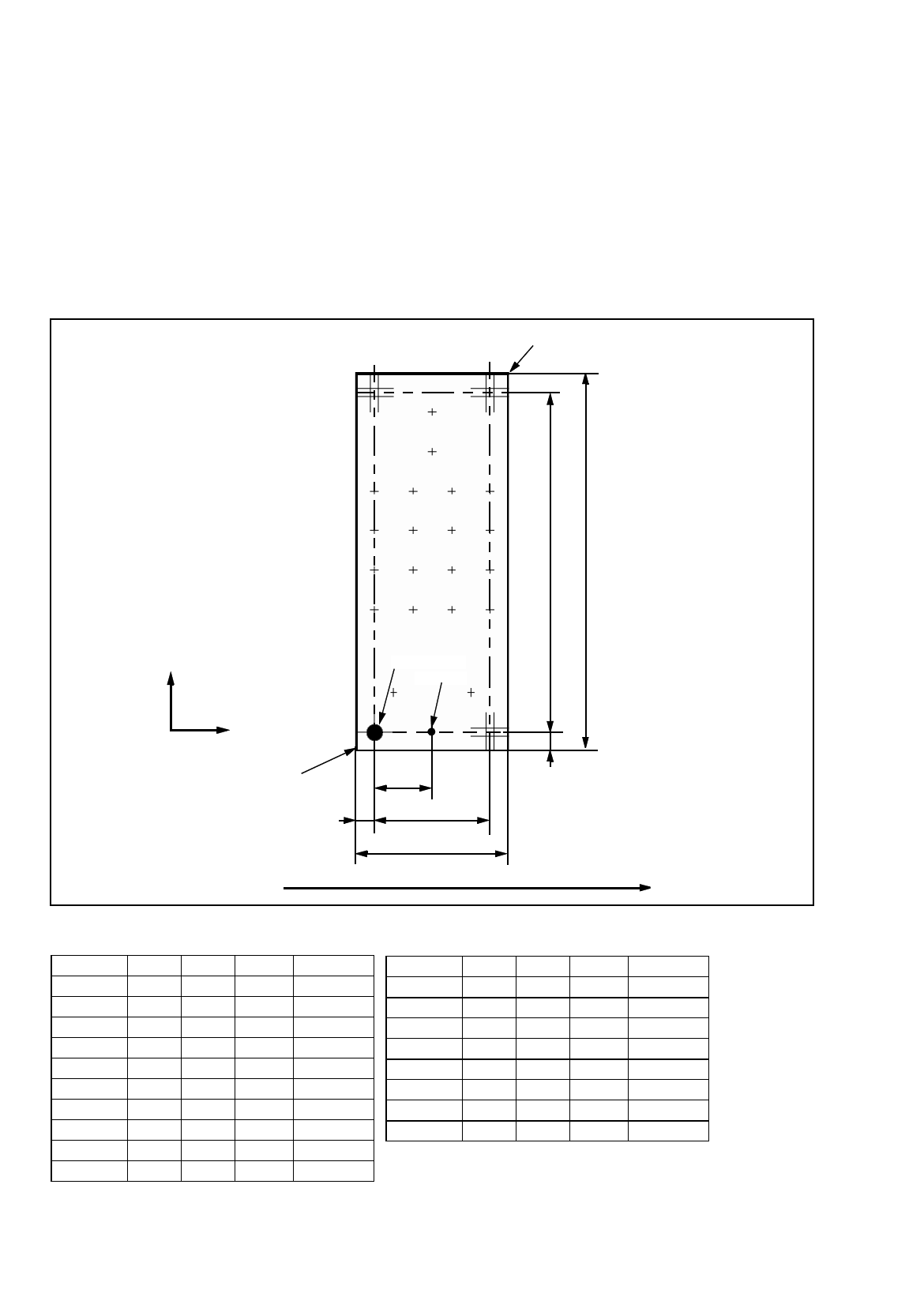
17.3.2 PCB 2: Focus on Package Form Description
PCB 2 is a sin
g
le circuit with three different components.
The packa
g
e forms are not contained in the GF-Bibliothek, the
y
must be newl
y
described. For this purpose,
the packa
g
e form numbers ran
g
in
g
from 1501 to 32767 of the customer GF-Bibliothek can be used.
The PCB is screen-printed, the components are onl
y
to be placed. No CRDL-test is envisa
g
ed. PCB position
reco
g
nition is to be performed; for this purpose three fiducials
(
PM
)
are available. An ink spot is also present.
The components at issue are one PDC, one re
g
ular FDC and one irre
g
ular FDC. The components are picked
up from the 0°-position.
Comp4 0.00 61.00 0.00 Pos1
Comp4 10.00 61.00 0.00 Pos2
Comp4 20.00 61.00 0.00 Pos3
Comp4 30.00 61.00 0.00 Pos4
Comp4 0.00 51.00 0.00 Pos5
Comp4 10.00 51.00 0.00 Pos6
Comp4 20.00 51.00 0.00 Pos7
Comp4 30.00 51.00 0.00 Pos8
Comp4 0.00 41.00 0.00 Pos9
Comp4 10.00 41.00 0.00 Pos10
Comp4 20.00 41.00 0.00 Pos11
Tab. 17.3-3 Placement Positions of PCB 2
Comp4 30.00 41.00 0.00 Pos12
Comp4 0.00 31.00 0.00 Pos13
Comp4 10.00 31.00 0.00 Pos14
Comp4 20.00 31.00 0.00 Pos15
Comp4 30.00 31.00 0.00 Pos16
Comp5 15.00 81.00 0.00 Pos17
Comp5 15.00 71.00 0.00 Pos18
Comp6 5.00 10.00 -90.00 Pos19
Comp6 25.00 10.00 -90.00 Pos20
Direction of travel
X
Y
PCB coordinate system 0°
PCB hei
g
ht= 1.5 mm
Corner
Fig. 17.3.4 Dimensions of PCB 2
Corner